-
-
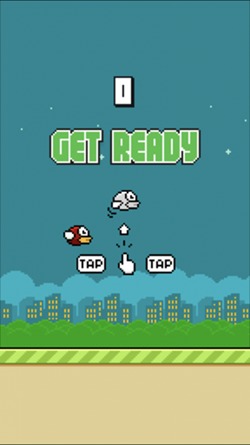
Game Start Screen
Inspiration
The inspiration for this project came from my older brother, who was reminiscing about the classic arcade games of his youth, such as Super Mario, Road Rash, and Flappy Bird. He spoke about how challenging and engaging these games were, and how he wished he could play them again. This gave me the idea to recreate Flappy Bird as a gift for my brother, so he could relive those nostalgic moments on his computer.
What it does
The recreated Flappy Bird game built using Python and Pygame functions similarly to the original game. The player controls a bird, which is constantly flying forward. The goal is to navigate the bird through a series of pipes without touching them. The player scores points for every pipe they pass through. The game ends if the bird touches any pipe or the ground. The game's scoring system and physics are implemented in the code to make the game challenging yet enjoyable to play. Overall, the game provides a fun and engaging experience for players to enjoy on their computer or laptop.
How we built it
To build the game, I first created the basic layout of the game and added the necessary features such as the bird, pipes, and score system. Then, I added the physics for the bird and the pipes and added the collision detection code. I also added sound effects and music to the game to make it more engaging.
Once the basic features were implemented, I began to polish the game's user interface and improve its overall performance. Finally, I tested the game thoroughly to ensure that it was stable and free of bugs.
Challenges we ran into
One of the main challenges I faced was learning how to use Pygame from scratch. While I had experience with Python, Pygame was an entirely new library that required me to learn a lot of new concepts and techniques.
Another challenge was implementing the physics of the bird and the pipes. It required a lot of trial and error to get the physics just right so that the game was challenging but not frustrating.
Accomplishments that I'm proud of
- Successfully learning and using Pygame from scratch.
- Implementing the physics of the bird and pipes and adding a scoring system.
- Improving my overall knowledge of Python by using other modules like Kivy and Sys.
- Creating a game that is stable and free of bugs.
- Giving my brother a personalized gift that brought back nostalgic memories.
What we learned
As someone who has experience with Python, I felt that it would be the perfect language to use for this project. However, I had never worked with Pygame before, which was necessary for building the game. So, I had to learn how to use Pygame from scratch. It was a challenging experience, but I learned a lot about game development and the Pygame library.
In addition to Pygame, I also had to learn how to use other modules, such as Kivy and Sys, to create the game. This allowed me to gain a deeper understanding of how to use Python for game development.
What's next for Flappy Bird
In the end, I am proud of the game that I have created. It was a challenging project, but it allowed me to learn a lot about game development and the Pygame library. I am also happy that I was able to give my brother a gift that brought back some nostalgic memories.
Looking forward, I am excited to continue improving the game and adding my own personal touches to make it even more unique.

Log in or sign up for Devpost to join the conversation.