-
App Logo
-
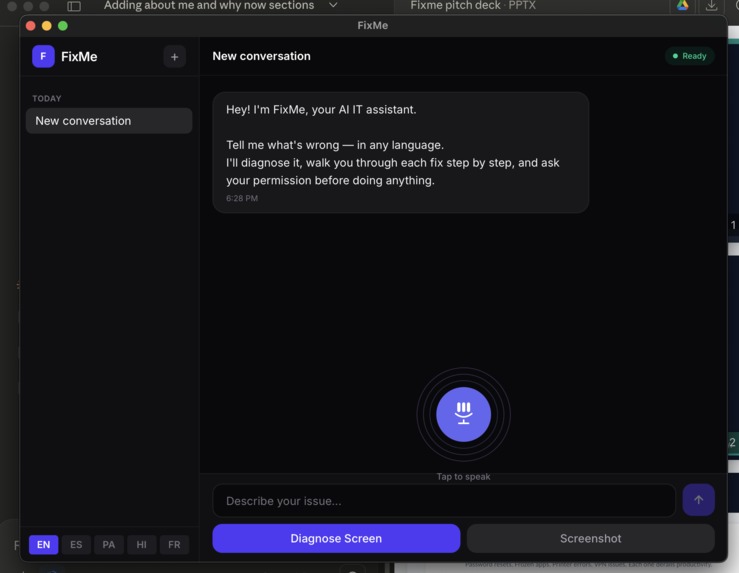
App MVP
Inspiration
Working with an IT firm, I saw the same story play out hundreds of times: someone's printer won't connect, their VPN drops, or an app keeps crashing. More than 70% of IT tickets are repetitive issues with known solutions — yet people still wait hours (or days) for help.
The ones who struggle most? People with language barriers. They can't easily Google their error message, can't follow a YouTube tutorial that assumes technical fluency, and often give up in frustration before getting help.
I watched users spend 45 minutes manually trying fixes from scattered YouTube videos and forum posts — copying commands they didn't understand, hoping something would work. Meanwhile, the helpdesk queue grows, and simple 30-second fixes sit unresolved for hours.
That frustration — the wasted time, the anxiety, the helplessness — is what inspired FixMe.
What it does
FixMe is your personal AI helpdesk that fixes IT issues in seconds, not hours.
Just show it or tell it your problem:
- Screenshot an error message
- Describe what's broken in plain language (in your own language)
- Talk to it like you'd talk to a coworker
FixMe then:
- Diagnoses the issue instantly
- Starts fixing your issue instantly
- Asks for your permission at each step — in your language
- Documents everything it tried, so if you need to escalate, Tier 2 support knows exactly where you left off
No more Googling error codes. No more watching 10-minute YouTube videos for a 30-second fix. No more waiting in a helpdesk queue for something you could resolve yourself.
How we built it
I used a combination of both PDD and Claude Code to build this app.
Architecture:
Tauri v2 + React for the desktop app (~10MB vs Electron's 150MB). A Python sidecar handles the AI work — screenshot capture, Claude for vision-based diagnosis, ElevenLabs for multilingual TTS. Communication happens over JSON-RPC through stdin/stdout. Simple, no networking headaches.
The safety flow:
- User describes the issue (voice or text)
- Screenshot → Claude analyzes → proposes fix
- We show exactly what we'll do and wait for approval
- User approves → executes. Declines → stops.
- Revert option available after every action
No background actions. No silent changes. Every step is visible and reversible.
Challenges we ran into
The biggest challenge was balancing automation with transparency. Tools like Microsoft's built-in troubleshooters do everything in the background — you click "Fix it" and either it works or it doesn't. You have no idea what it tried, what failed, or what to tell support if it didn't work.
We had to design FixMe to be powerful enough to automate fixes, but transparent enough that users always know what's happening. Every action is visible. Every step is explained. Every permission is requested.
Another challenge was language accessibility. We wanted someone who speaks limited English to feel just as confident using FixMe as a native speaker. That meant rethinking how we communicate technical steps — simpler language, visual confirmations, and prompts in the user's preferred language.
Accomplishments that we're proud of
Turning frustration into confidence. FixMe doesn't just fix problems — it shows users exactly what's happening, so they learn and feel in control.
Documentation that actually helps. If a fix doesn't work and you need to escalate, FixMe gives you a clear record of everything attempted. No more "I already tried that" back-and-forth with Tier 2 support.
Accessibility-first design. Language barriers shouldn't mean tech barriers. FixMe speaks to users in their language and at their pace.
Speed that respects your time. Issues that used to take 30+ minutes of Googling and guessing now take seconds.
What we learned
We learned that this problem is massively underserved. There aren't many products in the market that truly address the gap between "fully manual troubleshooting" and "black-box automation that tells you nothing."
Microsoft provides troubleshoot agents, but they operate entirely in the background. You never see what they tried. If it fails, you're stuck — and if you escalate to support, you can't tell them what was already attempted. That's a huge gap.
We also learned how important transparency is for trust. Users don't want magic — they want to understand. When FixMe shows each step and asks permission, people feel empowered instead of anxious.
What's next for FixMe
Expanding coverage:
- Cover all Tier 1 issues, then expand into Tier 2 complexity
- Partner with companies to create custom solutions using their internal documentation — fixes tailored to their specific environment that generic tools like Microsoft can't provide
Enhanced transparency:
- Step-by-step execution mode where every action happens visibly in front of you
- Permission prompts in your preferred language at each step
- Clear explanations of what each fix does and why
Quality of life features:
- Connectors to securely save and manage passwords
- Integration with existing ticketing systems for seamless escalation
- Learning mode that helps users understand common issues so they can prevent them
Our vision:
Turn IT issues from a frustrating experience into an enjoyable one. No more dread when something breaks. Just confidence that FixMe has your back — quickly, transparently, and in your language.
Built With
- claude-api
- claudecode
- elevenlabs
- elevenlabs-tts
- gemini
- pdd
- react-19
- tailwind-4
- tauri-v2-(rust)

Log in or sign up for Devpost to join the conversation.