-
-
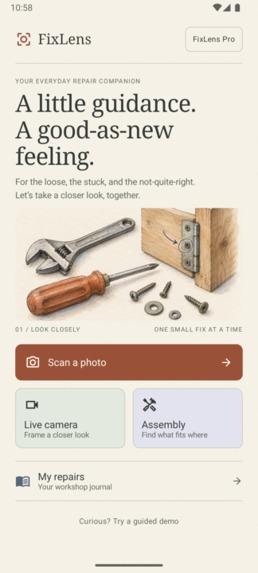
HomePage
-
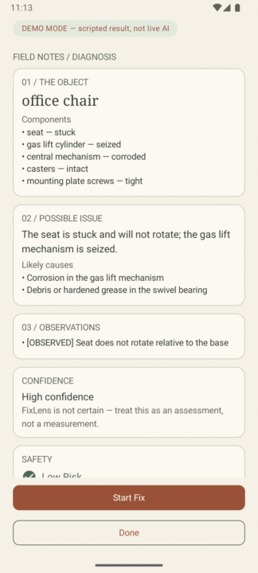
diagnosis
-
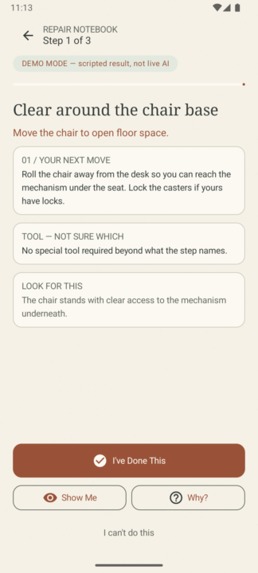
guided-repair
-
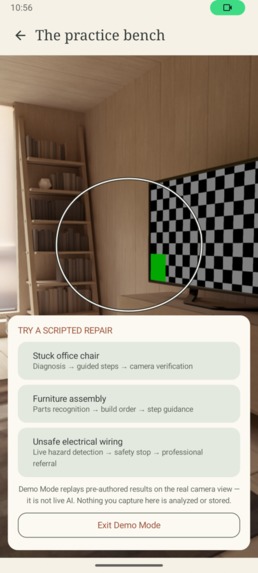
demo-picker
-
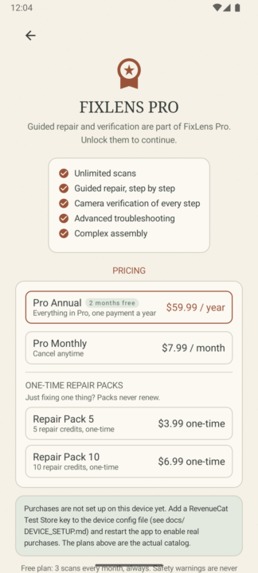
paywall
-
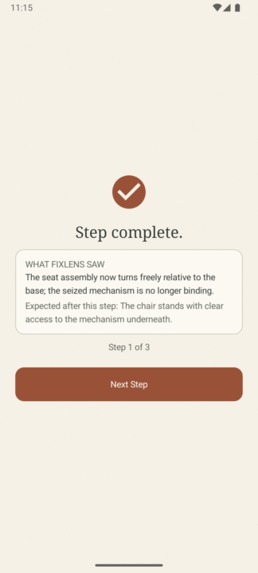
verify
-
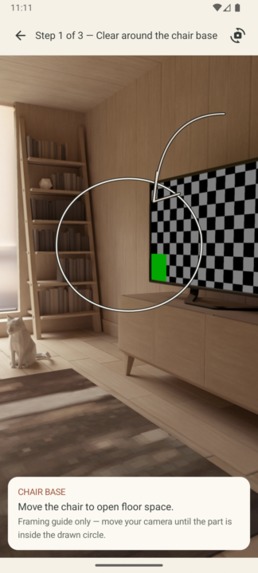
show-me
-
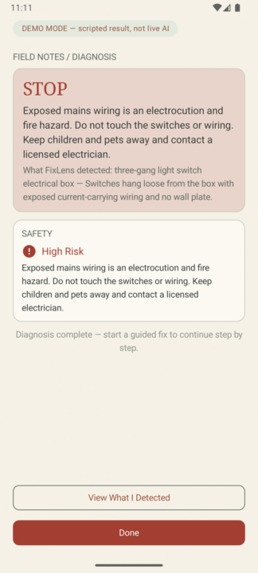
safety-stop
Inspiration
Every repair app we've ever used falls into one of two traps: a wall of unrelated forum answers, or a chatbot that confidently invents steps for a machine it has never seen. The moment that inspired FixLens was watching someone hold a wrench, a phone, and a dying office chair all at once, hands busy, eyes on the work, with no free hand to type a question. The phone should do the looking. Cameras are the one sensor everyone carries, and "fixing things" is fundamentally a visual problem: find the part, see what's wrong, know if it's safe.
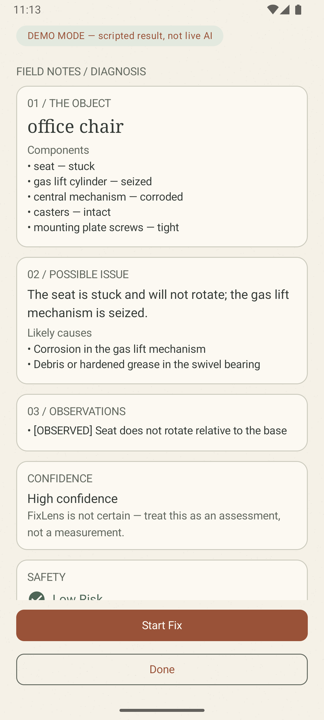
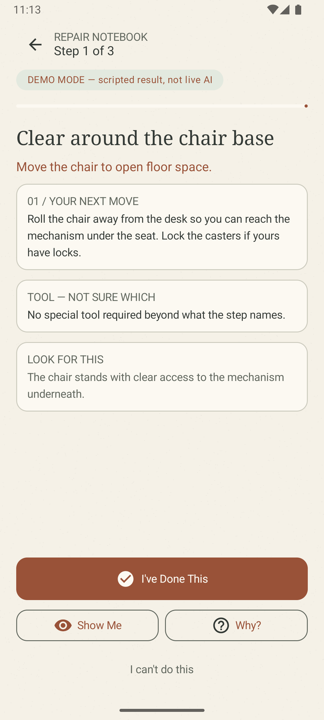
We also noticed that repair knowledge is visual and sequential, not conversational. You don't need a chat buddy; you need a patient instructor standing over your shoulder saying "look here, do this, now show me you did it." That became FixLens's whole shape: I SEE → POSSIBLE ISSUE → WHAT I FOUND → CONFIDENCE → SAFETY → guided steps → Show Me → verification, with no chat surface anywhere in the app.
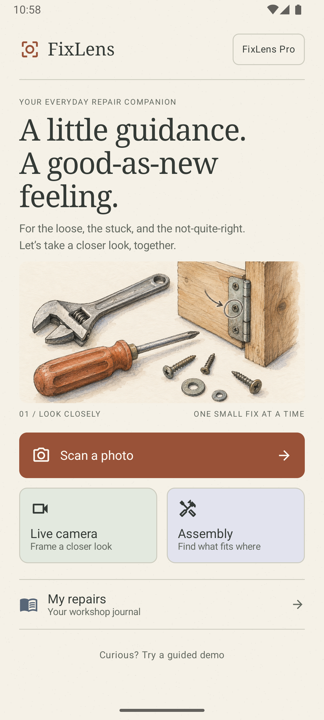
And since the brief is a watercolor field guide: real repair manuals, the kind folded into a box of screws, are illustrated, dense, and quietly beautiful. We wanted an app that felt like that notebook, not like a neon dashboard.
What it does
Point the camera at something broken, stuck, or half-assembled:
- It looks. A captured photo travels to the FastAPI backend through a quality gate (dark, blank, or tiny images are rejected before any AI quota is spent) and comes back as a structured diagnosis: the object, its components marked OBSERVED or INFERRED, the possible issue, likely causes, a controlled confidence band, and a deterministic safety assessment. Insufficient evidence produces exactly one specific "I NEED A BETTER VIEW" instruction, never a shrug.
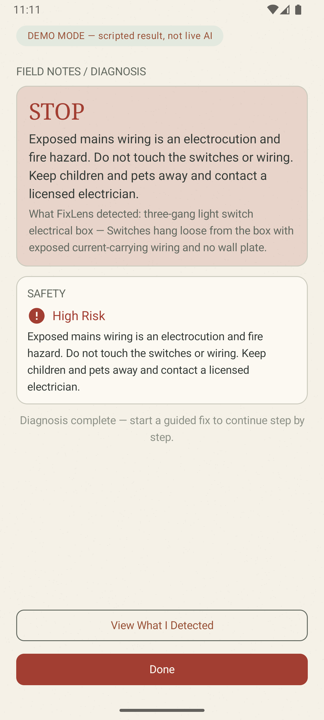
- It decides if it's safe to help. A policy layer runs before any generation: HIGH risk (exposed wiring, gas, structural hazards) produces a safety stop with a licensed-professional referral and no instructions exist at all; MEDIUM risk requires an explicit acknowledgement before any step is shown.
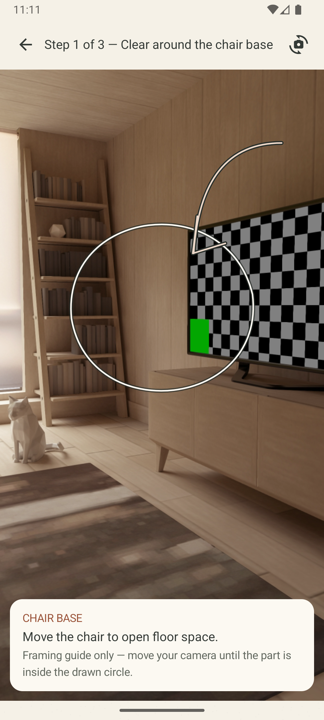
- It teaches, with voice and motion. Start Fix generates a plan once, then each step speaks itself via on-device text to speech (mute toggle included), shows an animated HOW IT MOVES diagram whose hand-drawn arrow matches the action verb (move, rotate, press, lift, slide, fasten, place, apply), and lists TOOL, CAREFUL, and WHAT YOU SHOULD SEE AFTER cards. Show Me overlays a sketchy ink target and pencilled arrow on the live camera.
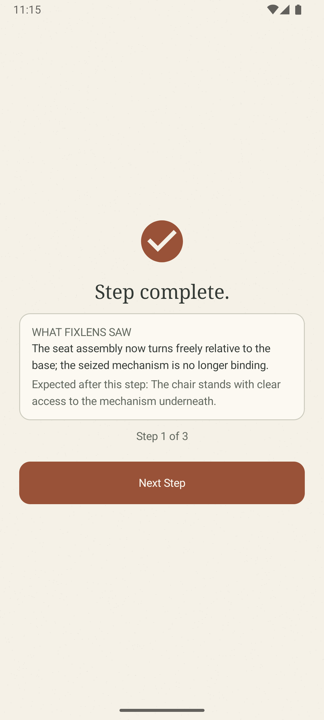
- It checks your work. Every step can be proven with a fresh camera scan: PASS, INCOMPLETE, or UNCERTAIN with evidence. Only PASS advances a step. The verdict is spoken and felt (haptics). The app never claims success without visual evidence, and completion says plainly: "Double-check the repair yourself before relying on it."
- It assembles. Photograph disassembled parts and get an ordered build plan, or an explicit "I can't determine the order yet" naming the one view that would settle it. Order is never guessed.
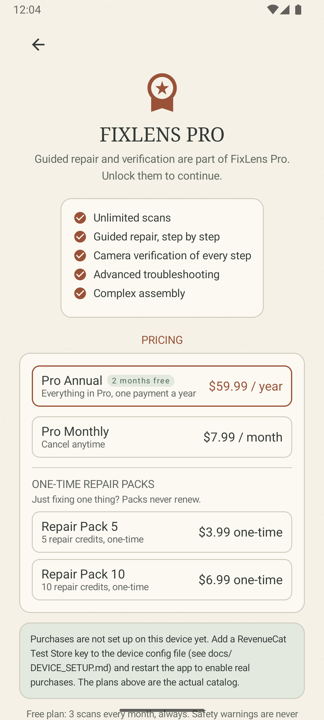
- It monetizes honestly. 3 free scans every month; Pro at $7.99/month or $59.99/year unlocks unlimited scans and guided work; one-time Repair Packs ($3.99, $6.99) for single repairs, never renewing. Safety information is never paywalled. Purchases run on RevenueCat with real entitlement state and Restore, and the pricing page shows the full catalog even before a store key is configured.
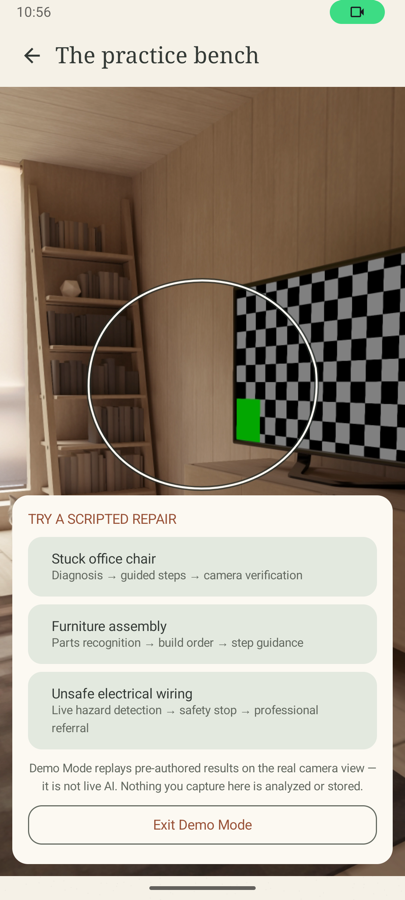
- It demos without risk. Demo Mode replays three deterministic scripted journeys (stuck office chair, furniture assembly, unsafe electrical wiring) on the real camera, permanently badged "DEMO MODE, scripted result, not live AI".
How we built it
- Android app (Kotlin + Jetpack Compose, single module): CameraX capture (photo + live preview), a navigation flow running HOME → capture → diagnosis → guided repair → per-step verification → completion, RevenueCat billing (
fixlens_proentitlement, subscriptions, one-time packs, restore, Test Store support), scripted Demo Mode, and a watercolor design system built from a single palette object. - Backend (FastAPI, Python):
/diagnose,/plan,/assembly,/verify; a provider layer over Gemini with OpenRouter as a config-driven fallback; strict Pydantic validation so malformed model output can never reach the UI; a deterministic safety policy; structured logging with no keys and no images. - Interactive guidance: on-device Android TextToSpeech (no network, no API key, nothing recorded) drives the voice guide for steps, verdicts, and completion; step diagrams are pure Compose Canvas (verb-matched arrows animated along ghost paths); haptics use view-level feedback constants (no vibration permission needed).
- Quality: 109 backend tests and 72 Android unit tests (offline, fake providers injected), a zero-warning lint build, and full emulator E2E runs walking the real journey, including live Gemini diagnoses and the safety stop blocking a HIGH-risk wiring scenario before any generation.
Challenges we ran into
- Making the safety gate genuinely zero-model-call. It's easy to "check safety" after asking the model. We restructured the pipeline so risk classification and the block decision happen deterministically server-side; we proved it in tests and live logs (model invocation count = 0 on blocked requests).
- Structured vision on a free tier. Free-tier vision calls are slow (46 to 150 s) and flaky (503/429). We designed every screen to communicate that honestly: explicit "this may take up to two minutes" copy, retry affordances everywhere, and an Analyzing state that never spins silently.
- Verification without over-claiming. Teaching the verify endpoint to return INCOMPLETE or UNCERTAIN instead of a hopeful PASS took several iterations of prompt plus post-validation, and the UX needed to treat UNCERTAIN as a normal, calm outcome with exactly one better-view instruction.
- Making uncertainty feel trustworthy. The hardest UI problem wasn't drawing the UI, it was earning belief in an AI's doubt. Controlled confidence bands, visible reasoning ("what I found"), honest demo banners, and a paper-and-ink aesthetic that feels hand-made turned out to reinforce each other.
- Keeping the demo honest while making it cinematic. Judges want a flawless run; credibility wants disclosure. We resolved it with Demo Mode: identical screens and engine, pre-authored data, and a permanent badge so a beautiful demo can never be mistaken for live AI.
Accomplishments that we're proud of
- A safety gate we can prove, not just promise. HIGH-risk diagnoses are blocked with zero model calls, verified in tests and in live server logs. Nothing to leak exists because nothing is generated.
- Verification that refuses to flatter. The verify path returns PASS / INCOMPLETE / UNCERTAIN with evidence, only PASS advances a step, and the completion screen still tells you to double-check the repair yourself.
- 181 automated tests, a zero-warning lint build, and every screen verified by emulator E2E across nine build phases, each logged in a public build journal.
- A multisensory repair experience: steps that speak, draw their own motion diagrams, and confirm with haptics, all on-device and free to run.
- An honest pricing page: real RevenueCat offerings with a computed savings badge when configured, and the same catalog shown as a clearly-labeled sketch when not, so monetization is transparent either way.
- A visual identity nobody else submitted: a watercolor workshop journal with hand-drawn camera annotations, generated 1024×1024 icon, and zero purple gradients.
What we learned
- Constraint breeds honesty. Because we refuse to render a fix for HIGH-risk objects, the safest code we wrote is the code that never calls the model.
- Vision models are witnesses, not oracles. Gemini describes remarkably well but hallucinates confidently if allowed. Structured output, OBSERVED vs INFERRED kinds, controlled confidence bands, and UNCERTAIN as a first-class answer (always carrying exactly one better-view instruction) keep it honest.
- Verification is the hard, valuable part. Letting a user mark a step "done" is trivial. Making them prove it with a camera scan is what turns an information app into a repair companion.
- Monetization can align with honesty. Gating the work rather than the safety information means free users still get hazard warnings, and one-time packs meet episodic repair intent without forcing a subscription. RevenueCat made the hybrid painless.
- A visual identity is a product decision. The watercolor restyle wasn't decoration: paper backgrounds keep camera overlays legible, serif headings signal "manual, not chatbot", hand-drawn targets read as annotations made for you.
- Multisensory beats pretty. The voice guide and motion diagrams changed usability testing more than any color change: hands stay on the work while the app reads the step aloud.
What's next for FixLens
- Per-step target boxes. Extend the plan schema so Show Me's ring and the motion diagrams anchor to the actual component's position, not just its name.
- Before/after pairs in My Repairs. The workshop journal already records sessions; next it stores the "before" capture and the verification capture side by side.
- Production billing. Move from Test Store to Play Billing with the same entitlement, plus a free trial on Pro Annual.
- Play Store beta. A closed track for real devices, expanding device verification beyond the emulator.
- Broader safety corpus and localization. More hazard phrases, regional plug/wiring standards, and translated voice guidance.
- Community repair library. Anonymous, verified repair outcomes aggregated into an open dataset of what actually fixes what.
Note for the demo video: the recording shows a real Test Store purchase flowing through RevenueCat (paywall → purchase sheet → entitlement flip → Pro features unlocking). Test Store purchases are RevenueCat's development-mode sandbox; no real money moves, and the same code path ships to production.
The watercolor workshop identity
The interface is deliberately anti-"AI app": no purple gradients, no glassmorphism, no chat bubbles. Warm paper (#F5F1E7), cream cards, charcoal ink, terracotta primary actions, sage and dusty-lavender washes, thin rule lines, serif display headings, and hand-drawn sketch targets overlaid on the live camera, so the AI feels like an instructor's pencil marking up your view of the world, not a HUD. Even the Demo Mode honesty banner is typeset like a field-note stamp.

Log in or sign up for Devpost to join the conversation.