-
-
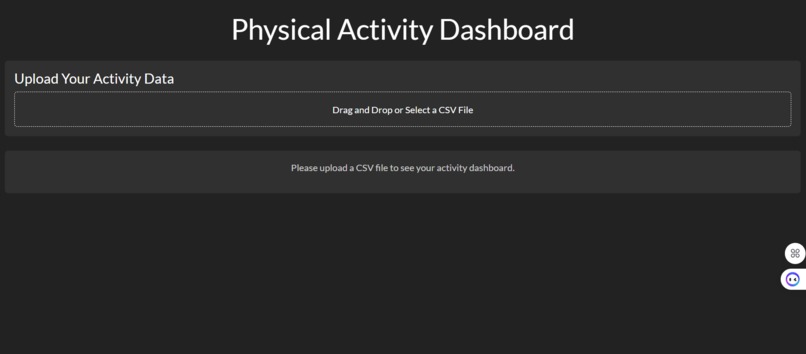
1. page with CSV uploading
-
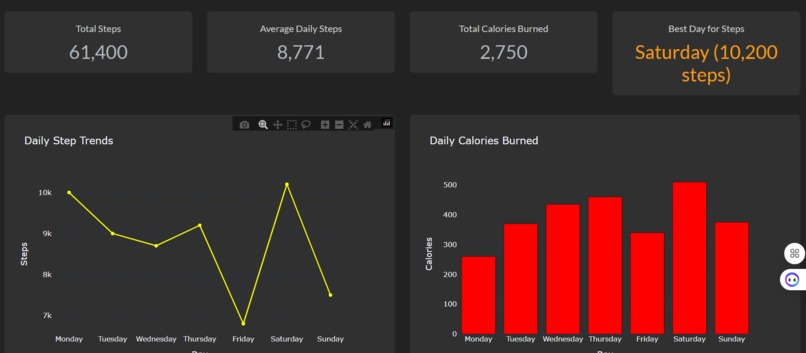
2. page with charts
-
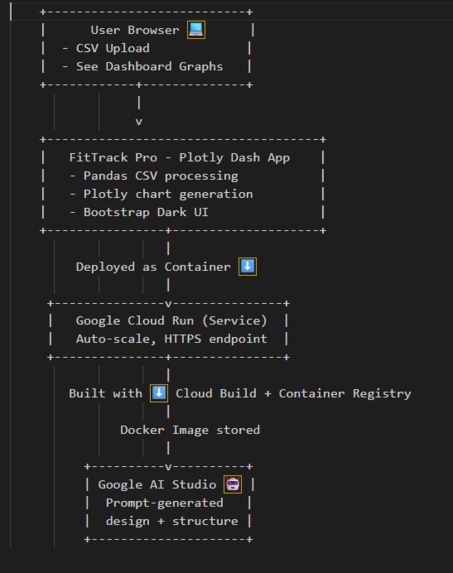
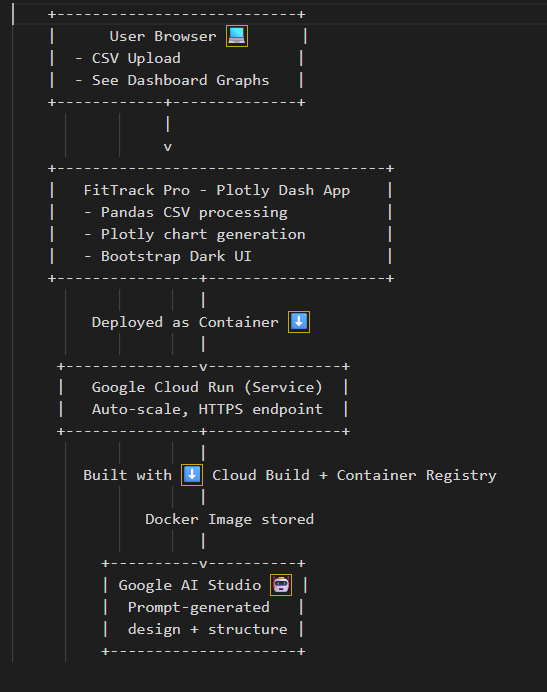
Architecture Diagramm
🏃 FitTrack Pro
A dark‑themed, serverless fitness dashboard built with Python Dash and deployed on Google Cloud Run — visualize your weekly steps and calories in seconds.
🧠 Inspiration
Data can often feel intimidating, but visual feedback can be motivating.
We wanted to create an intuitive, dark‑mode fitness dashboard where users can simply upload their weekly activity data and instantly see their progress.
FitTrack Pro makes personal activity tracking simple, modern, and serverless through Google Cloud Run.
⚙️ What it does
FitTrack Pro is a web app where users can upload a CSV file containing their daily steps and calories burned.
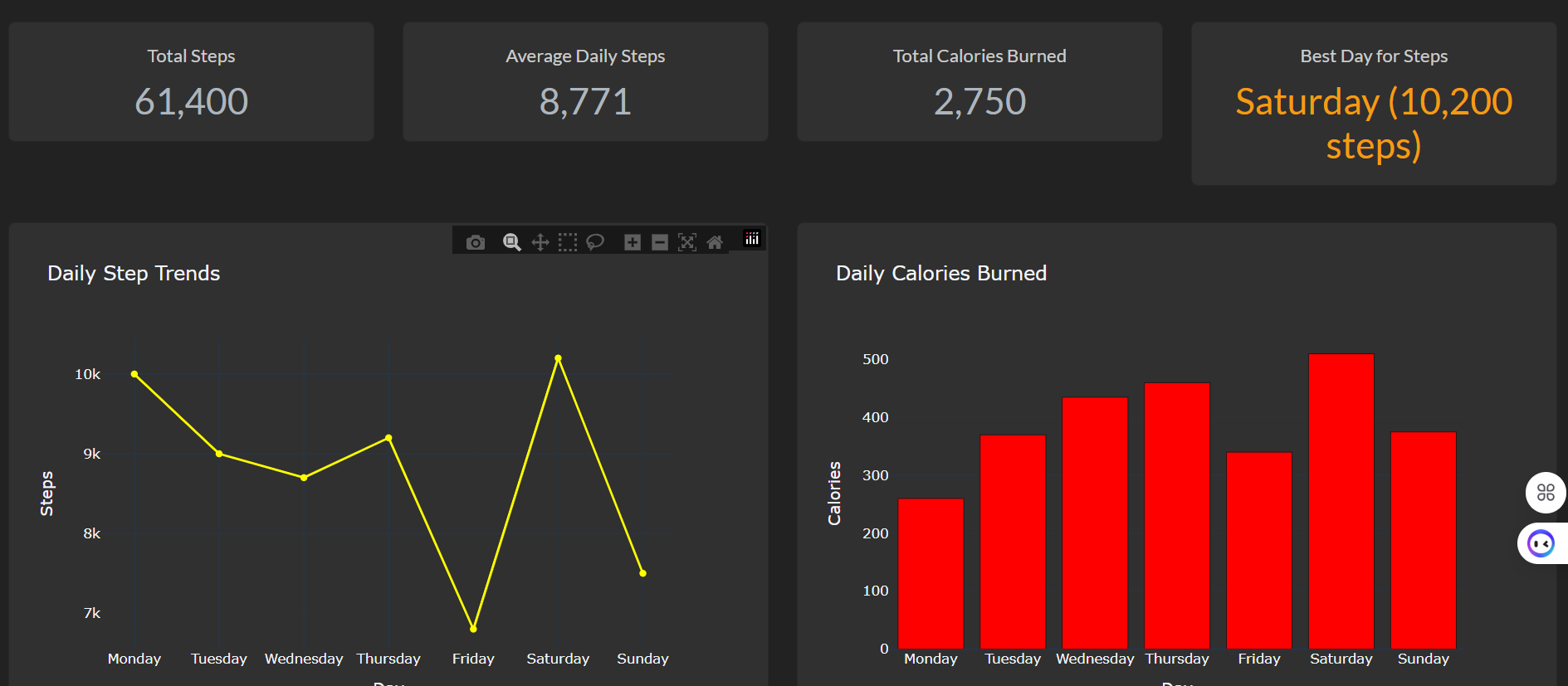
It automatically visualizes this data in two interactive charts:
- a line chart showing daily step counts,
- a bar chart showing calories burned.
The Insights page then summarizes the uploaded data visually to help users reflect on their week — without any manual data entry or setup.
Everything runs directly in the browser as a serverless web app hosted on Google Cloud Run.
🛠️ How we built it
- Framework: Python (Plotly Dash)
- Styling: Dash Bootstrap Components (Darkly theme – black, yellow, red palette)
- File upload: CSV input with instant chart refresh
- Deployment: Dockerized container deployed using Google Cloud Run
- Tools used: Google Cloud Shell, Cloud Build, Container Registry
- AI Studio integration: Used Gemini in Google AI Studio to help design and scaffold the app’s structure and layout.
💥 Challenges we ran into
- Understanding Cloud Run’s container deployment process — replacing the Procfile (used in Heroku) with a proper Dockerfile.
- Fixing Project ID configuration in Cloud Shell (
Unknown project iderrors). - Managing in‑memory CSV uploads within Dash without redundant state updates.
- Ensuring all visuals remain readable and consistent in dark‑mode.
🏆 Accomplishments that we're proud of
- Built a fully serverless, cloud‑hosted dashboard using only Python.
- Designed an elegant dark‑mode data dashboard UI.
- Deployed successfully to Google Cloud Run as a scalable container service.
- Learned to bridge AI‑generated designs from Google AI Studio with a working cloud deployment.
📚 What we learned
- The full workflow from code → container → Cloud Run deployment using Google Cloud tools.
- How Dash can serve as both backend and frontend in one Python environment.
- How to debug Cloud Run vs. Heroku builds (Procfile vs. Dockerfile).
- How to create user‑friendly data visualization apps without a heavy backend.
🚀 What’s next for FitTrack Pro
- Add Google Fit API integration to fetch live step data from smart devices.
- Extend Insights page with day‑by‑day comparisons (“Which day had the most steps?”).
- Save uploaded CSVs to Google Cloud Storage for persistent tracking.
- Export weekly visual reports as downloadable PDFs.
- Continue refining the UX and performance on Cloud Run.
🧩 Tech Stack
| Layer | Technologies |
|---|---|
| Frontend | Plotly Dash, Dash Bootstrap Components |
| Backend | Python 3.11 (Flask server within Dash) |
| Deployment | Google Cloud Build → Google Cloud Run |
| AI Tools | Gemini 1.5 Pro – architecture prompt used in Google AI Studio |
| Containerization | Docker (Debian slim image) |

Log in or sign up for Devpost to join the conversation.