💡 Inspiration
Many students struggle to stay active and maintain healthy habits, especially with the modern challenges of:
- Busy schedules with school, homework, and extracurricular activities
- Excessive screen time from phones, computers, and gaming
- Limited access to fitness guidance, gyms, or affordable programs
I realized that many teens want to stay healthy but lack a simple, friendly way to get started. I wanted to create a digital coach that is approachable, motivating, and easy to use, helping students build healthy habits that can last a lifetime.
The goal of FitBuddy is to empower teens to stay active, reduce stress, and track their personal growth, all without needing a gym membership, expensive equipment, or a personal trainer.
✅ What FitBuddy Does
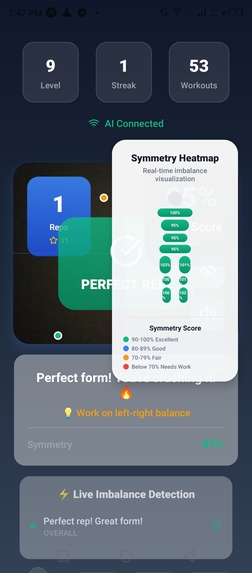
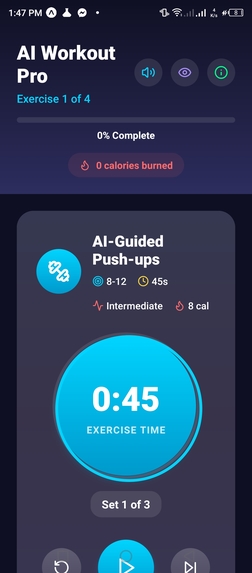
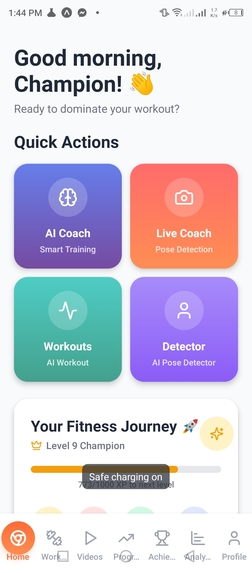
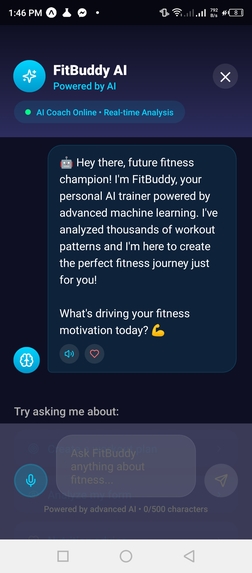
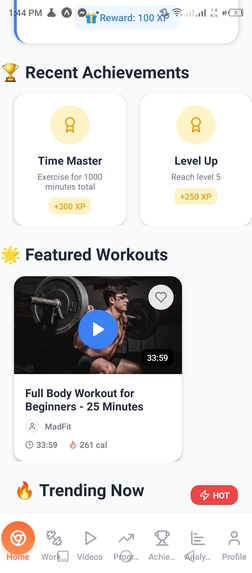
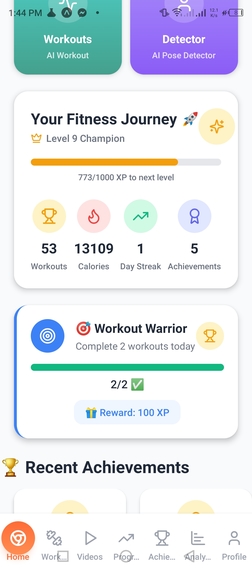
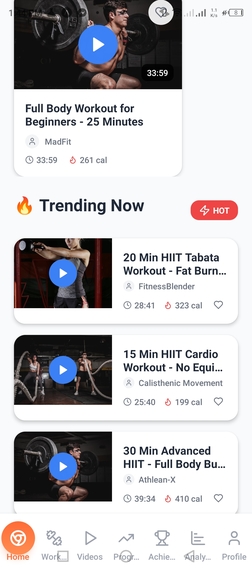
FitBuddy is designed to be an intuitive, student-friendly fitness companion. The app focuses on making fitness simple, fun, and achievable, even for beginners. Key features include:
- 🏃♂️ Daily Workout Plans: Pre-designed routines that students can follow at home, without any expensive equipment.
- 🔔 Personalized Activity Reminders: Gentle nudges and notifications to keep users on track and motivated.
- 💡 Motivational Tips & Guidance: Short, actionable advice to help students stay engaged with their fitness journey.
- 📊 Progress Tracking: Students can monitor their achievements, set realistic goals, and celebrate milestones.
FitBuddy ensures that fitness is accessible for everyone, regardless of experience, time constraints, or resources.
🛠 How I Built It
FitBuddy was built using React Native, providing cross-platform compatibility for both Android and iOS. The design and user experience were created in Figma, focusing on clarity, simplicity, and engagement for teenage users.
Key aspects of development:
User Interface Design:
- Clean, minimalistic screens that are easy to navigate
- Large buttons and clear visual cues for intuitive interaction
- Colorful progress bars and visual feedback to encourage daily engagement
App Logic & Personalization:
- Workouts adapt to the user’s experience level
- Notifications are timed to avoid interrupting study or rest periods
- Easy logging of completed workouts and progress tracking
Prototyping & Mockups:
- Wireframes and clickable mockups were used to test the user flow before implementation
- Ensured the app felt friendly and motivating, without overwhelming users with information
⚡ Challenges I Faced
Building FitBuddy came with several challenges, including:
- Maintaining Motivation: How to make workouts fun and engaging for teenagers who may feel intimidated or unmotivated by traditional exercise apps.
- Balancing Simplicity and Functionality: Designing a modern, visually appealing interface without adding unnecessary complexity.
- User Autonomy vs Guidance: Ensuring the app provides enough guidance to help students, while still allowing flexibility so it doesn’t feel like homework or a rigid schedule.
- Cross-Platform Consistency: Ensuring that the app behaves smoothly and consistently on both iOS and Android devices.
🏆 Accomplishments I’m Proud Of
- Developed an app that helps teens stay healthy and active, without requiring gyms, trainers, or expensive equipment.
- Created a simple and inviting design that appeals to students and encourages daily use.
- Built a working solution to a real problem, transforming inspiration into a functional, usable product.
- Learned how to turn a concept into a fully functioning app using React Native and Figma.
📚 Lessons Learned
Through this project, I gained valuable insights into product design, app development, and user experience:
- Designing a product that addresses real societal issues, such as teen health and well-being.
- Improving skills in UI/UX design, planning app logic, and user motivation techniques.
- Understanding how technology can positively impact daily habits and encourage better lifestyles.
- The importance of feedback loops — iterating on prototypes to make the app intuitive and enjoyable.
Built With
- asyncstorage
- blazepose)
- expo-lineargradient
- expo.io
- gemini
- lucide-icons
- react
- react-native
- react-native-reanimated
- tensorflow.js
- typescript
- vision-camera
- youtube


Log in or sign up for Devpost to join the conversation.