-
-
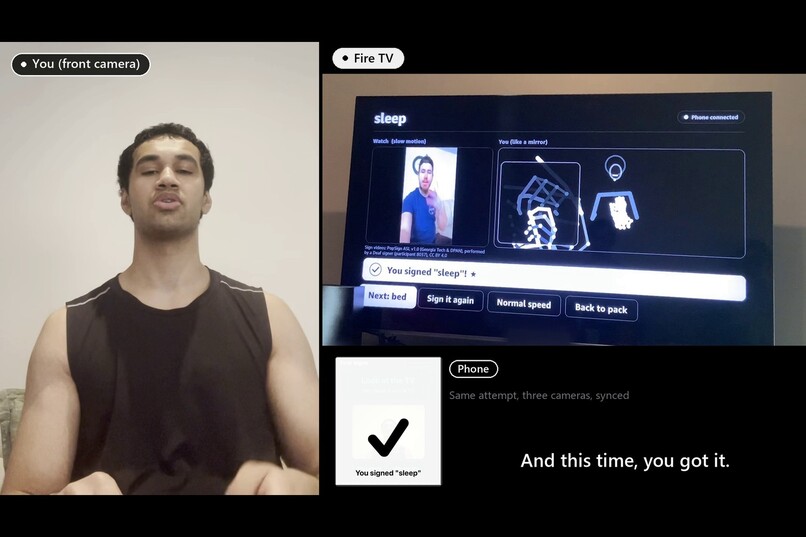
Your retry succeeding, three cameras, real TV
-
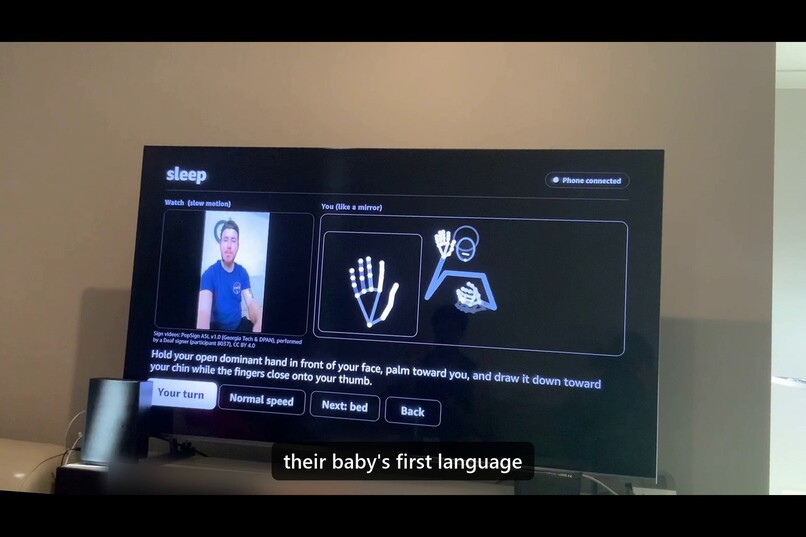
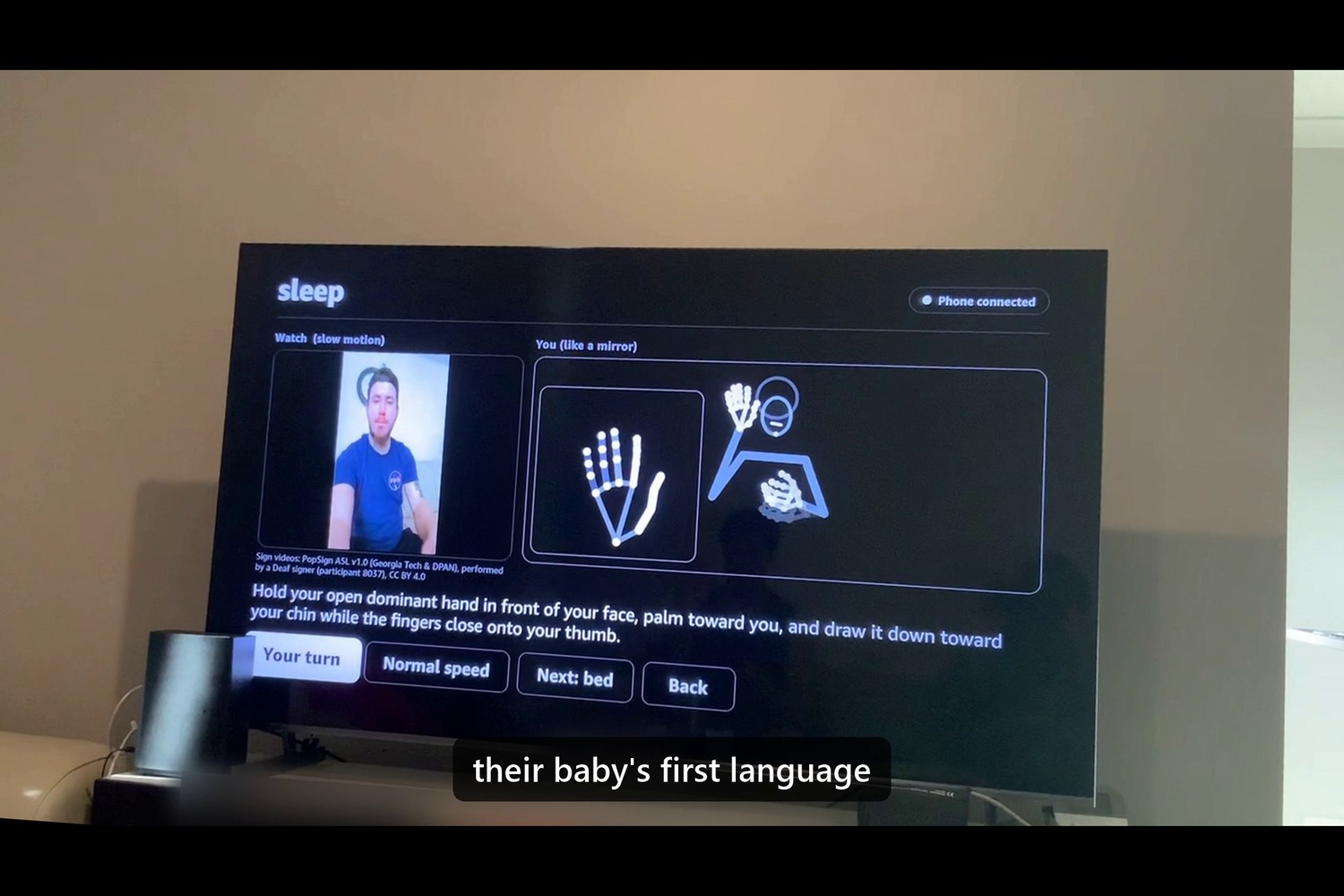
A lesson on the Vega stick
-
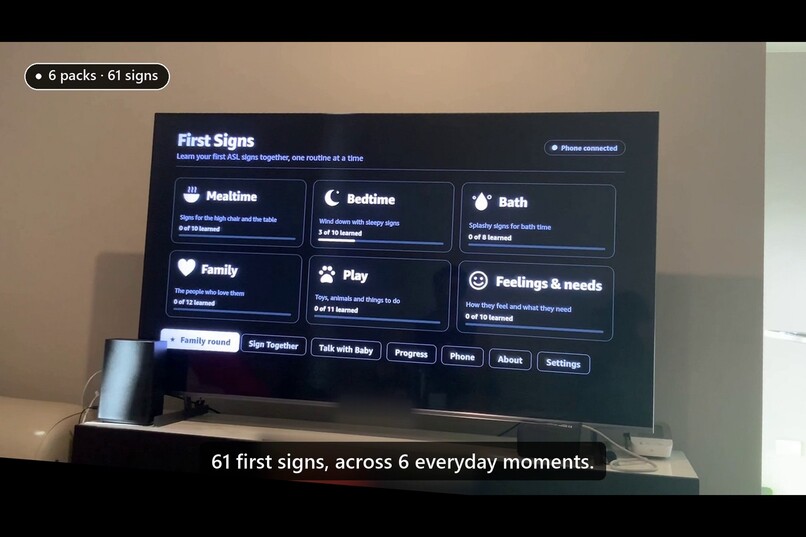
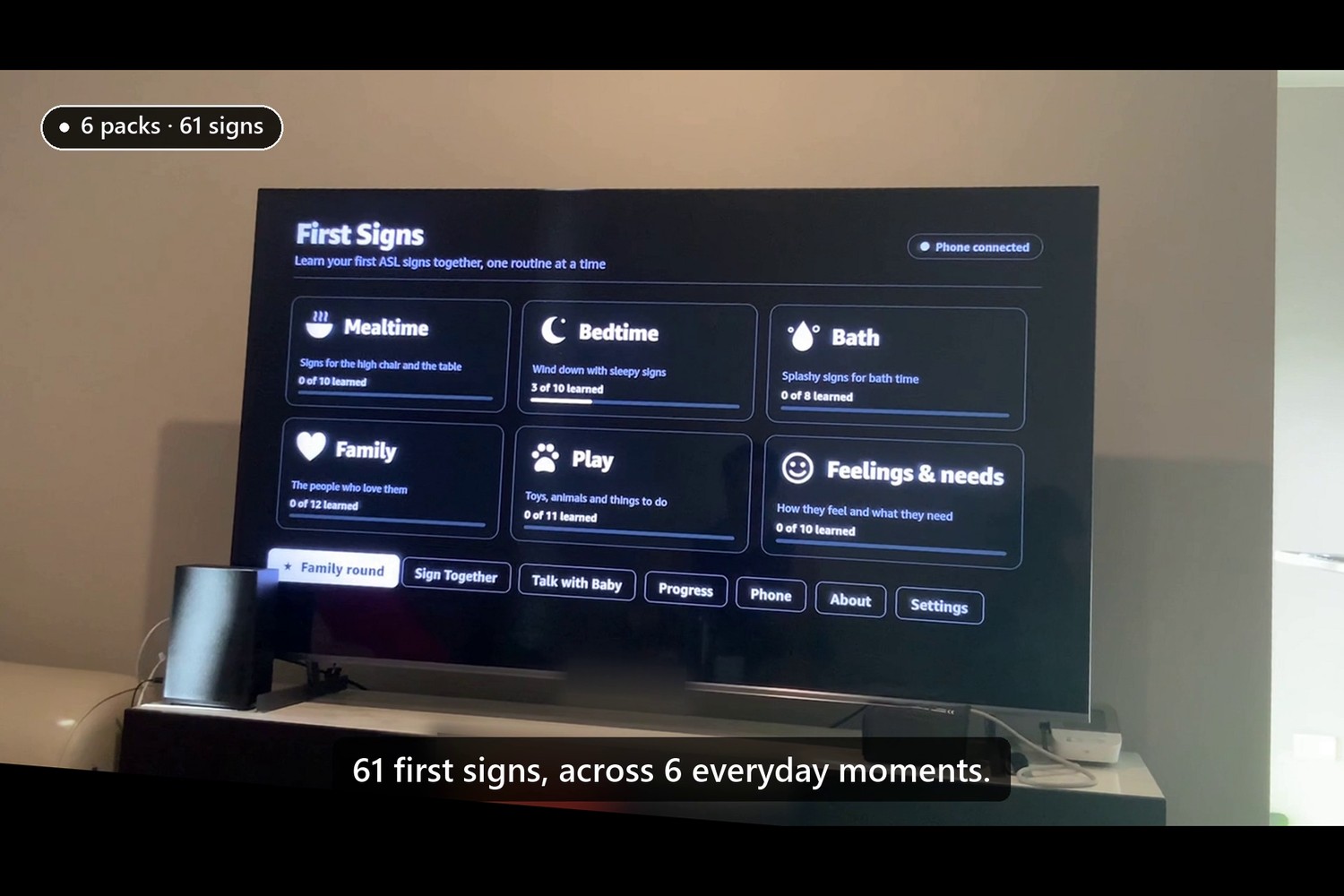
The 6 packs on your real TV
-
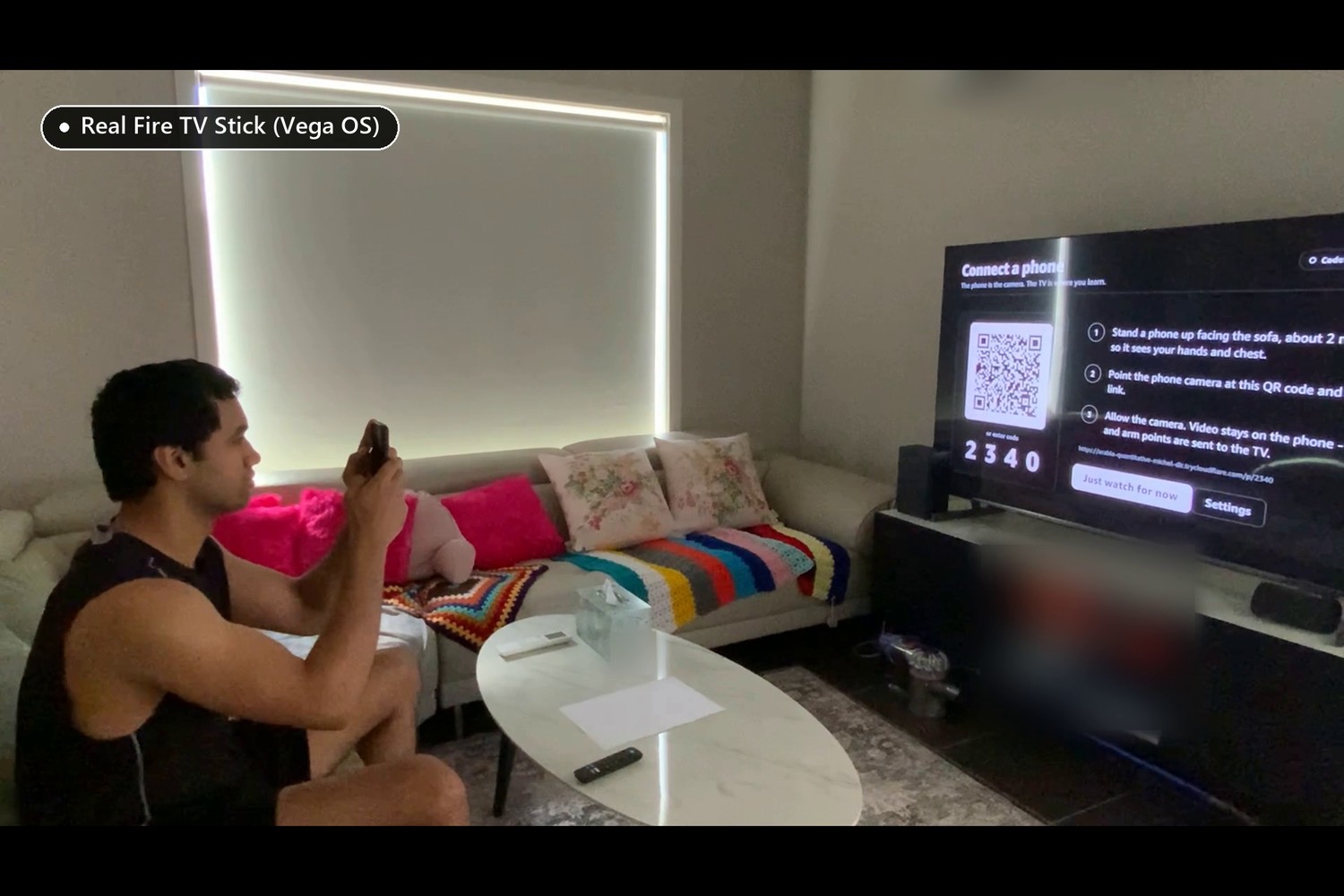
scanning the QR on the sofa
-
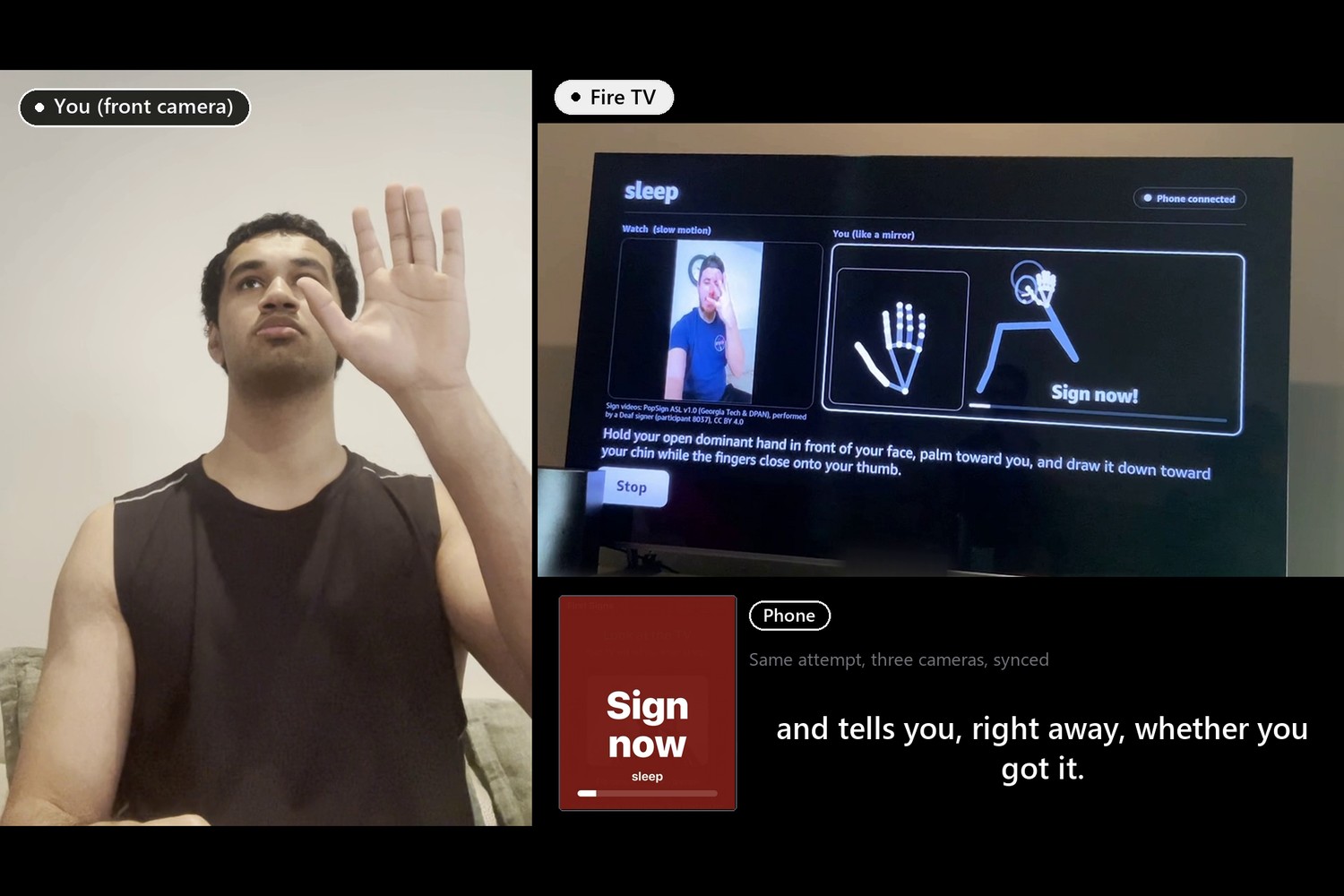
The three-camera "Sign now" moment
-
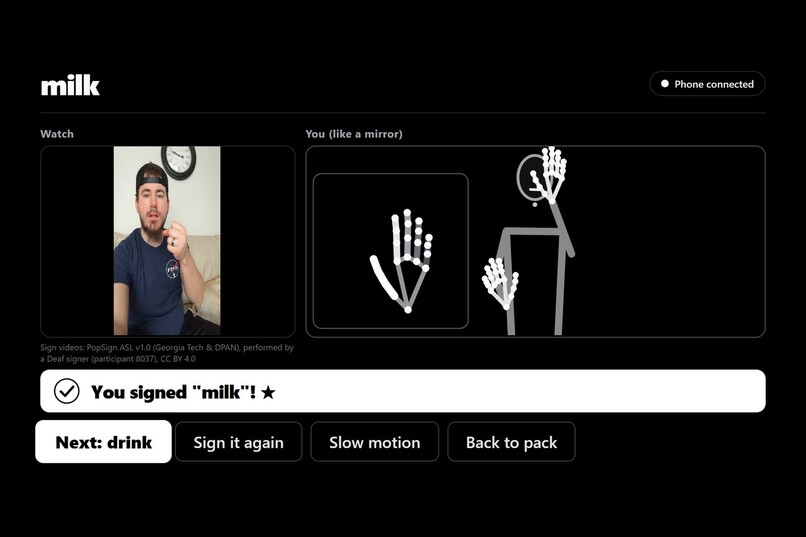
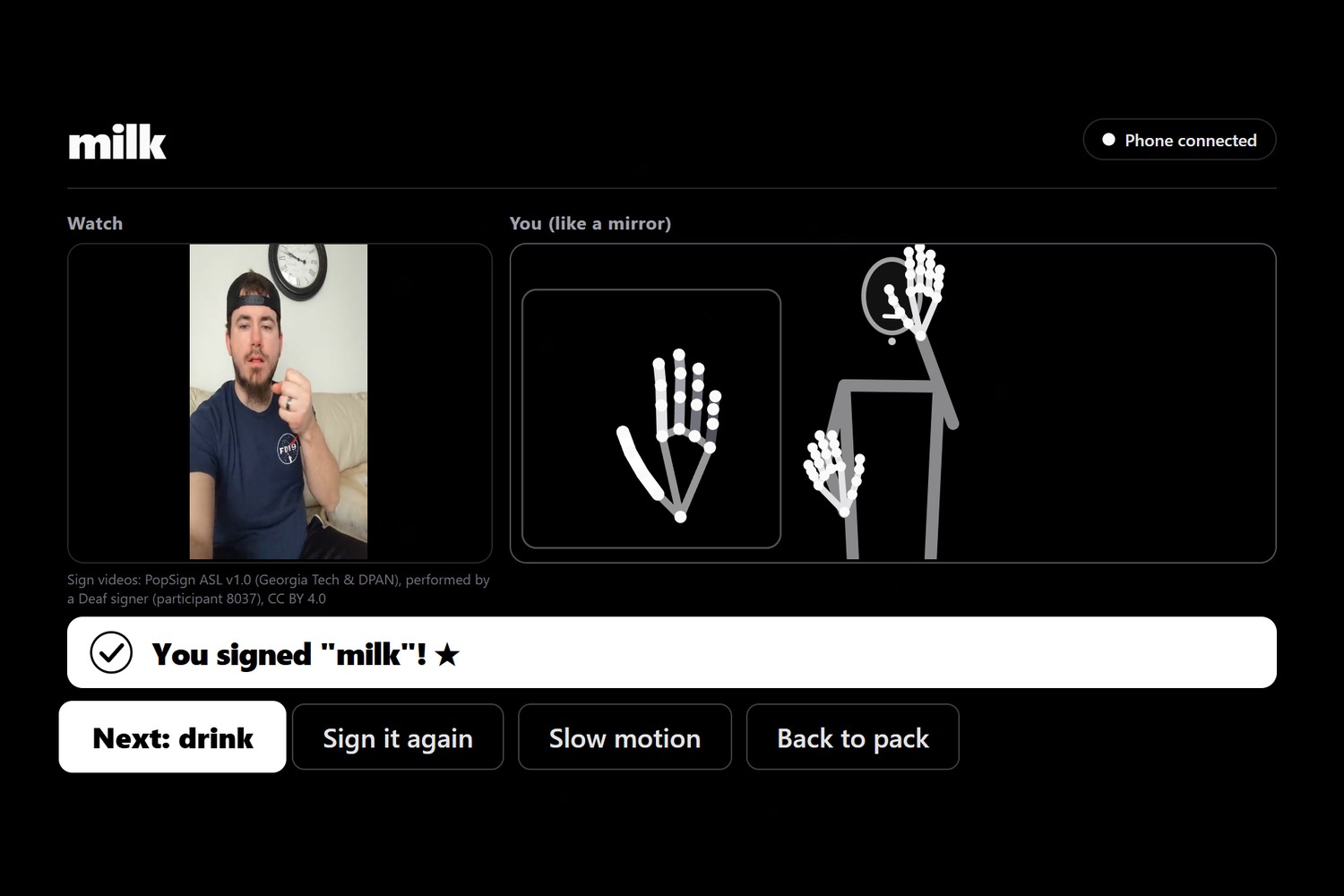
The lesson result (app screen)
-
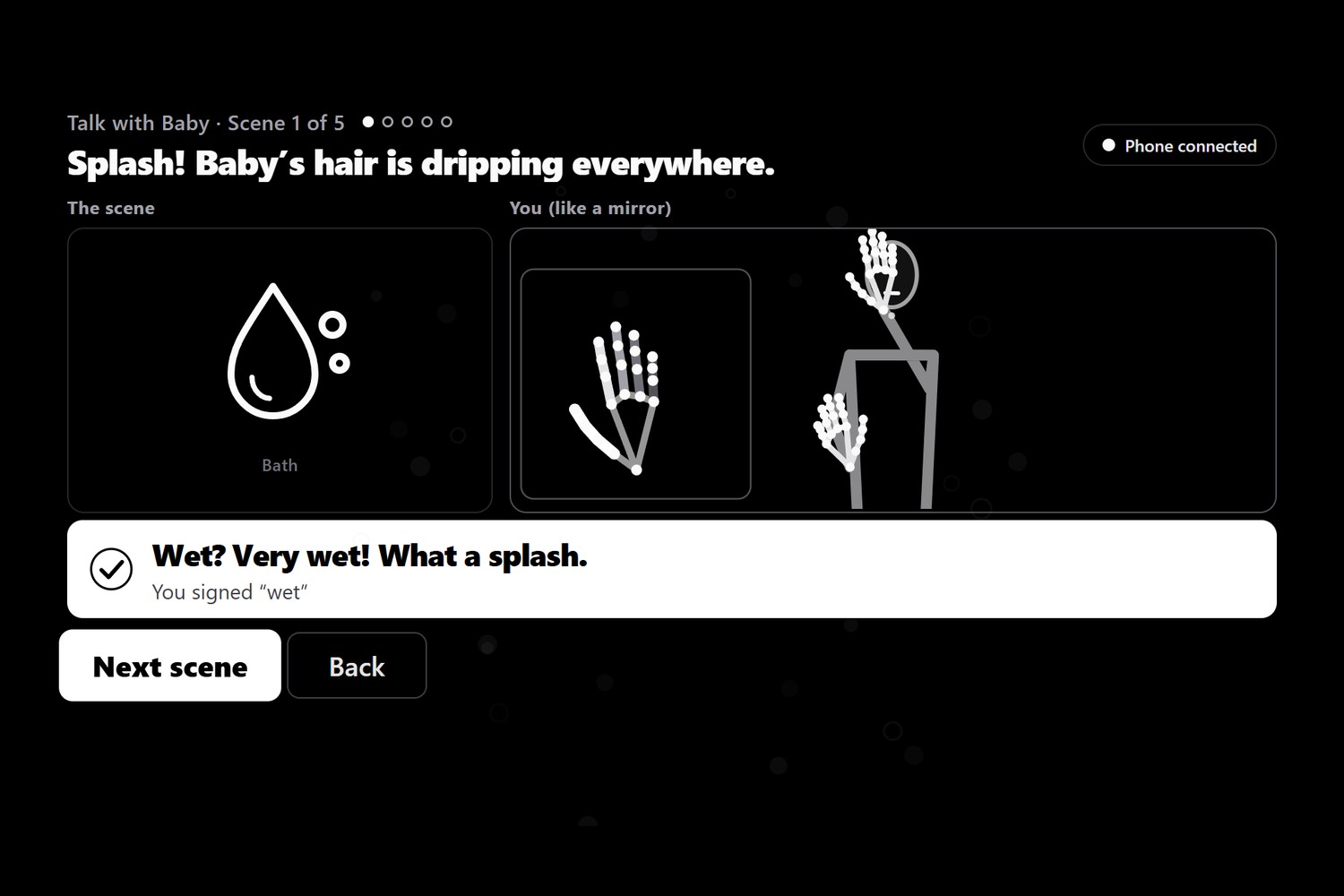
Talk with Baby (app screen)
Inspiration
Babies understand common words from about 6 months. For a Deaf baby, those first words have to be seen, not heard. But 9 in 10 children born deaf have hearing parents, so most Deaf babies depend on parents who are only just starting to learn a sign language. Early access to language matters: signed or spoken, the earlier the better.
Those parents have books, videos and phone apps. None of them can tell you that your sign is wrong. Phone apps have a second problem: you hold the phone in one hand and try to sign with the other, on a tiny screen, one person at a time. We saw this in our own data. The Deaf signer who recorded our reference videos held the phone while filming, so 17 two-handed signs in our 61 clips appear one-handed.
The living-room TV fixes all of that. Put the phone on a stand as a camera, and both hands are free. The teacher is life-size at couch distance. The feedback is big enough for the whole family to see, and they can learn together.
What it does
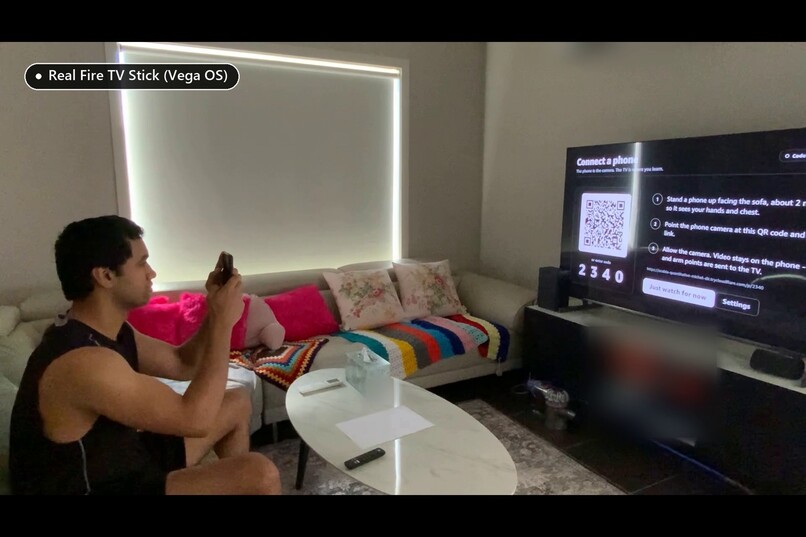
First Signs is a Fire TV app that helps hearing families learn their first ASL words for a Deaf baby or toddler. It runs natively on Vega OS on a real Fire TV Stick HD in a real living room; that is the device in our demo video.
- Pair: the TV shows a QR code and a 4-digit code. Scan it with a phone and put the phone on a stand. It is now the camera.
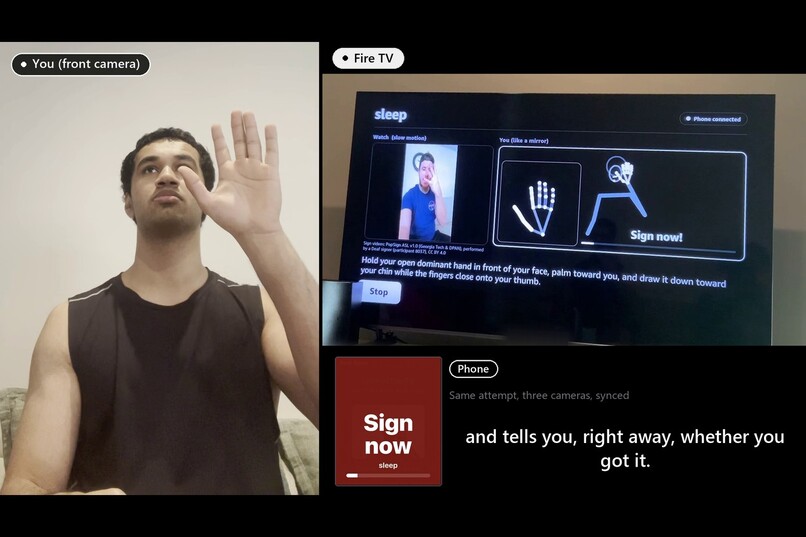
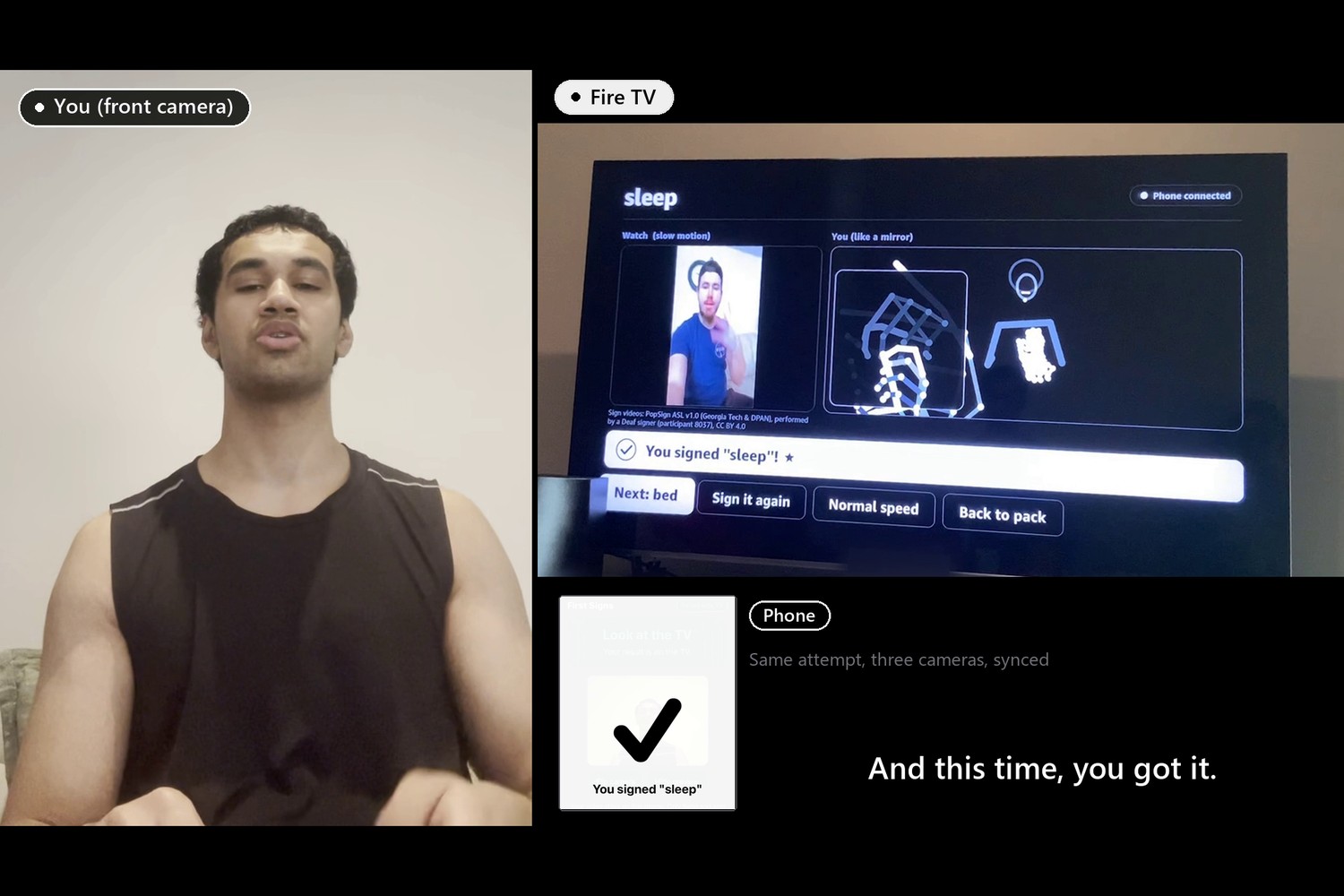
- Lessons: 61 everyday signs in six routine packs: Mealtime (milk, drink, food, please...), Bedtime, Bath time, Family, Play (dog, cat, car, outside...) and Feelings & needs (owie, sick, up, wait...). Watch a short clip of a Deaf signer making the sign, life-size, with a slow-motion option. Press Your turn: the TV counts you in, watches a 2.5-second window, and tells you whether you got it. If you missed, it says what the sign looked like instead and gives a short, specific tip. Each sign earns up to 3 stars.
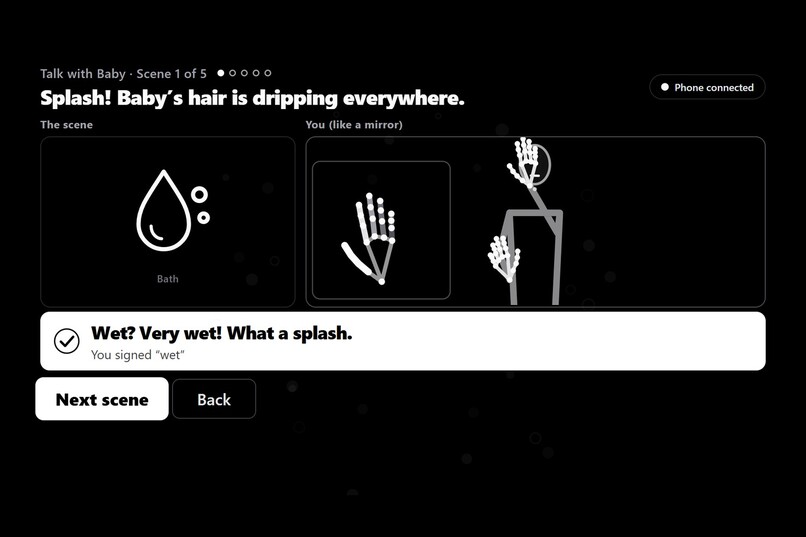
- Talk with Baby: practise signs in context. The TV shows a small everyday scene ("Baby is holding up an empty cup."), you answer with one sign, and the TV replies to the sign it saw ("Milk? Let's fill it up."). 52 scenes across the six packs.
- Family round: players take turns on random signs from a pack, with scores and streaks, ending on a scoreboard.
- Sign Together: two people stand side by side in one camera frame. Each gets their own live mirror and verdict.
- Phone feedback too: the phone on the stand briefly shows the verdict as well, so you can glance at either screen.
- Clear on a TV: a black-and-white interface with an inverted focus state (white fill, black text), so the D-pad focus is obvious from the couch.
- Remote only: everything works with the D-pad, OK and Back. Every prompt is shown as on-screen text.
- Private by design: video never leaves the phone. Only hand and body landmark points are sent.
It is a learning tool for hearing families. It does not translate or interpret ASL, and the About screen credits the Deaf signers and points families to Deaf-led ASL classes.
How we built it
- Vega OS app (the one in the demo): React Native for Vega (RN 0.83,
@amazon-devices/react-native-kepler4.0, Vega SDK 0.24), built in WSL2 and installed over Wi-Fi onto a Fire TV Stick HD (2nd Gen) running Vega "OS 2.0". We enabled Developer Mode from the CLI (vega devmode loginandvega devmode enable-device), set the stick's Connection Mode to TCP/IP, then usedvega exec vda connect,vega device install-appandvega device launch-app. We ported the Fire OS app screen by screen:@amazon-devices/react-native-svgfor the QR code and skeleton,TVEventHandlerfor the remote, the Vega AsyncStorage package for settings and progress, and w3cmedia for audio. - Tuned for a 1 GB stick:
- The reference clips play as bundled JPG sprite sheets (a frame flipbook animated by one
<Image>), because w3cmedia video would not play reliably on the real stick. - An ANR kill on the stick was diagnosed from the stick's own crash report (
vega device copy-logs): graphics memory (CMA) ran out from large decoded textures. We halved the sprite sheets (frames 320 to 240 px tall, sheets capped at 1024 px) and mount only one sheet at a time. - The live skeleton renders at 10 fps on Vega and always draws the newest frame, never a queue.
- The relay drops stale frames instead of buffering them, so the mirror never falls behind.
- Measured: the phone sends about 18.6 landmark frames a second, and the HTTPS tunnel adds about 40 ms one way.
- The reference clips play as bundled JPG sprite sheets (a frame flipbook animated by one
- Fire OS app: the same app for Fire OS, in React Native for TV (
react-native-tvos0.81) on Expo SDK 54, structured like Amazon's react-native-multi-tv-app-sample, whose remote handling we adapted. Focus is handled byreact-tv-space-navigationon both platforms. We built the APK on Windows and tested it on an Android TV emulator and in the web build; we did not have a Fire OS stick to test it on. - Phone (web page): MediaPipe tasks-vision Hand and Pose landmarkers run in the phone's browser and stream landmark frames. When the TV asks for an attempt, the phone records a window and runs our sign model on-device with onnxruntime-web. Video is never uploaded.
- Sign model: a ~1.0M-parameter convolution and transformer classifier (4.0 MB ONNX), trained in PyTorch on a GTX 1660 using landmarks from 21 Deaf signers in Google's GISLR dataset (D-PAN and Georgia Tech, CC BY 4.0). We tested it on 10 different Deaf signers it never saw (9,882 clips): within a pack, it gets the sign right first time 94.5% of the time, and in its top 3 97.7% of the time. On clips altered to look like the phone's window, those numbers are 92.4% and 96.3%. Every pack scores at least 96.7% top-3. The Python and JavaScript preprocessing are checked against each other on the same fixtures, and onnxruntime-web on the phone matches PyTorch to within 3e-6.
- Reference videos: 61 short clips, all of one Deaf signer (PopSign ASL v1.0 participant 8037, Georgia Tech and DPAN, CC BY 4.0), so every sign is taught by the same person. We fetched only the clips we needed out of tar files of up to 3 GB each, using HTTP Range requests, and re-encoded them for TV playback.
- Relay server (Node.js): pairs the TV and phone with a 4-digit room code and relays messages over WebSockets. It has code for Amazon Polly (neural voice) spoken prompts, cached so each phrase is synthesized once, and Amazon Bedrock with Amazon Nova Micro (falling back to Nova Lite) for coaching tips grounded only in our checked written description of the sign. If AWS is unreachable, the app keeps working with on-screen text and built-in tips.
- Testing: scripted drivers walk every screen using only remote keys: in a browser, on an Android TV emulator
(
adb shell input keyevent) and on the Vega Virtual Device (inputd-cli). Then we tested by hand on the real Vega stick. Unit tests cover the relay, pairing, handedness, verdict and two-person tracking.
Challenges we ran into
- Video on a real Vega stick. The w3cmedia player showed the clips zoomed and frozen on the Vega Virtual Device and never played them on the stick. We switched to bundled sprite sheets, which play reliably and need no network.
- An ANR on the stick. The app was killed with an "app not responding" error. The crash report from
vega device copy-logspointed to graphics-memory (CMA) exhaustion from large decoded textures. Smaller sprite sheets, one mounted at a time, fixed it. - A live mirror that lagged on 1 GB of RAM. The stick could not keep up with 15 skeleton redraws a second plus the sprite animation. We throttled drawing to 10 fps (newest frame only) and made the relay drop stale frames.
- Getting onto a retail Vega stick. Developer options shows only a QR code until you press the device name in About
7 times; Developer Mode is then enabled from the CLI, and
vega devmode loginin WSL needs an unlocked OS keyring. Our stick reports "OS 2.0", while the SDK 0.24 docs describe OS 1.2. It worked, but we couldn't confirm that from the docs beforehand. - Buying the right hardware. Retail Fire TV Stick HD and 4K Select models now run Vega OS, with no ADB. We only learned that after buying, which is why our Fire OS build is tested on an emulator rather than a stick.
- Windows path length broke the Fire OS native build. It failed after 13 minutes with
ninja: error: manifest 'build.ninja' still dirty; the real cause was object paths over 260 characters. We build from a short path and drafted a README fix for Amazon's sample. - Vega on Windows. Amazon doesn't support WSL2, but we ran the Vega SDK, the Vega Virtual Device and the real-device tooling there, after a host memory crash and a software-GL workaround. All of it is in our friction log.
- AWS permissions. Our IAM user on a shared account is denied every Polly and Bedrock call and can't list its own policies to see why. We wrote a least-privilege policy for an admin and made the server degrade gracefully.
- Matching two MediaPipe versions. The training data came from legacy MediaPipe Holistic; the phone runs tasks-vision. We measured both handedness conventions on hundreds of thousands of frames and designed features that don't depend on camera aspect ratio or mirroring.
Accomplishments that we're proud of
- First Signs runs natively on Vega OS on a real Fire TV Stick, in a real living room. We ported it to React Native for Vega, installed it over Wi-Fi, diagnosed an on-device crash from the stick's own logs, and tuned it until the live mirror kept up.
- An accuracy number we can stand behind: measured on 10 Deaf signers the model never saw, with the weak spots published (shower is the weakest sign; mom/grandma and dad/grandpa are the main confusions).
- One real Deaf signer teaches all 61 signs on screen, properly credited, instead of an avatar.
- Video never leaves the phone.
- The whole app works with just a remote, and every flow is tested that way automatically.
- A 46-entry friction log covering a Vega port on a real stick, the Vega SDK on WSL2, the Fire OS build and AWS, with workarounds others can use.
What we learned
- The TV changes what sign-learning software can do: two free hands, a life-size teacher and a shared screen.
- A streaming stick is a real constraint. Graphics memory and the UI thread, not the model, set our limits, and the device's own crash report found the problem faster than guessing.
- Hand-tracking data has conventions (handedness, mirroring, aspect ratio) that are rarely documented. Measuring them is faster than guessing.
- Generative AI is safest when it can only rephrase checked facts. Our Bedrock prompt contains the sign's verified description and nothing else, and unverified descriptions are never sent.
- Respect matters as much as accuracy: use the word "learning", not "translating"; credit the Deaf signers; point to Deaf teachers.
What's next for First Signs
- Measure accuracy live, with hearing learners on real phone cameras, and publish it whatever it shows.
- Get Deaf ASL teachers to review the packs, descriptions, scenes and feedback wording.
- Turn on the Polly voice and Bedrock tips once the IAM policy is attached, and check audio on the Vega stick.
- Test the Fire OS build on a Fire OS device.
- More packs, for baby-sign families (hearing babies) and general ASL learners.
- Auslan, built with Deaf Australians.
- Echo Show and other devices with built-in cameras, which would remove the phone.
Built With
- amazon-bedrock
- amazon-nova
- amazon-polly
- android
- aws-sdk
- expo.io
- fire-os
- fire-tv
- gislr
- javascript
- mediapipe
- node.js
- onnx
- onnxruntime-web
- python
- pytorch
- react-native
- react-native-tvos
- react-tv-space-navigation
- typescript
- vega-os
- vega-sdk
- websockets
- wsl2


Log in or sign up for Devpost to join the conversation.