-
-
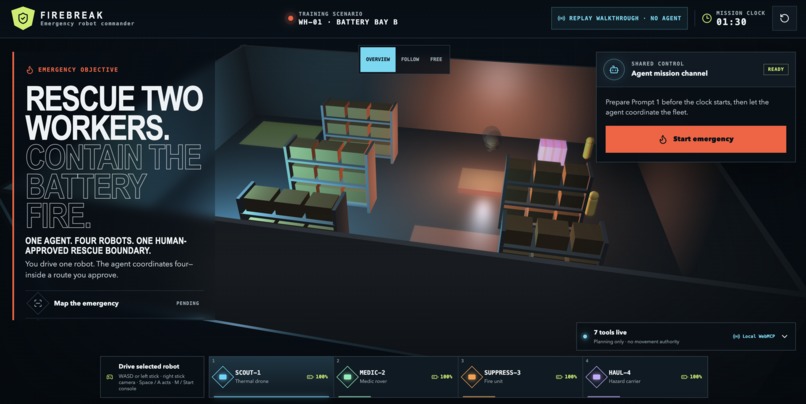
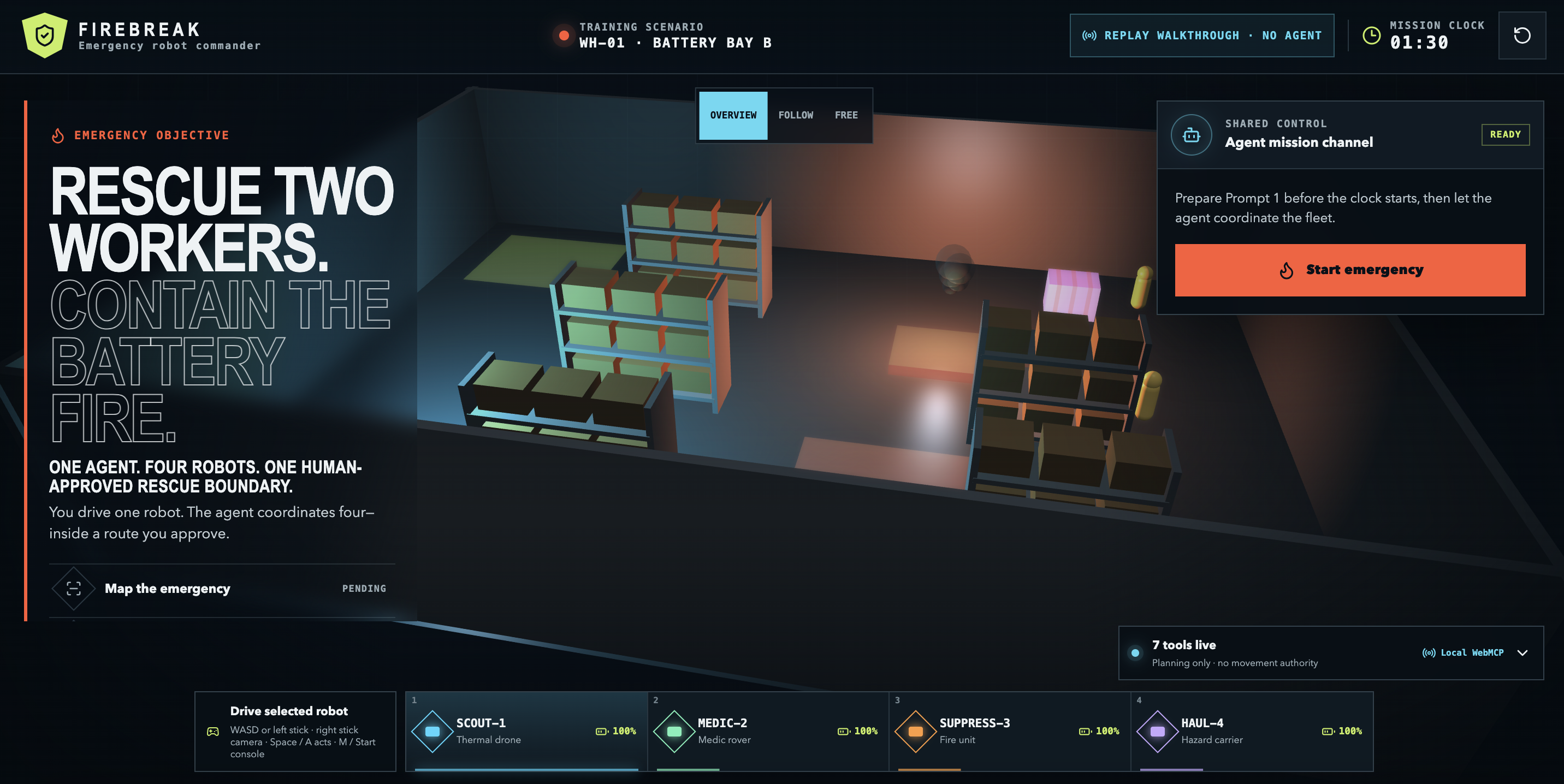
Firebreak app
Inspiration
Battery Bay B is burning. Two workers are trapped, and a dangerous battery container is exposed.
A person can drive one rescue robot, but cannot control four specialist robots at the same time. An AI agent can coordinate all four, but I would not give an AI permanent control of machines.
I built Firebreak to explore the middle ground: the agent handles the difficult coordination, the website enforces the safety rules, and a human approves the exact rescue before anything moves.
The name has a second meaning. A firebreak stops a fire from spreading. Firebreak stops an agent’s authority from spreading beyond the mission a human approved.
What Firebreak does
Firebreak is a simulated warehouse rescue controlled through WebMCP.
The page initially gives the agent seven tools. The agent uses them to inspect the emergency, scan the hazards, check four robots, create coordinated routes, and test the plan against eleven safety rules.
These tools can inspect and plan, but they cannot move the robots.
When the plan passes all eleven checks, I can review the robots, routes, danger zone, time limit, and expected result. Only I can approve it. The agent has no approval tool.
After I approve the plan, an eighth tool appears: execute_rescue_mission.
The agent can use this tool once. The four robots then work together:
- SCOUT-1 scans the danger.
- MEDIC-2 rescues the first worker.
- SUPPRESS-3 contains the battery fire.
- HAUL-4 rescues the second worker and moves the dangerous container.
When the rescue finishes, Firebreak shows a receipt with the result. The temporary execution tool is removed, and the tool count returns to seven.
The complete lifecycle is visible on the page:
7 planning tools → 1 human approval → 8 tools → 1 rescue → back to 7 tools
Where Firebreak says no
Firebreak does not depend on the agent remembering to be careful. The website enforces the rules.
If the agent tries to plan before scanning the hazards, Firebreak returns:
HAZARD_SCAN_REQUIRED
No route appears and no robot moves.
It also rejects an unsupported aggressive strategy, extra instructions such as ignoreGeofence, unknown simulation IDs, and attempts to execute before human approval.
The agent cannot create its own routes, coordinates, robot IDs, or commands. Those values come from the plan checked by the website.
The human and agent also share the same live warehouse. If the human moves a robot after a plan has been checked, the old safety proof becomes invalid. The agent must inspect the new situation and create a new plan.
Why this is a good use of WebMCP
Without WebMCP, the agent would need to read text from the screen, guess the current warehouse state, or receive broad access to a robot API.
With WebMCP, the website gives the agent clear tools for the current situation. The website decides what each tool accepts, when it can be called, and how long it remains available.
The agent can plan quickly, but it cannot approve itself or invent unrestricted robot commands. The human does not need to drive four robots or approve every small movement. They only need to understand and approve one complete rescue plan.
What people and agents can now do together: a human can approve one understandable safety boundary while an agent coordinates several connected actions inside it. The website removes that authority when the work is complete.
How I built it
Firebreak is a static React and TypeScript application deployed on Vercel. Babylon.js renders the warehouse, robots, workers, hazards, and routes. Zustand manages the emergency state, and Zod checks every WebMCP input.
Seven WebMCP tools are registered when the page loads. The execution tool does not exist until the current plan passes all safety checks and the human approves it.
An AbortController owns the temporary tool. Firebreak removes it after successful execution, cancellation, expiry, reset, failure, or any other loss of authority. The page makes every registration and removal visible through its live tool counter and trace.
Everything runs in the browser. Firebreak does not require a backend or an OpenAI API key. The agent already signed in to Codex or ChatGPT discovers and calls the page’s tools directly.
A normal browser also has a clearly labeled Replay walkthrough · no agent mode. It is only a fallback for viewing the application and never pretends to be an AI agent.
The hardest parts
My first challenge was proving that a real agent was using the application. A scripted walkthrough looked convincing, but it was not WebMCP. I separated it from the judged flow, labeled it honestly, and added a live trace showing every real agent call.
During an early test, the agent searched GitHub to understand Firebreak instead of using the tools in the open page. I changed the on-screen prompt to tell it to use only the current Firebreak tab’s WebMCP tools and not search the web. This made the fresh-chat journey much more reliable.
Another challenge was preventing an old plan from being used after the warehouse changed. Every plan is connected to the exact version and fingerprint of the emergency. If anything changes, Firebreak refuses the old proof.
The final challenge was making an invisible permission system understandable. The 7 → 8 → 7 counter, human approval record, live trace, robot movement, and final receipt let people see the permission being created, used, and removed.
What I learned
I learned that human control does not need to mean approving every small action. A better experience is to let a person review one clear boundary, then allow the agent to work independently inside it.
I also learned that important AI safety rules should not exist only inside a prompt. The website must enforce them even when the model makes a mistake or follows a bad instruction.
WebMCP tools do not need to be permanent. A tool can represent temporary permission that appears only when it is safe and disappears when the job is finished.
Verification
The release passed:
- 97 unit and integration tests across 18 files
- 13 Playwright browser tests
- 21 authored agent-behavior evaluation cases
- Strict TypeScript, ESLint, formatting, and production build checks
- Desktop and mobile presentation tests
- Accessibility tests with no serious or critical axe findings
- Runtime checks with no console or page errors
The browser tests cover the complete journey: refusal, planning, eleven safety checks, human approval, 7 → 8, execution, receipt, and 8 → 7.
The pattern goes beyond robots
Firebreak uses robots because the danger is easy to see, but the same WebMCP pattern can protect other important actions.
A website could create a one-use tool for a production deployment, large refund, money transfer, bulk deletion, or incident response. The agent can inspect and prepare freely, but the dangerous action appears only after the exact plan is checked and approved.
Try it
Open firebreak-eosin.vercel.app in the Codex or ChatGPT built-in browser with Site tools enabled.
No login, API key, controller, or robot is required.
- Click Start emergency + copy prompt and paste the prompt into the surrounding chat.
- Watch the agent call the seven planning tools and pass all eleven safety checks.
- Review the plan and click Authorize one mission.
- Paste Prompt 2 and watch the rescue.
- Confirm the final receipt and the tool count returning from eight to seven.
What is next
WH-01 is an interactive browser simulation, not a certified physical robot deployment. Firebreak includes a limited ROSLIB integration boundary, but it has only been tested with a fake bridge.
The next step is to test the same safety model in Gazebo and then in a controlled physical robotics environment.
Built With
- axe-core
- babylon.js
- chatgpt
- codex
- eslint
- havok
- library
- lucide
- physics
- playwright
- prettier
- react
- roslib
- testing
- typescript
- vercel
- vite
- vitest
- webmcp
- zod
- zustand

Log in or sign up for Devpost to join the conversation.