-
-
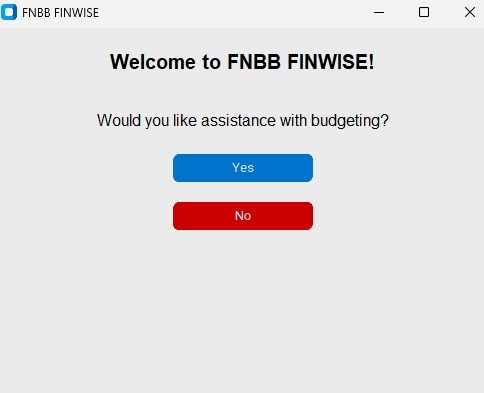
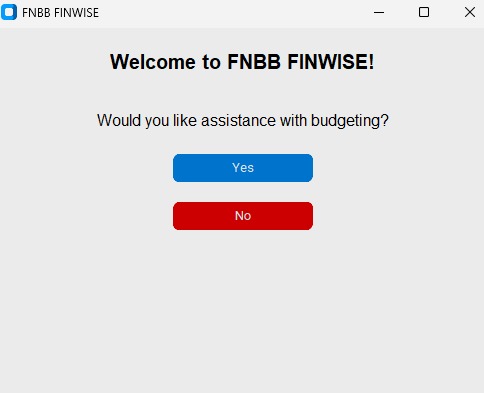
This is what appears first when the app is opened
-
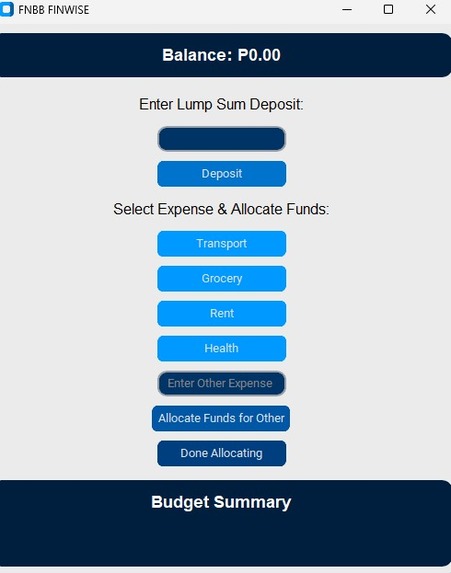
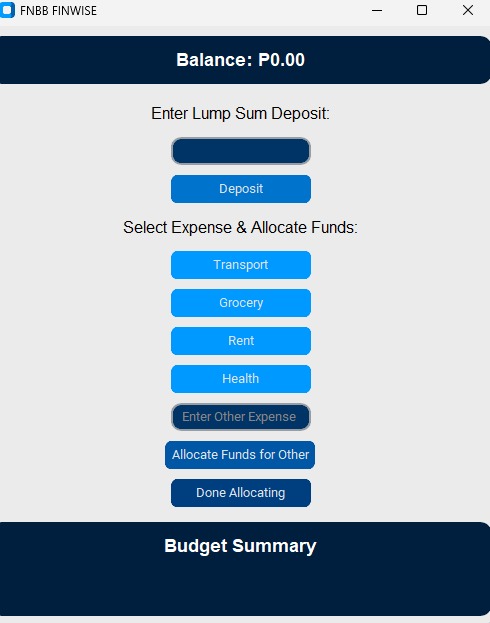
Adding a lumpsum deposit
-
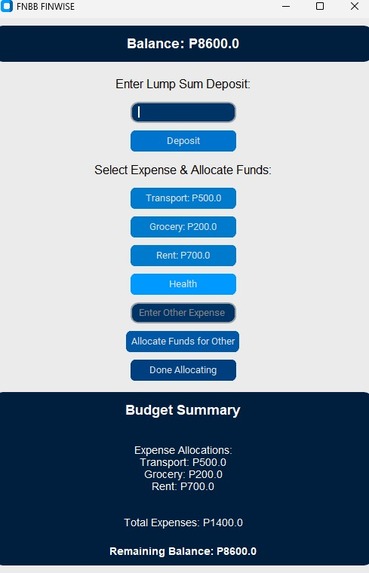
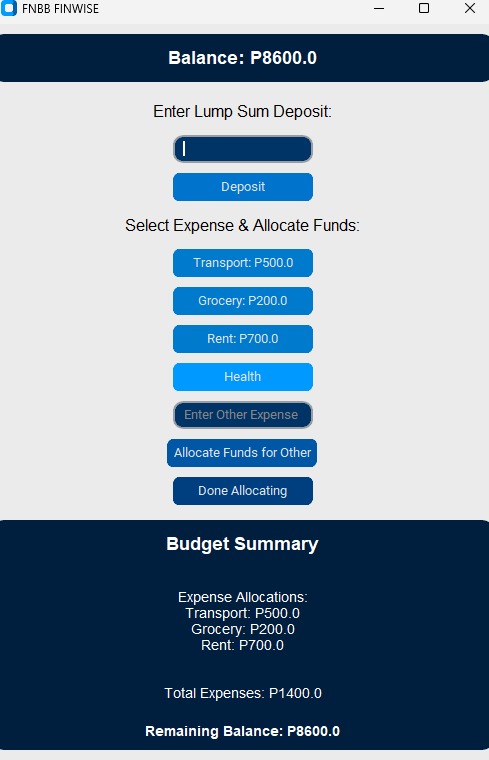
Expenses together with their cost
-
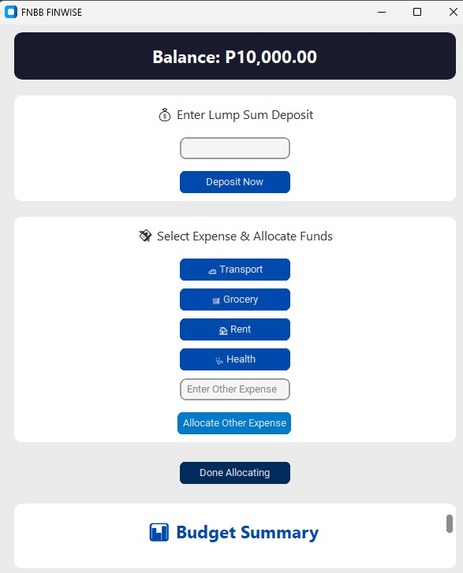
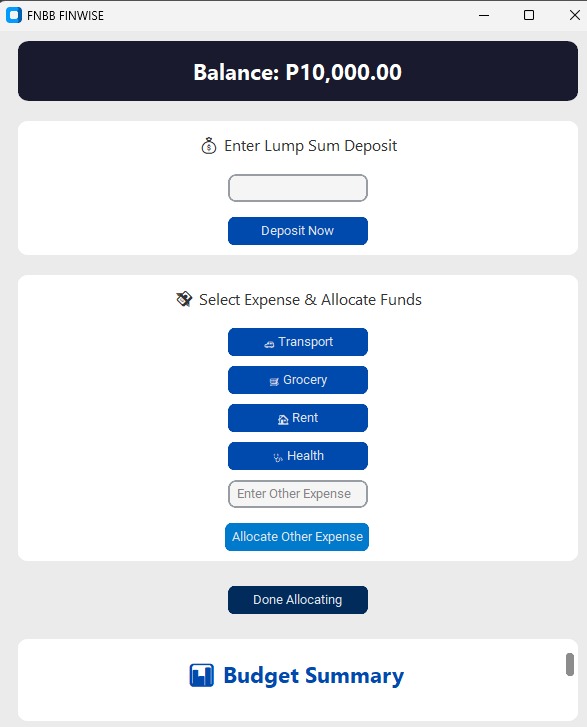
Expenses panel
Inspiration
As first-year university students, we faced three key financial pain points:
- Consistently running out of money before month-end
- No clear visibility on mobile money spending
- Existing apps being too complex for student needs
The "Bank of the Future" competition inspired us to build a solution addressing these exact challenges which in a way also addresses the problems Batswana have.
What it does
Tracks expenses
- Tracks income
- Manages budget
- Sets savings goals
- Sends reminders for bills and credit payment
How we built it
Current Tech Stack
| Component | Tools Used | Reason |
|---|---|---|
| Backend | Python (Flask) | Only language we know |
| UI/UX | Figma | Jotform prototyping |
| Logic | Python algorithms | Basic financial tracking |
Day 1 Prototype Features
- Email notifications for:
- Budget thresholds reached
- Unusual spending patterns
- Automatic transaction categorization
- Simple balance forecasting
The code for the FinWise App is below
import customtkinter as ctk import time
font_title = ("Segoe UI", 22, "bold") font_section = ("Segoe UI", 16) font_text = ("Segoe UI", 14)
class BudgetingApp(ctk.CTk): def init(self): super().init()
    self.title("FNBB FINWISE")
    self.geometry("600x700")
    self.configure(bg="#9DE748")

    self.total_balance = 0.0
    self.initial_balance = 0.0
    self.remaining_balance = 0.0
    self.categories = {}
    self.total_expenses = 0.0
    self.transactions = []
    self.selected_expenses = set()

    self.init_ui()

def init_ui(self):
    self.header_frame = ctk.CTkFrame(self, fg_color="#1A1A2E", corner_radius=10)
    self.header_frame.pack(fill="x", pady=10, padx=20)

    self.balance_label = ctk.CTkLabel(self.header_frame, text="Balance: P0.00", font=font_title, text_color="white")
    self.balance_label.pack(pady=15)

    self.deposit_frame = ctk.CTkFrame(self, fg_color="#FFFFFF", corner_radius=10)
    self.deposit_frame.pack(padx=20, pady=10, fill="x")

    self.deposit_label = ctk.CTkLabel(self.deposit_frame, text="💰 Enter Lump Sum Deposit", font=font_section, text_color="#333333")
    self.deposit_label.pack(pady=10)

    self.deposit_input = ctk.CTkEntry(self.deposit_frame, corner_radius=8, fg_color="#F5F5F5", text_color="black")
    self.deposit_input.pack(pady=5)

    self.deposit_button = ctk.CTkButton(self.deposit_frame, text="Deposit Now", command=self.deposit,
                                        fg_color="#004AAD", hover_color="#003080")
    self.deposit_button.pack(pady=10)

    self.expense_frame = ctk.CTkFrame(self, fg_color="#FFFFFF", corner_radius=10)
    self.expense_frame.pack(padx=20, pady=10, fill="x")

    self.expense_label = ctk.CTkLabel(self.expense_frame, text="💸 Select Expense & Allocate Funds", font=font_section, text_color="#333333")
    self.expense_label.pack(pady=10)

    self.expense_buttons = {}
    expense_list = [("🚗 Transport", "Transport"), ("🛒 Grocery", "Grocery"), ("🏠 Rent", "Rent"), ("🩺 Health", "Health")]
    for label, expense in expense_list:
        btn = ctk.CTkButton(self.expense_frame, text=label, command=lambda e=expense: self.allocate_funds(e),
                            fg_color="#004AAD", hover_color="#003080")
        btn.pack(pady=5)
        self.expense_buttons[expense] = btn

    self.other_expense_input = ctk.CTkEntry(self.expense_frame, placeholder_text="Enter Other Expense",
                                            corner_radius=8, fg_color="#F5F5F5", text_color="black")
    self.other_expense_input.pack(pady=5)

    self.allocate_other_button = ctk.CTkButton(self.expense_frame, text="Allocate Other Expense",
                                               command=self.allocate_other_funds, fg_color="#007ACC",
                                               hover_color="#005F99")
    self.allocate_other_button.pack(pady=10)

    self.done_button = ctk.CTkButton(self, text="Done Allocating", command=self.display_budget,
                                     fg_color="#002B5B", hover_color="#001F3F")
    self.done_button.pack(pady=15)

    self.summary_frame = ctk.CTkScrollableFrame(self, fg_color="#FFFFFF", corner_radius=10)
    self.summary_frame.pack(padx=20, pady=10, fill="both", expand=True)

    self.summary_title_label = ctk.CTkLabel(self.summary_frame, text="📊 Budget Summary", font=font_title, text_color="#004AAD")
    self.summary_title_label.pack(pady=10)

    self.expense_summary_label = ctk.CTkLabel(self.summary_frame, text="", font=font_text, text_color="#333333")
    self.expense_summary_label.pack(pady=5)

    self.total_expenses_label = ctk.CTkLabel(self.summary_frame, text="", font=font_text, text_color="#333333")
    self.total_expenses_label.pack(pady=5)

    self.remaining_balance_label = ctk.CTkLabel(self.summary_frame, text="", font=("Segoe UI", 14, "bold"), text_color="#004AAD")
    self.remaining_balance_label.pack(pady=5)

    self.warning_label = ctk.CTkLabel(self.summary_frame, text="", font=font_text, text_color="orange")
    self.warning_label.pack(pady=5)

def deposit(self):
    try:
        amount = float(self.deposit_input.get().strip())
        if amount > 0:
            self.total_balance += amount
            self.initial_balance = self.total_balance
            self.remaining_balance = self.total_balance
            self.balance_label.configure(text=f"Balance: P{self.total_balance:,.2f}")
            self.deposit_input.delete(0, "end")
        else:
            self.deposit_label.configure(text="❗ Invalid amount, enter a number.")
    except ValueError:
        self.deposit_label.configure(text="❗ Enter a valid number.")

def allocate_funds(self, expense):
    if expense in self.selected_expenses:
        self.expense_summary_label.configure(text="⚠️ Expense already allocated.")
        return

    amount_window = ctk.CTkToplevel(self)
    amount_window.title(f"Allocate Funds - {expense}")
    amount_window.geometry("300x200")
    amount_window.configure(bg="#F0F2F5")

    amount_label = ctk.CTkLabel(amount_window, text=f"Enter amount for {expense}:", text_color="#333333")
    amount_label.pack(pady=10)

    amount_input = ctk.CTkEntry(amount_window, fg_color="#FFFFFF", text_color="black")
    amount_input.pack(pady=5)

    def confirm_allocation():
        try:
            amount = float(amount_input.get().strip())
            if amount > self.remaining_balance:
                amount_label.configure(text="❗ Insufficient funds, try again.")
                return

            self.categories[expense] = amount
            self.remaining_balance -= amount
            self.total_expenses += amount
            self.transactions.append(time.time())
            self.selected_expenses.add(expense)
            self.expense_buttons[expense].configure(text=f"{expense}: P{amount:,.2f}", fg_color="#007ACC")
            self.balance_label.configure(text=f"Balance: P{self.remaining_balance:,.2f}")
            amount_window.destroy()
        except ValueError:
            amount_label.configure(text="❗ Enter a valid number.")

    confirm_button = ctk.CTkButton(amount_window, text="Confirm", command=confirm_allocation,
                                   fg_color="#004AAD", hover_color="#003080")
    confirm_button.pack(pady=10)

def allocate_other_funds(self):
    expense = self.other_expense_input.get().strip()
    if not expense or expense in self.selected_expenses:
        self.expense_summary_label.configure(text="⚠️ Invalid or duplicate expense.")
        return
    self.allocate_funds(expense)

def check_warning(self):
    current_time = time.time()
    recent_spending = [t for t in self.transactions if current_time - t <= 28800]
    if self.total_expenses / self.initial_balance >= 0.7 and recent_spending:
        return "⚠️ You have spent more than 70% of your budget within 8 hours!"
    return ""

def display_budget(self):
    expense_text = "\nExpense Allocations:\n"
    for category, amount in self.categories.items():
        expense_text += f"{category}: P{amount:,.2f}\n"

    warning_message = self.check_warning()

    self.expense_summary_label.configure(text=expense_text)
    self.total_expenses_label.configure(text=f"Total Expenses: P{self.total_expenses:,.2f}")
    self.remaining_balance_label.configure(text=f"Remaining Balance: P{self.remaining_balance:,.2f}")
    self.warning_label.configure(text=warning_message)
class WelcomeScreen(ctk.CTk): def init(self): super().init() self.title("FNBB FINWISE") self.geometry("500x400") self.configure(bg="#F0F2F5") self.grid_columnconfigure(0, weight=1)
    self.welcome_label = ctk.CTkLabel(self, text="🏦 FNBB FINWISE", font=font_title, text_color="#004AAD")
    self.welcome_label.grid(row=0, column=0, pady=(50, 10))

    self.question_label = ctk.CTkLabel(self, text="Need help managing your budget?", font=font_section, text_color="#333333")
    self.question_label.grid(row=1, column=0, pady=10)

    self.yes_button = ctk.CTkButton(self, text="Yes, let's go 💡", command=self.start_budgeting,
                                    fg_color="#004AAD", hover_color="#003080", font=font_section)
    self.yes_button.grid(row=2, column=0, pady=15, ipadx=10, ipady=5)

    self.no_button = ctk.CTkButton(self, text="No, Exit ❌", command=self.exit_app,
                                   fg_color="#880000", hover_color="#660000", font=font_section)
    self.no_button.grid(row=3, column=0, pady=5, ipadx=10, ipady=5)

def start_budgeting(self):
    self.destroy()
    app = BudgetingApp()
    app.mainloop()

def exit_app(self):
    self.destroy()
if name == "main": WelcomeScreen().mainloop()
Challenges we ran into
- Technical Limitations:
- No prior experience with financial APIs
- Initial Python script failed with real currency values
- Design Iterations:
- First UI prototype was too complex
- Simplified to 3 core screens after feedback
- Time Constraints:
- Working within competition deadlines
Accomplishments that we're proud of
Technical Achievements
- Successfully connected Python to mobile money APIs (after 6 hours of troubleshooting)
- Created a functional no code app prototype
- Implemented basic spending pattern detection using Python logic
What we learned
-learned how code Python -learned importance of UI/UX -Learned how to manage finances while developing the app algorithm
What's next for FinWise App
- Connect to live mobile money APIs
- Implement proper data encryption
- Develop group savings functionality
- Expand transaction categories 5.Expand so the application can be used by small business for record keeping


Log in or sign up for Devpost to join the conversation.