-
About FinOps Framework
-
Reference Architecture
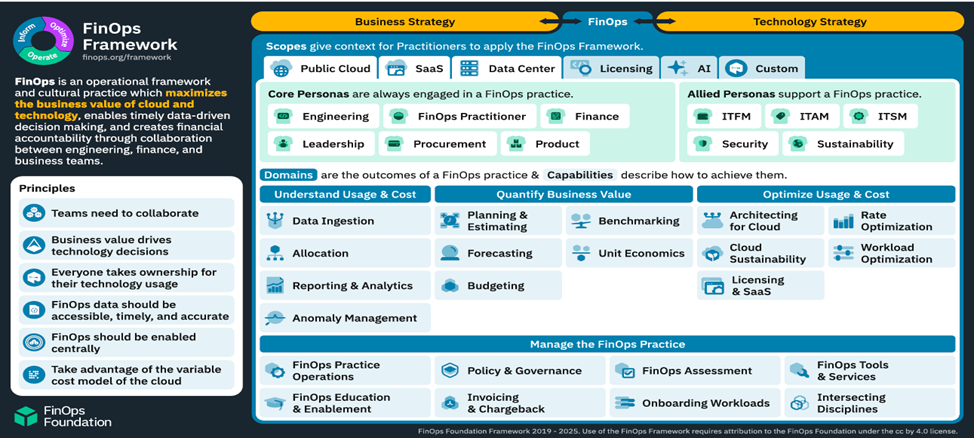

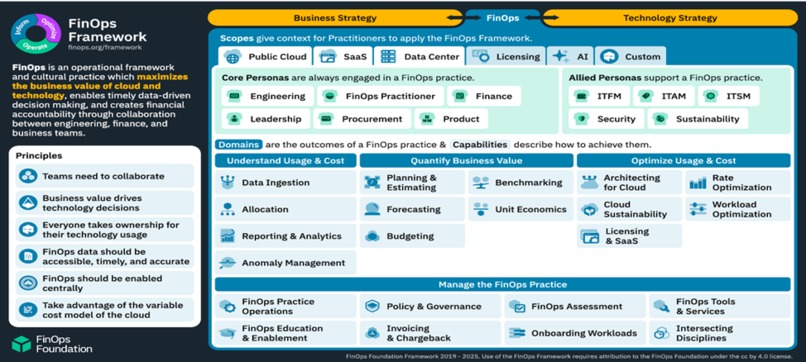
What it is? The FinOps Framework offers building blocks for a successful FinOps practice. It encompasses principles, personas, measures of success, maturity characteristics, and functional activities in a common language that reflect how successful practitioners drive value from cloud and intersecting technology spend.
How to use it? The Framework is flexible and non-prescriptive. With components that practitioners can select from, it enables organizations to start where the greatest need is, and evolve their FinOps practice in scale, scope, and maturity as business value warrants.
Where it comes from? The Framework has been iteratively developed from real-world practitioner experiences. Thousands of practitioners and other industry experts continuously collaborate to share learnings through open-source best practices.
Inspiration
The inspiration came from the need to optimize costs while maximizing value in the rapidly evolving technological landscape. With enterprises increasingly leveraging On-Demand technology, including public cloud services, Software as a Service (SaaS), various licensing models, and generative AI, it became crucial to develop strategies that balance cost efficiency and value maximization.
Contribution
Contributed using a strategic and holistic approach to optimize cost and maximize value. Key strategies included:
- Right-Sizing Instances: Regularly reviewing and adjusting instance sizes based on actual usage to avoid overprovisioning.
- Utilizing Reserved Instances: Committing to reserved instances for predictable workloads to benefit from significant discounts.
- Implementing Auto-Scaling: Using auto-scaling mechanisms to dynamically adjust resources based on demand.
- Leveraging Spot Instances: Utilizing spot instances for non-critical workloads to reduce costs.
- Monitoring and Optimization Tools: Employing cloud-native and third-party tools to monitor usage and identify cost-saving opportunities.
- User License Management: Regularly auditing user licenses to avoid payments for unused or underutilized subscriptions.
- Negotiating Contracts: Engaging with vendors to negotiate favorable terms.
- Consolidating Services: Identifying overlapping functionalities across different SaaS applications and consolidating them to reduce redundancy.
- Adopting Usage-Based Pricing: Opting for usage-based pricing models to align costs with actual consumption.
Challenges
Challenges included areas like those stated below for example:
- Balancing Cost Efficiency and Value Maximization: This required a continuous practice of maturing skills to adapt to the dynamic technological landscape.
- Ensuring Compliance: Conducting regular audits to ensure compliance and identifying opportunities to eliminate unnecessary licenses posed significant challenges.
- Resource Standardization: Enforcing minimum tagging requirements and instance type standardization across the account was challenging but necessary to ensure meaningful metadata attached to every instance.
- Deploying Ephemeral Environments: Automatically deploying ephemeral test environments when needed required careful planning and execution to ensure resource costs were reduced without compromising functionality.
- Right-Sizing Instances: Identifying EC2 instances that were incorrectly sized for the compute capacity and changing the instance type required continuous monitoring and adjustments.
- Optimizing Data Transfer Costs: Deploying a CloudFront distribution and an auto-scaling group to improve end-user network latency and optimize network and compute costs was a complex task.
- Managing Storage Costs: Leveraging Amazon S3's low-cost and durable storage while optimizing the storage supporting the document imaging system required a strategic approach.
- Scheduling Instances: Configuring custom start and stop schedules for Amazon EC2 and Amazon RDS instances using AWS Instance Scheduler to reduce operational costs was challenging but effective.
To overcome some of these and related challenges faced during the implementation of cost optimization strategies, several effective approaches were employed. Here are some of the key strategies used:
- Controlled Resource Consumption using Tagging Strategies, How?
Used AWS Config to enforce minimum tagging requirements and instance type standardization. By deploying this solution, ensured account-wide standardization of resources, as well as meaningful metadata attached to every instance. This strategy resulted in a 15% reduction in resource costs.
- Used Amazon EC2 Auto Scaling Groups to Deploy Ephemeral Environments, How did it help?
Reduced resource costs by deploying ephemeral test environments automatically when needed. This approach led to a 20% reduction in resource costs. Related Steps: - Created daily backups of the production environment using AWS Backup. - Used those daily backups to create a test environment that is launched and terminated as needed with an Amazon EC2 Auto Scaling Group. - Used an AWS Lambda function to update the Auto Scaling Group and scheduled the function to run daily to minimize drift between production and test environments.
- Right-Sized Amazon EC2 Instances using Amazon CloudWatch Metrics, How?
Identified EC2 instances that were incorrectly sized for the compute capacity by observing Amazon CloudWatch custom metrics. Resolved this by changing the instance type and configuring CloudWatch alarms to proactively monitor such recurrences in the future. This resulted in a 25% reduction in compute costs.
- Reduced Data Transfer Costs using CloudFront and VPC Endpoints, How?
Deployed a CloudFront distribution and an auto-scaling group to improve end-user network latency and optimize network and compute costs. This solution achieved a 30% reduction in data transfer costs.
- Reduced Storage Costs using S3 Lifecycle Management, How?
Optimized the storage supporting the document imaging system by leveraging the low-cost and durable storage offered by Amazon S3. Used Amazon S3 event notifications to trigger an AWS Lambda function to update the metadata index stored in an Amazon Aurora Serverless Database. This approach led to a 40% reduction in storage costs.
- Reduced Compute Costs using Instance Scheduler, How?
Deployed a cost optimization solution, AWS Instance Scheduler, to configure custom start and stop schedules for Amazon EC2 and Amazon RDS instances. This helped reduce operational costs by stopping resources that are not in use and starting them again when their capacity is needed. This solution resulted in a 35% reduction in compute costs.
These strategies collectively resulted in cost savings ranging from 15% to 40%, demonstrating the effectiveness of targeted optimization efforts in achieving financial efficiency and operational excellence.
Summary of Cost Savings
| Scenario | Cost Savings(%) |
|---|---|
| Controlled Resource Consumption using Tagging Strategies | 15% |
| Used Amazon EC2 Auto Scaling Groups to Deploy Ephemeral Environments | 20% |
| Right-Sized Amazon EC2 Instances using Amazon CloudWatch Metrics | 25% |
| Reduced Data Transfer Costs using CloudFront and VPC Endpoints | 30% |
| Reduced Storage Costs using S3 Lifecycle Management | 40% |
| Reduced Compute Costs using Instance Scheduler | 35% |
The implementation of these cost optimization solutions has had a significant impact on reducing operational expenses across various aspects of the infrastructure. By enforcing tagging strategies, deploying ephemeral environments, right-sizing instances, optimizing data transfer, managing storage lifecycle, and scheduling instances, the overall resource consumption and costs have been substantially reduced. These strategies collectively resulted in cost savings ranging from 15% to 40%, demonstrating the effectiveness of targeted optimization efforts in achieving financial efficiency and operational excellence.
Learnings
I learned the importance of continuous improvement and adaptation in the FinOps practice. The FinOps Framework, which offers building blocks for a successful FinOps practice, was instrumental in guiding ahead. It encompasses principles, personas, measures of success, maturity characteristics, and functional activities that reflect how successful practitioners drive value from cloud and intersecting technology spend.
The key metrics that were used to measure success centered around the FinOps Maturity Assessment, a comprehensive framework designed to evaluate and enhance the effectiveness of financial operations in cloud environments. It provides a structured approach to measure and improve various aspects of FinOps practices. Here are the key components of the FinOps Maturity Assessment:
Knowledge: This lens assesses the level of understanding and awareness of a specific capability within the target group. It ensures that team members are well-informed about FinOps principles and practices. Example: Used AWS Config to enforce minimum tagging requirements and instance type standardization. This ensured account-wide standardization of resources and meaningful metadata attached to every instance, resulting in a 15% reduction in resource costs.
Process: This lens evaluates the efficacy, validity, and prevalence of the set of actions and documentation related to cloud resource management. It focuses on the processes in place to manage and optimize cloud costs. Example: By deploying Amazon EC2 Auto Scaling Groups to create ephemeral test environments automatically when needed, reduced resource costs by 20%. This involved creating daily backups of the production environment, using those backups to create a test environment, and scheduling an AWS Lambda function to update the Auto Scaling Group daily.
Metrics: This lens determines whether a FinOps capability is measured, how measurements are obtained, and the relevance of those measurements in tracking progress and making informed decisions. It emphasizes the importance of having clear and actionable metrics to guide FinOps activities. Example: Identified EC2 instances that were incorrectly sized for the compute capacity by observing Amazon CloudWatch custom metrics and resolved this by changing the instance type and configuring CloudWatch alarms to proactively monitor such recurrences in the future, resulting in a 25% reduction in compute costs.
Adoption: This lens emphasizes four key areas to drive successful FinOps implementation: Communication, Community, Visibility, and Best Practices. It ensures that FinOps practices are widely adopted and integrated into the organization's culture. Example: Deploying a CloudFront distribution and an auto-scaling group improved end-user network latency and optimized network and compute costs. This achieved a 30% reduction in data transfer costs.
Automation: This lens focuses on the automation of cloud financial operations to streamline workflows, improve efficiency, and reduce manual effort. It highlights the importance of leveraging automation tools to enhance FinOps processes. Example: Deployed AWS Instance Scheduler to configure custom start and stop schedules for Amazon EC2 and Amazon RDS instances, reduced operational costs by stopping resources that were not in use and starting them again when needed. This resulted in a 35% reduction in compute costs.
Guidelines to Boost FinOps Maturity
To further enhance FinOps maturity recommendations are like those stated below for example:
- Establish Clear Financial Policies: Make sure you have clear and documented financial policies that govern spending, budgeting, and cost allocation.
- Implement a Cost Management Framework: Create a comprehensive framework for managing and optimizing costs.
- Foster a Culture of Financial Accountability: Encourage your teams to take ownership of their financial decisions by providing training and resources8.
- Leverage Automation for Efficiency: Automate repetitive financial processes to reduce errors and make things more efficient.
- Promote Cross-Functional Collaboration: Create a collaborative environment where finance, operations, and engineering teams work together towards common financial goals.
- Utilize Advanced Analytics for Insights: Use advanced analytics to gain deeper insights into your financial data and make data-driven decisions.
Conclusion
Optimizing costs while elevating the value of On-Demand technology across public cloud, SaaS, licensing, and generative AI necessitates a strategic and holistic approach. By implementing the strategies, enterprises can achieve a balance between cost efficiency and value maximization, ensuring to remain competitive and innovative in the rapidly evolving technological landscape.
In a nutshell ,
FinOps is evolving fast. It’s no longer just about cloud cost management. The scope has expanded to cover Technology broadly — including areas like AI spend, SaaS licensing, and enterprise subscriptions.
Why?
Because we’re all subscribing to more tools, more platforms, and more services than ever before. And without visibility, that spend adds up quietly. Even basic visibility and rationalization of:
- Redundant SaaS tools
- Unused licenses
- Overlapping AI subscriptions …can lead to savings of hundreds or even thousands of dollars every month.
FinOps today isn’t just about saving on infra — it’s about aligning tech spend with business value.
Appendix
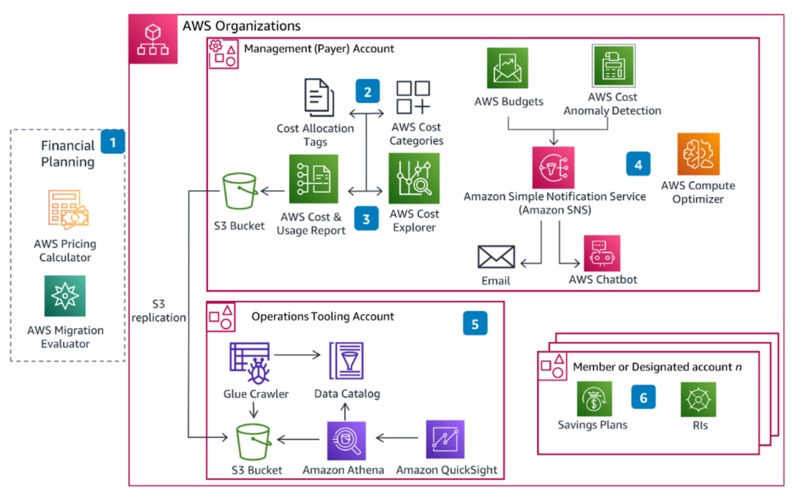
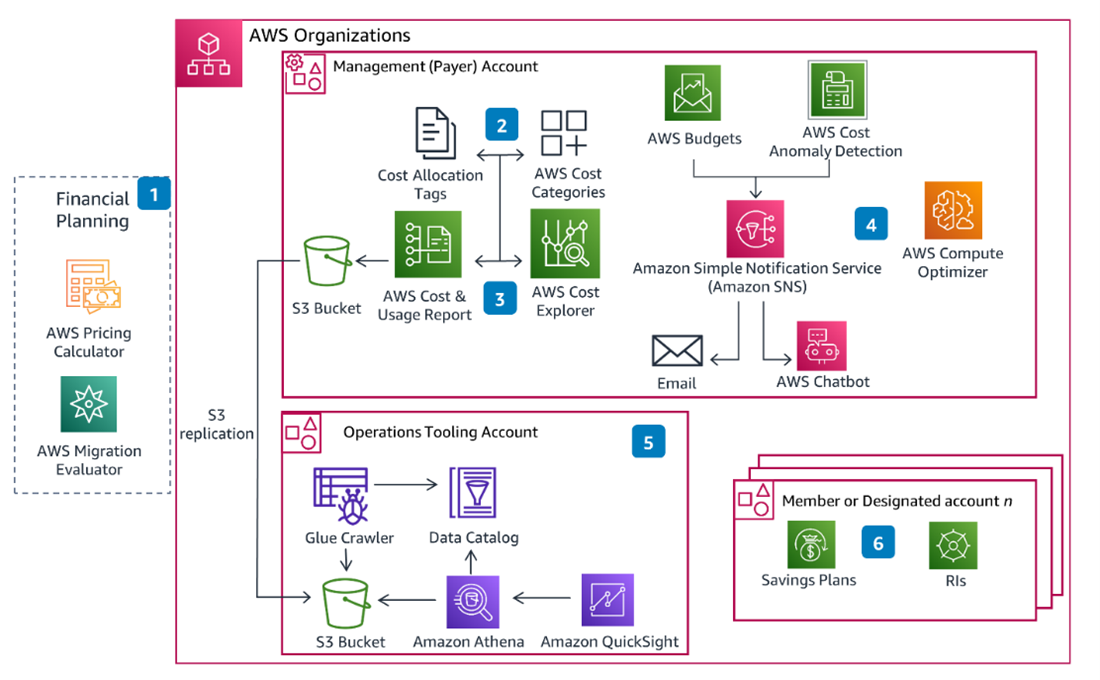
This Section details out a setup of a Cloud Financial Management (CFM) capability to manage and optimize expenses for cloud services. This capability includes near real-time visibility and cost and usage analysis to support decision-making for topics such as spend dashboards, optimization, spend limits, chargeback, and anomaly detection and response. This capability also includes budget and forecasting, giving a defined, cost-optimized architecture for workloads to select the right pricing model and attribute resource costs to relevant teams. This enables to track, notify, and apply cost optimization techniques across environments and resources. One can centrally manage expense information and give critical stakeholders access as needed for targeted visibility and to support decision-making.
Reference Architecture

Step 1: AWS Pricing Calculator helps estimate costs and model solutions before building them. For existing on-premises workloads, you can use AWS Migration Evaluator to receive a migration assessment, which includes projected cost estimates and savings.
Step 2: Cost Allocation Tags allow you to group costs by tag in AWS Cost Explorer and AWS Cost & Usage Report (AWS CUR). To group multiple tags or dimensions together, use AWS Cost Categories.
Step 3: By activating Cost Explorer and generating an AWS CUR, you can report on aggregate cloud cost and usage and then save the report to an Amazon Simple Storage Service (Amazon S3) bucket.
Step 4: Monitor cost and usage in your environment by creating alerts in AWS Budgets and AWS Cost Anomaly Detection. When actual, forecasted, or anomalous spend reaches a pre-defined threshold, you can get notified by email or chat channels like Slack or Amazon Chime through an AWS Chatbot integration. AWS Compute Optimizer provides recommendations to help you right-size your workloads.
Step 5: By integrating Amazon Athena with your AWS CUR, you can generate reports using SQL-like queries. You can visualize the data using Cloud Intelligence Dashboards, deployed through Amazon QuickSight.
Step 6: Purchasing commitments such as Savings Plans and Reserved Instances (RIs) for new and already deployed workloads can reduce costs up to 72%.
References
Built With
- amazon-web-services
- costoptimization
- finops

Log in or sign up for Devpost to join the conversation.