FinExtract: Your AI-Powered Bank Statement Analyzer 📖✨
Overview
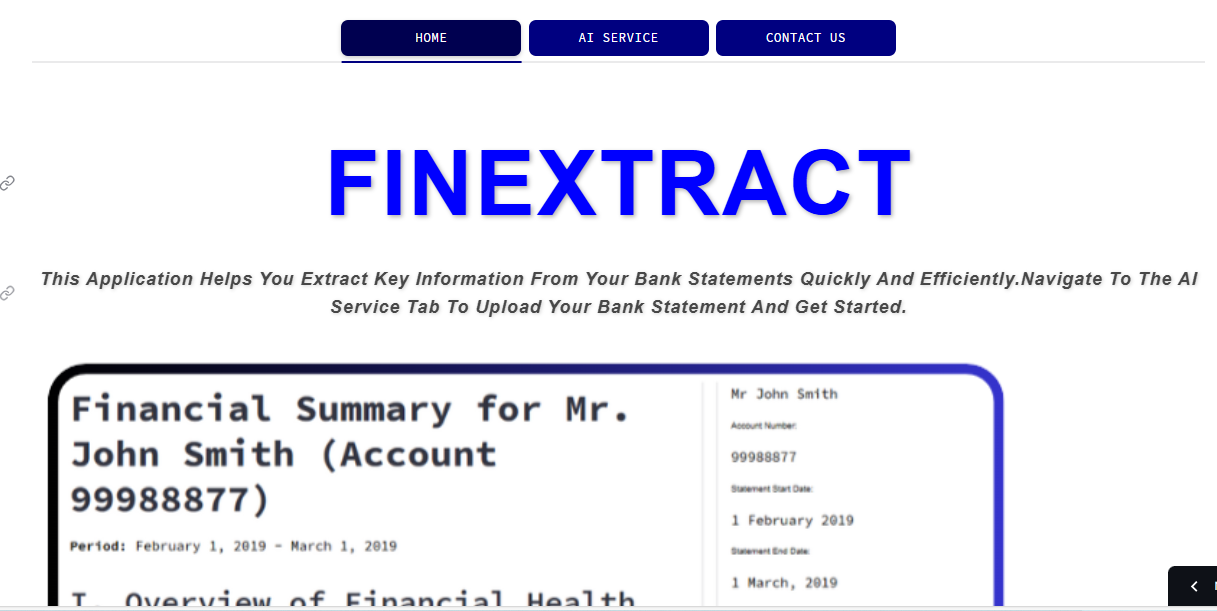
FinExtract is a Streamlit-based web application designed to simplify the process of extracting meaningful information from your bank statements. Leveraging the power of Google's Gemini AI model 🤖, FinExtract analyzes your bank statement PDFs to provide key insights, financial summaries, and interactive visualizations.
Inspiration 🤔
The inspiration for FinExtract came from the need to quickly and easily make sense of the often complex information presented in bank statements. Manually reviewing and extracting key financial data points from long bank statements can be time-consuming and error-prone 😫. FinExtract automates this process, providing users with a clear overview of their financial activities and trends using state-of-the-art AI 🚀.
Key Features 🌟
- Upload and process bank statement PDF files: 📁 Seamlessly upload your bank statements in PDF format.
- Gemini AI for analysis: 🧠 Utilize Google's Gemini AI model for intelligent analysis and interpretation of the bank statement content.
- Comprehensive data extraction: 📊 Extract key data points including:
- Bank Name, Customer Name, and Account Number.
- Statement Start Date, Statement End Date.
- Starting Balance, Total Money In, Total Money Out, Ending Balance.
- Detailed Transaction Information (Date, Description, Money In, Money Out, Balance).
- Financial summary generation: 🗜️ Get a detailed financial summary generated by Gemini, providing insights into financial health, income, spending, and recommendations in well-formatted bullet points.
- Graphical visualizations: 📈 View interactive charts, including:
- A line chart visualizing monthly spending and income trends.
- A pie chart breaking down spending by categories.
- User-friendly interface: 💻 The app's intuitive and styled design, made easy with Codebuff, simplifies interaction and access to your financial insights.
How to Use 🚀
- Upload your bank statement: 📁 Simply upload your bank statement in PDF format using the provided interface on the "AI Service" tab.
- AI Analysis and processing: 🤖 The app processes the PDF content using Gemini to extract relevant data, generate a financial summary, and create visualizations.
- Review Results: 📝 Once processing is complete:
- The extracted information will be displayed, including customer information, a table of transactions, and monthly spending charts.
- A detailed financial summary generated by Gemini will be available.
Technology Stack 🛠️
- Streamlit: A Python library for creating interactive web applications.
- Gemini API: Google's cutting-edge language model used for intelligent text analysis and financial summary generation.
- pdfplumber: A Python library used for reading PDF files and accurately extracting text content.
- Pandas: Python library used for data manipulation and processing.
- Plotly: Python library used for creating interactive visualizations.
- Codebuff: An AI tool used for helping in creating anything.
How I Built It 🏰
This project was built using Python 🐍, leveraging several key libraries:
- Data Extraction:
pdfplumberwas used to extract text from PDF bank statements. - AI Analysis: The extracted text was sent to the Gemini API, which was used for data parsing, financial analysis, and generating text summaries.
- Data Manipulation: The data from Gemini was cleaned and organized using
pandasDataFrames. - Visualization:
plotly.expresswas used to generate interactive charts. - User Interface:
Streamlitwas used for the user interface, allowing users to easily upload files and interact with their data, enhanced with styling made possible by Codebuff.
Challenges Faced 🚧
During the development of FinExtract, I encountered several challenges:
- Handling Varied PDF Formats: 📄 Bank statements come in various formats, making reliable data extraction difficult. I fine-tuned the Gemini API prompts to handle diverse layouts and text patterns.
- Gemini Response Handling: 🤖 Getting Gemini to consistently return a structured JSON response with the right data, in the correct format required experimentation with prompt engineering.
- Error Handling: 🐞 Implementing robust error handling to gracefully manage issues during PDF extraction, AI processing, and data parsing.
- UI Refinement: 🎨 Balancing UI complexity with user-friendliness was a continuous effort. I aimed for a clean and intuitive interface despite the complex processing occurring under the hood.
- Library Conflicts: 📒 When using multiple libraries, conflicts can arise, especially with machine learning libraries like
torch. Managing this was difficult, but now the requirements are resolved by managing thetorchversion.
Running FinExtract Locally 💻
- Clone the Repository:
bash git clone <your_repository_url> cd <your_repository_name> - Create a Virtual Environment:
bash python3 -m venv venv - Activate the Virtual Environment:
- On macOS/Linux:
bash source venv/bin/activate - On Windows:
bash
venv\Scripts\activate
- On macOS/Linux:
- Install Dependencies:
bash pip install -r requirements.txt - Set Gemini API Key:
- Create a file in your project directory
.streamlit/secrets.toml - Inside the file place your API key as follows:
API_KEY = "your_api_key"
- Create a file in your project directory
- Run the Streamlit App:
bash
streamlit run app.py
Now open your browser and go to the local URL provided by Streamlit and start analyzing your bank statements! 🎉
Future Improvements 🚀
- Support for other document types (e.g., CSV, Images).
- Machine learning model to categorize transaction categories automatically.
- More types of graphs and charts for financial analysis.
- Budgeting tool to compare spending with budget plans.
- Improved Error handling for more types of edge cases.
Contact 📧
For questions or inquiries, please contact us at:
- Email: [email protected]
- Website: finextract.streamlit.app

Log in or sign up for Devpost to join the conversation.