-
-
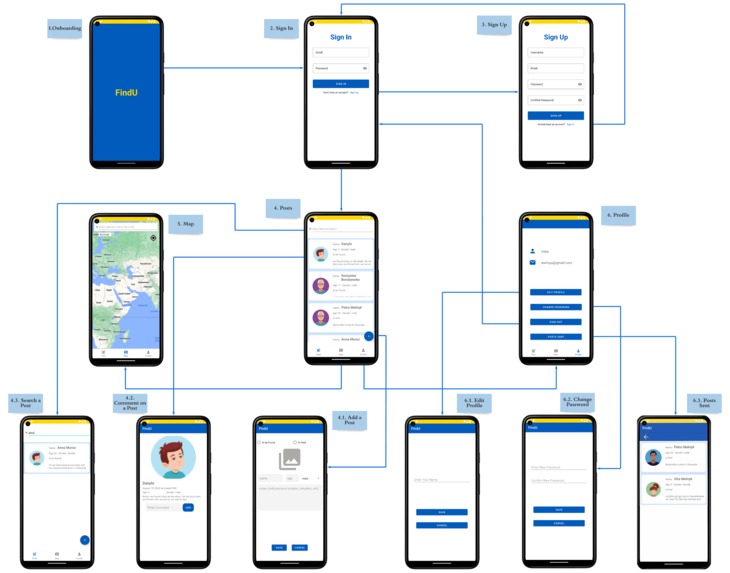
FindU_Wireframes
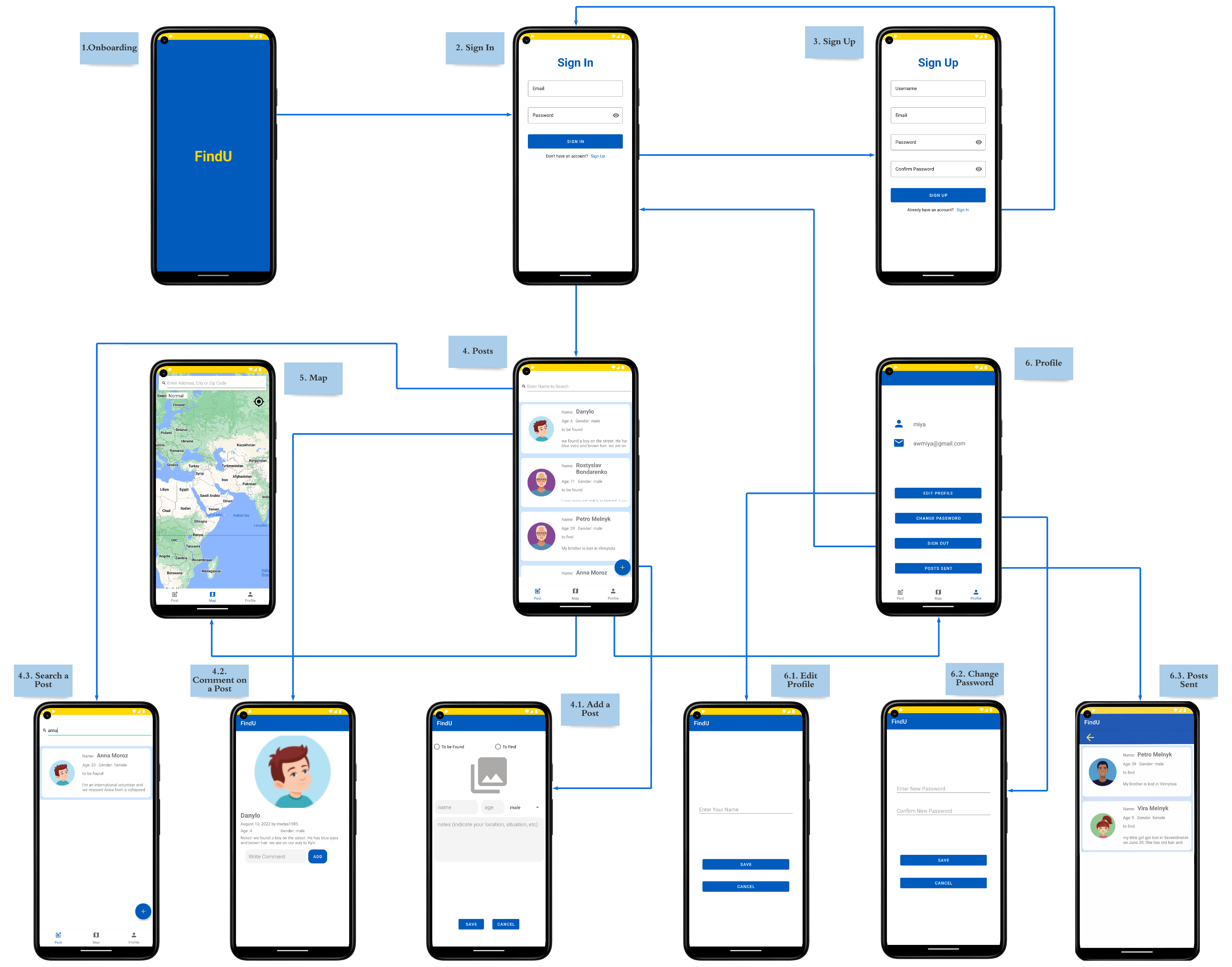
Inspiration
One of the team members, Joyce's grandmother who was born in 1939 during World War II and whose family had broken off contact for six years, her grandma kept emphasizing how difficult it was to contact and locate her family. We created this incredible communication mobile application because we could feel the pain. FindU creates a mobile-based community that stores user names, ages, genders, and images in the Google Cloud databases. Users simply need to put one word into the search bar to reestablish contact with friends and family.
Introduction
FindU, an Android communication application, promises to make it easier for Ukrainians to locate friends and family while the country is at war. The following features are available in FindU:
- Register & Sign In:
Join this mobile community by registering and signing in;
- Main Page:
Posting and commenting to exchange private information, upload images, and engage with other users, searching for people to make connections;
- Map:
Google Map is used to find users' most recent whereabouts;
- Profile Page:
Users' profile includes users’ posts & comments history, to sign out.
In addition to offering a GPS feature, FindU also lets users share their accurate positions in the community by using Google Maps to obtain their coordinates.
Application Guideline
- Step 1: Register/Sign In
When users use this mobile application, they send Firebase Authentication a registration request along with their username, email address, and a password that is longer than six characters. Firebase authentication will keep track of each user's profile details and create a special user ID for each of them.
- Step 2: Main Page & Search Posts
The user signs in to his/her account successfully to access the main page of this mobile application. Firebase will generate authentication for the current users for a specific time. The android application server performs the requested task – such as querying the database or processing the data – then generates the results of the requested data from the Google Cloud Platform. The Google Cloud PlatForm sends the results back to the main page of FindU. All community posts, including images, ages, genders, and to find/to be found, are displayed on the main page. Users can utilize the search box at the top of the home page to look for posts in the database that are linked to the names they enter.
- Step 3: Add Posts
On the home page, users could access adding post activity by clicking the "+" button. Users will be asked to grant FindU access to their local gallery to add their local photographs to the database. With the completion of personal information and a selected image, users could click the “SAVE” button, FindU will first upload the image to Firebase Storage and generate an image URL, then it sends all post inputs to the Firestore Database. If not, they can click "Cancel" to end the current action and go back to the home page.
- Step 4: Single Post & Comments
By clicking the specific single posts on the main page, the user could access the single posts view and view community comments by selecting a specific single post from the main page. Users only need to add their comments using the "Add Post" button if they want to get in touch with the post's author. The new comment on this single post page is automatically updated after FindU delivers its contribution to the database. Additionally, users might reload this page to get the most recent comments.
- Steps 5: Map
The users will be asked to permit to share their precise location. Users can share their positions either in a new post or in the comments area after Google Map returns specific locations for them. More crucially, users can search the location by entering the address, city, and zip code if they discover their family's shared specific positions in the neighborhood.
- Step 6: Personal Profile
The username, email, and post-history are all displayed on the individual profile page. When a user accesses this page, a request is sent over the Internet to the server. The Google Cloud Platform receives the request from the web server and transmits it to the web application server. By searching the user id, the FindU server executes the requested task and then generates the results of the required data. The results are returned to the web server by the app server. The required information is sent to the client via Firestore and shown on the user's screen. Finally, to return to the sign-in screen, the user might sign out of his or her account.
Development Path
- Step 1: Planning & Prepare
With the basic idea of developing an Android application to help Ukrainians find their families and friends, we had multiple group meetings to turn it into an actual project. First of all, we identified four features of the application, including registering and signing in, adding, searching, and commenting on posts, locating current positions through the map, and editing users’ profiles. After deciding to use Android Studio as the developing platform and Firebase as the database, we took some time to be familiar with the stacks and skills needed for the development process. At the same time, we selected FindU as the name of our app, indicating the app aims to help Ukrainians to find the target person. We also opened a GitHub repository and other sharing documents to make teamwork smoother.
- Step 2: UI/UX Design
According to the features of our app, we at least need the Register page, Sign in page, Post page, Map page, and Profile page. The first step of the design of each page is to determine the data our app will display to users and the data it will collect. Then we started app design with sketches on paper to show conceptual layouts. In this process, we inevitably found that we need extra pages such as the Edit Profile page and Change Password page. Finally, all the pages evolved into wireframes. We also polished wireframes repeatedly to create better user experiences and make them more user-friendly.
- Step 3: App Development
Back-End: FindU uses Firebase as the database. For different kinds of data, FindU will store them in different databases. By registering with email and password, users’ identities will be stored through Firebase Authentication. Meanwhile, the Firestore database takes the responsibility to store post information and Storage undertakes the task of storing images in posts.
API: To communicate between the app and back-end database, we defined necessary application programming interfaces in activities. Front-End: On the basis of UI/UX design, we turned conceptual layouts on paper into reality. We also unified some values such as colors to make the style of our app more consistent.
- Step 4: Testing
We first confirmed that the final implementation matches the user experience as created by us. Then we tested the functionality by registering, signing in, adding posts, searching posts, commenting on posts, and so on. To make sure we have covered as many potential conditions as possible, we not only tested it by ourselves but also invited friends to use it.
Difficulties & Challenges
- Design:
The greatest challenge during the design was to determine what data need to be collected and displayed in a single post. Undoubtedly, name, age, and gender are essential data. But what about other data such as location? If we upload automatic navigation information, then we assume the sender and the person listed on the post stay together. However, it’s not always the case. The sender should initiatively write the location which we think can be integrated into the note of a post.
- Workflow Management:
We had regular group meetings to update everyone’s progress tackle problems intersected with other team members and arrange new tasks to ensure we can complete the project on time. We tried to allocate the implementation of different features to different members to reduce conflicts during development. But adding, searching, and commenting on posts, a much more complicated feature, needed to be allocated to two or more people, which required more communication between collaborators to exchange ideas, discuss the existing issues and figure out a way to solve them. This was definitely a challenge for teamwork.
- Engineering Issue:
As mentioned above, we use email and password to register through Firebase Authentication. What we expected was that firebase will store the user’s name and email at the same time. As long as a user registers successfully, the profile page will display the name that the user typed on the register page. However, Firebase Authentication just keeps emails in memory and throws away names, which leads to the profile page cannot show the user’s name unless the user edits the profile. Finally, we figured out a way to solve this awkward issue. We defined a User class to keep the user name and user id and stored them in the Firestore database. Then we retrieved the data and displayed it on the profile page. Now you can see your name no matter if you sign in to FindU for the first time or not.
Another engineering issue was about the searching function, our team had different opinions on how to achieve the searching function. One of us wanted to use the search box component from the Android studio because Android studios & Firebase offer ready-to-use codes to search. However, UI was already completed by another team member, if we change the component, the whole layout of the main page would be changed. To solve this problem, we kept the original layout and gave up the ready-to-use component from the Firestore, and developed the back-end part to achieve the search function step by step.
Go-to-Market
FindU takes advantage of the Google Cloud Platform, which offers speed, scale, and secure cloud databases. Since the Google Cloud Platform will keep all user authentications, post contents, comments, and personal profiles, Ukrainians with Android smartphones can access this app from anywhere in the world.
No matter how many people are trying to access the app at once, FindU guarantees a super-fast load speed, high availability 24/7, and minimal disruptions to the user experience by employing the Google Cloud service. It can handle the increase in users and workload, which is a more scalable app offering a better user experience.


Log in or sign up for Devpost to join the conversation.