-
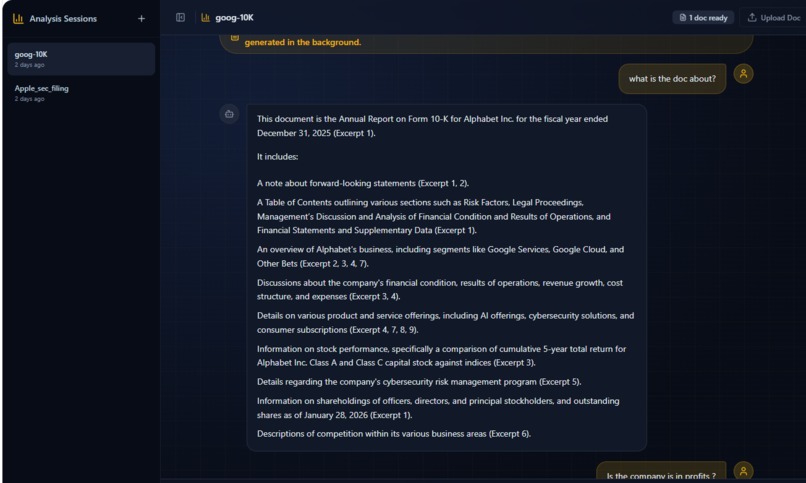
Sample1
-
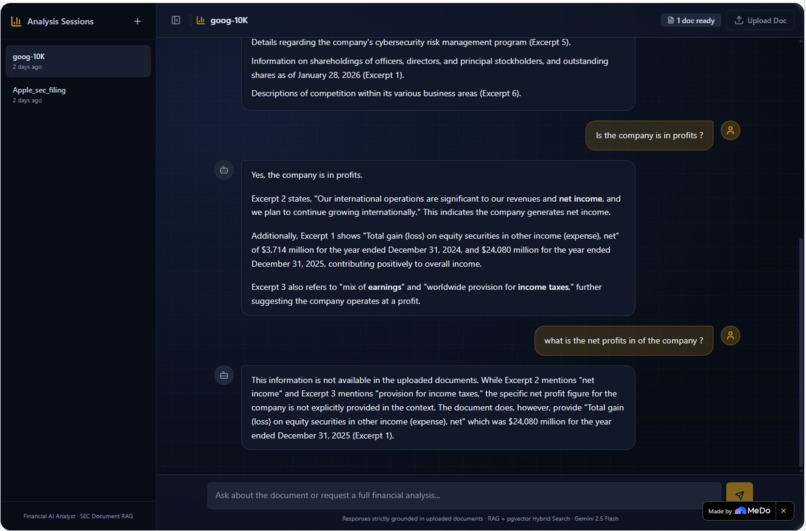
Sample2
\documentclass[11pt,a4paper]{article} \usepackage[utf8]{inputenc} \usepackage[T1]{fontenc} \usepackage{geometry} \usepackage{hyperref} \usepackage{xcolor} \usepackage{enumitem} \usepackage{titlesec} \usepackage{fontawesome5}
\geometry{margin=2.5cm}
\definecolor{primary}{RGB}{37,99,235} \definecolor{accent}{RGB}{16,185,129} \definecolor{muted}{RGB}{107,114,128}
\titleformat{\section}{\Large\bfseries\color{primary}}{}{0em}{} \titleformat{\subsection}{\large\bfseries\color{primary!80}}{}{0em}{}
\hypersetup{ colorlinks=true, linkcolor=primary, urlcolor=primary, pdftitle={Financial Document Analysis Chatbot}, pdfauthor={Built with MeDo} }
\begin{document}
\begin{center} {\Huge\bfseries\color{primary} Financial Document Analysis Chatbot}\[0.5em] {\large\color{muted} Built End-to-End with MeDo}\[1.5em] \end{center}
\section{What Problem This App Solves}
Financial analysts, investors, and researchers spend hours poring through hundreds of pages of SEC filings (10-K, 10-Q reports) to extract key insights about a company's financial health, risks, and growth prospects. These documents are dense, complex, and time-consuming to read.
\textbf{This app solves that problem by letting you upload any 10-K or 10-Q filing and ask natural-language questions about it.} You can literally drag and drop Apple's latest SEC filing, then ask \textit{What were the key revenue drivers this quarter?''} or \textit{What risks does Apple face in the AI market?''} --- and get an AI-generated, cited answer grounded directly in the document text.
\section{How I Structured the Conversation with MeDo}
I did not build this in one go. MeDo's ability to iterate quickly and apply changes across the full stack made it possible to go from idea to production-ready app in stages:
\subsection{1. Initial Architecture Planning}
I described the core problem (analyzing financial documents with AI) and MeDo immediately scaffolded the entire full-stack architecture: React + Vite + TypeScript + Tailwind + shadcn/ui on the frontend, Supabase with \texttt{pgvector} for the database, and Edge Functions for document processing and RAG querying.
\subsection{2. PDF Text Extraction Pipeline}
MeDo built a multi-strategy PDF text extractor tuned for SEC filings. Apple's 10-K filings are compressed FlateDecode PDFs, so a simple regex will not work. MeDo implemented a cascading 4-strategy approach:
\begin{enumerate}[label=\textbf{Strategy \arabic*:}] \item \textbf{Zlib decompression} of FlateDecode content streams using the Web \texttt{DecompressionStream} API \item \textbf{BT/ET block scanning} to extract text operators (Tj, TJ) from PDF content streams \item \textbf{Parenthesis extraction} for simple PDF forms with embedded text strings \item \textbf{Printable ASCII fallback} for edge cases where standard extraction fails \end{enumerate}
This reliably extracts hundreds of text sections even from the largest filings.
\subsection{3. Chunking and pgvector Storage}
MeDo designed a sliding-window text chunker (800 characters, 100 overlap) and wired it into Supabase \texttt{pgvector} with IVFFlat indexes for fast cosine similarity search. No external Pinecone or Weaviate accounts needed --- everything stays in Supabase.
\subsection{4. Hybrid RAG Search}
This is where the real intelligence lives. MeDo built a \texttt{hybrid_search} PostgreSQL function that combines:
\begin{itemize} \item \textbf{Dense vector similarity} (cosine distance over \texttt{pgvector}) \item \textbf{Full-text search} (PostgreSQL \texttt{tsvector/tsquery}) \item \textbf{Reciprocal Rank Fusion (RRF)} to intelligently merge both result sets \end{itemize}
The result: if you ask \textit{``What was the revenue breakdown?''}, the app finds the most relevant paragraphs through both semantic meaning \textit{and} keyword matching, then surfaces the best excerpts to the LLM.
\subsection{5. Embedding Resilience}
When the Gemini embedding API (\texttt{text-embedding-004}) became temporarily unavailable, MeDo did not just report an error. It built a \textbf{model fallback chain}:
\begin{center} \texttt{text-embedding-005} $\rightarrow$ \texttt{text-embedding-004} $\rightarrow$ \texttt{embedding-001} \end{center}
With \textbf{exponential backoff} and \textbf{graceful degradation}. If embeddings fail entirely, the app falls back to full-text search --- so the user never gets stuck.
\subsection{6. Two-Stage Upload Pipeline}
Large SEC filings (hundreds of pages) would timeout if embedding everything in one HTTP request. MeDo solved this architecturally by splitting upload into two stages:
\begin{enumerate}
\item \textbf{Stage 1} --- Extract + Chunk + Insert'': Returns in under 10 seconds. All text chunks are inserted into the database with NULL embeddings.
\item \textbf{Stage 2} ---Generate Embeddings'': Runs in the background. Embeds 5 chunks concurrently via \texttt{Promise.allSettled}, polled every 4 seconds by the frontend.
\end{enumerate}
Users can start asking questions immediately via full-text search, while semantic search vectors populate progressively.
\subsection{7. Multi-Skill AI Ecosystem}
Beyond document Q&A, MeDo integrated a rich set of skills and APIs:
\begin{itemize} \item \textbf{Gemini 2.5 Flash} for streaming chat responses with strict grounding \item \textbf{Global Stock Price Data} for real-time market context \item \textbf{AI Search} for web-aware grounding when the user asks about current events \item \textbf{Weather Inquiry, Exchange Rate, The News} for cross-domain intelligence \item \textbf{Google Scholar} for academic research citations \item \textbf{OCR} for extracting text from scanned or image-based documents \item \textbf{Text-to-Speech and Speech-to-Text} for voice interaction \item \textbf{Image Generation} for visual content creation \end{itemize}
\section{The Most Impressive Feature}
The \textbf{Two-Stage Background Embedding Pipeline with Real-Time Poll Progress} stands out.
Most RAG apps either: \begin{itemize} \item Take forever to process large documents (users stare at a spinner and get a 504 timeout), \textbf{or} \item Claim ``processing...'' and block all interaction. \end{itemize}
This app does neither. Here is what happens when you drop Apple's 200-page 10-K:
\begin{enumerate}
\item \textbf{T+0 seconds}: The document is chunked and indexed into PostgreSQL. You get a toast: \textit{Apple\_sec\_filing.pdf indexed --- 412 sections ready. AI embeddings generating in background.''}
\item \textbf{T+5 seconds}: You can already ask questions. The hybrid search uses full-text search to find relevant sections.
\item \textbf{T+30--90 seconds}: The progress bar silently fills up: \textit{387 / 412 sections embedded''}. Concurrent batching (5 at a time) with model fallback chains ensures every section gets a vector.
\item \textbf{T+90 seconds}: The document is fully vectorised. Now semantic similarity kicks in, making questions like \textit{``Explain Apple's strategy in Asia''} magically find the right paragraphs even when the exact words do not appear.
\end{enumerate}
This architecture makes the app feel instant while remaining accurate --- a hard balance to strike, and MeDo designed the entire state machine, polling loop, and Edge Function orchestration.
\section{How I Used Plugins and API Integrations}
\begin{itemize} \item \textbf{Supabase Auth + pgvector}: Zero-config authentication and vector storage. No Pinecone, no Weaviate, no external vector DB API keys. Everything lives in one Postgres database with IVFFlat and GIN indexes.
\item \textbf{Gemini 2.5 Flash via Platform Gateway}: All LLM inference and embedding calls route through the platform-managed API gateway --- no manual API key management, no rate limit surprises. The gateway handles load balancing and model fallback automatically.
\item \textbf{Hybrid Search RPC Function}: A custom PostgreSQL function (\texttt{hybrid_search}) deployed via migration, combining dense + sparse search with RRF ranking --- all server-side, all in SQL.
\item \textbf{Real-time SSE Streaming}: The chat UI streams token-by-token from Gemini via Server-Sent Events, making the experience feel like ChatGPT-native. \end{itemize}
\vspace{1em} \begin{center} \rule{0.5\textwidth}{0.4pt}\[0.5em] {\large\itshape Built end-to-end in MeDo.}\[0.3em] {\small\color{muted} No local IDE setup. No dependency hell. No ``it works on my machine.''\ Every change --- from the PDF parser to the CSS animation --- was tested, deployed, and linted in real time.} \end{center}
\end{document}
Built With
- gemini2.5flask
- langcha
- python

Log in or sign up for Devpost to join the conversation.