PocketPilot
PocketPilot is an intelligent financial and decision-making assistant built with Next.js and the AI SDK. It helps users manage their finances, make informed spending decisions, and provides conversational AI capabilities tailored for personal finance.
Project Story
Inspiration
The complexity of modern personal finance inspired the creation of PocketPilot. Managing budgets, deciding if a purchase is "safe to spend," and navigating financial decisions often require complex mental math and spreadsheet tracking. We wanted to build an AI-powered co-pilot that simplifies this process using natural language interactions. The goal was to bridge the gap between raw financial data and actionable, intelligent advice.
What it does
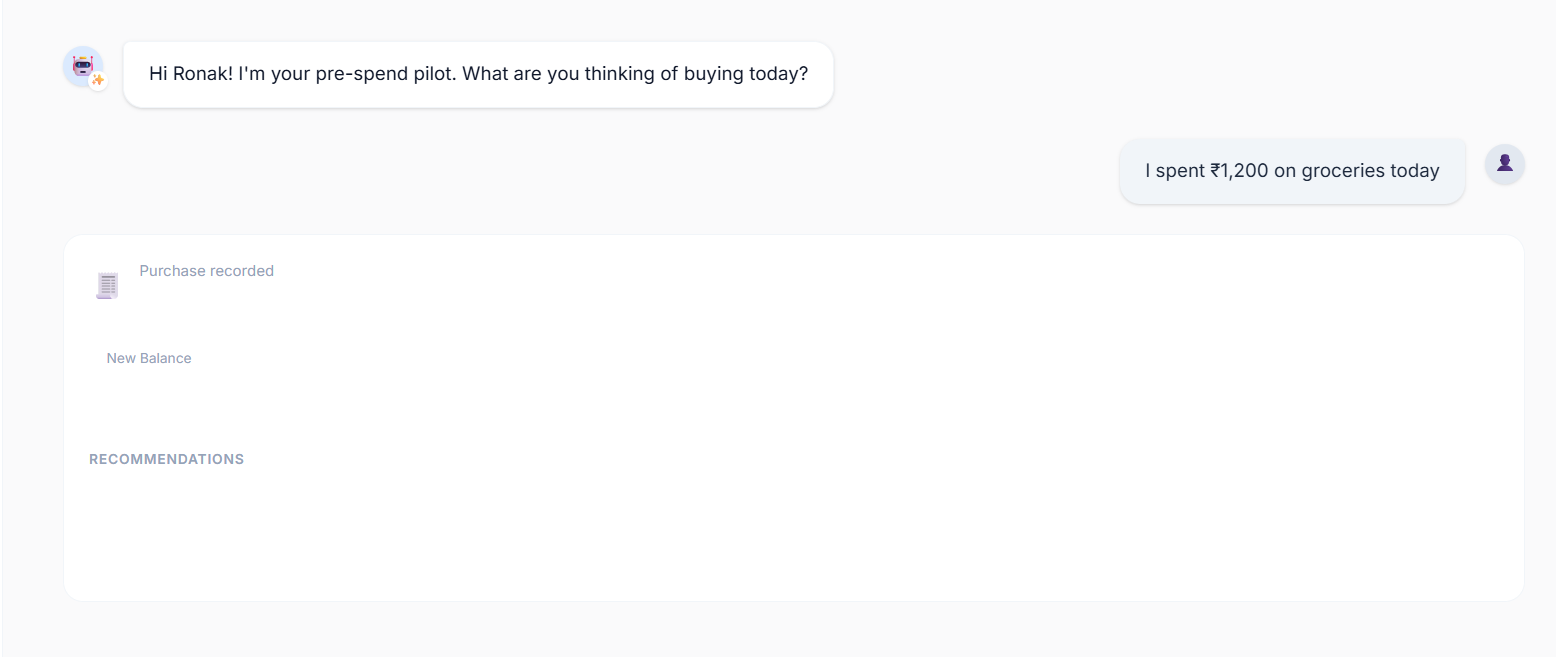
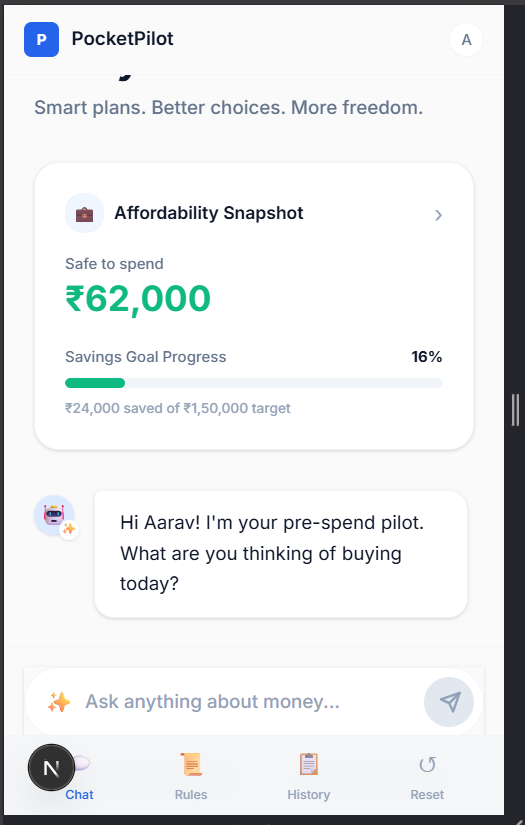
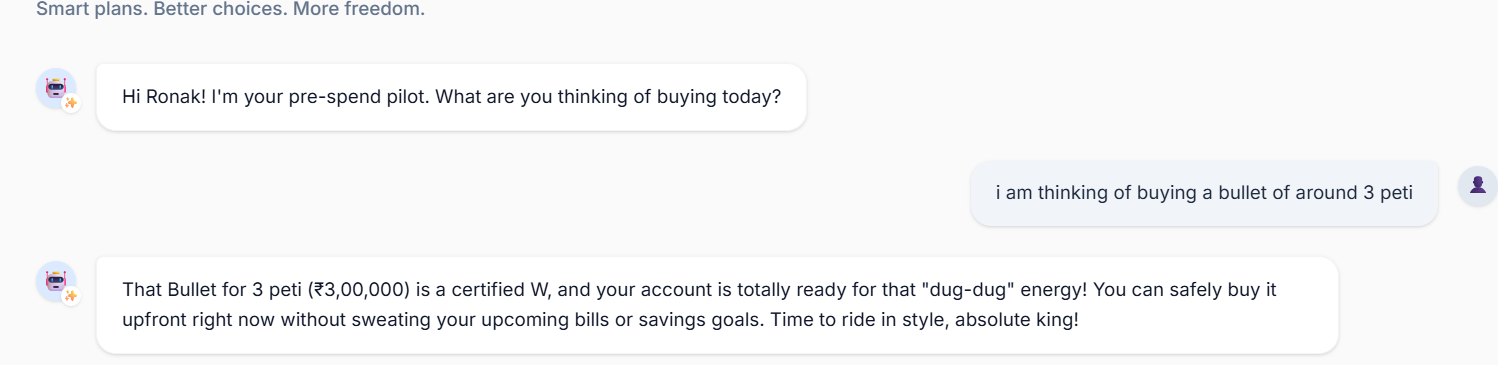
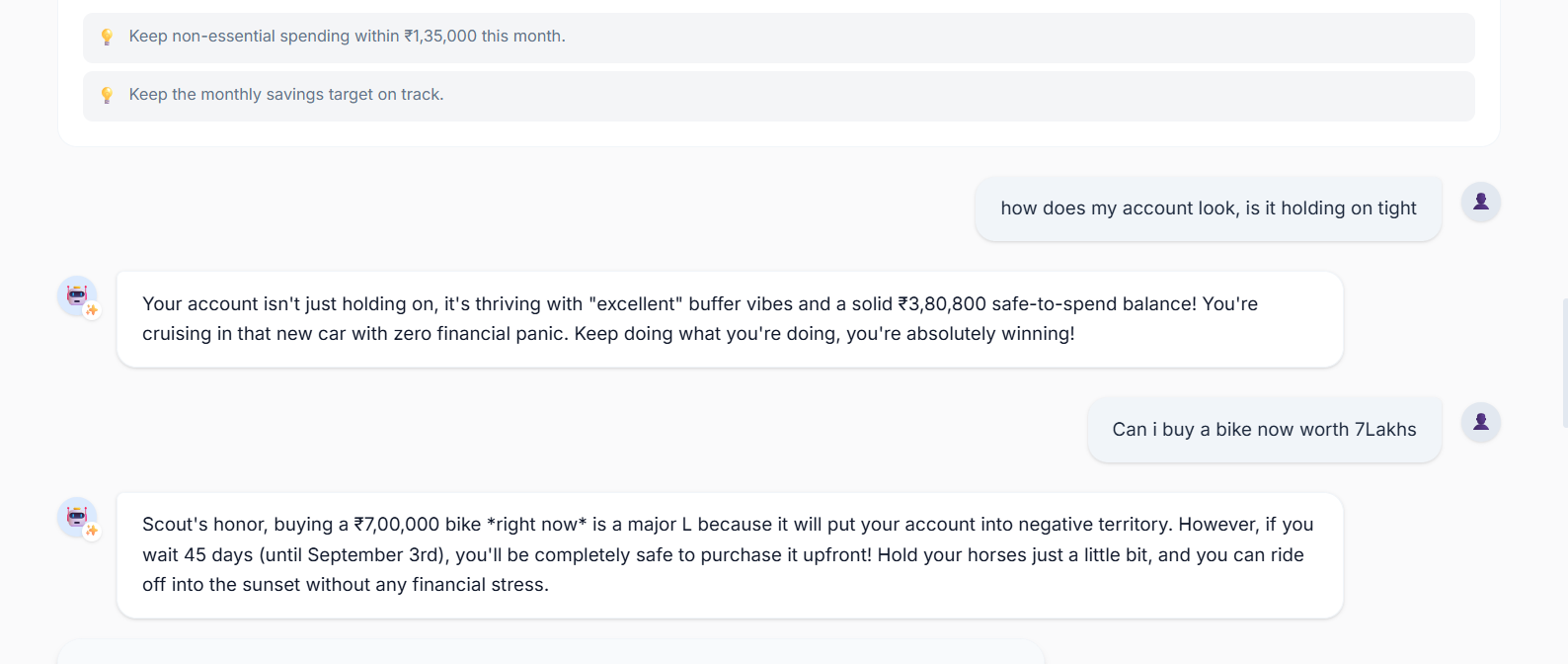
PocketPilot serves as a conversational financial assistant. It evaluates spending decisions using a math-driven approach to calculate whether a purchase is "safe to spend" given a user's budget constraints, and it provides general financial guidance using advanced AI models.
How we built it
The application is built on a modern web stack:
- Frontend & Framework: We used Next.js 16 with React 19 for a robust, server-rendered application.
- Styling: Tailwind CSS v4 for utility-first, responsive design.
- AI Integration: We leveraged the Vercel AI SDK (
@ai-sdk/react,@ai-sdk/google,@ai-sdk/openai) to power the conversational interface and decision-making endpoints. - Testing: We implemented comprehensive testing using Vitest for unit tests and Playwright for end-to-end testing to ensure reliability.
Challenges we ran into
One of the main challenges was accurately modeling the financial decision-making process. We had to ensure the AI's responses were not just conversational but mathematically sound. We utilized complex formulas to determine budget viability. For instance, calculating the projected impact of a recurring expense over time required strict mathematical formulations, such as computing the future value of savings: $$ FV = P \times \left(1 + \frac{r}{n}\right)^{nt} $$ Integrating the AI SDK to stream responses while simultaneously handling structured data for the "safe to spend" logic was also a significant technical hurdle.
What we learned
Building PocketPilot deepened our understanding of integrating Large Language Models (LLMs) into specialized domains like finance. We learned how to effectively prompt models to act as financial advisors and how to seamlessly blend deterministic mathematical functions with generative AI. We also gained valuable experience with the latest features in Next.js and React 19.
Built with
next.js, react, typescript, tailwind-css, vercel-ai-sdk, openai, google-gemini, playwright, vitest, zod
Getting Started
To run the PocketPilot application locally, follow these steps:
Install dependencies: Ensure you have Node.js installed. Then, run:
npm installEnvironment Variables: You will need to set up the necessary API keys for the AI providers (OpenAI, Google) in a
.env.localfile at the root of the project.Run the development server: Start the local development server by running:
npm run devAccess the application: Open http://localhost:3000 in your browser to interact with PocketPilot.
Scripts
npm run dev: Starts the development server.npm run build: Builds the app for production.npm run start: Runs the built production app.npm run lint: Runs ESLint to check for code issues.npm run typecheck: Runs TypeScript compiler checks.npm run test: Runs unit tests using Vitest.npm run test:e2e: Runs end-to-end tests using Playwright. # 🛩️ PocketPilot — Think Before You Pay > *Your AI-powered pre-spend co-pilot. * PocketPilot warns you before a payment — not just analyses it afterward.





💡 Inspiration
PocketPilot started with a problem the three of us faced ourselves: we tracked our expenses, but still struggled to control our spending. Most finance apps tell us where our money went only after it is gone. We check the charts, regret a few purchases, and repeat the same habits next month. So we asked:
What if a financial app could warn us **before* a payment — not just analyse it afterward?* That idea became PocketPilot: a personal financial buddy that understands your income, bills, EMIs, savings goals, and spending habits — and speaks up before you tap "Pay."
✨ What It Does
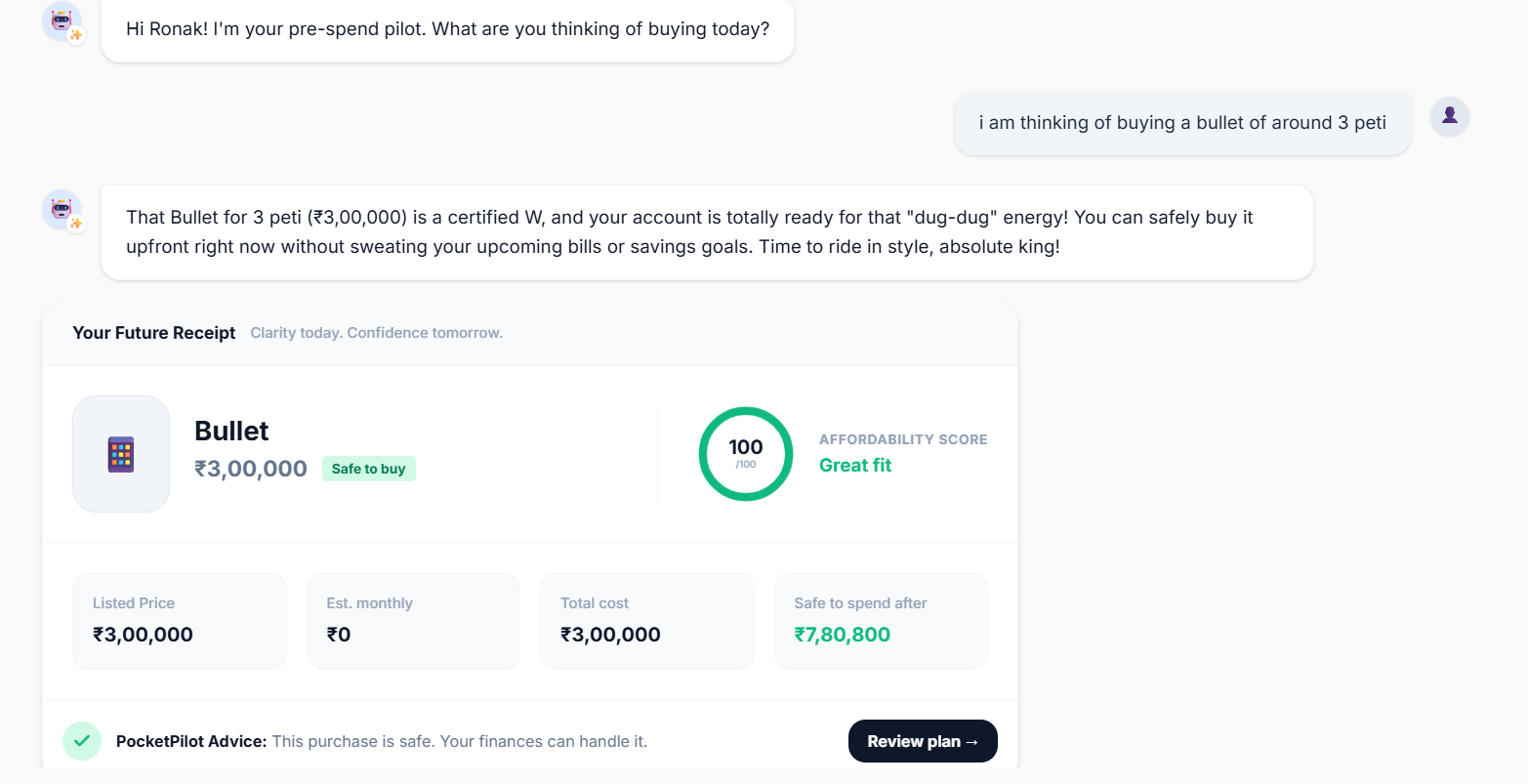
Before making a purchase, users can ask in plain language:
| Question | What PocketPilot Does |
|---|---|
| "Can I afford this phone?" | Runs a 90-day cash-flow simulation |
| "What happens if I use EMI?" | Models each repayment against your salary cycle |
| "Will this delay my savings goal?" | Calculates the exact goal delay in days |
| "Would waiting 45 days be safer?" | Compares buy-now vs. wait scenarios side-by-side |
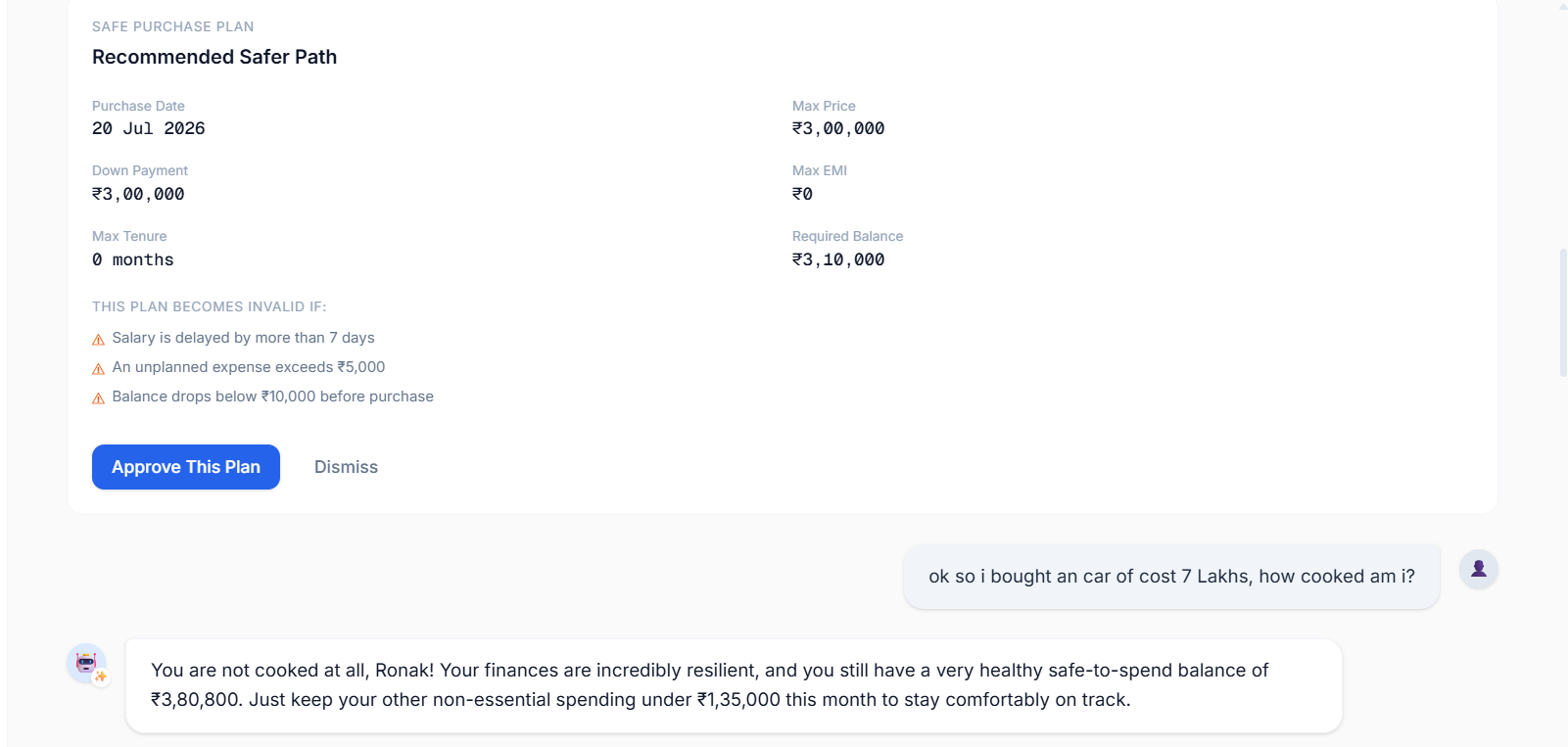
PocketPilot calculates the future impact and compares options such as buying now, waiting, or choosing a cheaper alternative — then recommends the safest route.
📐 The Core Formula
At the heart of every decision is one honest number: $$ \text{Safe-to-Spend} = \text{Current Balance} - \text{Upcoming Commitments} - \text{Protected Savings} - \text{Safety Buffer} $$
🛡️ Money Constitution
Users can create a personal Money Constitution — a set of rules that automatically protect:
- 🏦 Minimum account balance (floor)
- 📅 Rent and recurring bill reserves
- 🎯 Monthly savings targets
- 📊 EMI-to-income ratio limits
- 🚨 Emergency fund milestones Every purchase is checked against these rules before a recommendation is made.
🏗️ How We Built It
We built PocketPilot using Next.js, React, and TypeScript, with conversational AI powered through the Vercel AI SDK.
Architecture
User Question
     │
     ▼
  AI Layer (Gemini / GPT)          ← Understands intent, explains results naturally
     │
     ▼
  Finance Engine (Deterministic)   ← Handles all the real math
     │
     ├── Daily cash-flow ledger
     ├── Safe-to-spend calculation
     ├── EMI & total repayment cost
     ├── Minimum projected balance
     ├── Savings-goal delay (days)
     └── Money Constitution rule checks
AI handles the conversation. Our finance engine handles the money. We deliberately kept financial mathematics outside the AI — using a deterministic engine that produces repeatable, auditable results. The AI's role is to translate the user's question into structured parameters and explain the engine's output in a natural, personalized way. We also built personalized memory and emergency detection. PocketPilot can normally be friendly and even humorous, but automatically switches to a calm, responsible tone when it detects a serious financial or personal crisis in the user's message.
🤖 Built With AI — How Codex Helped Us
PocketPilot was built with AI as much as it was built for it. OpenAI Codex (via GitHub Copilot) was an active collaborator throughout the project — not just an autocomplete tool. Here's specifically how Codex accelerated our build:
🔢 Finance Engine Scaffolding
The deterministic cash-flow engine — with daily ledger entries, paise-integer arithmetic, and salary-cycle-aware projections — was one of our most complex pieces. Codex generated the initial scaffolding from our type definitions alone, then helped us debug edge cases like month-end rollovers, EMI rounding drift, and overlapping commitment dates.
🧱 Type-Safe Contracts
We described our data model in plain English and Codex produced fully typed TypeScript interfaces (FinancialProfile, FutureReceipt, ScenarioComparison, ActionPlan, etc.) that became the shared contract between the AI layer and the finance engine.
⚡ Vercel AI SDK Tool Definitions
Wiring the AI to call our finance engine via structured tool calls was non-trivial. Codex helped us write the calculatePurchase and recordPurchase tool schemas, handle streaming partial results, and display them progressively in the chat UI.
🧪 Test Generation
Our Vitest unit tests and Playwright end-to-end tests were largely co-written with Codex. We described the scenario in a comment, and Codex generated the test body — including tricky edge cases we hadn't thought of ourselves, like zero-balance starting states and salary-day boundary conditions.
🎨 UI Components
Repetitive but design-sensitive components — FutureReceiptCard, ScenarioComparison, SafePurchasePlan, ConstitutionPanel — were drafted by Codex from our design tokens and then refined by hand. This let us ship a polished, consistent UI far faster than building from scratch.
In short: Codex handled the boilerplate and scaffolding. We handled the judgment calls — especially around financial accuracy, AI persona design, and edge-case handling.
⚡ Challenges & Learnings
1. Making the Math Reliable
Our biggest challenge was making calculations repeatable and trustworthy. EMI rounding, recurring bills, salary dates, and month-end schedules can easily create small but critical errors. How we solved it:
- Stored all money as integer paise (no floating-point)
- Used explicit ISO dates for every ledger entry
- Tested calculations with deterministic, repeatable scenario fixtures ### 2. Preventing AI Hallucination in Finance The AI must never guess missing financial information. A silently assumed ₹0 rent could make an unaffordable purchase appear safe. How we solved it: PocketPilot always asks the user for missing details before running calculations — never fills in defaults silently. ### 3. Balancing Personality with Responsibility Humour can make personal finance less intimidating, but it is completely inappropriate during a financial emergency. How we solved it: An emergency-detection layer monitors every message. When a serious situation is detected, PocketPilot's tone automatically shifts — regardless of the active persona mode. ### 4. The Real Insight We started thinking personal finance is a tracking problem. We finished knowing it is a decision-timing problem. > Expense trackers show where your money went. > PocketPilot helps you decide where it should go next.
🛠️ Tech Stack
| Layer | Technology |
|---|---|
| Framework | Next.js 16 (App Router, Turbopack) |
| UI | React 19 + Tailwind CSS v4 |
| Language | TypeScript 5 |
| AI | Vercel AI SDK + Google Gemini + OpenAI |
| Testing | Vitest (Unit) + Playwright (E2E) |
| Validation | Zod |
| Package Manager | pnpm |
🚀 Getting Started
1. Install dependencies
pnpm install
2. Set environment variables
Create a .env.local at the project root:
OPENAI_API_KEY="sk-..."
# or
GOOGLE_GENERATIVE_AI_API_KEY="AI..."
3. Run the development server
pnpm dev
Open http://localhost:3000 to use PocketPilot.
📜 Scripts
| Command | Description |
|---|---|
pnpm dev |
Start development server |
pnpm build |
Build for production |
pnpm start |
Run production build |
pnpm lint |
Run ESLint |
pnpm typecheck |
Run TypeScript checks |
pnpm test |
Run Vitest unit tests |
pnpm test:e2e |
Run Playwright end-to-end tests |
👥 Team
Built with ❤️ (and a lot of financial anxiety) at a hackathon.
Don't just spend — pilot your money. 🛩️
Built With
- ai
- codex
- gpt
- math
- node.js
- react
- typescript


Log in or sign up for Devpost to join the conversation.