
Inspiration
In March 2026 I posted a price comparison to r/japanlife: two discount supermarkets, OK and Trial, 950 metres apart in Saitama, compared head to head on a pork cutlet bowl, strawberries and beef, with photos of every price tag. The post reached about 46,000 views.
The comparison itself was fun. The work around it was not. I walked both stores photographing labels, then sat with a camera roll of IMG_4821.jpeg, IMG_4822.jpeg… trying to remember which photo was which item in which store, and typing the prices into a spreadsheet by hand. Doing it for more items or more stores would not scale.
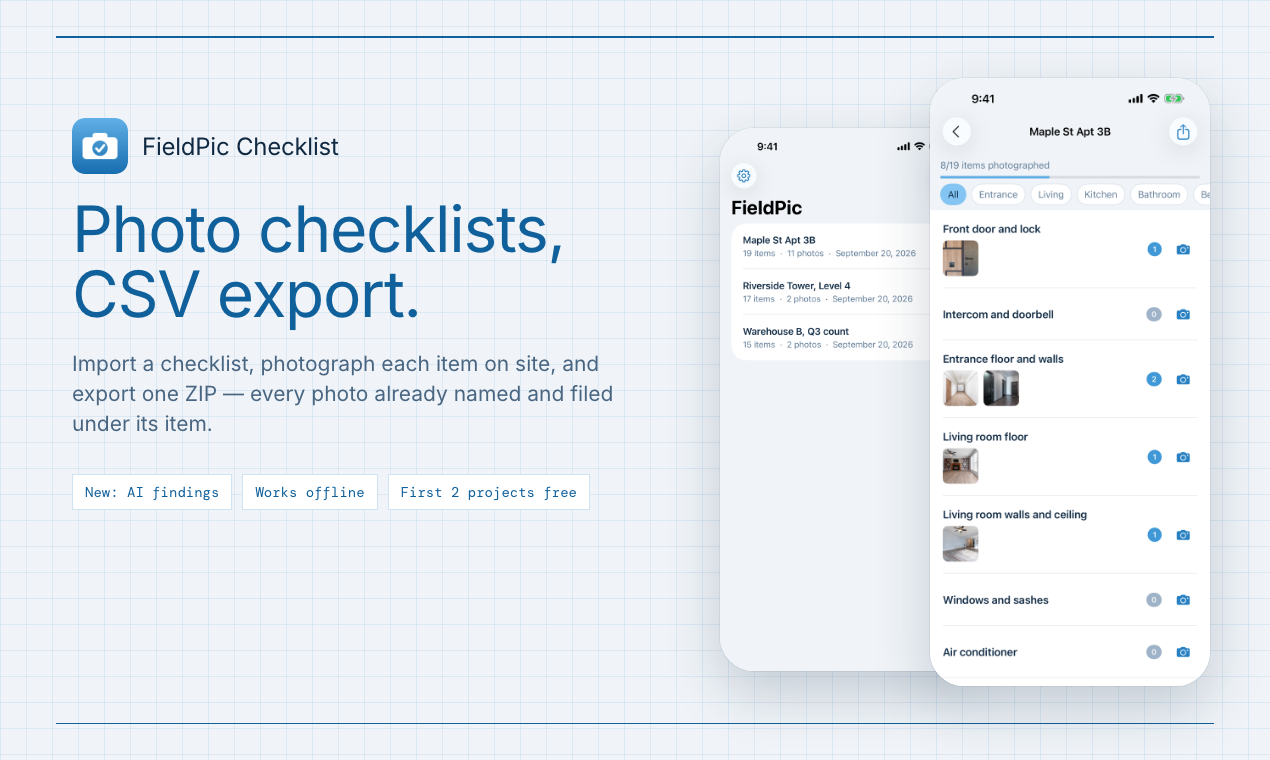
That is a much more general problem than supermarkets. Property inspections, construction punch lists, stocktakes, mystery shopping, insurance claims and field research all come down to the same deliverable: a photo of every item on a list, at every site. FieldPic Checklist is the tool I wanted for that post, built for all of them.
What it does
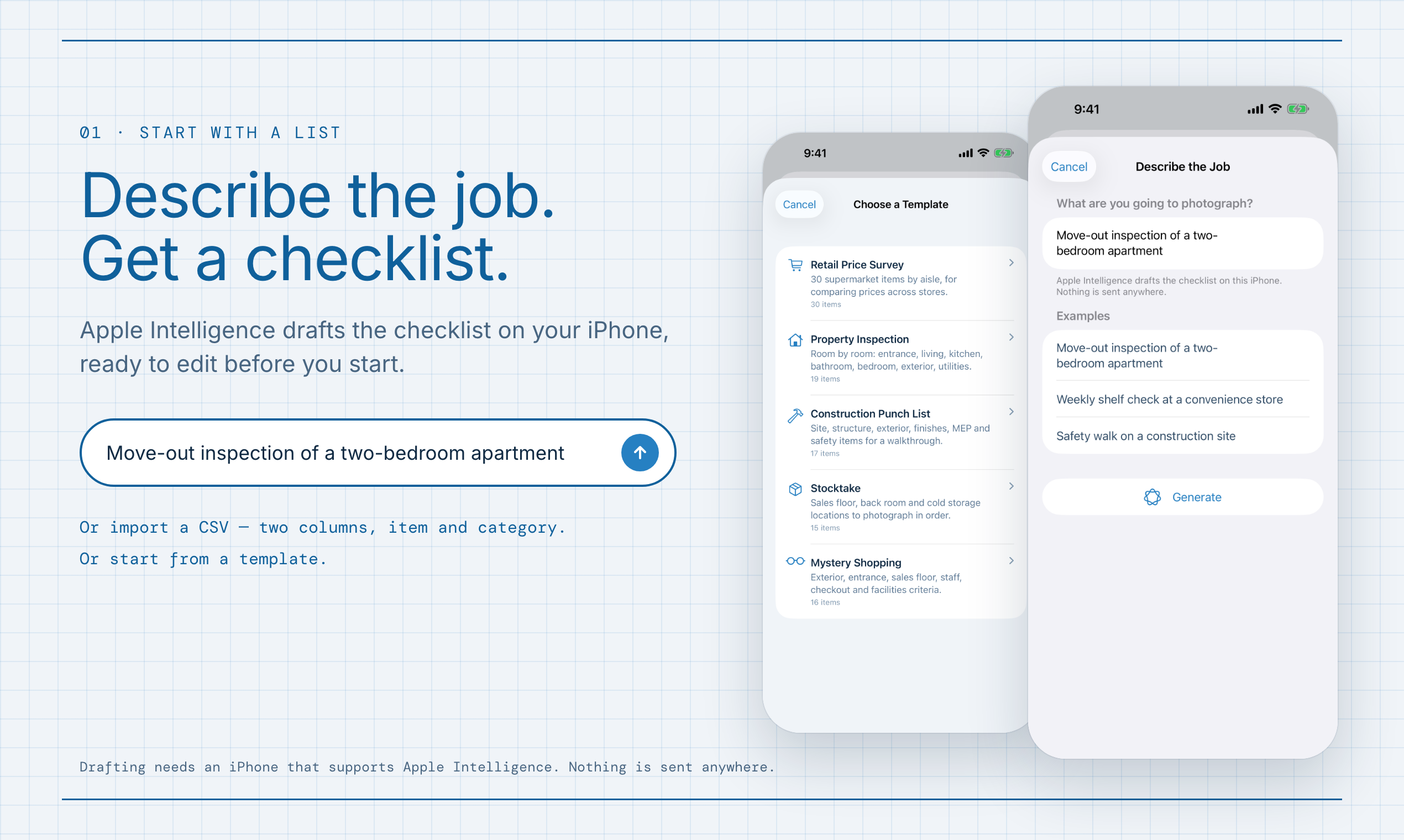
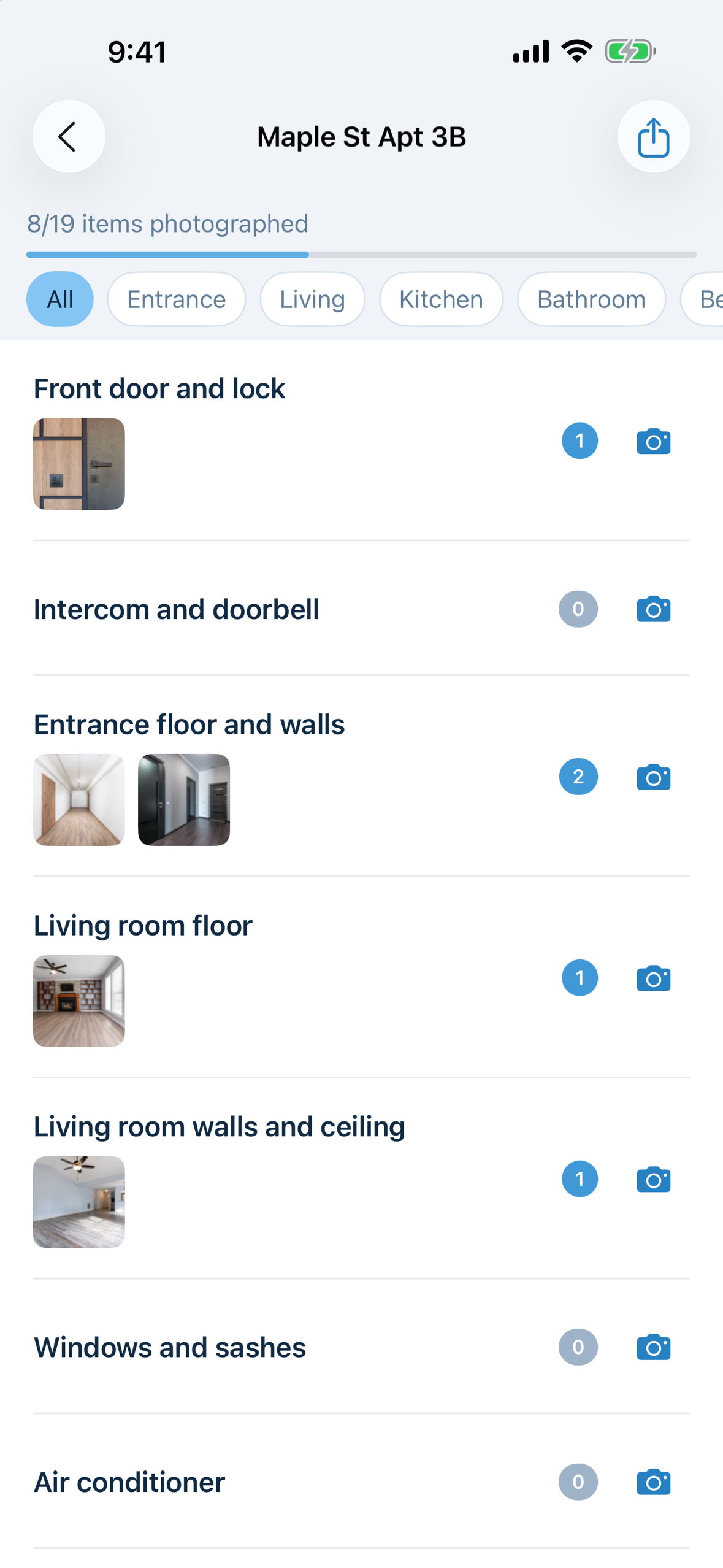
- Start with a list. Import a CSV with two columns,
itemandcategory, or pick one of five templates (including a Retail Price Survey). On an iPhone with Apple Intelligence, describe the job in one sentence and the checklist is drafted on the device. - Photograph each item in place. Tap the camera on a row and the photo lands on that item, already named. Several shots per item, a note, a category filter. A blurry shot is flagged the moment it is taken, so it gets retaken before you leave. There is no camera roll to sort afterwards.
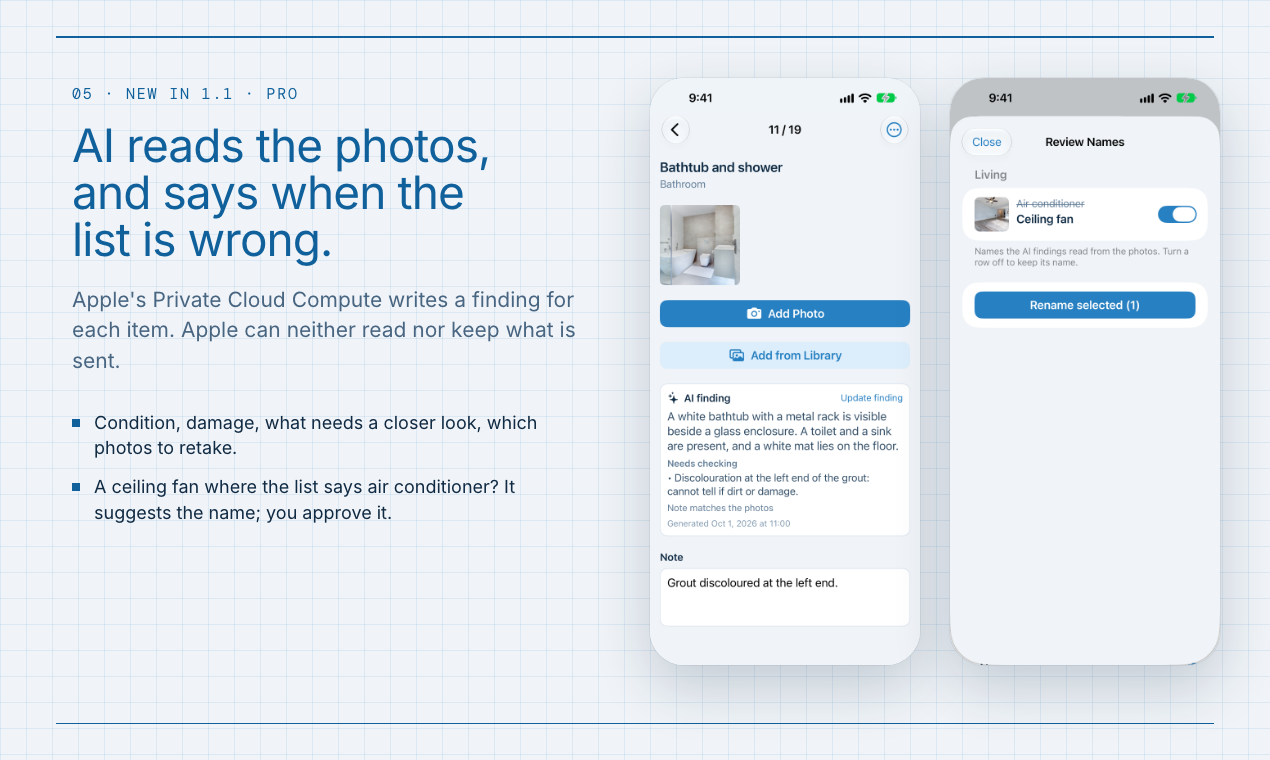
- Let AI read the photos (Pro, new in 1.1). AI Findings sends each item's photos and note to Apple's Private Cloud Compute and writes a short finding: the condition, what looks damaged or missing, what needs a closer look, and which photos to retake. Apple can neither read nor keep what is sent.
- Fix the list on site (new in 1.1). The shelf is often not what the list says. Rename an item by hand, or let AI Findings suggest what the photos actually show and approve the suggestions in one list. Something that was not on the list at all can be added at the end.
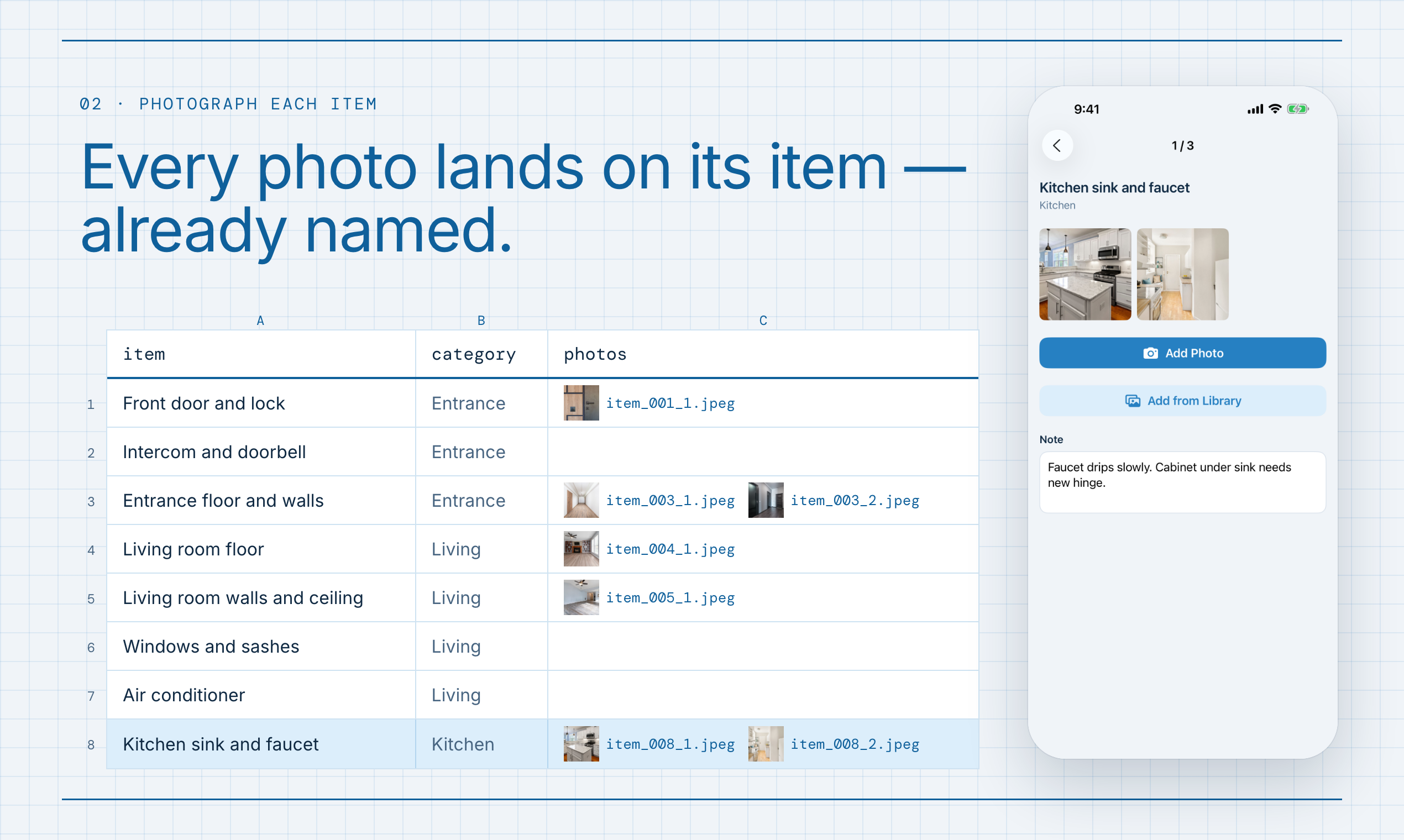
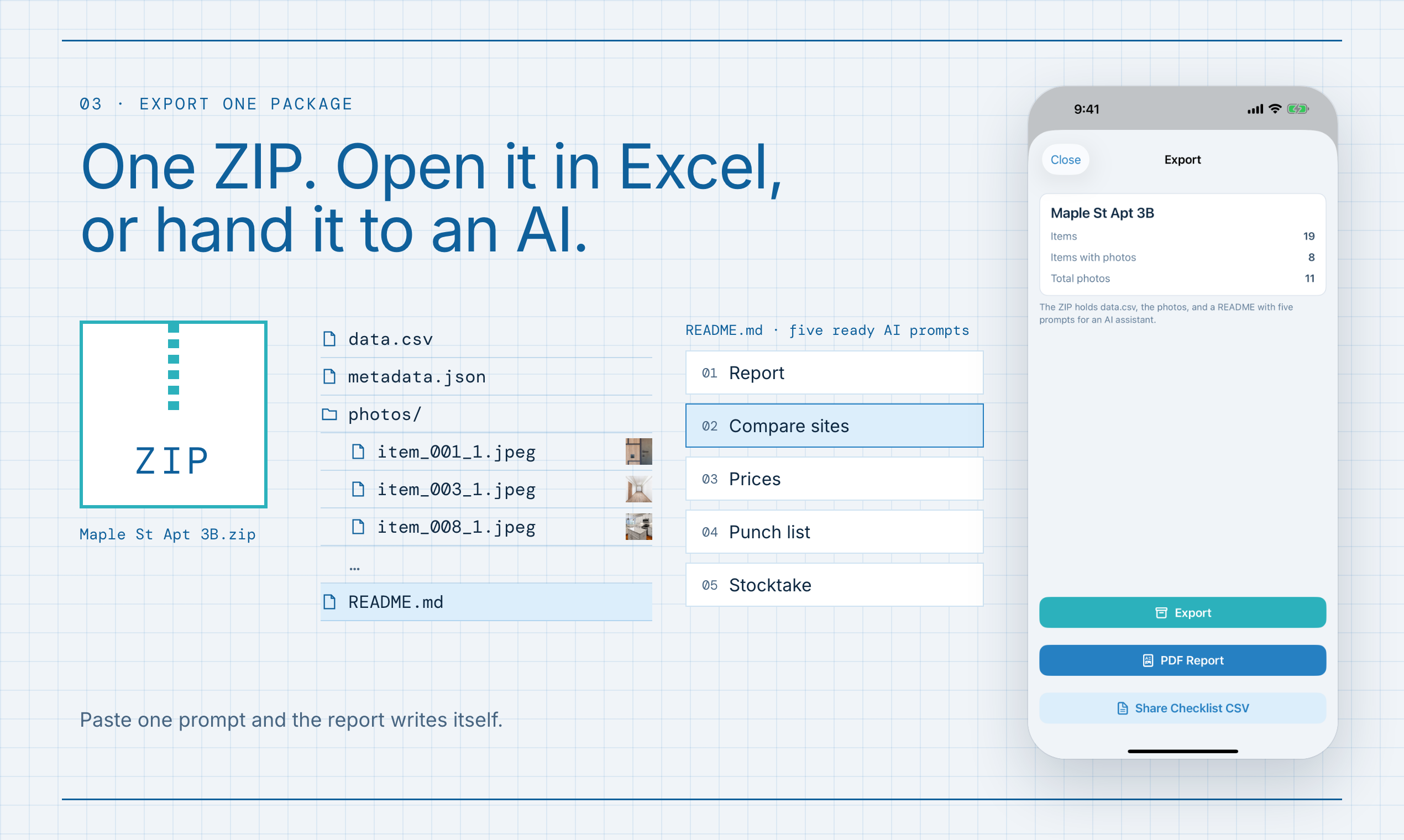
- Export one package. A ZIP with
data.csv(item, category, photo filenames, note),metadata.json, and every photo nameditem_001_1.jpegin checklist order. It opens in Excel as it is.
Two design decisions carry most of the value:
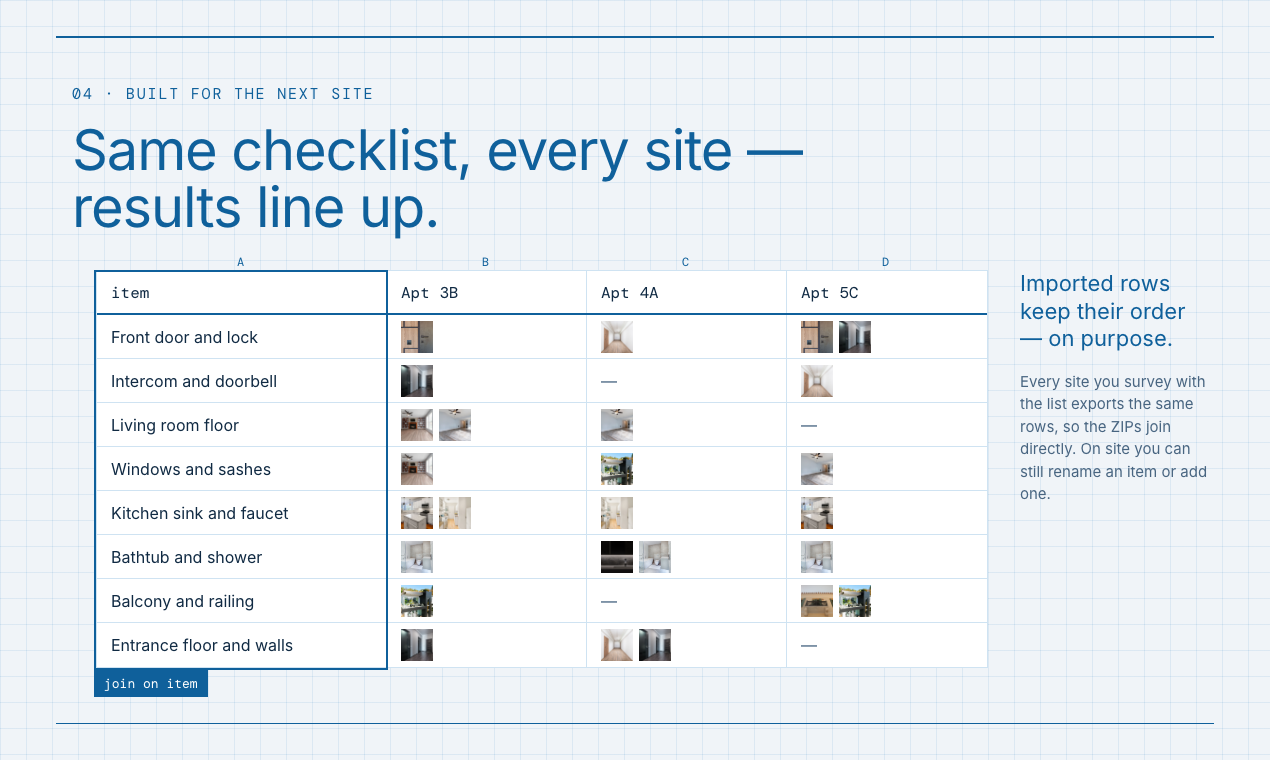
- The imported rows keep their order, on purpose. Every store you survey with the same list exports the same rows in the same order, so ten stores become ten columns in one sheet with no matching. That is exactly the comparison my Reddit post needed. What changes on site is a name or an added row, and duplicating the corrected project carries the fix to the next store.
- The ZIP explains itself to an AI. Every export carries a
README.mddescribing the format and offering five ready prompts: an inspection report, a comparison across sites, a price comparison, a punch list and a stocktake. Attach the ZIP to an AI assistant, paste a prompt, and the report is written from your photos and notes.
No account, no server of ours: nothing leaves the phone unless you share it. The one exception is AI Findings, which you start yourself and which Apple's Private Cloud Compute reads without keeping. Everything else works fully offline.
How I built it
- Swift 6, SwiftUI and SwiftData, iOS 27, iPhone. MVVM with protocol repositories. SwiftData models are not
Sendable, so the whole model layer stays on the main actor and only plain values (Data, an export snapshot) cross into the background tasks that resize JPEGs and build the ZIP. Strict concurrency makes the compiler enforce that line. - RevenueCat for all purchases, imported in exactly one file. The rest of the app sees its own small plan type, so the paywall and the free-plan rules are unit-tested against an in-memory mock. Debug builds use RevenueCat's Test Store, which let me exercise the whole purchase flow in the simulator before App Store Connect had approved a product.
- Foundation Models: the on-device model drafts a checklist from a sentence; the Private Cloud Compute model reads up to six photos per item, attached from their files and labelled with their export names, with greedy sampling so the same photos give the same answer.
- Vision for the blurry-photo warning, with thresholds measured on a real device.
- ZIPFoundation for the export, and a hand-written RFC 4180 CSV parser.
- Claude Code as a pair programmer, working from a written spec: behaviour, export format and pricing live in one
SPEC.md, and every bug fix starts with a failing test that reproduces it. English and Japanese ship at launch.
Monetization
The first 2 projects are free, with photos, notes, export, templates and fixing the list on site. The count is cumulative and kept in the Keychain, so deleting a project does not free a slot, and the bundled sample project does not count. FieldPic Pro removes the cap and adds AI Findings and a PDF report with photos, notes and findings for every item, the document an inspector hands to a client. Monthly ($4.99, 7-day free trial), yearly ($29.99, 14-day free trial), or lifetime ($49.99). The people who need it most do paid site work and expense the cost, so pricing sits above consumer utilities.
Challenges
- App Review. The first submission was rejected under Guideline 2.3.4: the app preview showed the screen capture shrunk onto a coloured field with a headline band above it, which counts as "framing". The binary was fine. I rebuilt the previews as full-screen captures with the headline laid over them and resubmitted the same day; it was approved on the next review.
- Apple Intelligence cannot be tested in the simulator. It reports the model as available but has no model assets, so every request fails. Generation had to be verified on a real device, and the screenshots use a canned generator.
- Teaching Private Cloud Compute to judge, not just describe. Its descriptions were right from the first run; its verdicts were not. It called 70 g bags of tea leaves a match for "Green Tea Bottles 2L (6-pack)", answered a bilingual list in Japanese alone, and filled the parentheses with package text. Each fix took one round on a device: first concrete criteria with examples (same kind, form and size; "bottled tea is not tea leaves"), then a per-item hint describing the name's bilingual form, and finally moving the note after the photos in the prompt, because listed under the item name it was judged against the name. Rewording never moved it; restructuring did.
- A free tier that cannot be reset by deleting. "Two projects at a time" would have made the cap meaningless, so the count had to survive deletion and reinstall.
What I learned
I launched believing that editing the checklist in the app would break the product, because a fixed list is what makes results from different sites line up. Half of that held. The order and the rows have to stay put; the names do not. On site the strawberries on my list were apples that day, and a list that cannot say so records something that was not there. The first support email, within a week of launch, asked "What good is this app if a person can't edit add modify an entry?" 1.1 keeps the rows fixed and lets the name follow the site. And the most useful export format turned out to be one that an AI assistant can read without being told how.
What's next
AI findings in data.csv for spreadsheet users, comparing the same checklist across visits, more languages chosen from where the App Store downloads actually come from, and whatever the first users in the field turn out to photograph.


Log in or sign up for Devpost to join the conversation.