-
-
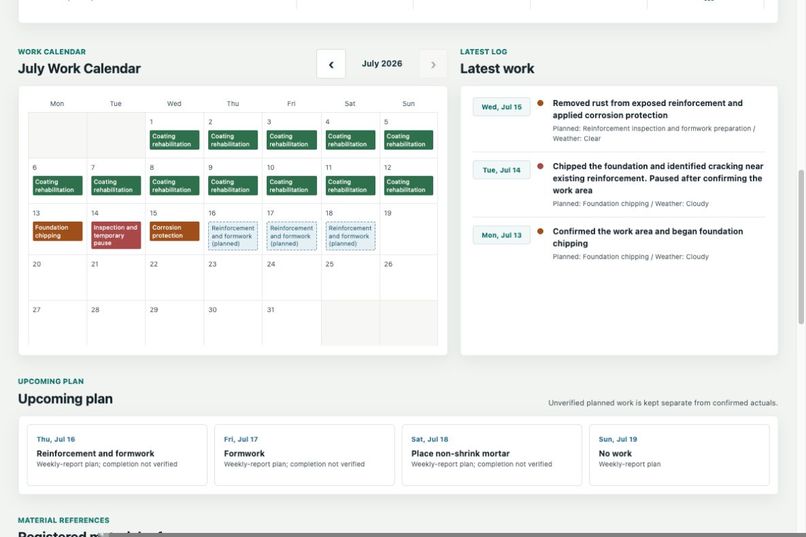
English calendar view separating verified recent work from upcoming plans, with registered material references continuing below.
-
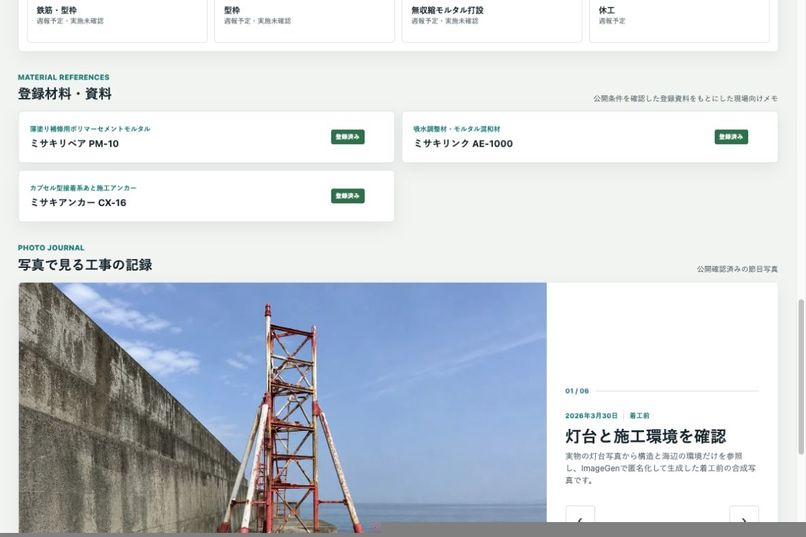
Japanese material and photo-journal view with fictional catalogs and synthetic, publication-approved milestone images.
-
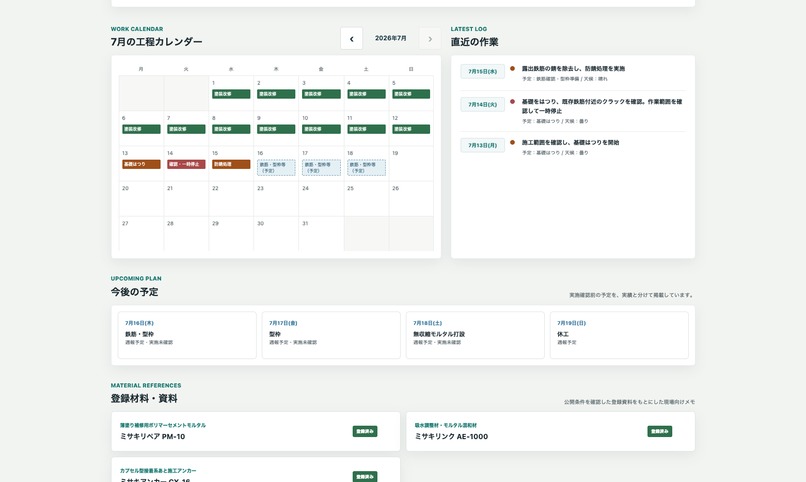
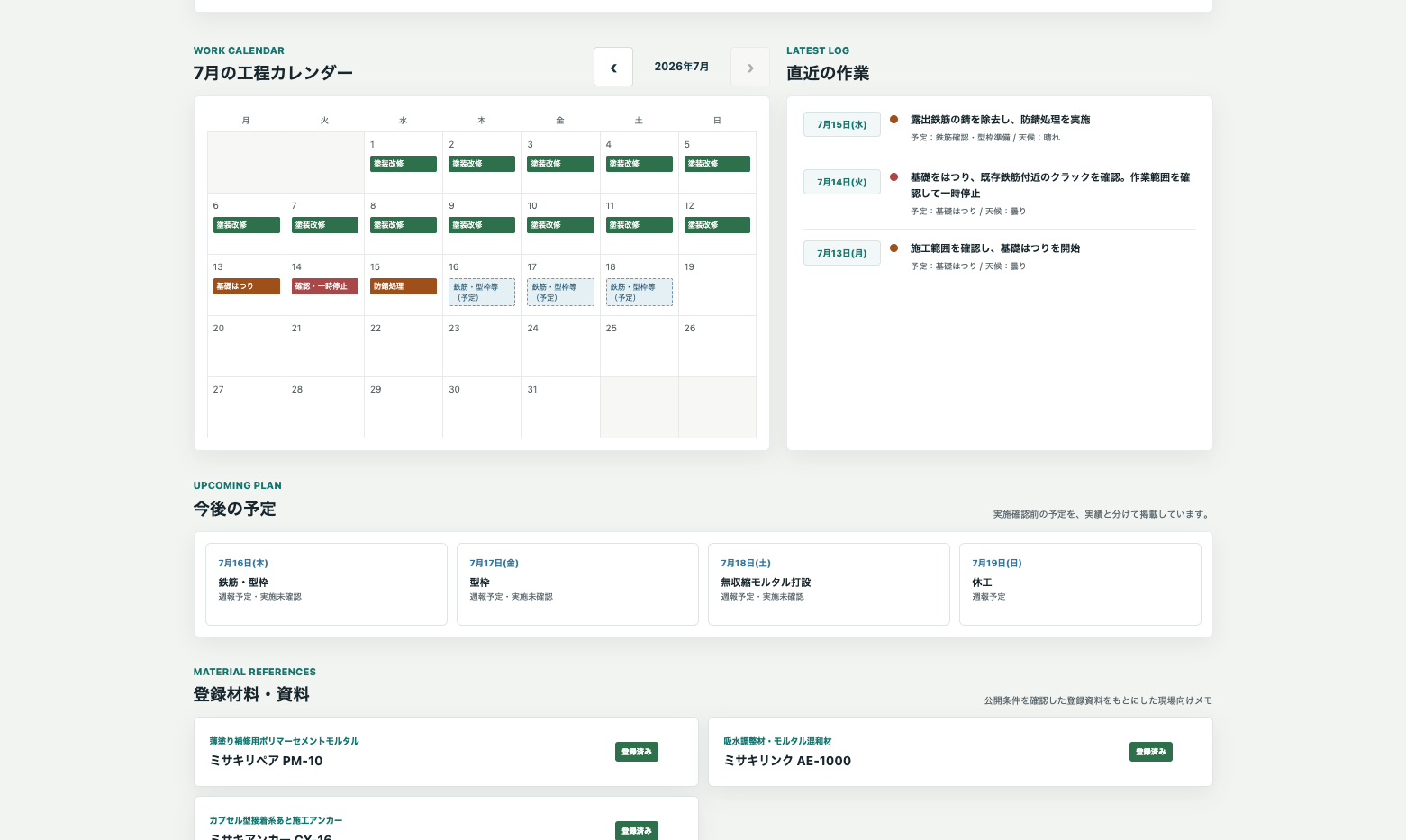
Japanese calendar view separating verified recent work from upcoming plans, with registered material references continuing below.
-
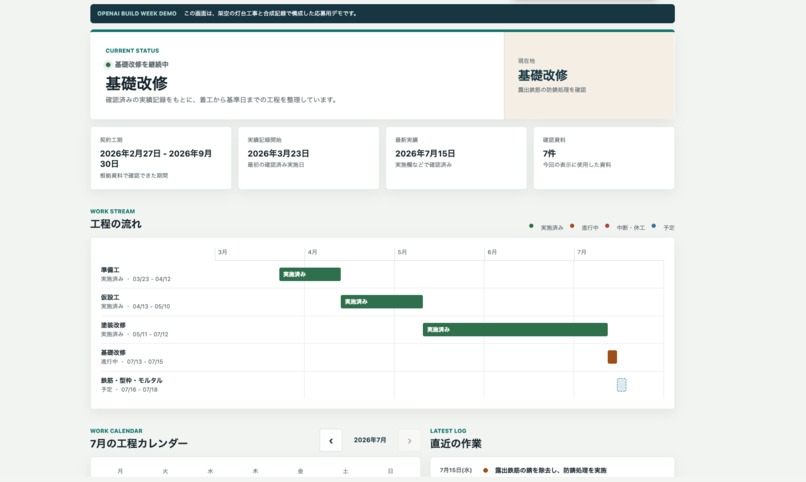
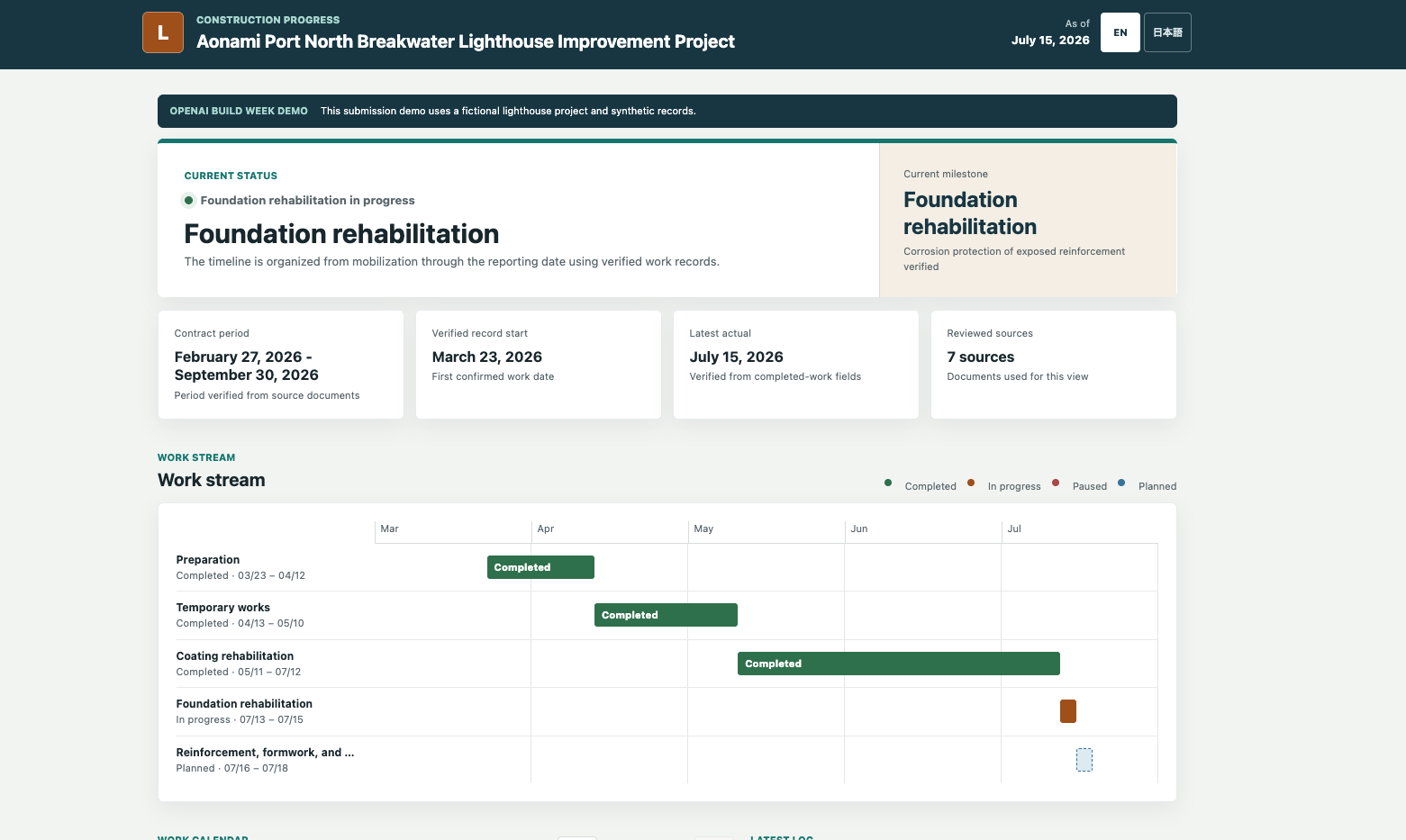
Japanese overview of the fictional demo, showing the verified current phase, key dates, reviewed sources, and workstream.
-
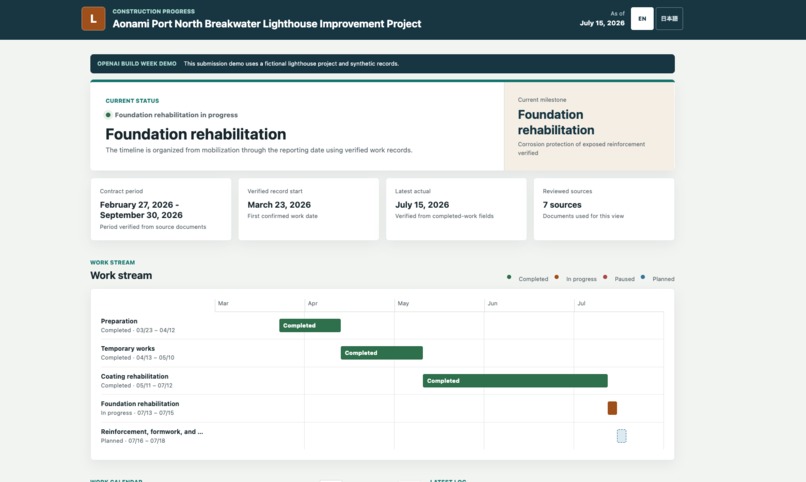
English overview of the fictional demo, showing the verified current phase, key dates, reviewed sources, and workstream.
-
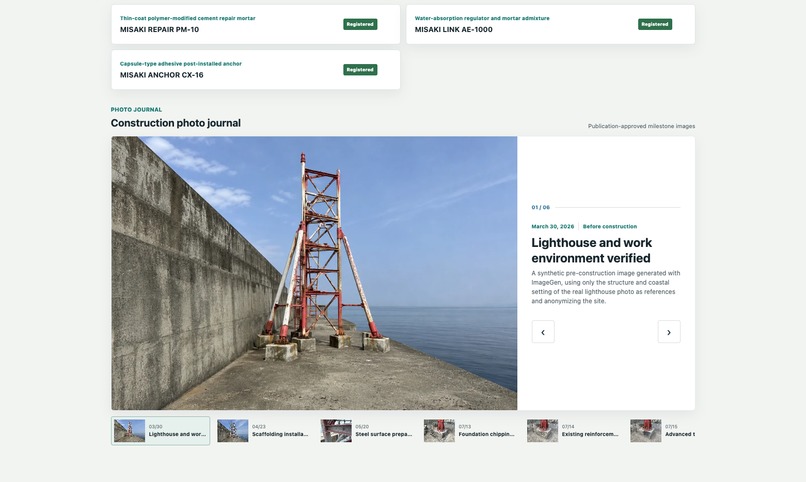
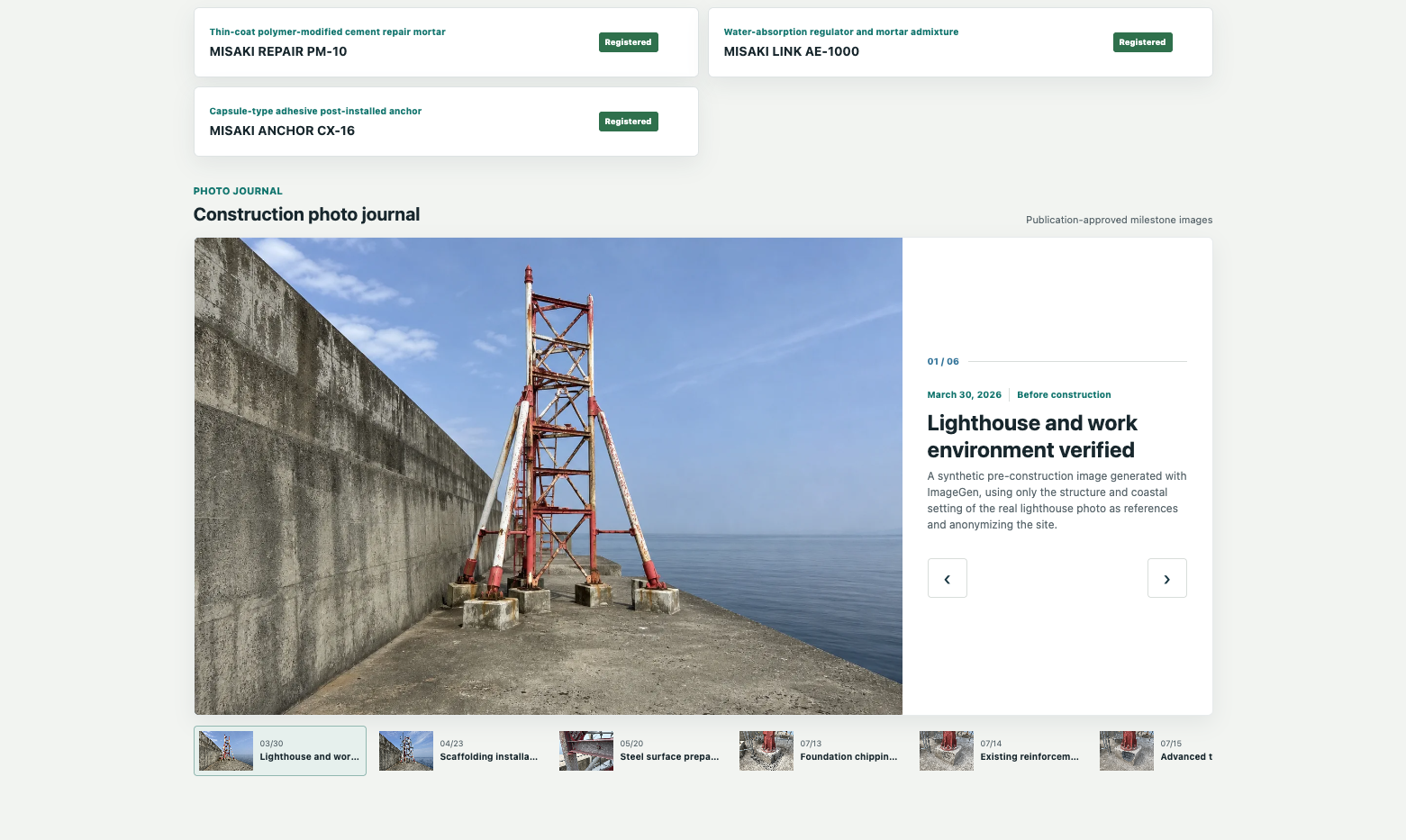
English material and photo-journal view with fictional catalogs and synthetic, publication-approved milestone images.



Inspiration
Dropbox already contained weekly reports, daily reports, photographs, specifications, material documents, and other project information in a structured form. However, each participant opened different files, noticed different changes, and understood the contents differently. The same information did not always give everyone the same view of the project.
Storing information is not the same as sharing it.
I wanted to make project progress understandable at a glance, without requiring everyone to know the folder structure or how to interpret every document. The idea was to bring progress, plans, photographs, materials, and related records into one dashboard where everyone involved could see the same current status.
Shortly before the Build Week submission period, I used Codex to build the first field dashboard and shared its URL with site members. The first useful version went from nothing to a working page in roughly one day. That experience made me realize that Codex could be more than a coding assistant: it could take an idea, carry out the work, and build it into something other people could see.
The real-project product that served as the basis for this Build Week version is still used in an active public-works construction workflow in Japan. I run a Codex update check approximately once per day, and project stakeholders use the dashboard as a common entry point for reviewing the latest status. I am still evaluating its practical effectiveness. This does not imply endorsement, adoption, or approval by any government agency or contracting authority.
What it does
Field Progress Copilot turns accumulated project records into a continuously maintained progress dashboard.
For a newly awarded project, it first performs a read-only intake inspection of the existing project folder. It checks which source documents are available, whether PDFs can be read directly or require OCR, whether important facts conflict, and whether sensitive information may be present. An intake result of READY means that the information is reviewable; it does not authorize setup or publication.
After the contract and proposed setup have been confirmed by a human, Field Progress Copilot previews an initialization plan and can prepare the operational folders, weekly and daily report templates, photograph storage locations, project metadata, and initial dashboard.
During regular operation, it:
- checks for new or changed reports and other approved records;
- leaves the dashboard unchanged when the source records are already up to date;
- separates confirmed activity from future plans;
- updates the current phase, workstream, calendar, and latest activity;
- detects newly added photographs and proposes meaningful milestone images with evidence-based captions;
- accepts useful catalogs and work instructions while excluding orders, invoices, quotations, prices, and other transaction documents;
- prepares short material notes linked to the screened source document; and
- keeps internal evidence and review records outside the public website.
The workflow also includes a read-only project:doctor preflight. It checks lifecycle state, source integrity, pending reviews, and dashboard consistency before routine operation, without modifying the project.
The core product is not only the finished dashboard. When project members maintain records as part of their normal work, Field Progress Copilot keeps organizing that information into a shared view. Codex performs the repeatable work, while a human retains the final decision over facts, wording, photographs, privacy, rights, and publication.
How I built it
From the earliest development of this project, I used GPT-5.6 through Codex. The first working version was a simple progress dashboard with a bar chart. During Build Week, I reconstructed and substantially expanded that early visualization into a reusable operational workflow that could be introduced to other projects.
I used Codex as an implementation and operations partner. Codex inspected heterogeneous source folders, helped me define the evidence model and project lifecycle, implemented the read-only intake inspection, created a dry-run-first initialization process bound to the reviewed source fingerprint, built changed and unchanged paths governed by lifecycle state, added resumable checkpoints for interrupted runs, maintained rolling date and photograph folders, and implemented the project:doctor preflight.
Codex also built the responsive dashboard, implemented photograph detection and human approval before publication, screened material records and retired previously published references that were no longer safe to show, configured source-document links, generated test data, ran privacy and consistency checks, tested the Japanese and English interfaces, prepared releases from approved previews, and prepared Git commits and pushes.
GPT-5.6, used through Codex, supported reasoning across spreadsheets, PDFs, OCR results, images, JSON, and code. It helped identify changed evidence, understand relationships between dates and documents, keep confirmed work separate from future plans, distinguish useful material references from transaction documents, identify references that were no longer suitable for publication, and maintain a consistent project timeline.
For the judging environment, GPT-5.6 was especially useful in creating the reports, plans, and synthetic photographs required at each stage of one fictional construction scenario. This allowed me to test not only a finished screen, but the entire progression from project intake and initialization based on reviewed sources through routine updates, no-change confirmation, and completion.
I supplied the real operational problem and field context. I defined the rules, decided which information was useful, determined what could be shared, reviewed the generated results, and retained final responsibility for operational correctness and publication.
For Build Week, I reconstructed the idea as a separate, self-contained judging version using a fictional project, synthetic records, and AI-generated construction images. Apart from the early dashboard concept, most of the substantive workflow in this submission was implemented or meaningfully extended during the Build Week period with Codex and GPT-5.6.
Challenges
The hardest part was not rendering a dashboard. It was defining the boundaries of what the system was allowed to communicate.
A planned date is not evidence that work happened. A document placed in a material folder is not automatically safe or appropriate to publish. A short AI-generated material note must not be mistaken for an engineering instruction or safety guarantee. Site photographs can also reveal people, locations, or operational details that should remain private.
I addressed these risks by defining explicit evidence types and separating confirmed work from future plans. I also introduced document exclusion rules, links to original sources, internal review records, human review before publication, and automated validation of the public package.
Another major challenge was testing how the state of the project changed over time. For each point in the fictional scenario, I prepared only the weekly reports, daily reports, photographs, confirmed work, and future plans that should exist by that date. I then advanced the date, introduced new records, and verified that the dashboard changed without turning plans into completed work.
I also tested that previously processed reports and photographs were not detected again or registered twice. The same scenario can be rerun from a predefined checkpoint, which made it possible to verify both changed and unchanged paths repeatedly.
(Note: The public demo contains no confidential information from any real project. It does not disclose actual clients, contracting authorities, locations, contract information, personnel, original reports, specifications, photographs, private paths, or original source files.)
(Note: The three material catalogs in the demo are original artifacts created as product catalogs for the fictitious Japanese manufacturer AOMISAKI Construction Materials Laboratory Co., Ltd. The products and catalogs are fictional and are provided solely for demonstration; they are not valid for use in actual construction. The construction photographs in the judging scenario are also synthetic images used as test evidence.)
Accomplishments
- Turned a one-off field dashboard into a reusable evidence-to-publication workflow.
- Reconstructed the operational concept as a fully fictional, privacy-safe judging demo.
- Added a deterministic, read-only project intake inspection that inventories source documents, reads embedded PDF text, uses OCR only when needed, and returns
READY,REVIEW_REQUIRED, orNOT_READYwithout authorizing setup or publication. - Bound onboarding application to the exact source fingerprint reviewed during dry-run, so changed source documents require a new review.
- Added dry-run-first, lifecycle-gated project initialization with resumable checkpoints, atomic no-overwrite writes, and idempotent repeat execution.
- Created weekly and daily report preparation, evidence-bounded photograph folders, and an initial dashboard from reviewed project facts.
- Added reliable changed and unchanged paths so an unchanged source does not modify public data or create duplicate records.
- Kept confirmed work, current status, and future plans separate throughout the dashboard.
- Added photograph detection and a distinct human approval step before selected images enter the gallery.
- Added a screened material-reference workflow that stages clean catalogs, excludes transaction and private documents, and retires stale public cards and copies when a registered source becomes unsafe or unreadable.
- Added the read-only
project:doctorpreflight with stable human-readable and JSON results. - Added an approval-bound release process with recovery checkpoints and selectable filesystem or Cloudflare Pages deployment adapters, without storing credentials in project configuration.
- Preserved internal evidence and review state without exposing it in the public website.
- Built a complete Japanese and English interface.
- Completed a repeatable lifecycle rehearsal from project intake through routine updates and completion, and tested desktop, narrow mobile widths, long text, links, images, privacy boundaries, interrupted-operation recovery, and repeated execution.
- Used Codex across the full loop: inspection, implementation, testing, dashboard updates, serving configuration, validation, Git preparation, and approved publication.
What I learned
My honest reaction was, “I can really hand off this much to Codex?!”
While building this product with Codex, I learned that I could entrust it with far more than writing code. I could rely on it to inspect records, create and run tests, determine whether an update was needed, identify inconsistencies, and carry out the repetitive work required to prepare information for publication.
I also learned that human review, judgment, and instructions are not separate from the AI workflow. They are themselves an essential part of making the product safe.
No matter how much AI can execute, humans must authorize actions, define what can be published, stop the process when necessary, and remain responsible for the results. AI handles execution; humans make judgments and grant permission, retain the authority to stop the process, and remain accountable for the outcome. That division of responsibility matters.
This combination showed me that workflows once considered impractical because they required too much repetitive manual work can become feasible when execution is entrusted to Codex.
What's next
I will continue using Field Progress Copilot on real projects and incorporate feedback from the people who use it.
I plan to support additional report formats, make unresolved evidence and source confidence more visible, and improve diagnostics based on issues observed during actual operation. I also want to evaluate material-retirement handling, report-and-photograph consistency checks, interrupted-operation recovery, and stricter automated browser validation before representing them as finished features.
The goal is not to add complexity for its own sake. It is to make the workflow easier to introduce, safer to operate, and less dependent on one person's knowledge of the project folder.
Ultimately, while preserving explicit human decision-making over publication, I want to develop Field Progress Copilot into a standard workflow that can be applied across different projects and industries worldwide.
Built With
- codex
- css3
- gpt-5.6
- html5
- javascript
- json
- node.js
- openai

Log in or sign up for Devpost to join the conversation.