Inspiration
As a developer exploring AI image generation, I found myself constantly switching between documentation, JSON editors, and the actual generation interface. The disconnect between technical parameters and visual outcomes was frustrating. I wanted to build a tool that bridges this gap—making AI image generation as intuitive as using a camera, where you adjust settings and immediately see the impact.
What it does
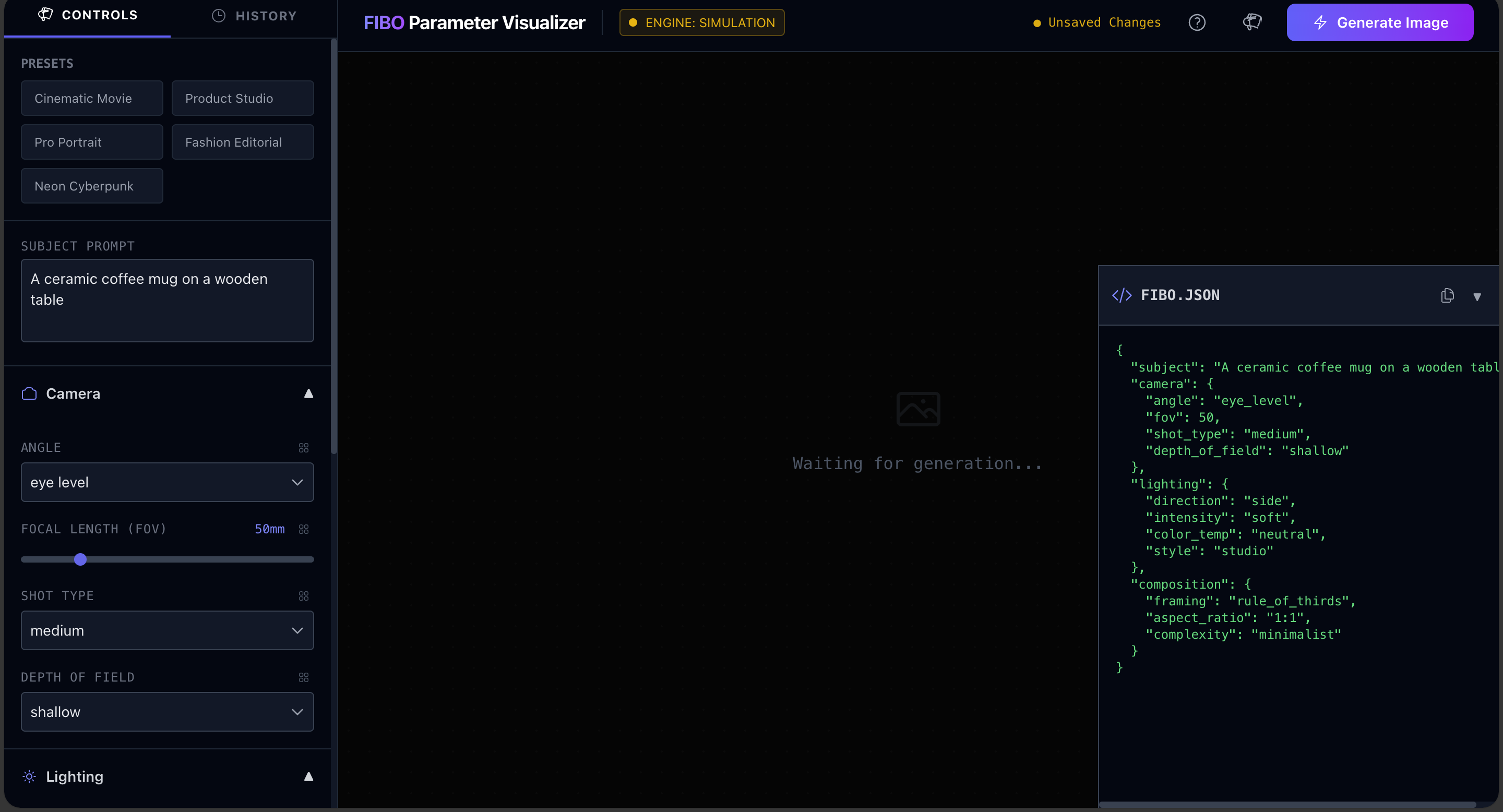
FIBO Parameter Visualizer transforms complex AI image generation into a visual, interactive experience. Users control camera settings (focal length, aperture, ISO), lighting (type, intensity, temperature), and composition (aspect ratio, framing) through intuitive sliders. The app offers two modes: a free unlimited mode using Pollinations AI for experimentation, and a professional mode using Bria's FIBO API. It features real-time JSON preview, A/B testing through Isolation Mode, generation history tracking, and professional presets for common photography scenarios.
How we built it
Built with React and TypeScript for robust component architecture, styled with Tailwind CSS for a modern interface. The app integrates both Pollinations AI (via their free API) and Bria's FIBO API for dual-mode generation. State management handles complex parameter updates in real-time, while the JSON viewer provides live feedback. I implemented an interactive tour system for first-time users and a grid-based isolation mode for parameter comparison. Deployed via GitHub Pages with automated CI/CD workflows.
Challenges we ran into
The biggest challenge was mapping abstract camera parameters to meaningful visual changes—balancing technical accuracy with user-friendliness. Creating the Isolation Grid for A/B testing required careful state management to prevent interference between simultaneous generations. Handling API rate limits and errors gracefully while maintaining smooth UX was tricky. I also spent considerable time optimizing the real-time JSON update mechanism to avoid performance bottlenecks during rapid slider adjustments.
Accomplishments that we're proud of
Creating an actually useful tool that makes AI image generation accessible to non-technical users while still being powerful for experts. The dual-mode system lets anyone experiment freely before committing to API costs. The Isolation Mode is particularly innovative—I haven't seen this A/B testing approach in other image generation tools. The interactive tour system ensures zero learning curve, and the responsive design works seamlessly across devices.
What we learned
Deep dive into camera optics and how parameters like focal length and aperture affect composition. Learned to balance API efficiency with user experience—implementing smart debouncing and caching strategies. Discovered the importance of visual feedback in technical tools; users need to see both the JSON and the result simultaneously. Most importantly, learned that the best tools abstract complexity without hiding it—power users can still access the raw JSON.
What's next for FIBO Parameter Visualizer
Planning to add batch generation with parameter sweeps (generate 10 images with focal lengths from 20mm to 200mm). Want to implement a "favorites" system with cloud sync for saving successful configurations. Exploring integration with more AI providers to offer users choice. Considering a collaborative mode where teams can share and iterate on generations. Also looking into advanced features like style transfer presets and automatic parameter suggestions based on the input prompt.
Built With
- bria-fibo-api
- css3
- github
- github-actions
- html5
- icons
- local-storage-api
- lucide
- pollinations-ai-api
- postcss
- react
- tailwind-css
- typescript
- vite

Log in or sign up for Devpost to join the conversation.