-
-
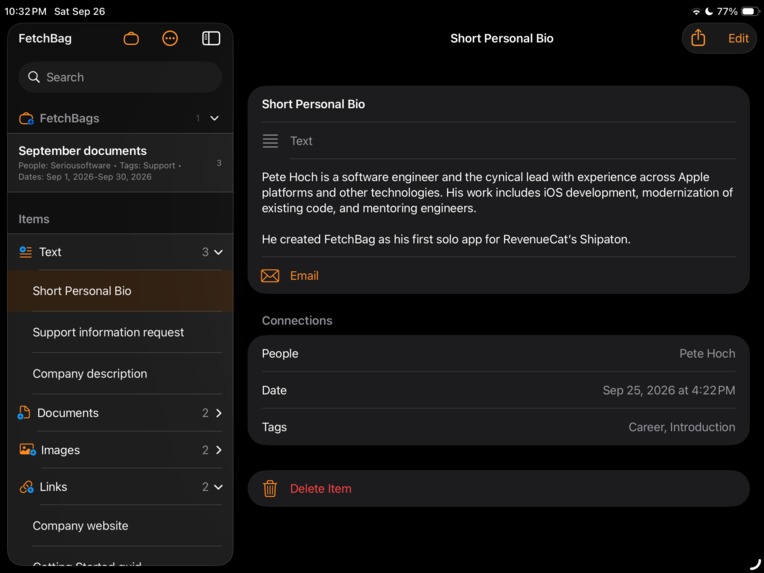
Screen Shot
-
App Icon
-
App Icon (dark)
Inspiration
I have worked on plenty of software projects as an employee or contractor. I have written code, designed systems, fixed bugs, automated builds, shipped products, and learned more programming languages and frameworks than I care to count. But I have never really been a weekend code warrior. When the workday was over, I usually did something else.
On August 3, 2026, I found myself in a position to try to solo code warrior thing. Because on that day at 6 AM, the start of my day, I was told that my company was “restructuring” and that my job was ending.
So, among the other things you do when this happens, I ventured onto LinkedIn to update my résumé and profile. While I was there, I saw a post from RevenueCat about their Shipaton. It had started August 1. This was August 3.
And I thought:
Okay. I'll build an app.
In one way that seemed a little crazy. I had just lost my job, I had never done a complete solo app, and the clock was already running. In another way, it made perfect sense. It was time.
But I still had that age-old question: what to build?
Thankfully, Shipaton offered a category built around influencer challenges. I watched the pitches, and Christopher Lawley's Productivity Challenge hit home: a fast, focused place for the content people reuse, with the thought and care Apple power users expect.
A series of connections had brought me there in the first place. Someone I met on a Hawaii vacation in 2017 became a coworker years later. His post about DeepDish Swift led me to the conference in 2025, where I learned more about RevenueCat. Following RevenueCat meant their Shipaton announcement appeared just when I needed something new to do.
I tell that longer story in my Build In Public posts. But it seems appropriate that those connections led me to build an app about connections.
My mother used to say:
A place for everything and everything in its place.
I like that idea. Things have a place. Put them where they belong and you can find them later.
That works pretty well for tools in a workshop or dishes in a kitchen. But as Christopher pointed out, many times data does not have just one 'place' and so I started on FetchBag.
I have had a hard time remembering which folder I stored something. So the idea of tracking other meta data with the file intreagued me.
And a little to my surprise, on September 8, 2026, FetchBag 1.0 went live on the App Store. A little over a month after “Okay. I'll build an app,”. It felt amazing.
What it does
FetchBag brings the information you reuse into one focused place, with four kinds of Items: Text, Document, Image, and Link.
A canned reply. A document you share with clients. An image you regularly show people. A link you can never quite remember. The information you keep typing into forms.
Different kinds of content, but the same reason for keeping them:
Something I saved because I expect to use it again.
The basic product loop is:
Add → Connect → Fetch
Add something once. Connect it to the context that makes it meaningful. Fetch it later using whatever you remember.
Items can be connected to People, Places, a Date, and Tags. Text Items contain the text you want to keep and reuse. Document, Image, and Links can also have Notes for supplemental context. A project's name or the reason you keep something can be useful information too, recorded in a Tag to include in the Item's searchable content.
The important part is not just the Item itself. It is the context around it. If I connect a document to Sarah, Chicago, and the relevant date, those are ways I can find it again without remembering its filename.
A QuickBag lets me combine search criteria for a one-time search. When a combination is useful enough to keep, a saved FetchBag preserves the search. Its results update as Items are added or changed.
A saved FetchBag is not a folder. It does not own or duplicate the Items it finds. The same Item can appear in different searches because it has more than one useful connection.
That is what the tagline means to me:
Everything. Relevant. Connected.
Everything is the different kinds of reusable content. Relevant is the goal: helping me get to the things that matter to what I am doing. Connected is how we get there, by preserving the context around those things.
The goal is not to create the world's most sophisticated filing system. The goal is to make the filing system disappear as much as possible.
How we built it
FetchBag is a native Apple application built with Swift and SwiftUI.
The 1.0 release was built with Xcode 26.6. The 1.1 release is being built with Xcode 27 RC. (Apple has approved the RC for App store releases, but I will switch the the final Xcode 27.0 as soo as it's available.)
I paid for ChatGPT Pro and have been using it for overall design and then handing crafted prompts from the web app to Codex in Xcode for the iOS/iPadOS app and to Codex in VSCode to handle the website.
For builds and distribution, I used Xcode Cloud and TestFlight. Testers' feedback helped me find and address some issues before shipping 1.0. ANd some were left for the 1.1 release.
Xcode Cloud has been a particularly enjoyable part of the work. At more than one company I have written bash scripts to generate archive builds and push them to TestFlight. There is something delightful about being able to use Apple's integrated tooling and let the build pipeline take care of itself.
RevenueCat handles subscriptions, entitlements, and the paywall. And yes, I used Rico to help with the Paywall design. It's not fancy, but it works nicely.
The source is managed with Git and GitHub.
I also established Seriousoftware as my business/trade name and created its website, hosted through GitHub Pages. The site gives FetchBag a home for support, privacy information, and user documentation.
The website is intentionally simple.
The overall process has been iterative: build a usable piece, run it on real devices, find the issues, fix it, and repeat. I have found that the smaller the change the faster I can review, test, commit and more on to the next issue.
Challenges we ran into
The first obvious challenge was time. I found the Shipaton on August 3, after it had already begun. There were always more things the app could do, and September was coming whether I was ready or not.
Deciding where to draw the 1.0 boundary turned out to be harder than I expected. I submitted the app for review several times, then withdrew it to add “one more thing.” Apparently, knowing about feature creep does not make you immune to it.
Eventually I had to decide that 1.0 was ready to stand on its own, and that the next good idea could go into 1.1. Shipping on September 8 was partly a technical accomplishment and partly learning to stop moving the finish line.
The second challenge was scope.
It is very easy for an app that stores things to gradually turn into a file manager, a notes application, a project manager, or a database front end. Christopher's challenge called for something focused, and keeping that boundary required repeated decisions.
I kept coming back to two questions:
Does this make it easier to add something I will need again?
Does this make it easier to fetch the right thing later?
If the answer was neither, it probably did not belong in FetchBag.
The third challenge is that retrieval is fundamentally harder than storage.
People don't remember database keys. They remember fragments: a person's name, a place, “last month,” or “that thing I use for client onboarding.” Those pieces overlap and reinforce one another. Figuring out how to make them useful without asking people to spend more time organizing than they save through retrieval has been a central design challenge.
Then there was a challenge I definitely did not put on the project plan:
Hurricane Lala.
I live in Hawaii. During development, my home lost power for more than a week. Part of building FetchBag involved working on battery power and figuring out where I could charge equipment and continue working.
Software projects always have unexpected problems. I don't think “hurricane” was on my original risk assessment.
And finally, there was doing it all myself for the first time.
It turns out that I really like workig on a team. Even a team of two. And in a way, ChatGPT/Codex became my team. But if anyone asks when the AI is gping to take over, I can clearly say, not with the current technology. Don't get me wrong, I would not have shipped on time without the help, but I konw of at least 3 other programmers that if paired with, the two of us could have also gotten it done and had a little more fun in the process.
Accomplishments that we're proud of
I designed, built, tested, documented, submitted, and shipped my first complete solo app.
FetchBag 1.0 has been live on the App Store since September 8, 2026.
That feels different from every product I have helped ship before. I have spent a career contributing to software, often with a great deal of responsibility. This time I was responsible for getting all the pieces into place, including the ones I would normally expect someone else to handle.
In a little over a month, I went from discovering Shipaton to a shipping product, with subscriptions and a paywall, a release pipeline through Xcode Cloud, TestFlight testing, an App Store presence, support and privacy information, user documentation, and the Seriousoftware website.
I am also proud that tester feedback made it into 1.0 before release. Seeing where another person gets stuck is useful in a way that looking at your own app for the hundredth time is not.
And I drew the line. After several rounds of “one more thing,” I let 1.0 ship and moved the next work into 1.1.
What we learned
I went into this project expecting to learn some new APIs and discover a few corners of SwiftUI that I had not worked with before. I certainly did that.
But the larger lesson has been about building the whole thing.
All of my professional experience has been as part of a larger team (or teams). There are designers, engineers, QA, product people, and others thinking about releases, support, documentation, and everything else that turns source code into a product.
With FetchBag, every piece was mine. That made me appreciate those disciplines differently. It also helped me understand something about myself: I love learning, but I particularly enjoy learning in a group.
I missed being able to turn to someone with a different perspective. The designer who sees a confusing interaction immediately. The tester who tries something I never considered. The engineer who asks the question that changes how I understand a problem. Solo development has made me more aware of how much I have learned from those people throughout my career.
Another lesson came from changing how I worked with AI.
I had been reading The Phoenix Project, and its lessons about the flow of work became very practical. AI can produce a large change very quickly. That does not mean I can understand, test, and review a large change just as quickly.
I started making much smaller requests and working in shorter cycles:
Plan → Implement → Test → Review → Push
During the 1.1 work, I got to roughly three complete changes delivered to the staging branch in a day. The useful part was that each change made it through the whole cycle. I could understand it, check it, and move on.
Using Codex effectively requires context, judgment, review, testing, and knowing when to redirect it. Architecture decisions and responsibility for what ships are still mine. Learning to keep the changes small has helped me use the tool more effectively and stay in control of the product.
For someone who has spent a career learning programming languages, APIs, frameworks, and development processes, this feels like the next thing to learn.
And maybe the biggest thing I have learned is that starting something new does not mean starting from zero.
I started FetchBag immediately after losing a job, but I brought every previous job, every lesson, every mistake, every tool, and every person who had taught me something along with me.
Experience is another kind of connection.
FetchBag started because of connections in my own life, and I ended up building an application about connections between the things we keep. That seems appropriate.
What's next for FetchBag
FetchBag 1.1 is already well underway.
The immediate work comes from using the app and finding places where it should be easier or faster: launch and loading, access to referenced Documents, clearer handling when an asset is unavailable, better inline Contacts integration for People, and more useful actions for each Item type.
A big new feature is Share and open-in behavior for Documents. The request came in when 1.0 was in TestFlight and I thought about adding it to 1.0, but by then I realized it has=d to wait. These are the kinds of details that matter once finding something is only the first half of what you wanted to do with it.
The direction I am particularly excited about is deeper Shortcuts integration. It fits Christopher Lawley's audience, and it fits the reason I built FetchBag: make reusable information easier to get back into whatever you are doing.
In the 1.1 development work, Search FetchBag returns actual FetchBag Items that can participate in a larger Shortcut. It supports free-text search and structured criteria such as Item Type, Title, People, Places, Tags, Text/Notes, URL, Filename, and Date Range. The returned Items expose properties that later actions can use.
Add Text and Add Document provide ways to bring content into FetchBag through Shortcuts.
That makes workflows like these possible in the 1.1 work:
- Search FetchBag → Choose from List → Get FetchBag Item File → Share
- Search FetchBag → Choose from List → Get Text Content → Copy to Clipboard
I want FetchBag to be a useful component inside larger Apple workflows. Finding a client document should lead naturally into sharing it. Finding a Text Item should let that text move into the next step of an automation.
Alongside that work, I am continuing platform compatibility improvements, iPad and physical keyboard refinements, automated test coverage.
I have more ideas, of course. “One more thing” has not gone away. But I have a shipping 1.0 now, a concrete 1.1 in progress, and a better understanding of how to decide which ideas belong. For example, running the iPad app on a Mac is nice, but maybe 1.2+ will have a native MacOs App.

Log in or sign up for Devpost to join the conversation.