Inspiration
If you're blind, your ears are how you get around. The hum of a car at a crosswalk, a conversation off to your left, the way a hallway sounds different from a room. Most of the "AI for blind people" apps we looked at take that channel and fill it with narration. Chair, two meters. Person on your left. It's useful information, delivered over the one sense you can't spare.
We wanted to see what happens if you use a different sense. Your palm can take in a surprising amount at once, and it does it silently. So the question we started with was pretty literal: can a phone turn the room into something you can hold?
What it does
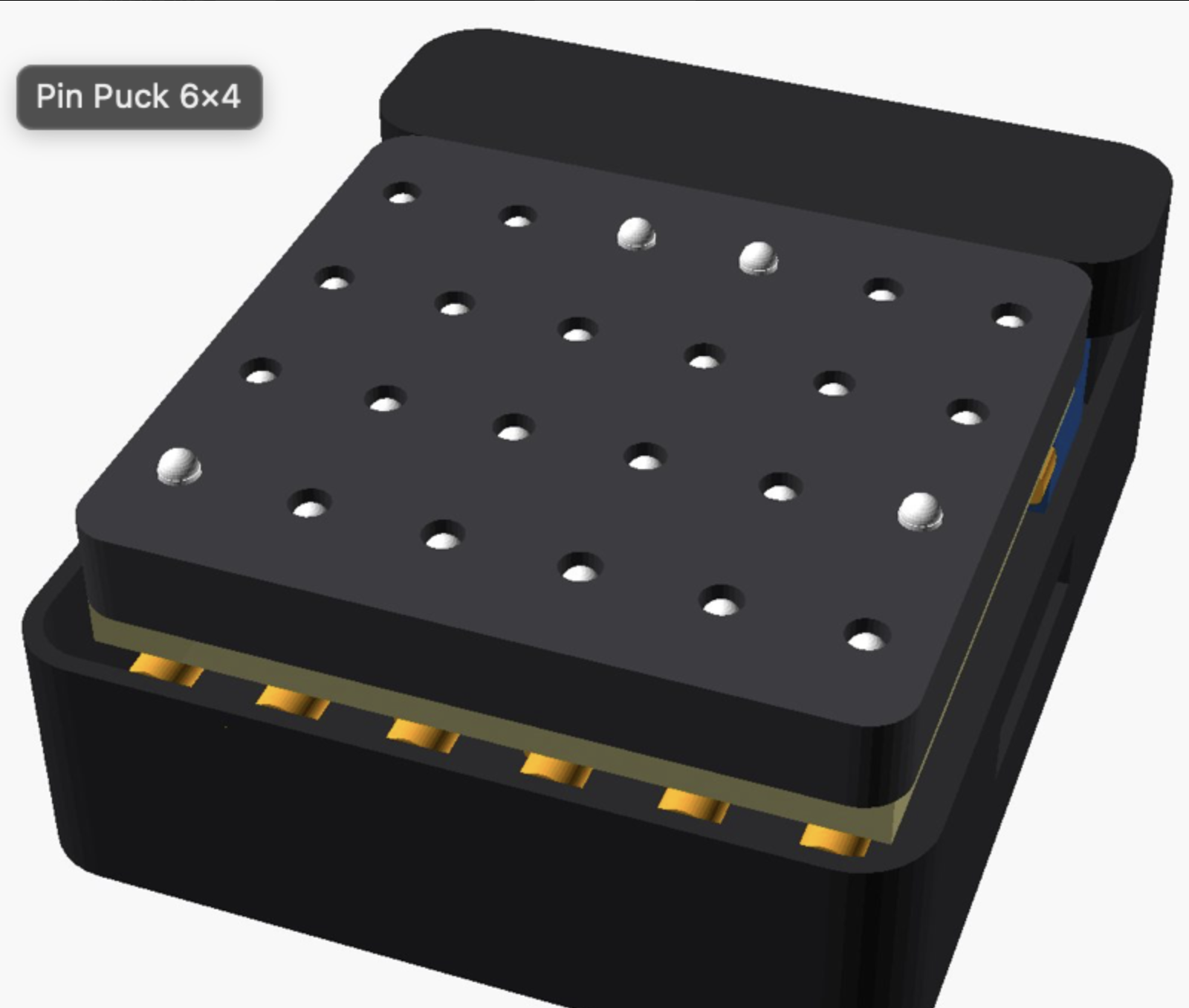
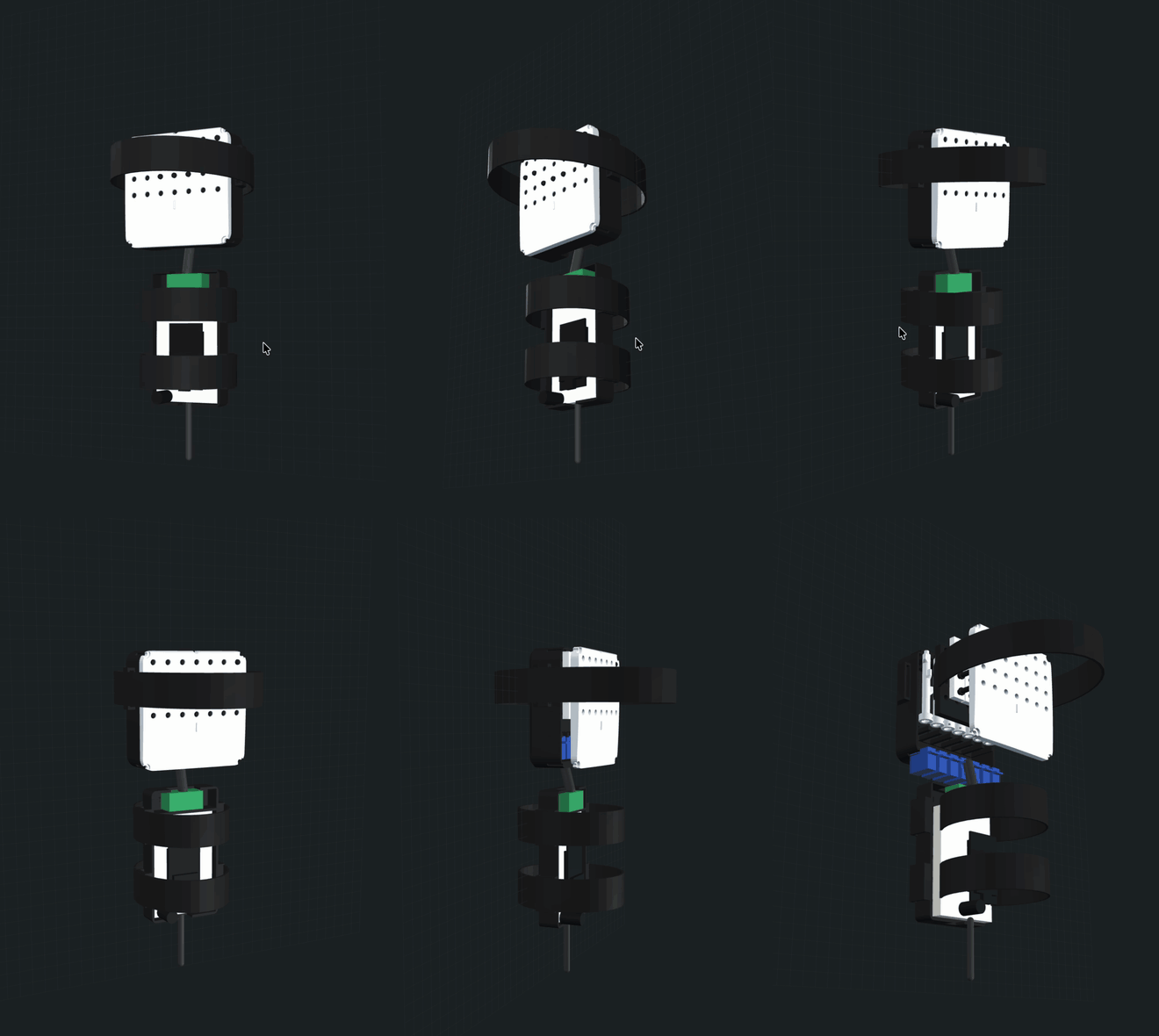
FEEL is a LiDAR iPhone plus a puck you hold in your palm. The puck has 24 pins in six columns. Each column is a direction, and the pin that's up in that column tells you how far away the nearest thing is in that direction. Close things push up the row near your wrist, far things the row near your fingers.
You can ask for things. "Where's the exit?" and the pin in that column starts tapping. If you've walked somewhere before, you can ask how to get back there and the pins lead you one point at a time. If it can't find what you asked for, it says so instead of pointing somewhere. And if the phone and the puck lose each other, all the pins drop.
How we built it
From the phone to your hand
The easiest way to explain the software is to follow "where's the exit?" from the phone to the puck.
The voice assistant hears the question and calls a where_is tool. The tool sends one camera frame through Chalk's Model Gateway to a vision model, gets back a box (or "not found"), and uses LiDAR depth at that spot to turn the box into a real direction and distance. If there's no signal, the phone's own Vision and Core ML detection takes over. It's worse, but it works in a basement.
Meanwhile, every frame, the phone is chopping the LiDAR depth into six 15° slices and finding the nearest obstacle in each one. That distance picks a row:
$$ b(d) = \begin{cases} 1 & d < 0.9\ \text{m} \ 2 & 0.9 \le d < 1.6\ \text{m} \ 3 & 1.6 \le d < 2.5\ \text{m} \ 4 & 2.5 \le d \le 4.0\ \text{m} \ 0 & \text{nothing reliable} \end{cases} $$
Ten times a second the phone sends nine bytes over Bluetooth: a sequence number, the six rows, and which column should tap.
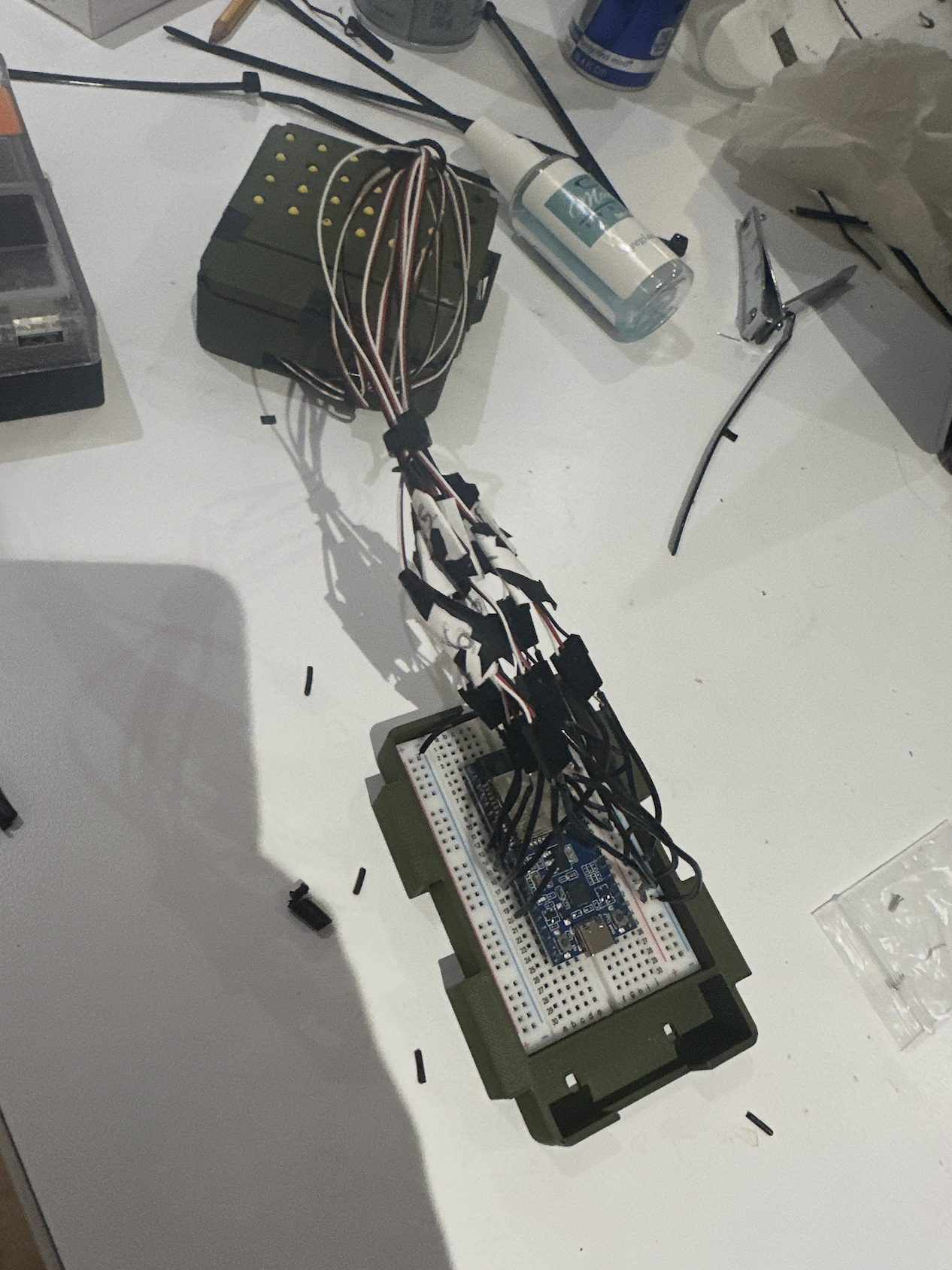
On the other end is an ESP32 in a forearm pack. It's paranoid on purpose. A malformed or out-of-order packet is thrown away whole. If 500 ms pass without a good packet, every pin drops and stays down until a fresh command shows up. Servo output is compiled out by default and only turns on with measured pulse limits for each servo.
The mechanism
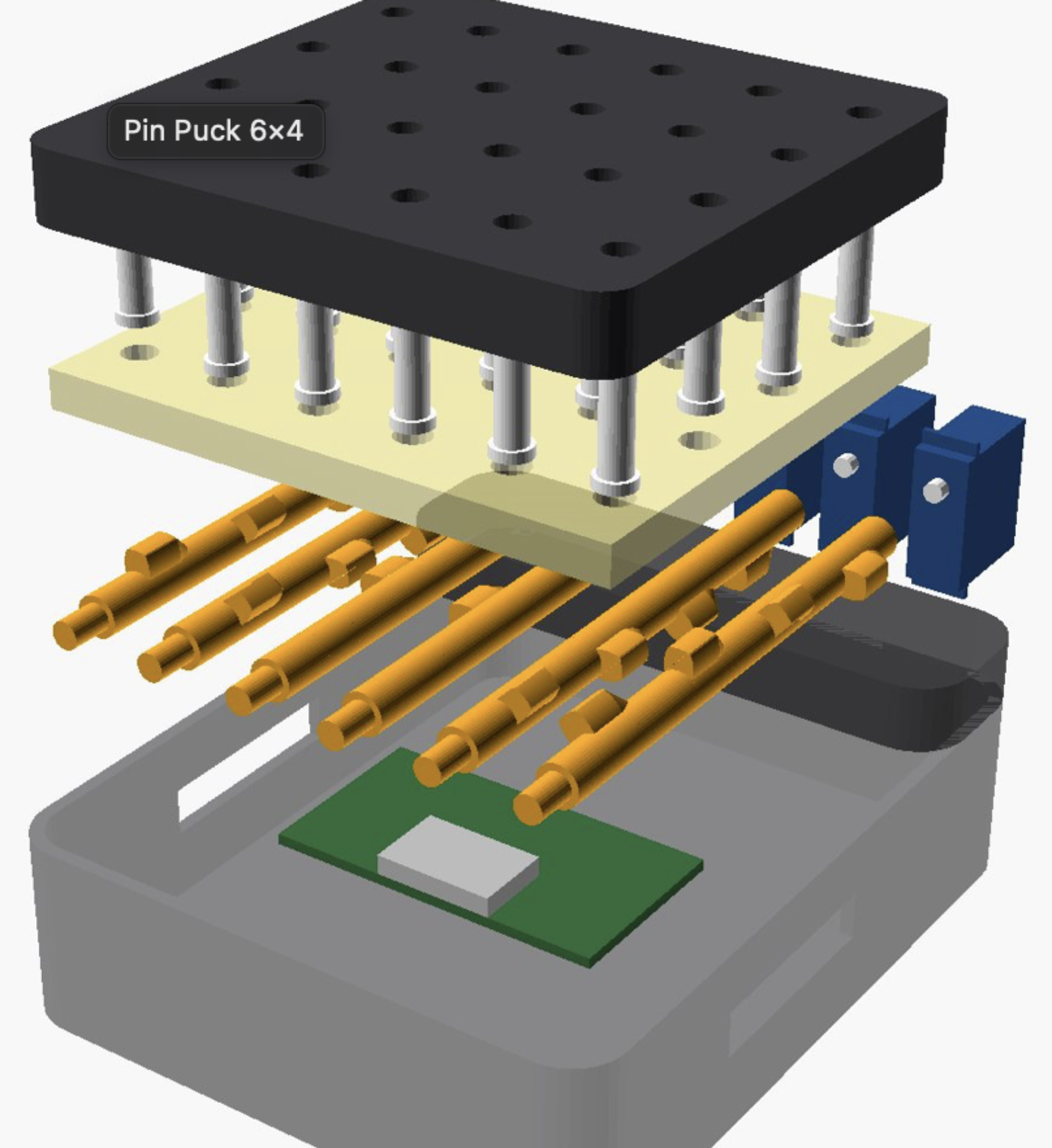
Each column has one FEETECH FS0307 servo turning a 3D-printed cam rod. The rod has four lobes, one under each pin, staggered around the rod. Four angles of the rod raise one pin each, and the angles in between leave everything down. Pin travel is about 2 mm through a guide plate, with a strip of craft foam behind the pins so they return and don't feel like needles. Tapping is the servo nudging its rod back and forth so the pin pulses under your finger.
We modeled the whole puck in parametric OpenSCAD: chassis, guide plate, domed face plate, the cam rods, the pins, a foam template and the forearm tray. Before printing we ran a cam contact simulation on the actual exported geometry to make sure a rod lifting one pin doesn't also drag its neighbour, because a rod that lifts two pins at once is a wasted three-hour print.
Printing and assembly
We printed everything at the makerspace on two printers at once. The cam rods and the pins went on a Bambu P1S, because small dense parts come out better there: 0.15 mm layers, four walls, 100% infill, 3 mm brim so the tall skinny rods don't tip over mid-print. The chassis, guide plate, face plate and forearm tray went on a Prusa MK3S at 0.20 mm layers and 15% infill. No supports on anything.
The pins print upside down on a 1 mm sprue plate with their tips flattened by a quarter millimetre so they stand up. After the plate cooled we snipped each pin off the sprue and cleaned the nub. The plate has eight spares, which turned out to matter.
All the pin holes are printed deliberately undersize at 4.3 mm and reamed by hand to 11/64" (4.37 mm) afterward, since a printer can't be trusted to hit a clearance fit on a 4.2 mm pin. Each cam rod gets a single-arm nylon servo horn pressed into a coupling pocket in its end, arm first, with a recess for the screw head.
The first chassis didn't go together. The bulkhead had a closed window the servo was supposed to slide through sideways with 0.2 mm of room, and a hand fit on Saturday showed it just wasn't going to happen. We reworked the chassis so the window is open at the top and each servo drops straight down into its pocket with 0.5 mm per side, with a wire slot running across all the pockets, and reprinted it. Then the order was: drop each servo into its pocket, seat its cam rod on the horn, rotate the rod until the lobes line up under the pin holes, and only then glue the servo at its mounting ears with CA gel. Gluing before alignment would have locked in a crooked column.
Then the pins go into the guide plate, the foam strip goes over them using the printed template to punch the holes, and the domed face plate screws down over everything with four M3 screws. Strap ears on the chassis take an elastic band around the hand. The ESP32, the barrel-jack adapter and the 1000 µF capacitor live in the forearm tray, with six signal wires and the servo power running down to the puck.
Power
The six servos run from their own 5 V / 4 A supply through the capacitor, with ground shared with the ESP32. The ESP32 runs from its own USB lead, so a servo surge can't reset it.
Testing before the puck existed
Since the hardware wasn't ready for most of the weekend, we built a replay harness that runs the real phone code and the real firmware controller against recorded scenes. That's what let us keep working on the pin logic while the puck was still a pile of prints. It passes 395 Swift tests and 44 firmware tests right now.
Tracks
Hardware for Good
The puck is the whole point. Without it this is just another app that talks.
We designed, printed and assembled the tactile display ourselves: 24 pins, six servos, six cam rods, parametric OpenSCAD with the cam geometry checked in simulation before printing. The firmware is small and defensive, with the packet validation and the 500 ms failsafe described above. The parts came from Micro Center, Walmart and a couple of hardware stores in Cambridge, and the only tools we needed were two printers, a reamer, flush cutters and glue, so someone with a makerspace and a weekend could build another one. We did the power math instead of hoping (there's more on that below), and the replay harness means every change to the firmware gets run against real recorded scenes before it gets near a servo.
Chalk
Chalk is where FEEL's decisions get made and, more importantly, where they get graded.
The first use is the where_is tool. Requests go through the Model Gateway on a restricted key with a two-model allowlist and prompt logging off. Chalk Evaluations score it on labeled photos: does it point at the right thing, is the reply well-formed, and how often does it claim to see something that isn't there. That last one, the false-found rate, is the number we care about most. A confident wrong answer is worse than no answer when the person can't check.
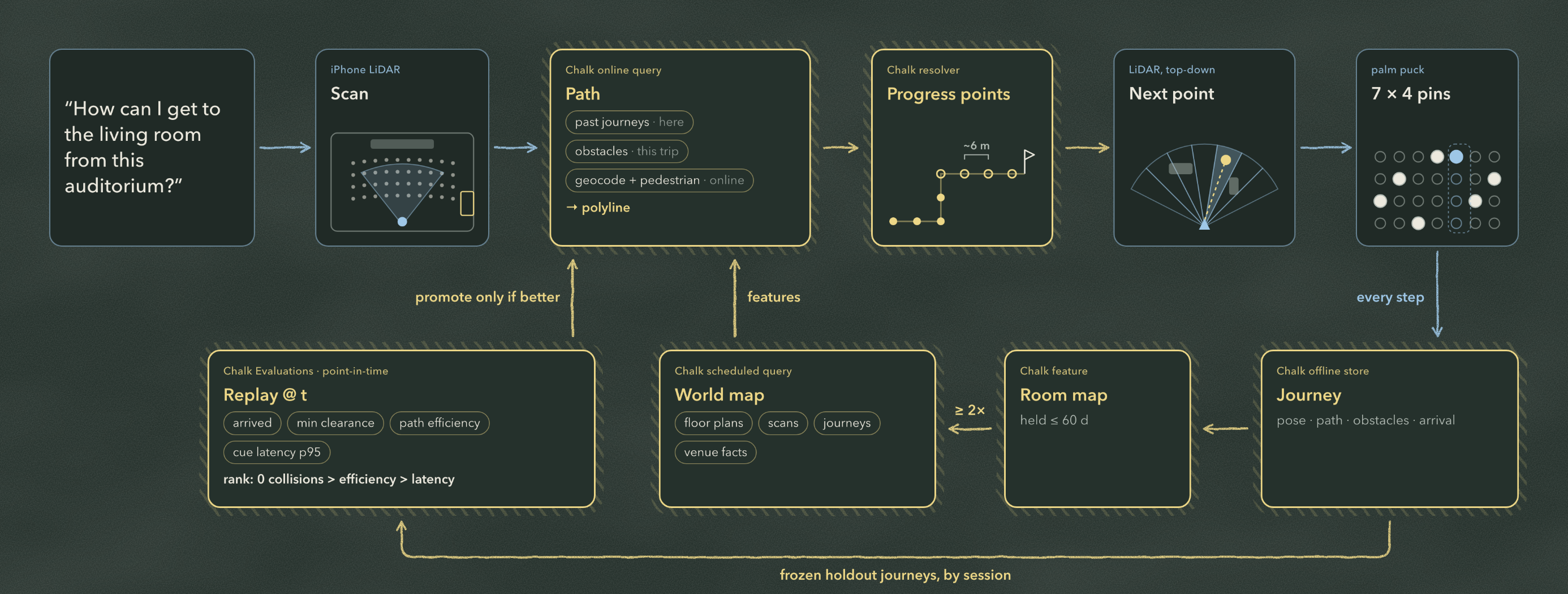
The second use is a loop over real walks. Ask "how do I get to the living room from this auditorium?" and:
- The phone scans the space with LiDAR.
- A Chalk online query plans a path over what's been seen on this trip plus past journeys through the same place.
- A resolver splits the path into progress points roughly 6 m apart.
- The phone finds the next point with live LiDAR and the pins point at it, still showing obstacles the whole way.
- Every step of the walk goes into Chalk's offline store: pose, path, obstacles, whether you arrived.
- Each visit becomes a room map feature, kept for at most 60 days.
- A scheduled query merges floor plans, scans, journeys and venue facts into a world map, keeping only what at least two visits agree on. That map feeds the next path.
- Chalk Evaluations replay frozen holdout journeys, split by session so a walk never grades itself. Candidates are scored on arrival, minimum clearance, path efficiency and cue latency at p95, ranked collisions first, and a new planner only gets promoted if it wins on that ordering.
The data is real: LiDAR scans, logged walks, and venue facts like a downloadable pack for this building built only from what the public pages actually say. A path is a suggestion about direction. It's never a claim that the way is clear.
Challenges we ran into
We bought what we could get. Everything came from stores we could walk or drive to. The cam rods ended up about 11 × 11 × 58 mm, and the rods, not the pins, set the 12 mm column pitch and most of the puck's bulk. We also went from seven columns down to six to keep the build reliable.
One servo per column means one pin per column. A column can only show the nearest thing in that direction, so a chair a meter away hides the door behind it. It's a real limit of the cam design, and we decided to live with it this weekend rather than redesign the actuator.
We don't actually know how far our servo turns. FEETECH rates the FS0307 at 120°. Ours visibly went further on wider pulses. The cam lobes only line up if that number is right, so we designed shafts for both cases and wrote a 15-minute protractor test to pick.
The first chassis couldn't be assembled. A 0.2 mm sideways slide fit looked fine in CAD and was hopeless with a real servo and real PLA. We lost a print cycle to it, reworked the pocket so the servo drops in from the top, and reprinted.
Power has almost no margin. The servos are rated down to 4.8 V, which is 0.2 V under our 5 V supply. A meter of thin USB cable at 2 A eats
$$\Delta V = I \cdot R \approx 2\ \text{A} \times 0.43\ \Omega \approx 0.85\ \text{V},$$
which puts the servos out of spec. And the 1000 µF capacitor doesn't rescue a startup surge:
$$\Delta V = \frac{I\,\Delta t}{C} = \frac{3\ \text{A} \times 1\ \text{ms}}{1000\ \mu\text{F}} = 3\ \text{V}.$$
So the servos run from a wall supply on short, thick wire, which means the demo is tied to an outlet.
A review caught a bad bug. After a neutral packet followed by packet loss, old pin positions could come back about 150 ms later. For this device that's the worst possible failure. We wrote a regression test that reproduced it (43/44 passing), changed the controller so neutral stays latched until a fresh command, and got 44/44.
Perception has known blind spots. The replay harness flags things we decided to report rather than tune away: a 2.03 m door frame can read as an obstacle, and a single LiDAR outlier can raise a pin.
Accomplishments that we're proud of
We designed a tactile display from scratch, printed it, found out the chassis didn't fit, fixed it and printed it again, all inside the weekend. Six servos, six cam rods, 24 pins, and a mechanism where turning one rod picks exactly one pin.
The firmware fails the right way. Bad packets are dropped whole, and a quiet link means every pin goes down and stays down. When a review found a case where old pins could come back after a dropout, we had a failing test for it within the hour and a fix after that.
We could test the puck before it existed. The replay harness runs the real Swift encoder and the real C++ controller on recorded scenes, so most of the pin logic was already working by the time the prints came off the bed.
And the agent is graded on the thing that matters to the user. Not accuracy in general, but how often it claims to see something that isn't there, and whether a new route planner causes more collisions than the old one. Nothing gets promoted unless it wins on those first.
What we learned
The hardware store decided more of the design than we did. Rod thickness, servo travel and a 0.2 V margin shaped the puck more than any of the code.
CAD clearances are a hypothesis. 0.2 mm is a real number on screen and nothing in your hand.
Writing "not verified" next to things was the most useful habit we picked up. It kept simulated results and physical results apart, so we always knew which problem was the real one.
For an assistive tool, what the AI is allowed to say matters more than which model it is. "Found" is a promise. We measure how often it's broken, and a new planner has to beat the old one on collisions before anything else counts.
And a nine-byte contract let four people work in parallel without stepping on each other. The app, the firmware and the CAD all met at that one tiny interface.
What's next for FEEL
Smaller rods, more columns. Machined shafts or finer resin-printed cams would bring the column pitch down and make room for more directions in the same palm.
One actuator per pin. Micro solenoids or shape-memory wire would let a column show near and far at the same time, so a chair can't hide the door behind it. It's more parts and more power, so we'd build a single column first.
Measure the servos. Run the protractor test on every unit, settle on one cam shaft, and set the pulse limits from real numbers.
Cut the cord. Stagger servo startup so they don't all surge at once, test a battery bank under real load, and make the puck walkable instead of tied to an outlet.
Feed the loop. Record consented walks through a few buildings, freeze a holdout set, and let the planner start learning from real journeys.
Put it in the right hands. Everything we know about whether 24 pins are readable comes from our own fingers. Spacing, stroke, tap rhythm and how many directions are actually useful should be set by blind users, and that's the first thing we'd do with another week.


Log in or sign up for Devpost to join the conversation.