-
-
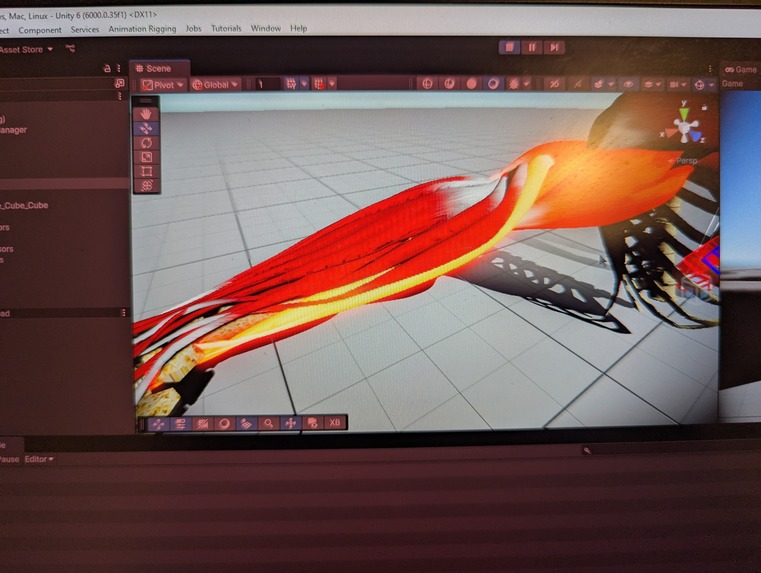
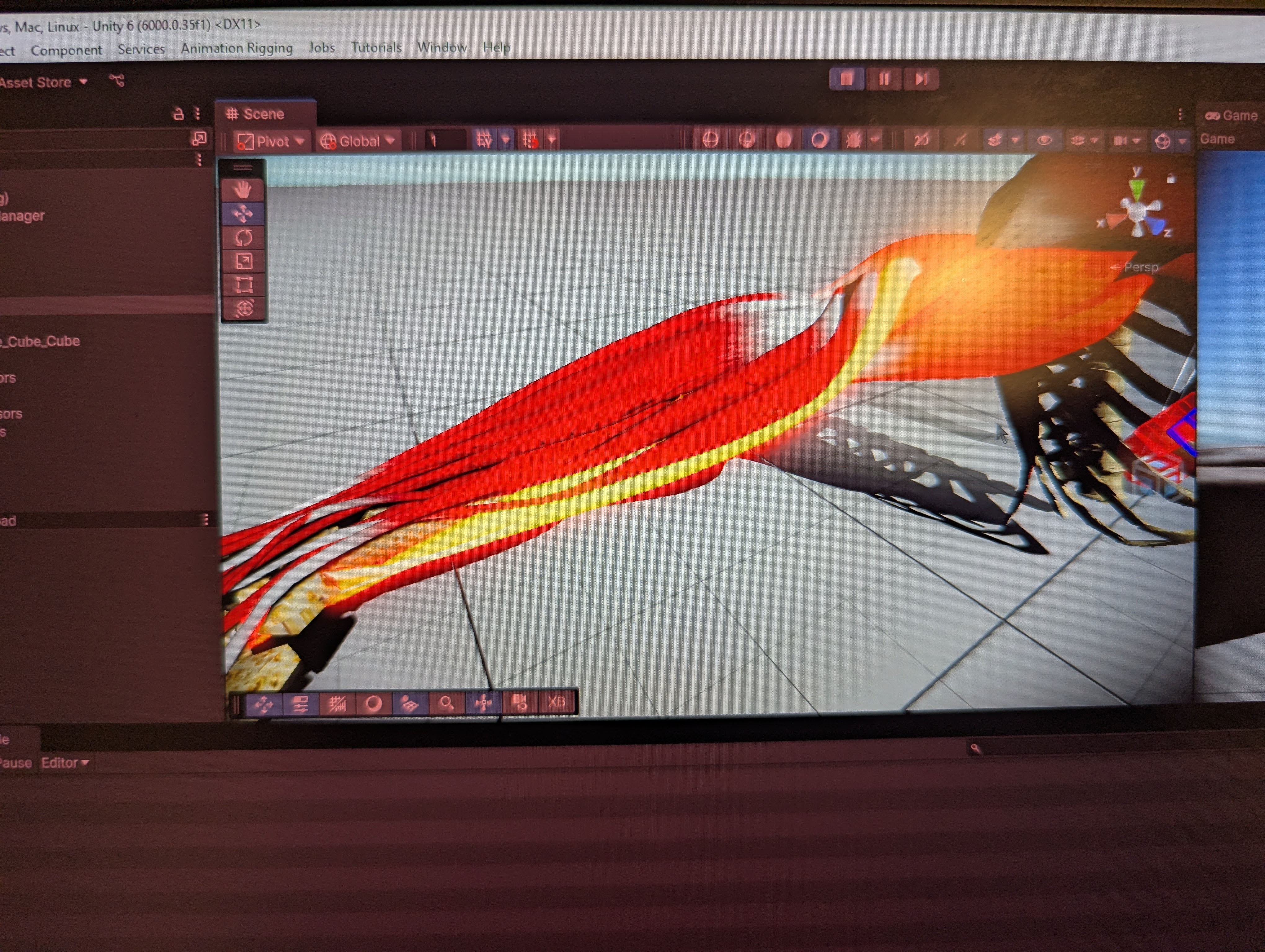
Glowing VR muscles!
Inspiration
Biomedical engineering brings together all kinds of technologies to solve a healthcare need. An experience many people endure at some point in their lives is rehabilitation and physical therapy, activities that are often tedious chores: difficult to do well or motivate to do at all when not in a physician's office. But what if you could do PT anytime on your own with real-time feedback like a practitioner would give you, plus in a fun, engaging manner?
What it does
The FLEXR system guides users through a progression of increasingly controlled isolated then coordinated muscle contractions and movements, visualizing your movements and muscle activity in virtual reality in real-time so you know exactly what you're doing. This feedback helps you assess if you are actually activating the muscles the exercise is intended for, and to help users regain more precise control of muscle contractions.
How we built it
Our project has four main functional components:
- electromyography (EMG) - or muscle activity - recording and processing
- data transmission
- real-time arm movement and muscle activation visualization in virtual reality (VR)
- guided exercise progression in VR
1. EMG
We used a Delsys Trigno(R) Wireless EMG System (Trigno Legacy EMG Sensors) to capture muscle activity. Our proof-of-concept system uses four sensors - placed on the arm for ease of demonstration - to capture activity of four main muscles or muscle groups: biceps, triceps, wrist flexors, and wrist extensors. Each sensor also contains and inertial measurement unit (IMU) and reports kinematic data. The desktop Delsys Control Utility enables MATLAB to communicate with the Delsys Trigno system via a TCP connection and the built in Trigno SDK commands. This connection enables the Trigno system to stream real-time information about the activations of the four muscle groups directly to MATLAB. Raw EMG data are noisy and both centered about zero. In order to create a smooth and accurate measure of muscle activation, the raw signals were rectified and the moving average was taken. Normalization between 0 and 1 was performed automatically by constantly updating the minimum and maximum muscle activation values. Normalization is done per user, and the GUI supports quickly switching between two different users in real time. These processed and normalized muscle activation values were then packaged and sent to Unity via a UDP connection.
2. Data Transmission
UDP is a lightweight transport-layer networking protocol that connects the MATLAB signal processing to the C# environment within unity. UDP was selected due to its speed, alignment with our data, and ease of implementation.
- UDP's lack of handshaking improves the speed at which packets can be sent. Furthermore, UDP's lack of encryption improves the speed at which packets can be constructed.
- The muscle activation packets sent over UDP contain all information required to determine the state of muscle activity. The muscle activation values aren't dependent on any previous packets or time-dependent computations. Thus, the system is sampling at a high enough frequency that minor packet losses due to UDP's lack of handshaking will not negatively impact the system.
- Due to the reduced complexity of UDP, much less configuration is required to get successful communication than other alternatives (MQTT/HTTP/TCP). This allowed us to focus our development efforts on original ideas.
We also chose to operate on the localhost address, port 5005. Localhost was selected to avoid the endpoints mutually locating each other's IP address on the network, an impossible task on CaseWireless. Localhost also allows us to run both the MATLAB service and the Unity executable on one computer, further simplifying the system. An alternate method that avoids the CaseWireless IP issue would be a client-server-client architecture. A server on a cloud service like AWS could run an MQTT broker, or a simple UDP broker, and serve as an intermediate between the two clients, alleviating the need for the mutual IP address search.
3. Real-Time VR Visualization
We developed a 3D Unity VR app to run on the Quest2 VR headset and create an engaging, immersive experience. This consists of a player avatar for movement and interaction in VR, a UDP receiver script to stream processed EMG data from MATLAB, and a muscle model of individual upper arm muscles.
The player avatar was downloaded from Mixamo and included a humanoid rig. Movement of the player avatar was accomplished with an inverse kinematics setup. This approximates the upper arm movements using only the tracking information from the headset and controllers.
We purchased an upper arm model containing individual muscles from the Unity asset store. This model allowed us to individually modulate the bloom of each muscle proportional to their activation. For visualization muscles corresponding to overall arm movement (wrist flexion, wrist extension, elbow flexion, elbow extension) were grouped together to glow with their corresponding EMG sensors. These muscle models were linked to this character avatar such that the user can see their muscles correctly positioned as they move their arm.
A C# script in the Unity app receives normalized EMG intensity data from the UDP port. These values are applied to the emission color on each corresponding muscle which is visualized via a post-processing bloom effect.
Altogether, when you flex a muscle, the corresponding VR visualization of the muscle will glow at an intensity corresponding to the amount you are flexing, and your arm movements are visualized in VR.
4. Guided Exercise
While still a work in progress, the VR app will guide users through a sequence of isolated muscle contractions, specifying which muscle users should flex and to what level. The guided exercise will increase in difficulty, requiring users to gain more and more control over their muscles. Then, the guide will start specifying muscles to contract at the same time, building patients' coordination abilities.
Challenges we ran into
Inverse Kinematics
Initially, we wanted to move the arms based on orientation data from the Delsys EMG sensors. However, our version of the hardware did not support outputting rotation information via MATLAB. To compensate we implemented an inverse kinematics rig using Unity's Animation Rigging package. Our initial setup resulted in unnatural movement of the upper arm. Still, with some guidance from the Valem tutorial linked below, we ended up with a result that approximated our movements.
Visual "Glow" Effects
By default, the project was not set up to support post-processing. The render pipeline asset in Unity and the camera needed to have post-processing, HDR, and a bloom effect enabled. The bloom effect works on materials with an emission map. Color values > 1 are processed as a glowing effect. We modified the default muscle material to include emission and tweaked the threshold and intensity values of the bloom such that the muscles glowed appropriately.
UDP Communication
We created three iterations of UDP communications:
- A bidirectional python UDP client at first, to prove system functionality and determine packet structure.
- A C# UDP receiver to work with unity.
- A MATLAB UDP transmitter, that sends commands out
Many errors and weird bugs were encountered when attempting to send and receive simultaneously on the same port across multiple frameworks and languages. Different software packages and languages had different defaults for mutual port access or the ways they format the packets.
Software Tool Integration
A major challenge we had was with the Delsys data acquisition software. The only machine we had capable of running the VR as a dynamic app in the editor window initially could not connect to the Delsys base station for communication with the sensors. We resolved the issue by investigating the driver software of the USB connection. The Delsys hardware we used was an older model so by rolling back our USB drivers we were able to communicate with the station! As a backup, we considered running the MATLAB/Delsys data software on one machine and UDP the data to a separate laptop running the Unity simulation. Luckily, this was not necessary but could be a solution for underpowered machines.
Accomplishments that we're proud of
- Succesful IK implementation
- Isolating the VR setup, per muscle bloom effects, the networking, and the EMG data acquisition such that each could be developed independently.
What we learned
- real-time EMG processing
- "glowing" VR objects
- UDP client creation
- photo editing
- IK rig setup
Favorite Team Moments
(but it's just Eileen)
- "They're all in the position to be un-exploded" - Eileen
- "If they're all in the same mesh, I cannot glow them individually" - Eileen
- “God this IK looks sexy though” - Eileen
- "We have ourselves heart attacks too"
What's next for Feedback-Linked Exercise: XR Rehab (FLEXR)
Immediate next steps include finishing the guided exercise program. Future development would include expanding the muscle model imported into the VR app to support all possible muscles and allow physical therapists to input set exercise guides.
References
Valem Tutorials:
- Complete VR Body Setup - Arms and Legs IK with Hand Animation (https://www.youtube.com/watch?v=v47lmqfrQ9s)
- https://drive.google.com/file/d/1eSaeMTLxWpRYo8ZYM6hprlMG-N716REL/view : IK Rig Follow script
- https://www.mixamo.com/#/?page=1&type=Character : Mannequin character model
- https://assetstore.unity.com/packages/3d/characters/arm-muscles-motion-104538 : Upper Arm Muscle Models


Log in or sign up for Devpost to join the conversation.