

Inspiration and What It does
Foster Users Engagement with who Views, Plays and Watch Your Facebook Videos in Real-time.
About 70% of Facebook users are more dependent on video contents.
Most Facebook Users who Post Videos online has been trying to know who is ,b>watching their videos live, see who is viewing it in real-time,his pictures, name and time so as to be able to
connect to them in real-time as they play the video.
Imagine when someone clicks on your Facebook Video to play it and you as the poster of the video gets an immediate alerts with information of the person watching your video in real-time. You as the Poster of the Video can immediately connect to the viewer perhaps say (Hi, I see your are now watching my Video. How was it etc.). This does not only create more room for friendship but an everlasting engagement ever in the history of Facebook.
Our question now is how do I connect and notify the posters of this videos via a real-time alerts when someone is watching their video, who watched the video and time the video was watched?.
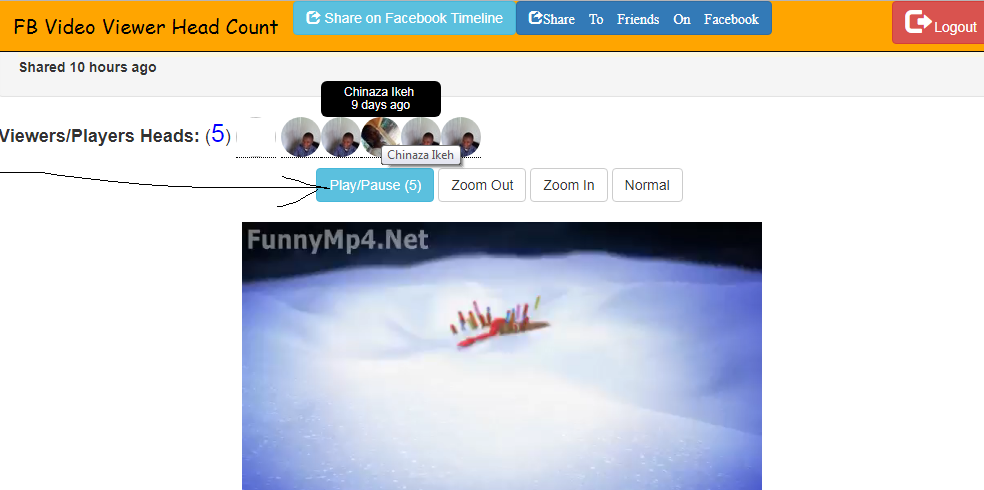
Introducing FB Video Player Profile Head count is the answer to that. >b>This app does not only shows facebook head of the Video viewers but along with their names and time for which the video was viewed. And also when a Facebook User clicks to watch the Video an assumed realtime is sent to the Poster of the video which will create a real time interaction between the Poster and the Viewer. This will create an engaging experience on the Facebook ever in the history.
How to use this app:
1.) Login using Facebook
2.) Click on Video to Play it. Your are counted in. Your Facebook Picture Head, names and time
for which you viewing the Video will appear and an assume real time alerts is sent to the Poster of the Video in order to foster collaboration between the Video Poster and the Viewer.
3)Ability to Zoom the Video In, Out and Normal to create amazing video display
4.)Use Facebook Share button and Facebook Send Dialog Button to share your content
on your Facebook Timeline and to a specific Facebook user,Friends etc..
in HIPAA Compliance Mode respectively.
FaceBook Technology Used:
1.)Facebook Login Graph API: Used to authenticate Users
2.)Facebook Shared Button: used to allow user to share content to her Facebook Timeline
3.)Facebook Send Dialog Button: used to allow user to content to a specific Facebook Friends. in HIPAA Compliance Mode.
.


Log in or sign up for Devpost to join the conversation.