Inspiration
A few months ago, one of our team members had their Discord account hacked, which really highlighted how vulnerable we can be with weak or reused passwords. On the flip side, several of us have struggled with forgetting complex passwords we’ve created for security's sake. We realized that most password generators either give you something super secure or something easy to remember—but rarely both. So, we wanted to create a solution that hits that sweet spot. By letting users input a few personal but non-sensitive details, we generate passwords that are secure and actually stick in your mind. It's all about making strong digital security a little more human-friendly.
What it does
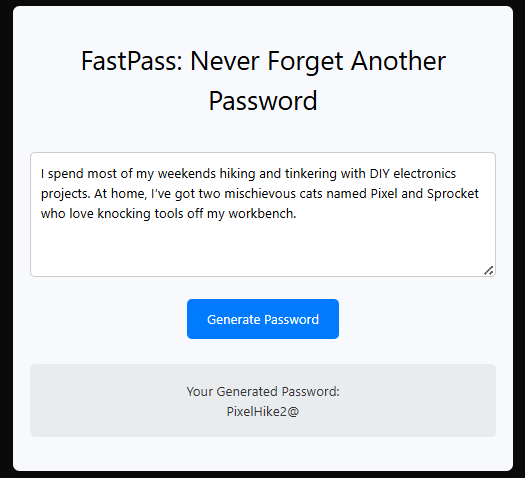
Our project generates secure, memorable passwords by allowing users to submit a short piece of texts such as a meaningful sentence, a list of favorite things, and/or a memory. We then process that input to create a strong, unique password that’s hard to guess but easier for the user to remember. It’s a simple, user-friendly way to improve password security without the usual frustration of forgetting complex passwords.
How we built it
We built the project using Next.js for the frontend, which allowed us to quickly set up a responsive and clean user interface. For the backend, we integrated the Google Gemini API to help generate passwords based on the user’s input. The API takes the text users submit and returns password suggestions that balance security with memorability. This setup let us combine a smooth user experience with powerful backend processing, all within the timeframe of the hackathon.
Challenges we ran into
Since users can submit anything in the textbox, it was tricky to design an algorithm that could consistently turn that into a secure password. We addressed this by using natural language processing techniques to extract key elements and then applying transformations like substitutions, capitalization, and special characters. There was also concern that users might accidentally include personal or sensitive data in their inputs. To mitigate this, we added warnings and tips in the UI, encouraging users to avoid things like full names, birthdays, or addresses. We also ensured that no inputs are stored or logged.
Accomplishments that we're proud of
We're really proud of all that we've accomplished, especially since this is many of our teammates' first hackathon. It was our first time building something like this under a time crunch, and seeing it all come together as a real, working tool was a huge win for us.
What we learned
We learned a lot throughout this project, both technically and as a team. On the technical side, we gained experience working with text processing, basic encryption concepts, and building logic that transforms user input into something secure and functional. We also learned how important it is to design with the user in mind, especially when it comes to guiding input and ensuring clarity in the UI. Since this was many of our teammates' first hackathon, we learned how to collaborate under pressure, divide tasks effectively, and quickly turn ideas into a working prototype. It showed us how much we can accomplish in a short time when we work together and stay focused.
What's next for FastPass
Next, we plan to improve the user experience by adding a real-time password strength meter, so users can better understand the security level of their generated passwords. We'll also focus on protecting user privacy by ensuring all text inputs are processed safely, without storing any sensitive information. Additionally, we want to give users more control by allowing them to customize password criteria such as length, use of symbols, or numbers to better match the requirements of different platforms.
Built With
- google-gemini-api
- next.js

Log in or sign up for Devpost to join the conversation.