-
-
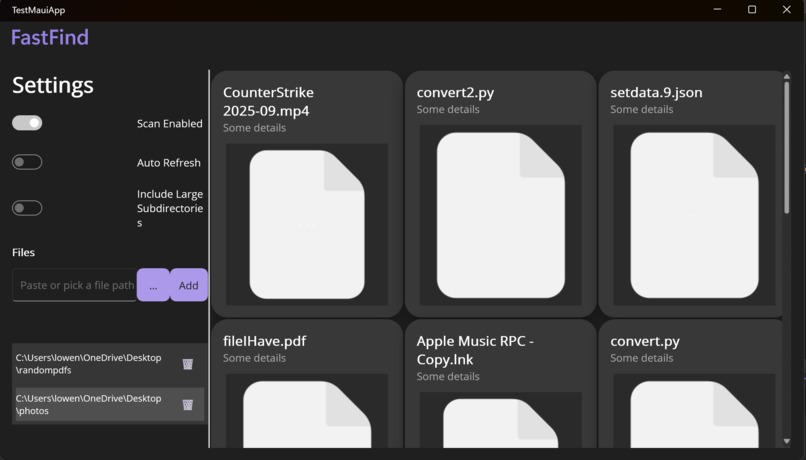
Main App Dashboard
-
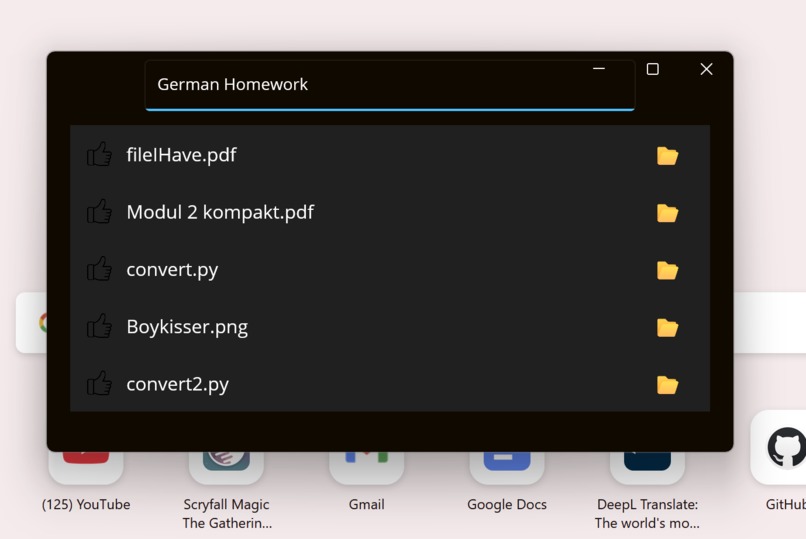
Search Bar
Inspiration
We got tired of having to manually scour through our hard drives just to find the one file we're looking for. Sometimes you download your favorite picture of your dog, but it gets lost among the sea of files on your device. We wanted an elegant way to avoid this problem in the future.
What it does
We built a desktop application that allows you to choose directory to "tag". Whenever a file is added to this directory, we utilize artificial intelligence to tag your file with many different unique keyword identifiers. For example, going back to that dog picture example, it would add tags like "Dog", "Pet", "Fluffy", or "Photograph", and depending on the context given, like name and file location, it may be able tag it with his actual name. It's a multi-modal approach that supports evaluating the contents of images and pdf files, and uses additional context such as the file path and file name to generate even more accurate file descriptions.
How we built it
We built this app using a cross platform C# platform called Maui. It was made using Visual Studio, with a fair bit of help from GPT-5.
Challenges we ran into
Learning new frameworks is hard. No one on our team had much experience, if at all, with the framework we were using. Figuring out the ways and methods of this new framework came at quite the challenge, but we tried our best to persevere.
Accomplishments that we're proud of
We are proud that we figured out a good method for collaborative development that allowed us to avoid merge conflicts and other common issues. We also managed to complete our goal to a degree which we are satisfied with
What we learned
We learned some great strategies on how to integrate artificial intelligence into our development cycle without just copy and pasting everything from ChatGPT into the IDE.
What's next for FastFind
We just need to add some finishing touches, some polish here and there, and we'll be ready to release the project and add it to our Githubs.
Built With
- c#
- gpt5
- maui
- visual-studio


Log in or sign up for Devpost to join the conversation.