-
-
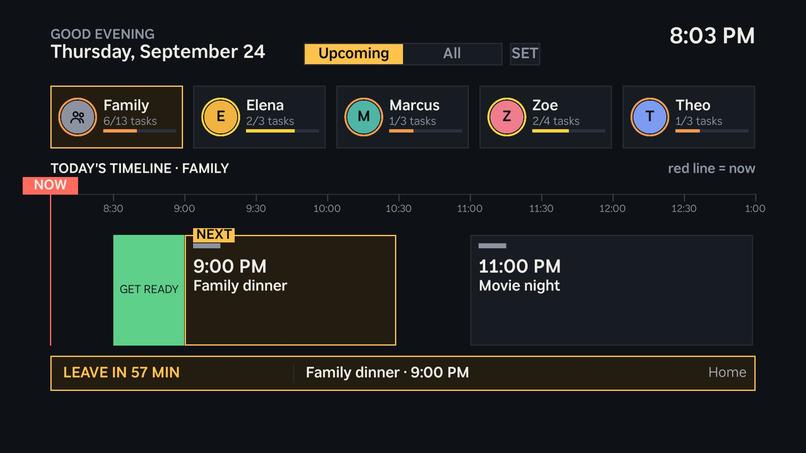
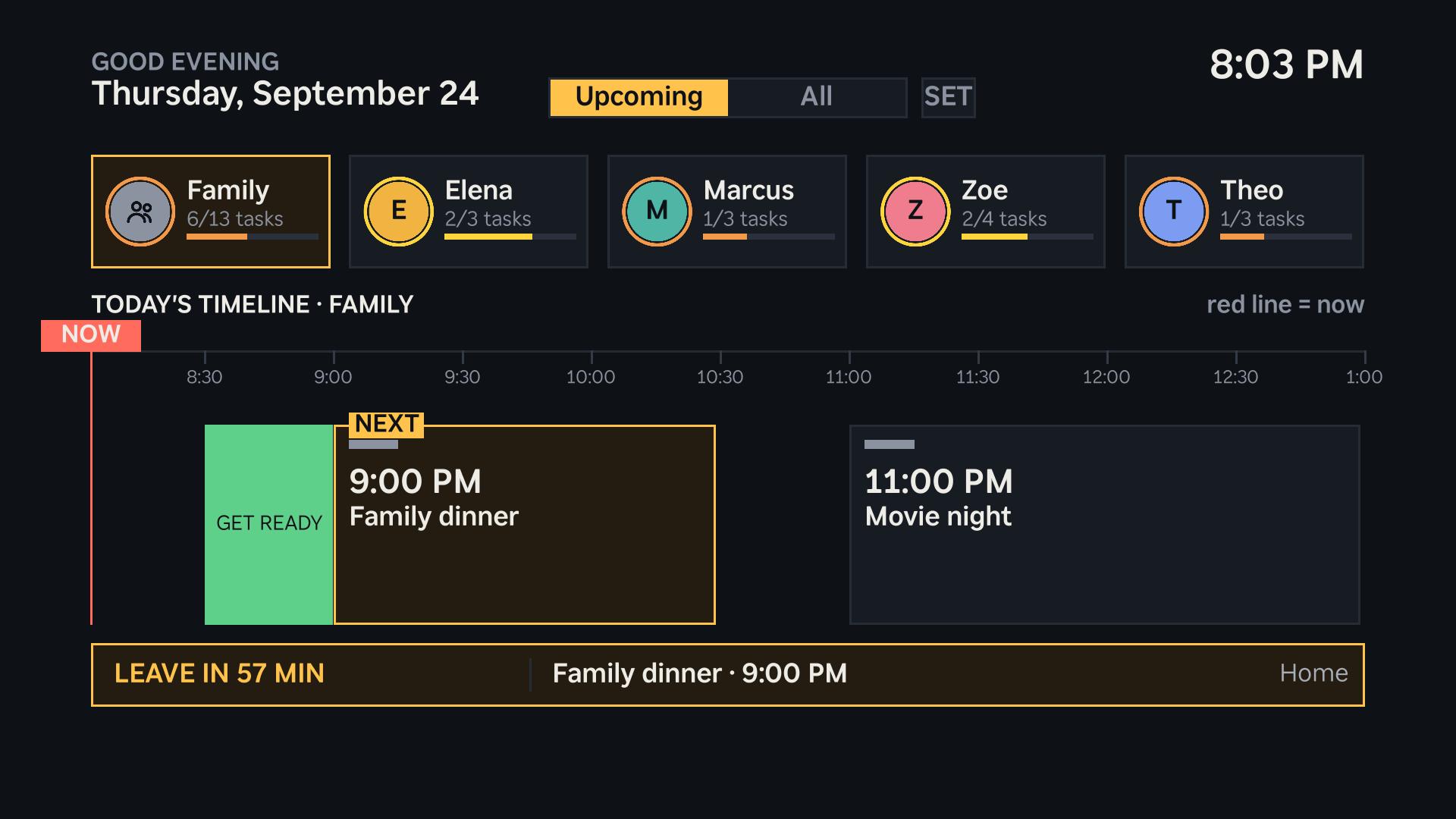
The Roku TV dashboard: everyone's day on a timeline, a red NOW line, a GET READY block and a LEAVE IN countdown for dinner.
-
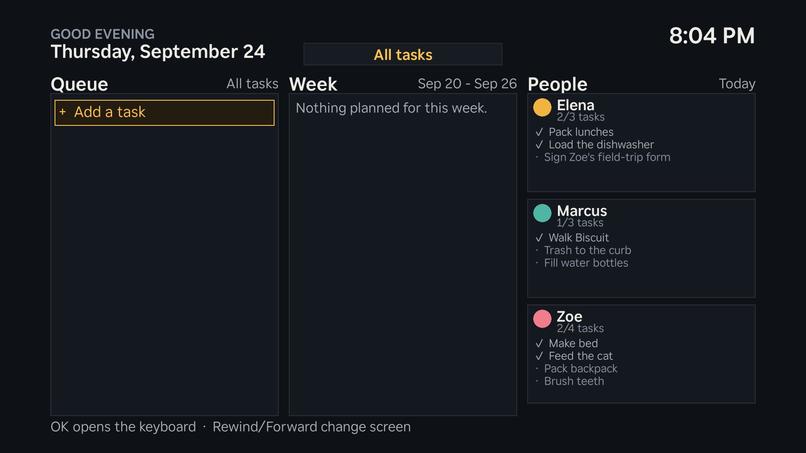
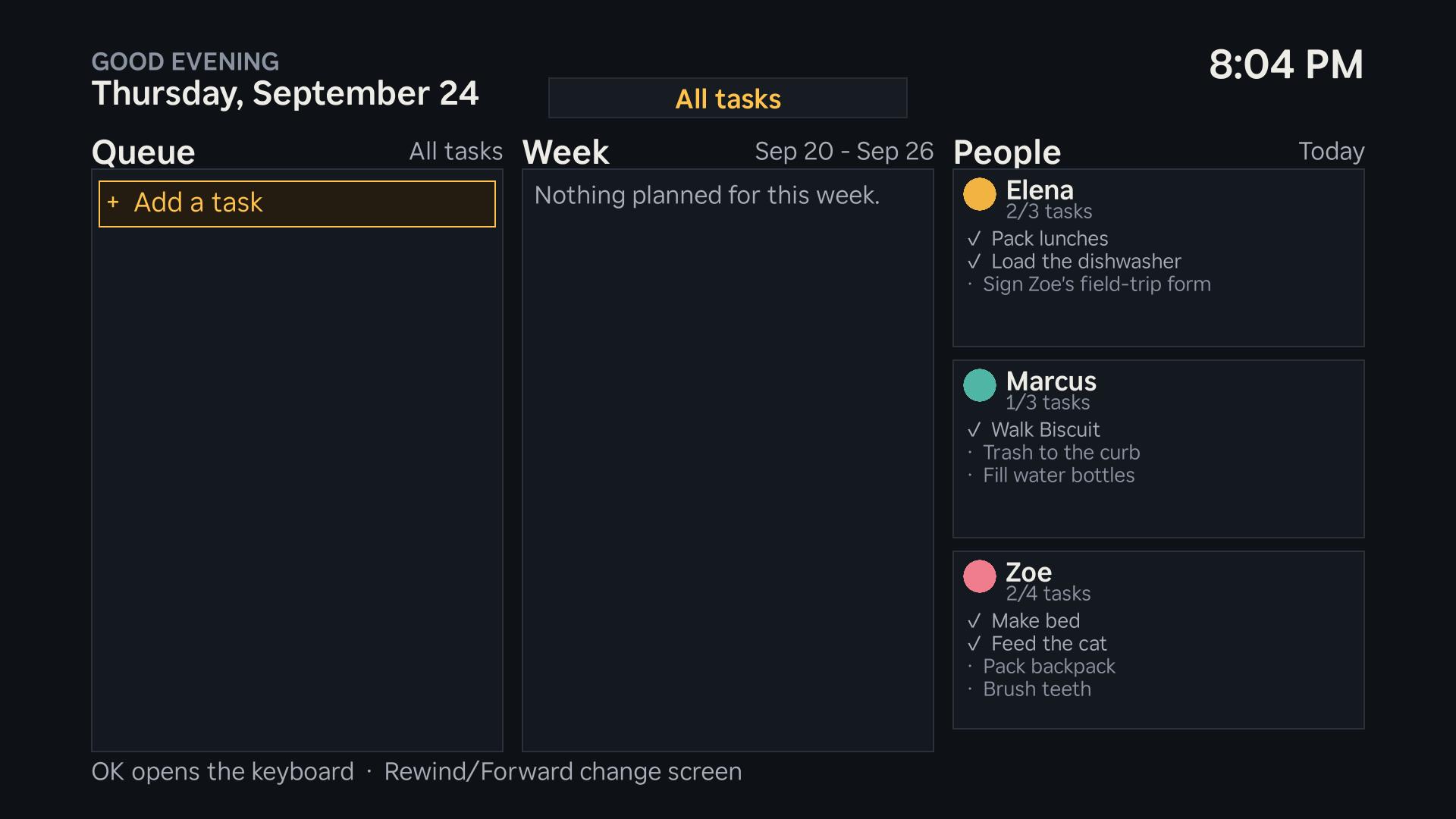
Everyone's tasks on the TV: the queue, the week ahead, and each person's checklist, ticked off with the remote.
-
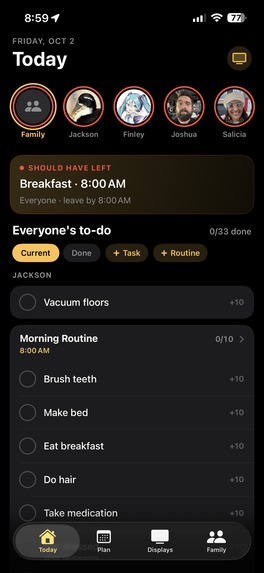
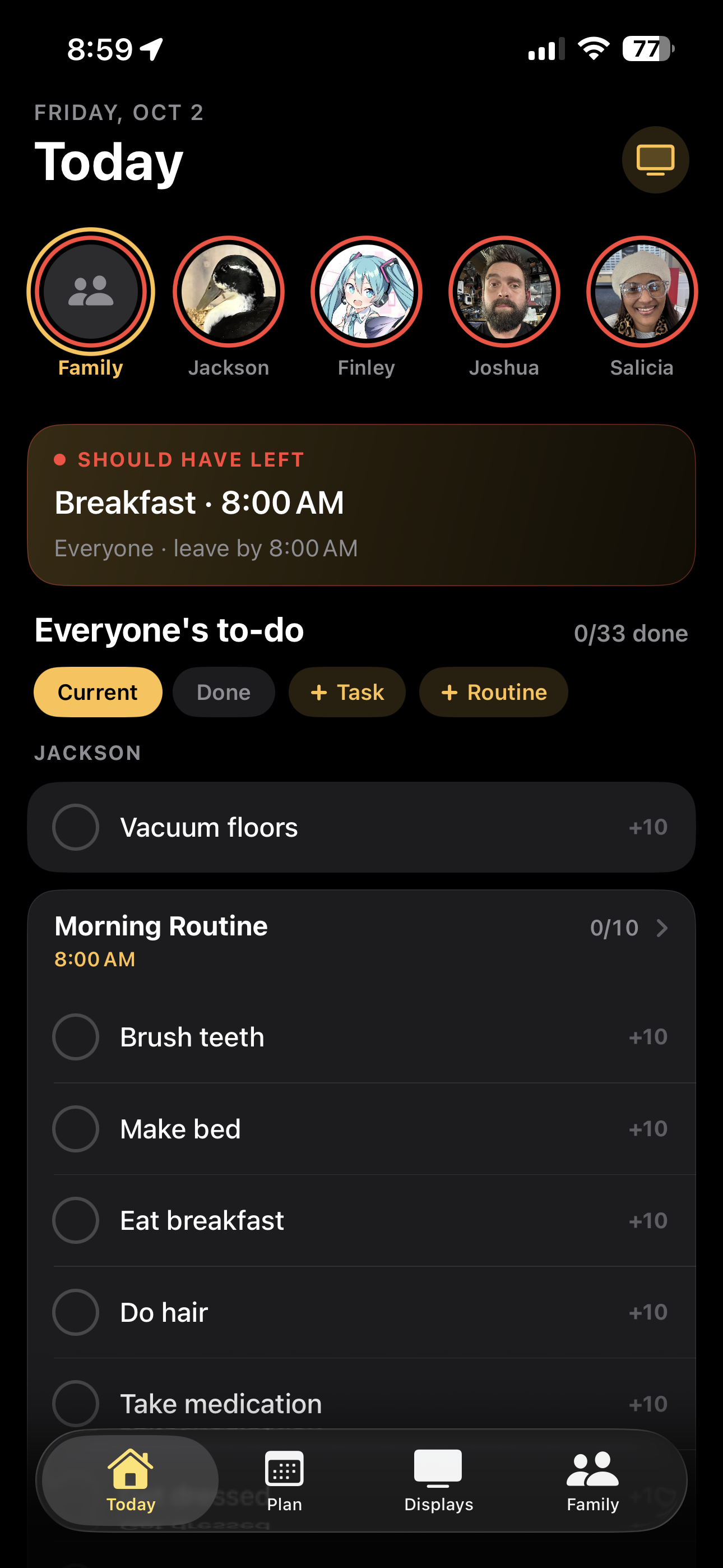
Home screen for task organization.
-
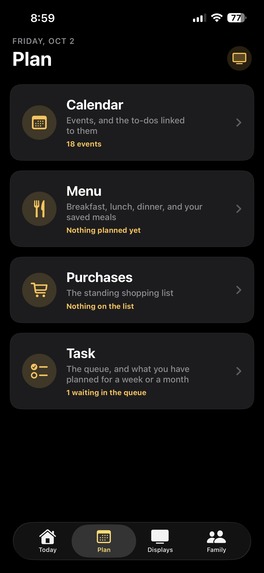
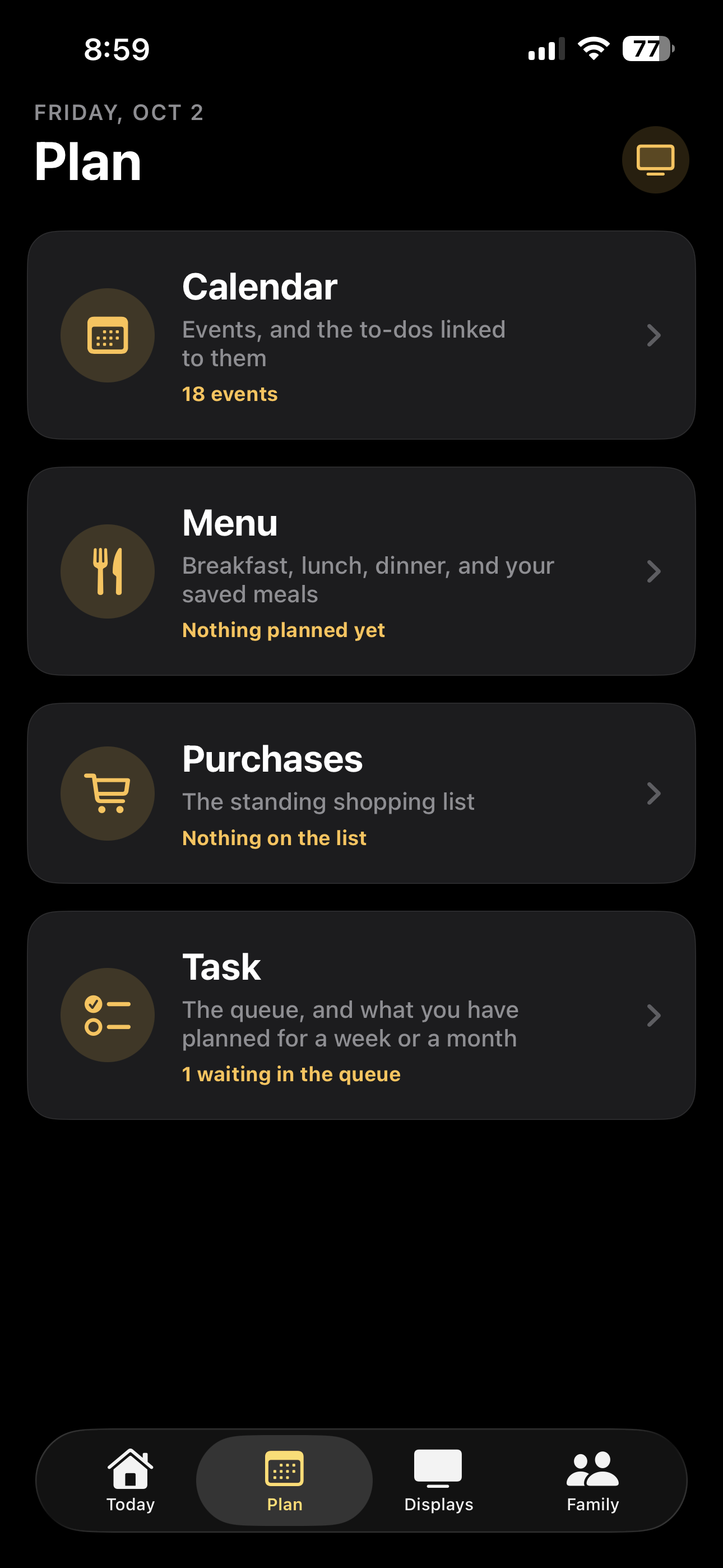
Meal Planner, Purchase Planner, and Task Planner for long-term planning.
-
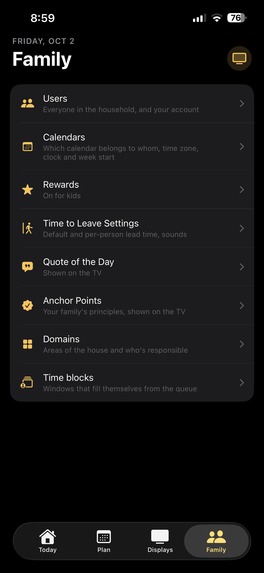
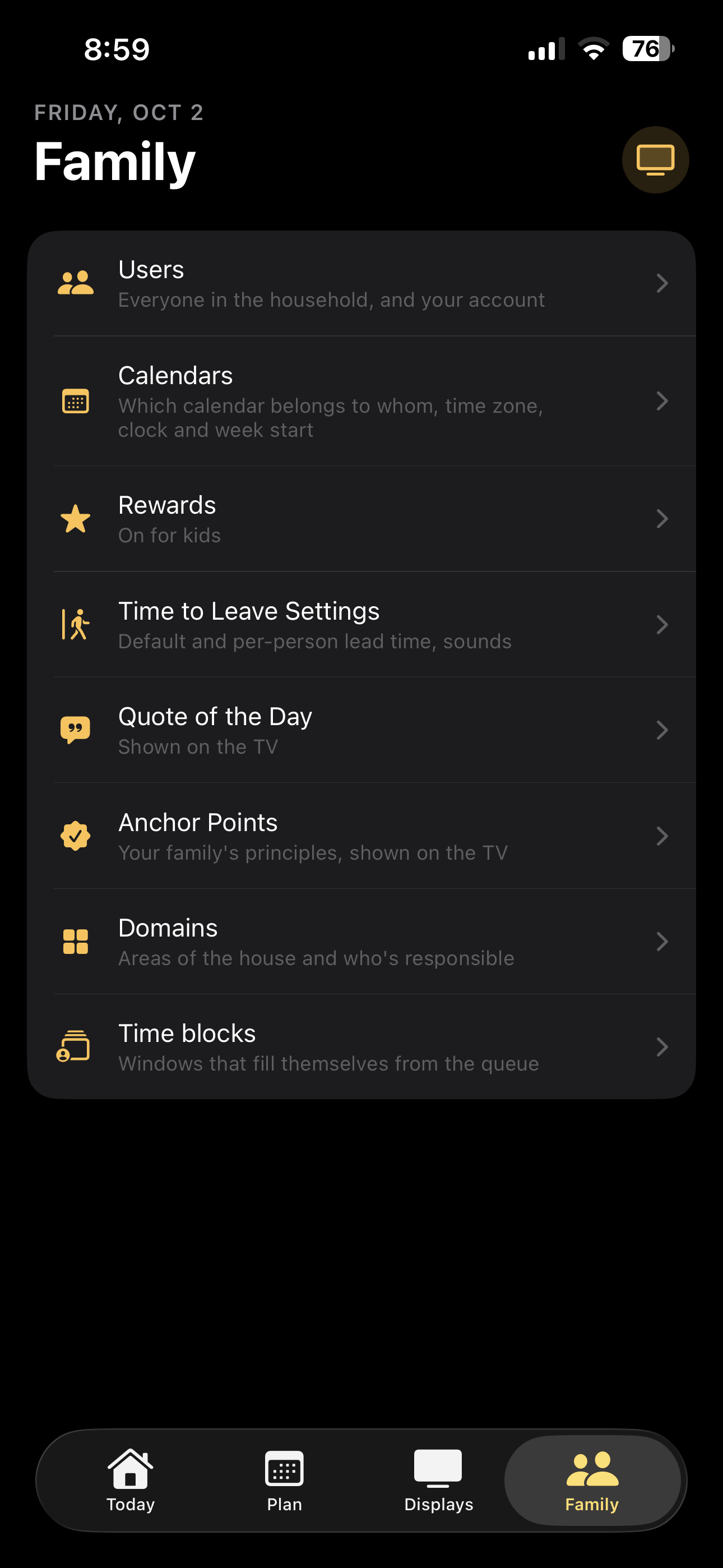
Our family settings page.
-
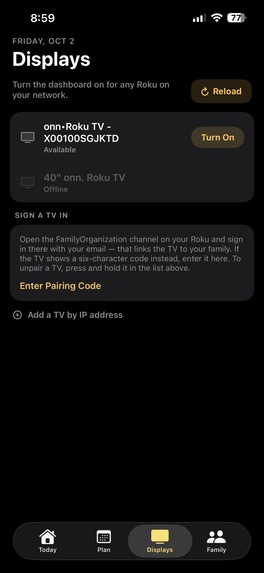
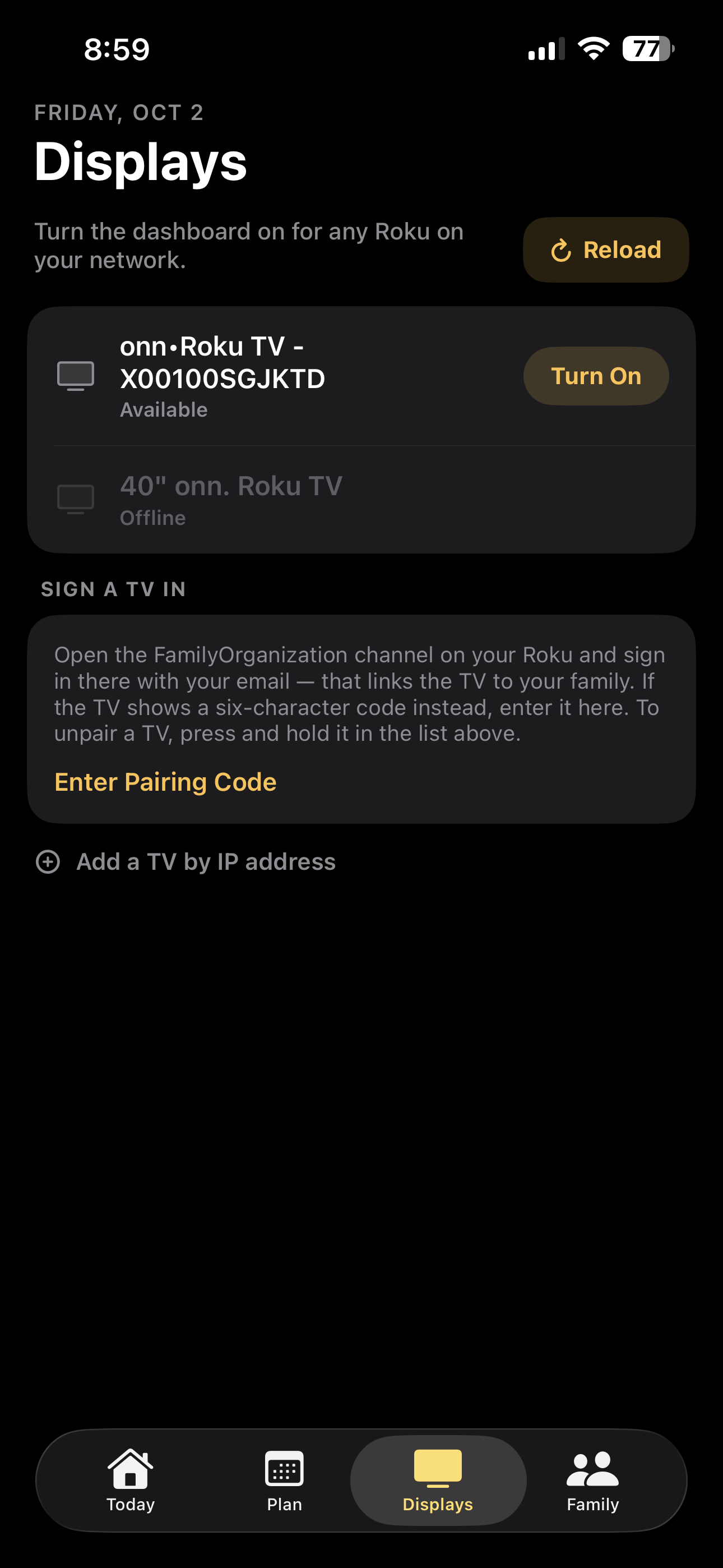
Roku pairing and screen control. Launches app on the Roku from the iOS.
-
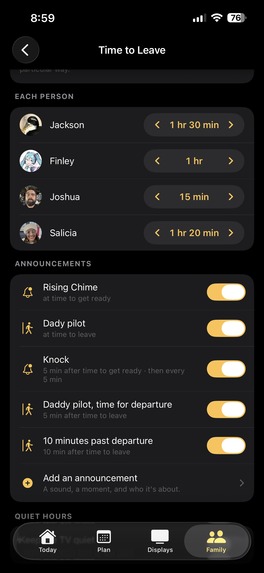
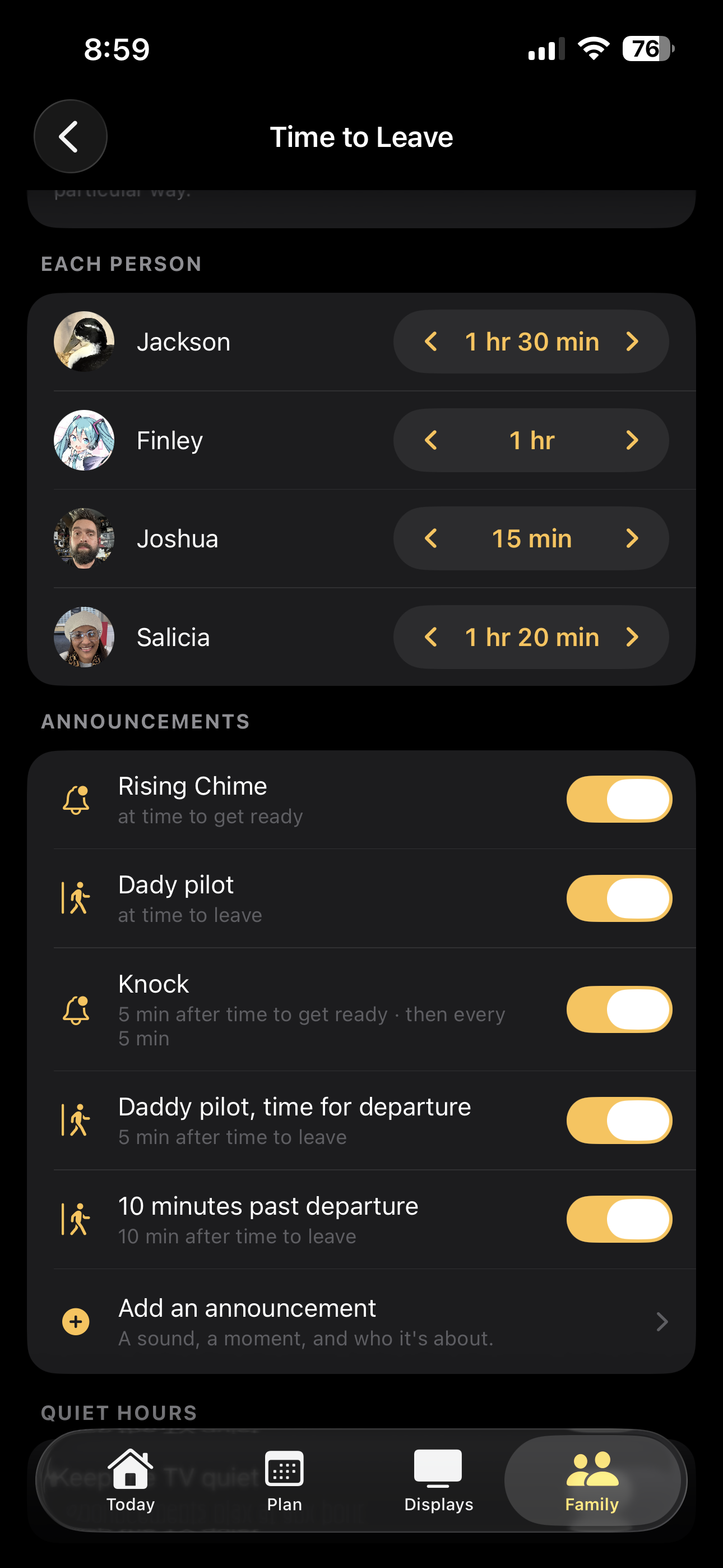
Sound effects that play when there's a calendar event and it's time to leave the house.
-
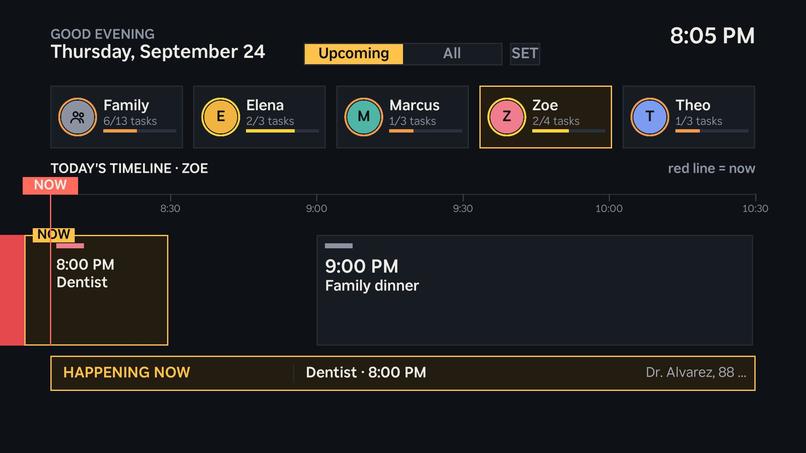
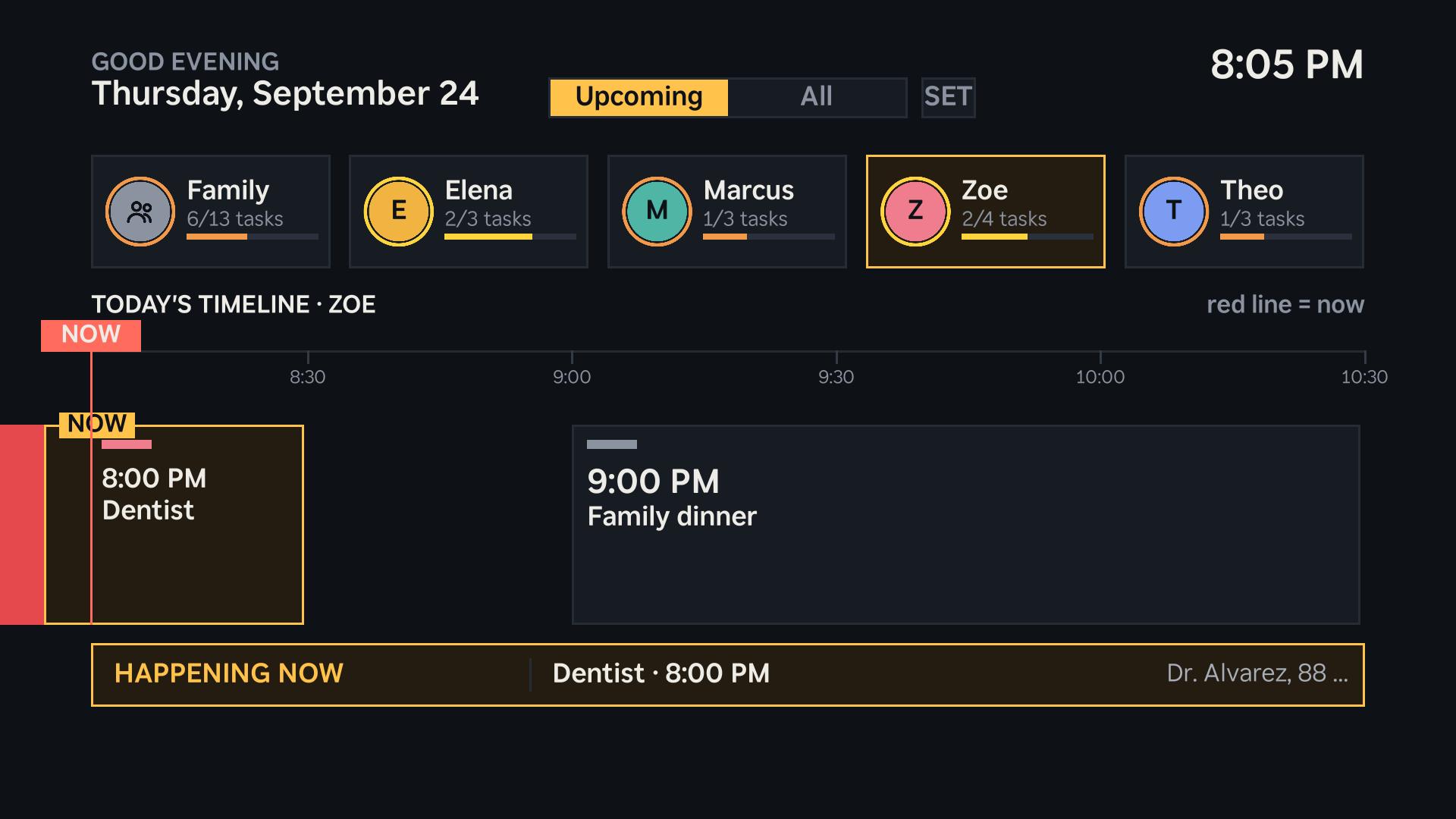
One person's day: pick someone with the remote and the timeline becomes theirs. Here a dentist visit that's happening now.
-
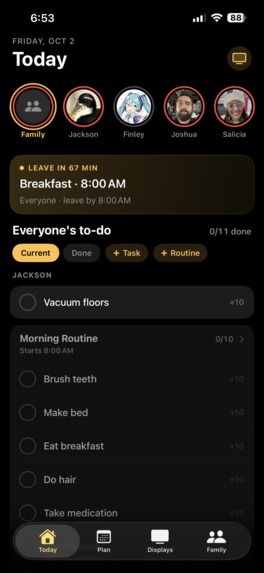
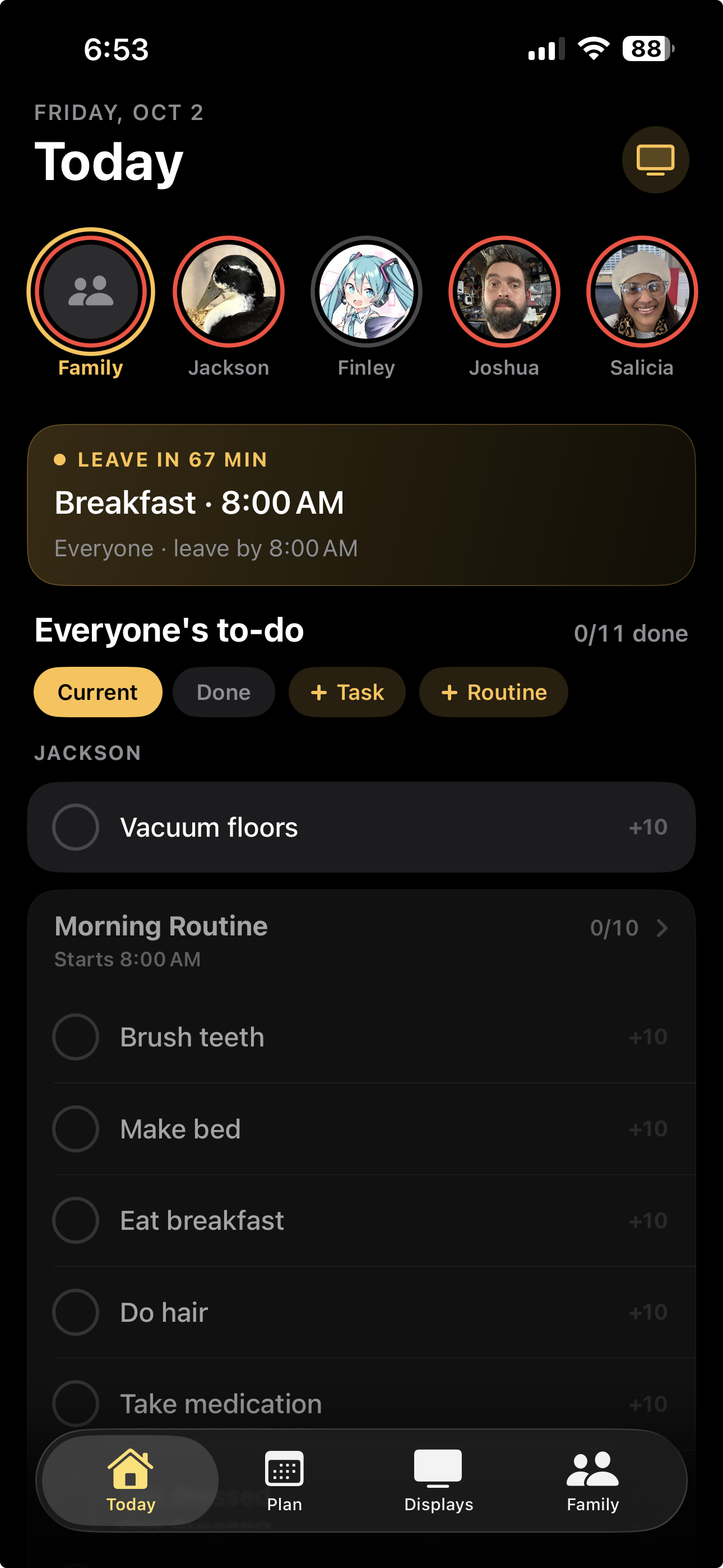
The iPhone app: everyone's day, the LEAVE IN countdown, and each person's to-dos and routines.
-
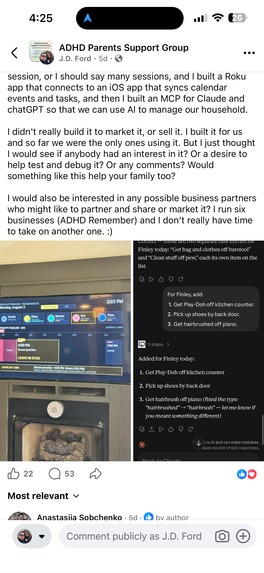
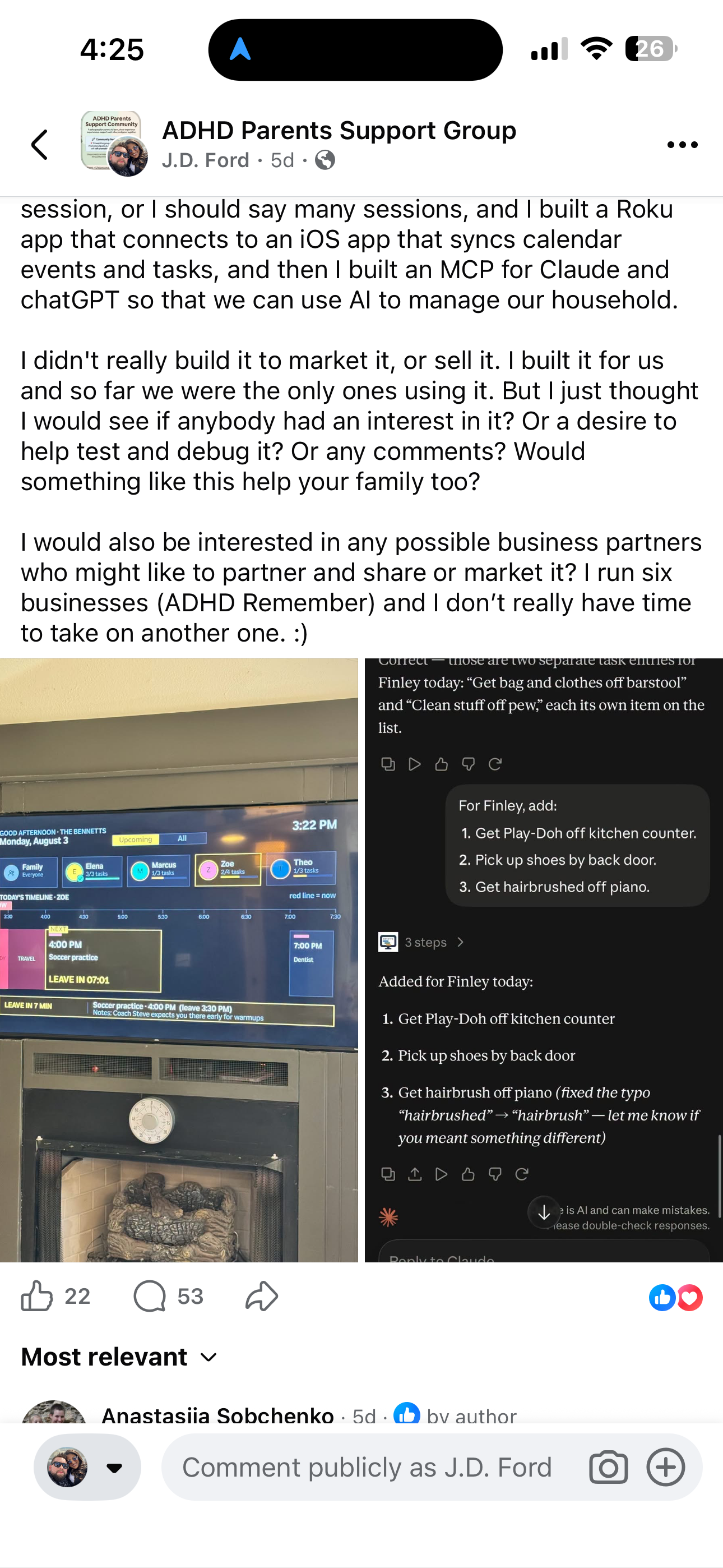
The post that went viral.
-
FamilyOrganization.app iOS app icon, 1024 × 1024, uncropped.
Try it right now, in your browser: FamilyOrganization.app runs the TV app and the iPhone app side by side, interactive, on any device. And you can follow the whole build, start to finish, at FamilyOrganization.app/build-in-public.
Inspiration
This wasn't the app we planned to enter
In all honesty, FamilyOrganization.app wasn't our first pick. Since July 17th I had been building Organized.Health, a HIPAA-compliant healthcare app that helps chronically ill patients, and that was the app we were going to enter in Shipaton. FamilyOrganization started on the side on August 1st... something I was building for my own family and worked on whenever I could.
Then, a couple of weeks before Shipaton closed, I posted a phone photo of our TV in a few ADHD and parenting Facebook groups, and it blew up. 104,703 views. Over 20,000 engagements. Hundreds of parents in the comments asking how they could get it.
Switching wasn't easy. It meant setting aside an app we had put months into, it was incredibly hard on us, and it made us late... this entry went in with minutes to spare. But the way we read the Build in Public award, the whole spirit of it is building what the public actually wants, and the public had just told us, loudly, what that was. So we shifted everything, and built the rest of it in public.
The morning that started it
All four of us in our house have ADHD... and if you've lived in an ADHD house, you already know what that means at 7:30 in the morning. "Five more minutes" isn't a unit of time, it's a feeling. Shoes go missing. Somebody's still in the shower when we should be pulling out of the driveway.
My wife has fought time blindness her whole life. Getting out of the house on time was a daily battle for her... not because she didn't care, but because time just doesn't show up for an ADHD brain until it's already gone. So the heart of this app is a timeline calendar: it takes the events already in our iPhone calendars and turns them into blocks on the TV that you can watch move in real time, with announcements and reminders set up the way each person needs them.
My own vision was simple. I wanted to stand in the kitchen fixing breakfast and see where every one of my kids was in their morning, without screaming across the house, "Do you have your shoes on? Are you ready?" I wanted to look up at the TV and just see it, live. That's what this does. When one of the kids ticks off a task (shoes on, teeth brushed, backpack packed), it shows up on the TV right away. One place I can see from anywhere in the house... and one my kids can see too, on the TVs in their own rooms.
The family wall screens built for this, like Skylight and Hearth, run about $150 to $700 for a dedicated screen. That being said, we already had a big screen in the living room that every single person in our house looks at every single day. So why buy another one? We built the family hub for the TV we already owned.
What it does
FamilyOrganization.app is an iPhone app that runs your family's day and puts it on the TV you already own — a Roku TV, today.
ADHD makes time invisible. Transitions are hard, the next step slips away, and "we need to leave soon" means nothing until it's too late. So instead of adding more to a parent's plate, the app takes all of that out of everyone's head and puts it on the wall, where the whole family can see it.
- Everyone's day as a timeline, drawn to scale. A red NOW line moves across it as the day goes, so a kid with time blindness can watch time pass instead of guessing at it.
- Leave settings that do the math for you. Events come in from the family's iCloud calendar. When an event has an address, we pull the drive time from the Google Maps API, live traffic included. Then each person sets how long they need to get ready... it might take one person an hour and another two. Put together, the TV shows a GET READY block, a TRAVEL TIME block, and a LEAVE IN 7 MIN countdown that turns into GO NOW.
- Announcements and sound effects. An announcement when it's time to get ready, another when it's time to leave, and interval reminders in between, so nobody loses track halfway through. They can play through the whole house or just on one person's TV, and you can record your own.
- Kids check off their own tasks with the TV remote. No phone or tablet in their hands, and the moment they do, every TV in the house shows it.
- Just tell Claude, or Alexa. Our own MCP connector lets me walk through the house at night and tell Claude, in voice mode or by dictating, what needs to be picked up before bed and what needs to change tomorrow... and it lands on the list and on the TV. Our Alexa skill does the same by voice. Both work today and are in beta with a small group of families.
- Routines that reset every day and rotating chores, so the morning list is already waiting when everybody wakes up.
- Meal planning. Plan the week's meals on the phone, and the TV shows what's for breakfast, lunch and dinner when it's mealtime.
- Anchor points. The things our family believes and wants our kids to hold onto, on their own screen on the TV.
- Built for families anywhere: 12- or 24-hour clocks, Sunday or Monday weeks, and a time zone for each TV.
The iPhone app is where the family gets set up, the week gets planned and the TVs get managed. Parents create every login for their kids.
How we built it
While I was building Organized.Health, the app we had planned to enter, I started this one on the side on August 1, 2026, and worked on it whenever I could. By the deadline it had 222 commits. One repository, one shared database, every screen.
| Layer | What we used |
|---|---|
| iPhone | Swift and SwiftUI, EventKit to read the family's iCloud calendars, RevenueCat for plans |
| TV | A Roku channel in BrightScript and SceneGraph that pairs with a 6-character code |
| Backend | Supabase (Postgres) with row-level security, so every family only ever sees its own rows. Edge Functions and a scheduled job refresh drive times from the Google Maps API |
| Voice and AI | A Model Context Protocol (MCP) server, so Claude can read and add to the family's list as the signed-in parent, and an Alexa skill |
| Web | React, Vite, TypeScript and Tailwind on Netlify, including the interactive versions of both apps |
| Shared rules | One shared set of test cases for the scheduling rules (week starts, get-ready windows, time zones), so the phone, the TV and the web can't disagree with each other |
I've been coding since I was 16, when I built my first website in HTML... in Notepad. That's a little over 20 years now. This time I built it with Claude as a pair programmer, and in all honesty it's the fastest I've ever shipped anything this size. AI wrote a lot of the code. I decided what got built, and every feature got tested on our own TV before anybody else saw it.
Challenges we ran into
- Changing apps right before the deadline. The hardest challenge wasn't code. It was walking away from two months of work on Organized.Health with only weeks left on the clock, and pointing everything at the app people were actually asking for. In our belief, that's exactly what Build in Public is about.
- International expansion. We were shocked when beta requests came in from 13 countries. Our signup form had been built for Americans: it assumed any 10-digit number was a US number, so a Dutch mobile typed the local way became a broken "+1" number and the whole signup failed. We had to make last-minute changes so international families could actually get in... per-country phone parsing and a country picker, then 12- or 24-hour clocks, Monday week starts and a time zone for each TV, tested by pretending we lived in London.
- Families on devices we don't support yet. A lot of the people asking to test it didn't have an iPhone or a Roku. Rather than tell them to wait, we rebuilt both apps as an interactive web version on FamilyOrganization.app, so anyone can try it in a browser and tell us what they think.
- The first build on our TV was unreadable. August 3rd: text cut off and spilling past the edges of the screen. We reworked the whole layout that same afternoon.
- Kids use this app, so it has to be built carefully. Children's privacy rules (COPPA) drove real decisions: parents create every child's login, and there's no Google Analytics anywhere a child can see.
- Honestly? The deadline. Because we switched late, RevenueCat, App Review and this write-up all happened in the final stretch... the first version of this page was written with eight minutes on the clock.
Accomplishments that we're proud of
- We submitted at all. The last-minute switch put us in a huge pinch, and getting a working app across the line anyway is the thing we're proudest of.
- We listened when parents were wary of AI. Some of the strongest reactions we got were from parents who didn't want AI anywhere near their kids. So we took a hard look at the AI connector with children's privacy (COPPA) in mind: only a parent who runs the household can connect it, they see plainly what it can view and change and have to acknowledge that before connecting, every approval is recorded and kept, and we stopped it from reading the family's home address. AI isn't involved in the app unless a family turns it on.
- We built an online, interactive version of both apps. So many beta families weren't on iPhone or Roku that we put the TV app and the iPhone app side by side on FamilyOrganization.app, so people on any device could try it and give us feedback.
- Posts about our TV — phone photos of the real thing above the fireplace, no mockups — reached 104,703 views and 20,178 engagements in ADHD and parenting Facebook groups (Facebook Insights, Aug 29 – Sep 25, 2026), with about 435 comments in one week and beta testers in 13 countries.
- The feature people loved most, the LEAVE IN countdown, was built on August 3rd for our own mornings. One parent wrote: "I LOVE the leave in 7 minutes."
What we learned
- We weren't the only ones. We thought we were building something for our own family. It turned out a lot more people struggle with this than we ever knew... especially people who've been diagnosed with ADHD. Comment after comment, parents and adults told us they needed exactly this, and needed it badly. That opened our eyes.
- The public picks the app, not us. We came in with the app we thought mattered most. The public pointed at a different one, and listening to them was the most build-in-public thing we did.
- Feedback has to be easy to give. We read every comment, but the most useful feedback came once we made it easy: an interactive web version anyone could try, a beta group where families talk to us directly, and signups we could actually watch. The things people told us went straight into the app... more platforms, international support, and the changes to the AI connector. The full record is on our build-in-public page.
- AI doesn't know every language. Roku apps are written in BrightScript, a language AI tools barely knew... it kept inventing functions that don't exist. So we built a reference library inside the repo from Roku's own documentation, sample apps and toolchain, and had Claude work from those real sources instead of guessing. That changed everything.
- Most requests were about where it runs, not what it does. The features people asked for were mostly already there. What they needed was their own platform... Android alone came up 12 times.
- The quietest bug was the most important one. Nobody reported the phone-number bug. Real signups did.
- Show the real thing. A phone photo of our actual TV did more than any mockup ever could have.
What's next for FamilyOrganization.app
| Where | Status |
|---|---|
| Roku | Live, in beta |
| iPhone | On the App Store |
| Alexa skill | Working, in beta |
| Claude and ChatGPT connector (MCP) | Working, in beta |
| Android | Written, getting ready for real devices |
| Fire TV, Google TV, Apple TV | Ports underway, and the backend already pairs all of them |
After that, it's for the kids: points, rewards, and screen time that unlocks when the chores are done. A parent asked for exactly that.
We built this for our family first. If it helps yours get out the door on time... that's worth losing sleep over.
Built With
- brightscript
- claude
- eventkit
- google-distance-matrix
- netlify
- postgresql
- react
- revenuecat
- roku
- scenegraph
- supabase
- swift
- swiftui
- tailwindcss
- typescript
- vite

Log in or sign up for Devpost to join the conversation.