The problem
Fires, floods and storms give families minutes, not hours. Afterwards, the first thing insurers, banks, embassies and relief agencies ask for is documents: passports, policies, birth certificates, medical records. Emergency agencies such as FEMA and the Red Cross advise households to keep copies ready.
Most NAS owners already have scans of these papers somewhere on their NAS. Almost nobody can answer three questions about them:
- Is the set complete?
- Has anything expired?
- If we had five minutes to leave, where is it all?
Checking this by hand means opening dozens of files, for every family member, against a checklist nobody has. So it does not get done.
It is also the one job people will not hand to a cloud assistant. Nobody wants to upload their family's passports, insurance policies and medical records to a chatbot. An AI NAS, where the documents already live and the AI runs locally, is the natural place to do it privately.
What the Skill does
Family Go-Bag gives the user two results.
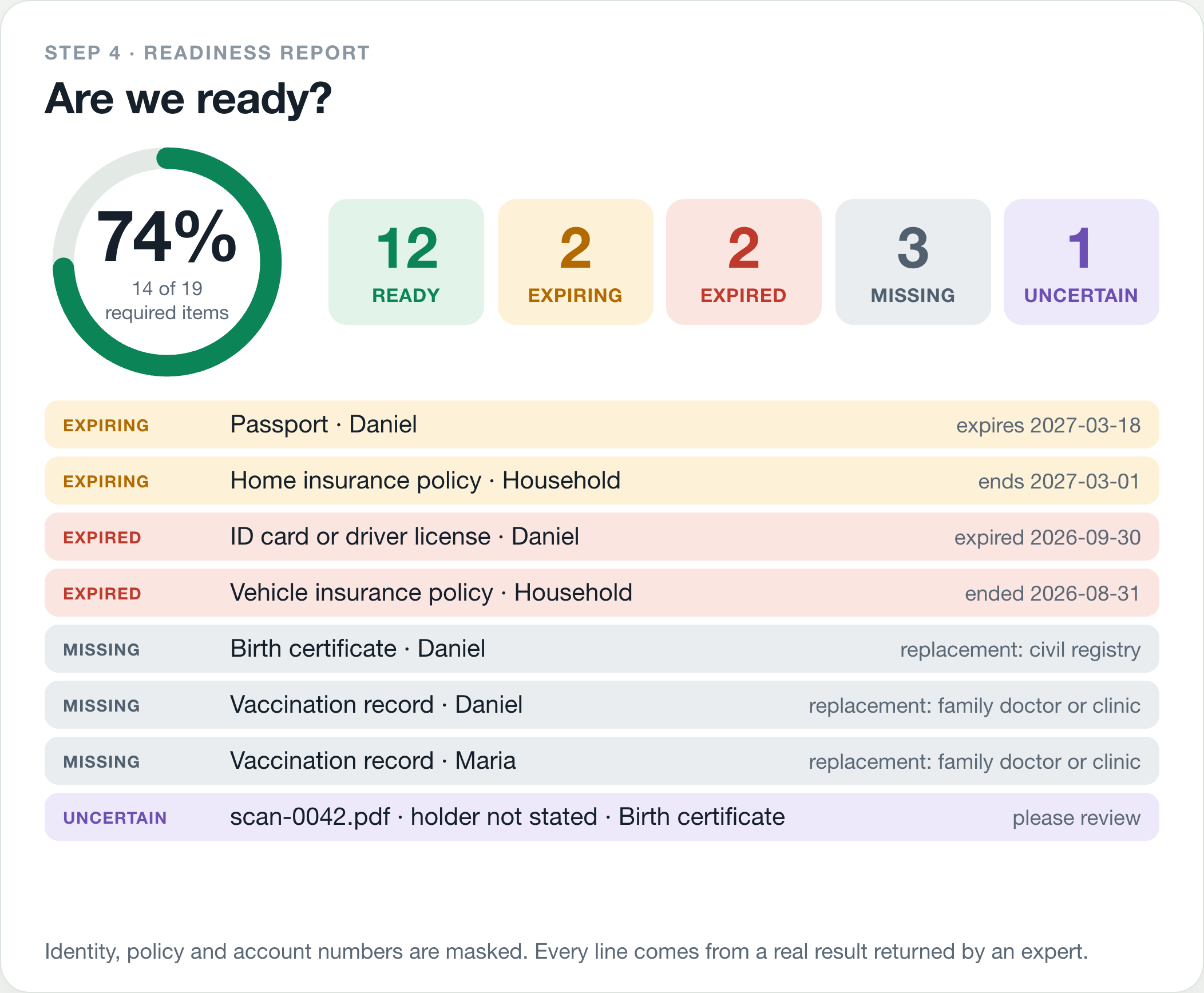
1. A readiness check (read-only). The user names the folder that holds the household's papers and who is in the household. The Skill checks an emergency-preparedness checklist (identity, financial and legal, medical) against what is really stored on the NAS and reports, per person:
- what is ready
- what is expiring within six months (for example a passport that would soon fall short of the six months of validity many countries require)
- what has expired
- what is missing, with a one-line pointer to where a replacement usually comes from
- what is uncertain and needs a human look, such as a scan with an unreadable name
It ends with a readiness score, for example "74 percent (14 of 19 required items ready)".
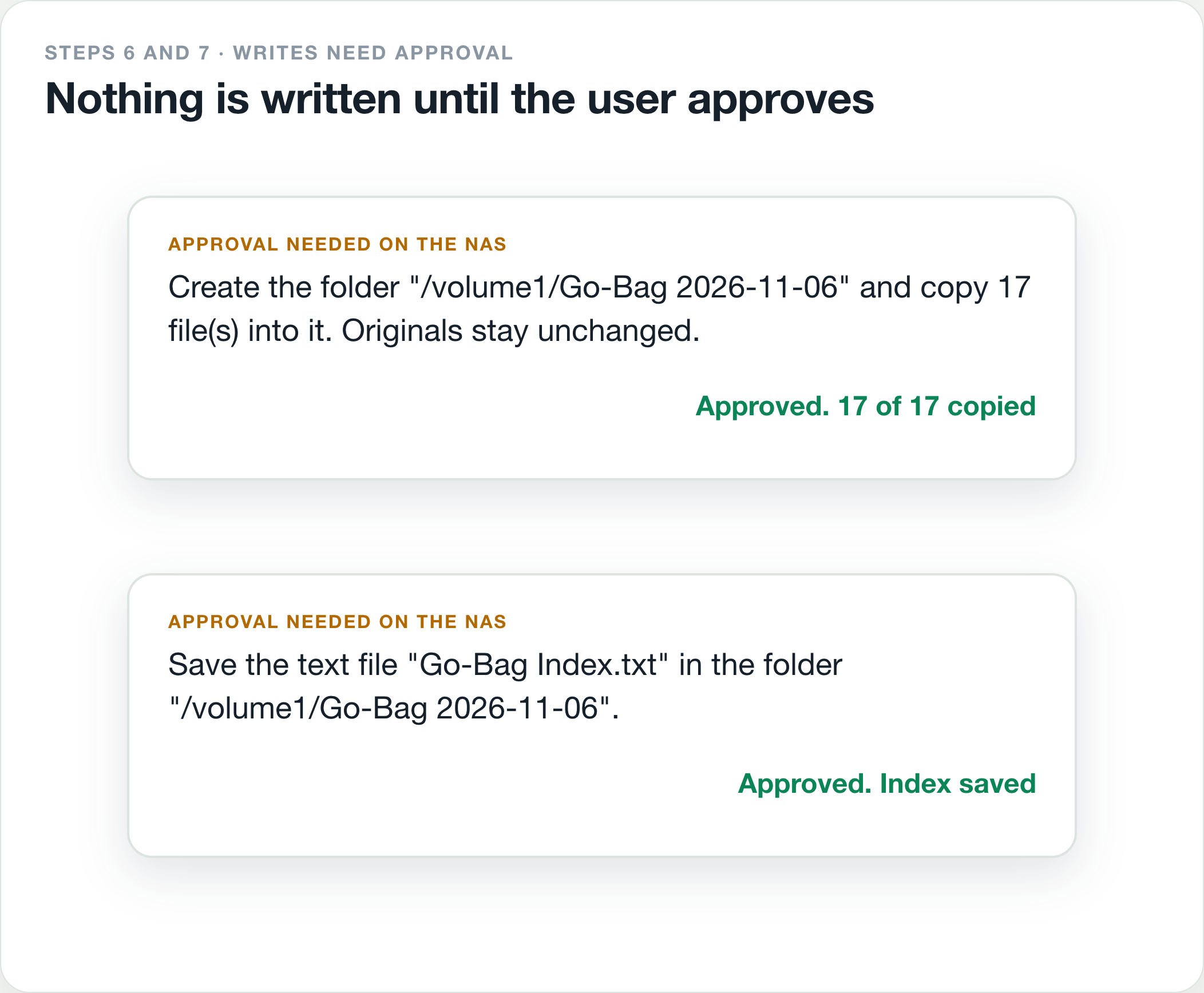
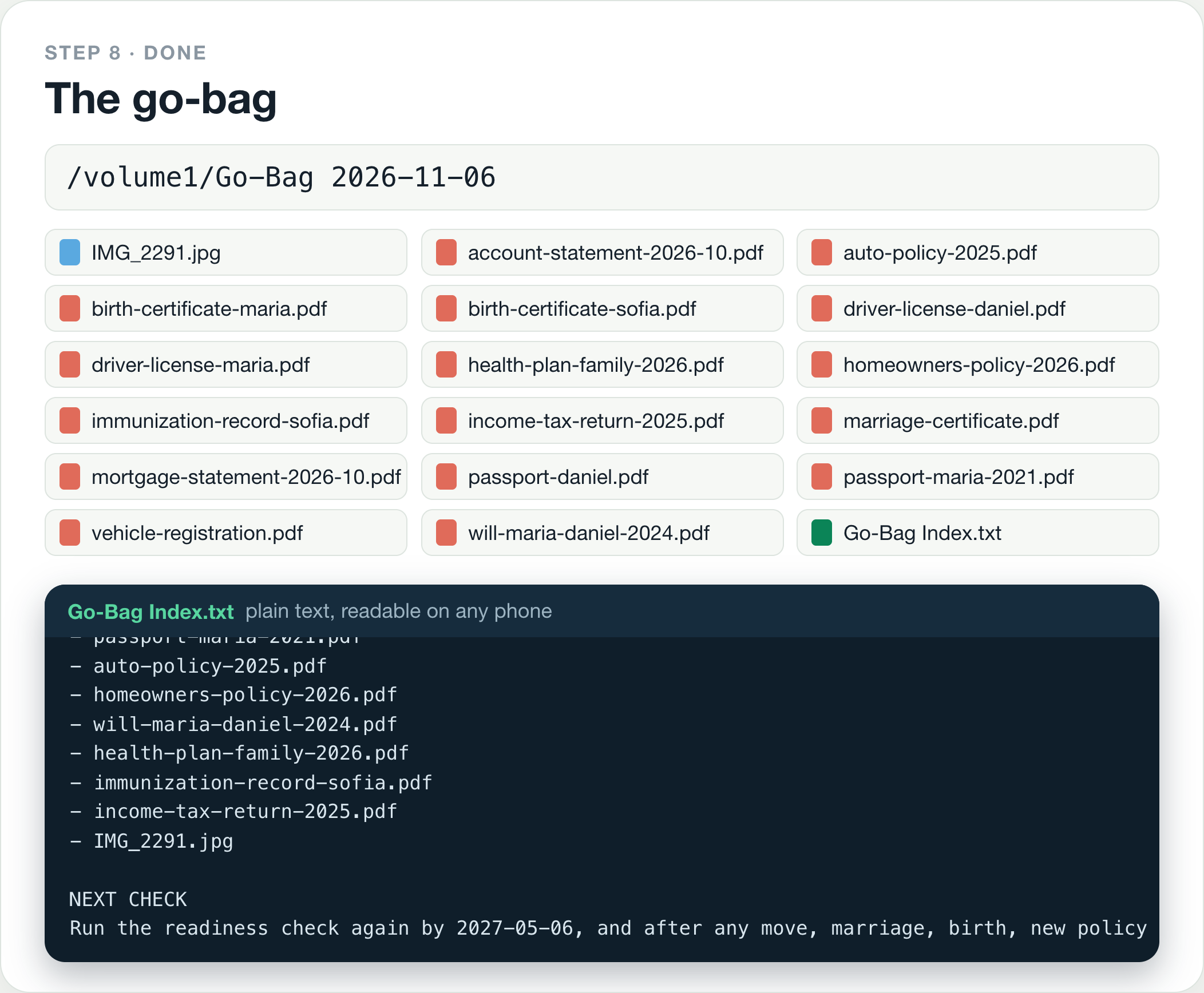
2. A go-bag (written only after the user confirms). The Skill shows the exact list of files it would copy and the destination. After the user says yes and approves the write on the NAS, it copies the documents into a new go-bag folder and saves a plain-text Go-Bag Index next to them. The folder is ready to sync to a phone or put on an encrypted USB drive.
How it works
The Skill is a pure orchestration Skill. It uses only capabilities in the public capability catalog and delegates all NAS work to four registered experts.
| Step | Expert | Capability | What happens |
|---|---|---|---|
| 1 | file-agent |
ug-filesystem |
Confirms the folder exists and counts documents and images. Read-only. |
| 2 | document-agent |
ug-document |
One search per checklist group. Returns the document type, holder, issue and expiry dates, and a quoted line of evidence. Read-only. |
| 3 | photo-agent |
ug-photo |
Only if an identity document is still missing and the user agrees: looks for photographed IDs using card and text recognition. Read-only. |
| 4 | none | Builds the readiness report and score from the real results. | |
| 5 | none | Shows the pack list and destination, and waits for a clear yes. | |
| 6 | file-agent |
ug-filesystem |
Creates the go-bag folder and copies the confirmed files. Needs approval. |
| 7 | knowledge-agent |
ug-knowledge |
Saves the Go-Bag Index text file. Needs approval. |
| 8 | none | Final answer: score, paths, what is missing or expiring, and a reminder to re-check in six months. |
The package is SKILL.md plus three reference files that are loaded only when needed: the checklist, the report layout, and a plain-language user guide.
What makes it different
- It knows what you are missing. Most Skills organize what is already there. This one audits the NAS against a checklist and tells the user what is not there, what has lapsed, and where to get a replacement.
- Gaps drive the search across libraries. When a passport is not found as a file, the Skill asks whether to look in the photo library, and finds the phone photo someone took of it. Files, documents, photos and knowledge work on one question.
- Privacy is the reason it exists. Every document is read on the NAS. Nothing is sent anywhere. Identity, policy and account numbers are masked to the last four characters in every report and in the saved index.
- Safe by construction. Steps 1 to 4 are read-only. Nothing is written without a confirmed pack list and the platform's approval. The Skill only ever copies. It never moves, renames, overwrites or deletes.
- Honest about partial results. If one file cannot be copied, the index lists only the files that were really copied, and the user is told which one failed and why. If the folder is empty, the Skill says so and stops. It does not widen the search on its own.
- Useful more than once. A reminder to re-check every six months, and after a move, a marriage, a birth or a renewed passport, turns a one-off task into a habit.
Technical execution so far
- Static check. The package passes the official checker in
uliya-skill-kit0.7.3 with statusstatic-pass: 0 errors, 0 warnings. - Delegation states.
completed,failed,cancelled,waiting_userandwaiting_approvalare each handled explicitly, including partial copies and empty results. - Scenario testing before any hardware. I do not own a UGREEN AI NAS, so I built a small simulator of the public contract: the four experts as deterministic stand-ins working on a synthetic household of 23 documents and 3 photos, with approvals a scripted user can grant or decline. A small language model plays the main assistant and is given only the Skill. An automated evaluator then checks each transcript.
- Results. On the final package, 10 runs across 6 scenarios (full pack, check only, declined approval, partial copy failure, empty folder, no folder named) passed 243 of 243 automated checks. Eight runs used a small model as the orchestrator and two used a mid-size model. The checks cover the order of delegations, read-only behaviour before confirmation, approval handling, masking of numbers, the readiness score, which rows land under ready, expiring, expired and missing, the exact contents of the saved index, and that no original file changed.
- What the tests changed. Earlier rounds exposed seven weak instructions, which I fixed before the final runs. The photo question was sometimes not asked. The destination was passed as a description instead of a path. One run put the go-bag inside the source folder. One run joined the index text into a single line. The default folder name was ambiguous. One run merged three family members into one line, so the rows did not add up to the score. And one run listed a passport that expires in four months as ready instead of expiring, which is why the Skill now works out a cutoff date first.
The simulator shows that the instructions can be followed and are safe on this contract. It does not show how the real experts respond on a device. That is what the finalist round is for.
Plan for the finalist round
- Load the synthetic household (all documents carry a SPECIMEN watermark) onto the provided iDX6011 Pro.
- Run the six scenarios on the real experts and compare with the simulator transcripts.
- Tune the wording of the delegations to what the real experts return, especially date formats and how approvals are presented.
- Record the final demo on the real NAS.
Built with
The official UGOS Skill Creation Tool (uliya-skill-kit 0.7.3) and Claude as the AI assistant, as the starter kit suggests. All sample people, numbers and organizations are fictional.
Built With
- claude
- markdown
- ugos
- uliya-skill-kit
