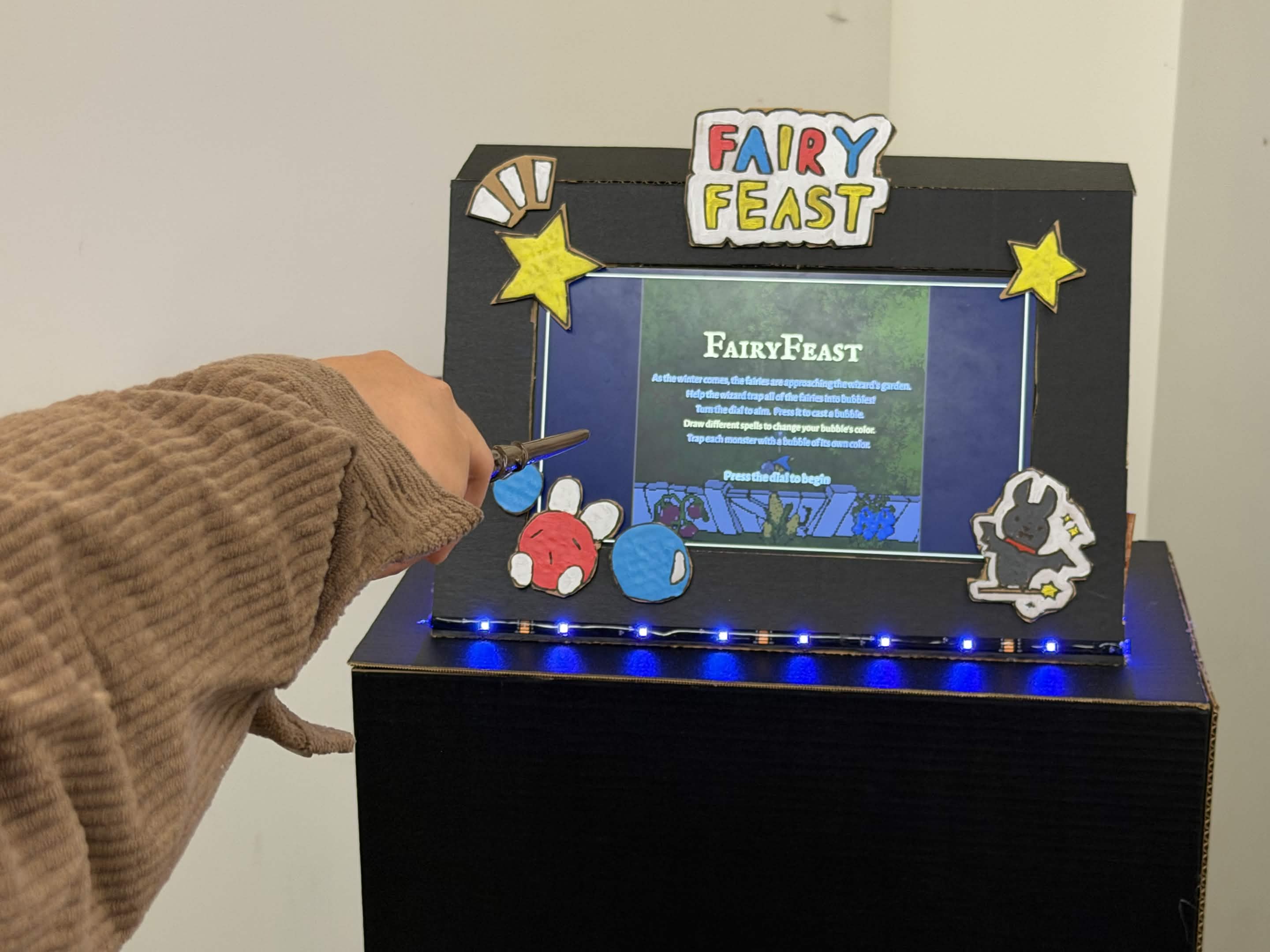
Inspiration
The hackathon theme is fairy tales, and we keep thinking of one idea: in every story, the magic happens from a wave of the wand. Games usually remove that magic by using a simple press of a button on the keyboard. We wanted to build an arcade machine where you can actually use magic, where you can draw spells in the air and immerses in the fairy tale world.
What it does
Fairy Feast is about... fairies trying to feast on your garden as winter comes. As a wizard, you will try to trap every single one of them into a bubble in order to protect your winter reserve from their tyranny.
- Turn the dial to aim the wizard's wand.
- Press the dial to cast a bubble.
- Draw a spell with the wand to change your bubble's color: blue, yellow, or pink.
A fairy can only be trapped by a bubble of its own color, so players constantly switch between aiming with one hand and casting spells with the other. Trapped fairies get flung out of the garden and knock out any fairy they hit on the way, which builds chain combos and score multipliers. The fairies speed up the longer you survive, and you have three hearts to protect.
How we built it
Fairy Feast run on two different systems, a computer and an ESP32. The computer runs the game and computer vision to check the position of the wand and makes sense of the player's spell. While the ESP32 acts as a custom wireless controller through Bluetooth.
The game is an HTML5 canvas game, made with fully hand-drawn art and human-composed music. The art and animation is made using Aseprite and the game is hosted on GitHub.
The ESP32 sends wireless keyboard signal to the computer, so the game can be played on any computer, no matter an actual laptop or a Raspberry Pi. A Python script decodes player's spell and overlays their input on the screen.
We also made an actual arcade machine with cardboard and acrylic paint. This helps create an immersive experience for the player.
Challenges we ran into
No micro-HDMI, so no Raspberry Pi. We planned to run the wand's computer vision on a Raspberry Pi 5, but the Pi 5 only has micro-HDMI ports and we didn't have an adapter, so we couldn't set it up or see what it was doing. We moved spell recognition to a laptop instead. Because the game only listens for key presses, swapping the Pi for a laptop didn't require any changes to the game.
Ghost button presses. Turning the dial slowly made the game think the player was pressing the button, firing bubbles nobody asked for. The knob's rotation was nudging the push switch and adding electrical noise to its signal. We fixed it with a pull-up resistor on the button line and firmware that ignores presses while the knob is moving or resting between clicks.
Godot was harder than we expected. We started building the game in Godot, but between learning the engine, setting up scenes, and exporting builds for the Raspberry Pi 5, progress was slow for a hackathon timeline. Partway through, we rebuilt the game as a single HTML file. That let us test changes instantly in a browser, swap in new art in seconds, and run it fullscreen on.
Accomplishments that we're proud of
Real spellcasting. Drawing a shape in the air with a wand and watching your bubble change color is the moment that makes people smile, and it's exactly the feeling we set out to build.
Everything is original. Every sprite, animation, and piece of music in Fairy Feast was made by our team during the hackathon.
A custom wireless controller. We turned an ESP32, a rotary dial, and a touch pad into a Bluetooth keyboard that pairs with any computer, with no drivers or extra software needed.
A real arcade machine. We built a full cabinet out of cardboard and acrylic paint, so players step up to a machine instead of sitting at a laptop.
Adapting under pressure. When the Raspberry Pi and Godot didn't work out, we changed plans mid-hackathon and still finished a complete, polished game.
What we learned
Keep the connections simple. Because every input reaches the game as an ordinary key press, we could swap the Pi for a laptop, test without the hardware, and debug each part on its own. That one decision saved us hours.
Hardware is noisy. We learned how rotary encoders work at the signal level, and that real buttons need debouncing, pull-up resistors, and careful firmware to behave.
How to build Bluetooth devices. We learned how to make a microcontroller act as a wireless keyboard (BLE HID) and pair it reliably.
Computer vision for gestures. We learned how to track a moving wand with a camera and turn its path into a recognizable spell.
What's next for FairyFeast
Run it on the Raspberry Pi as originally planned, so the whole arcade machine is self-contained.
More spells, including special moves like a screen-clearing star spell.
Boss fairies with their own attack patterns and art.
Built With
- art
- aseprite
- ble
- computer-vision
- esp32
- gamedev
- hardware
- raspberry-pi

Log in or sign up for Devpost to join the conversation.