-
-
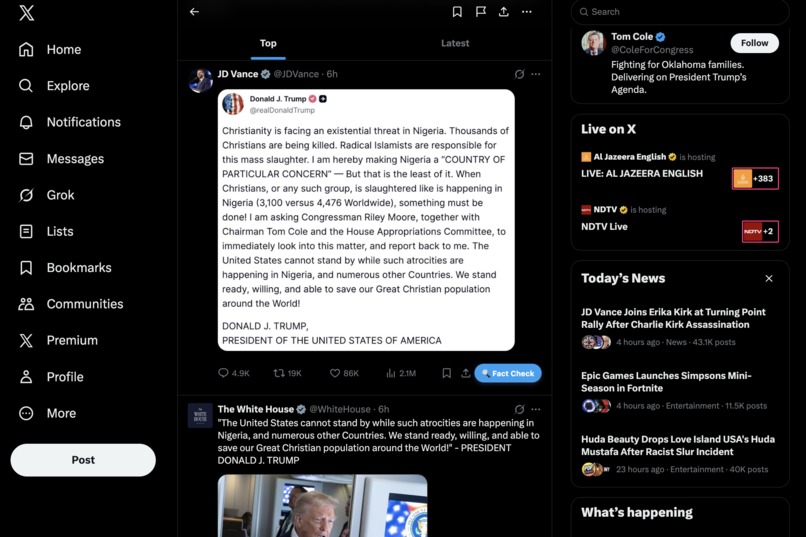
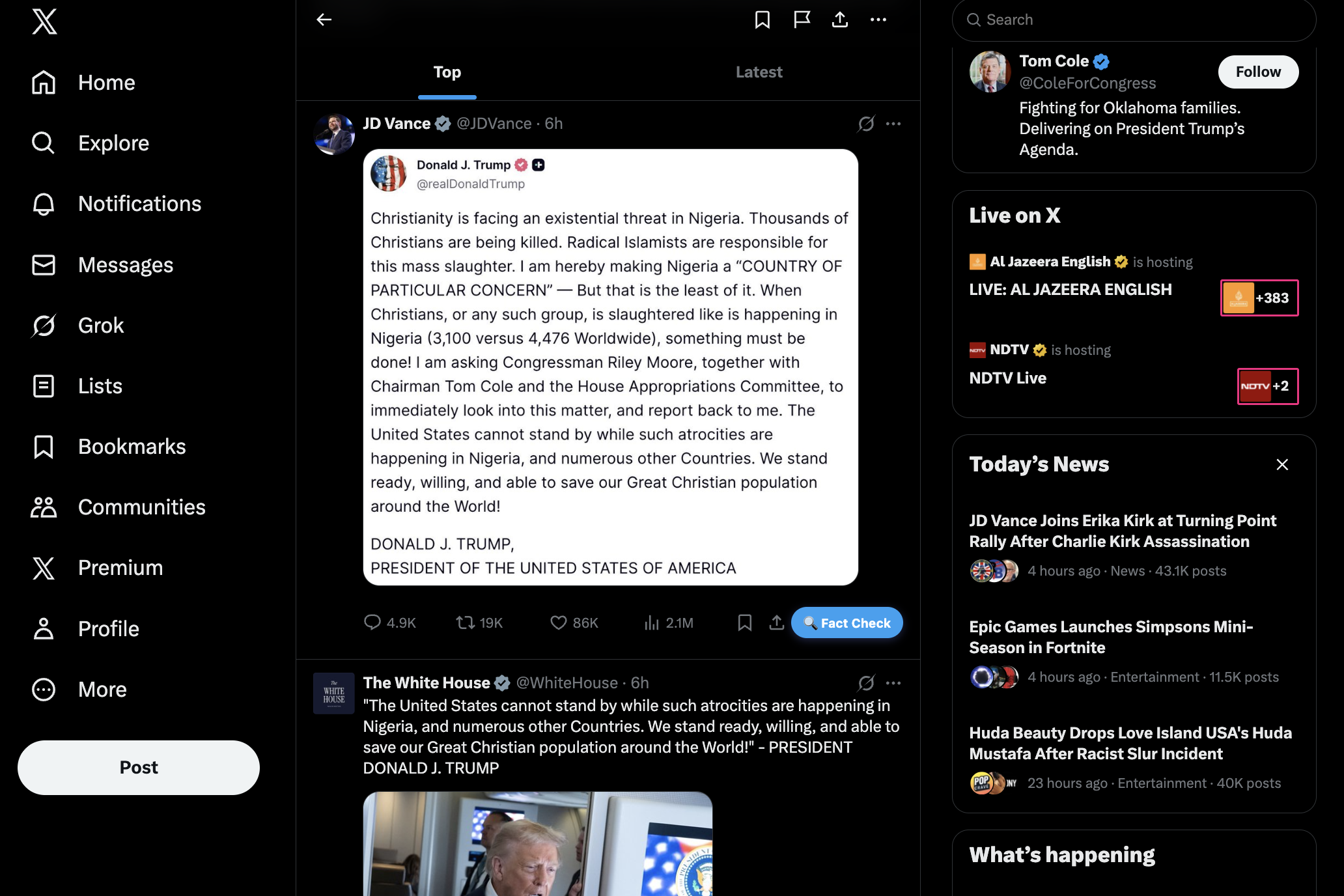
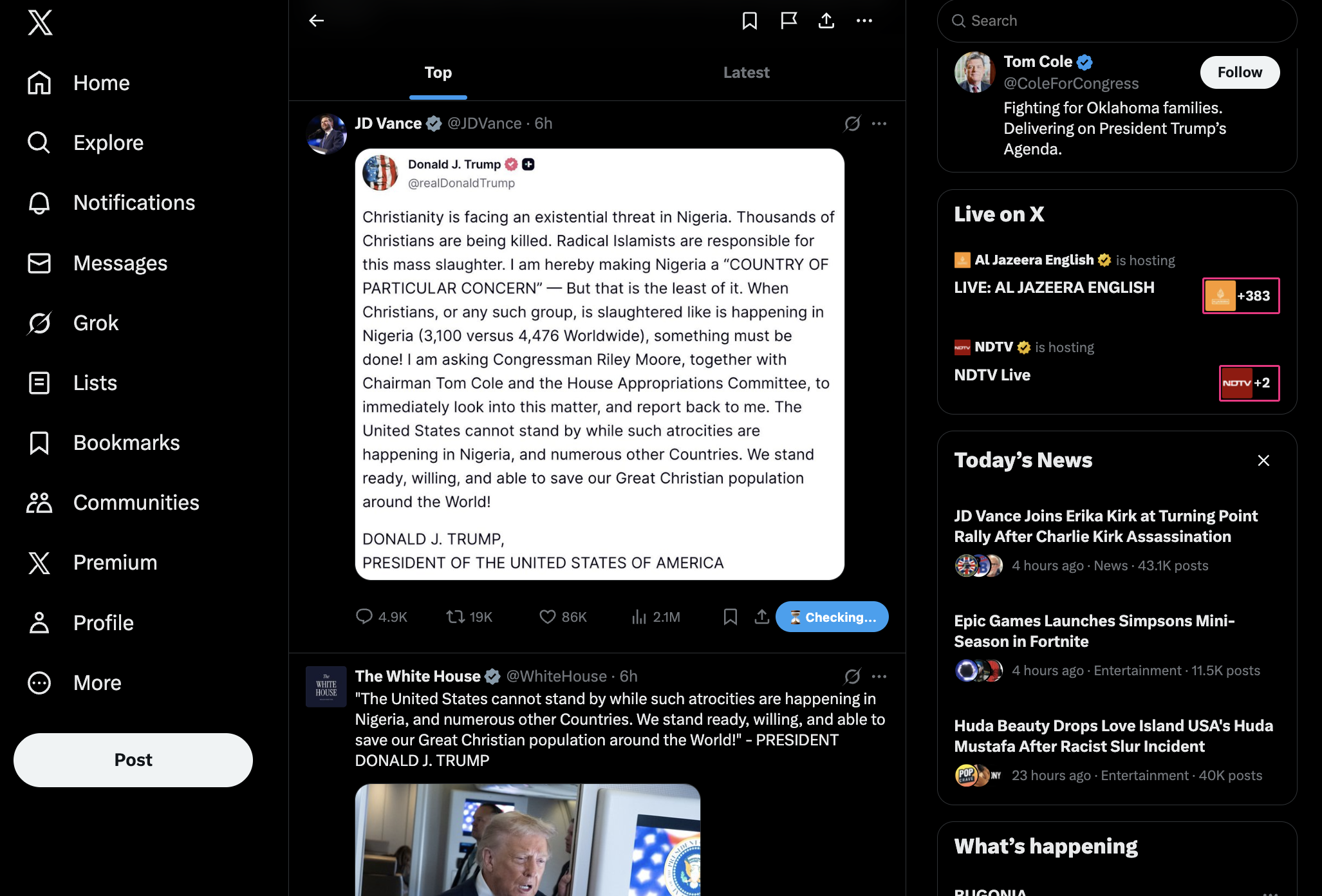
The "Fact Check" can be clicked to analyze a post
-
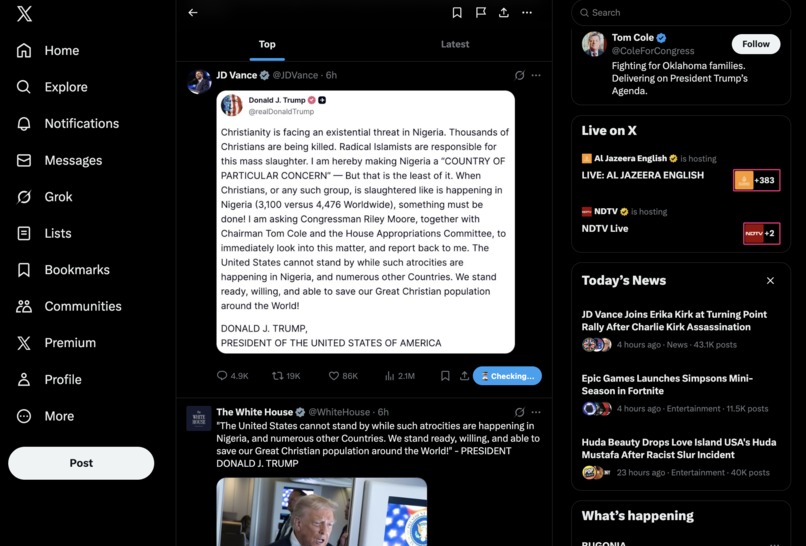
Once the post starts getting analyzed, you will see "Checking.." text
-

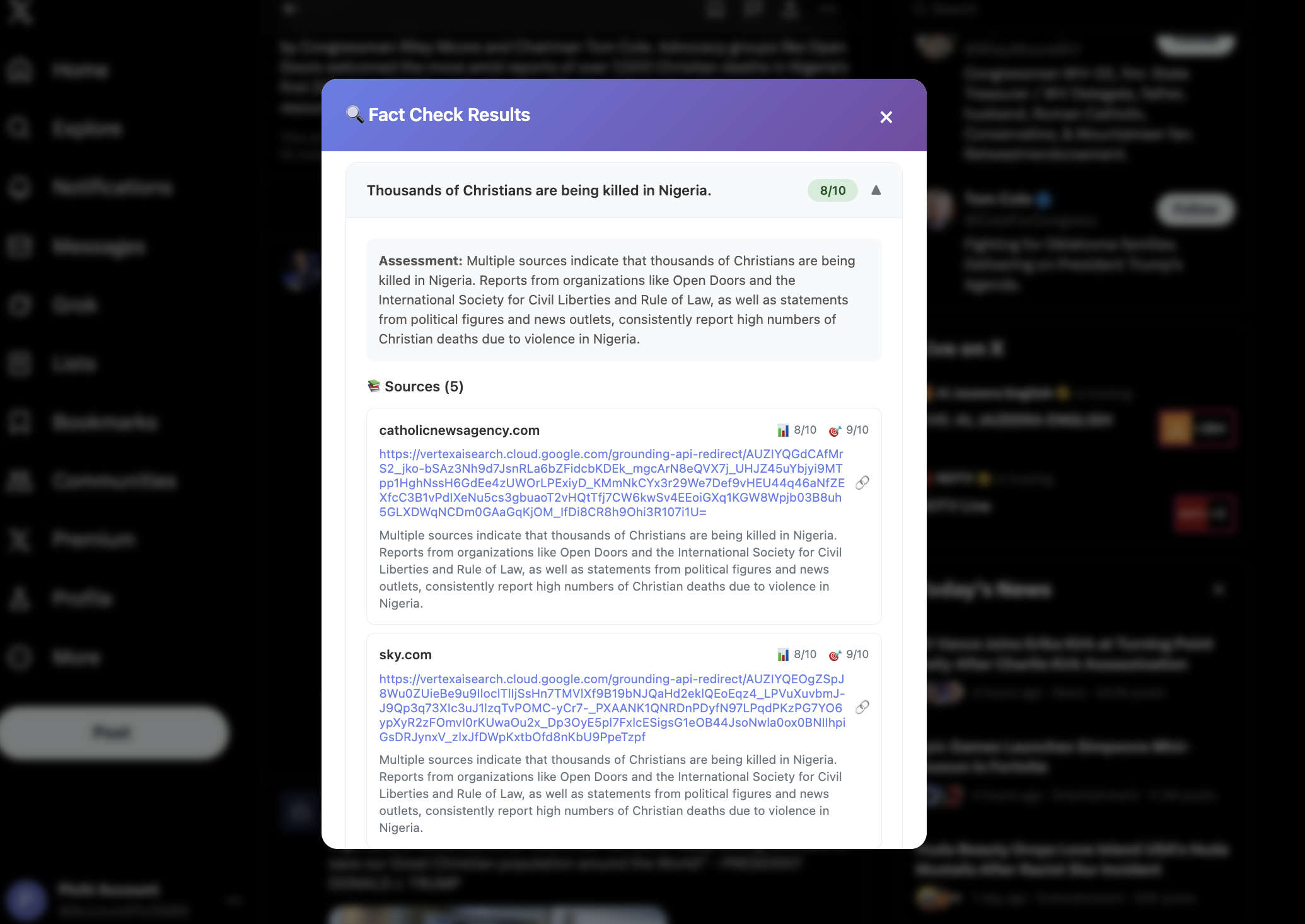
Fact Check Analysis
-
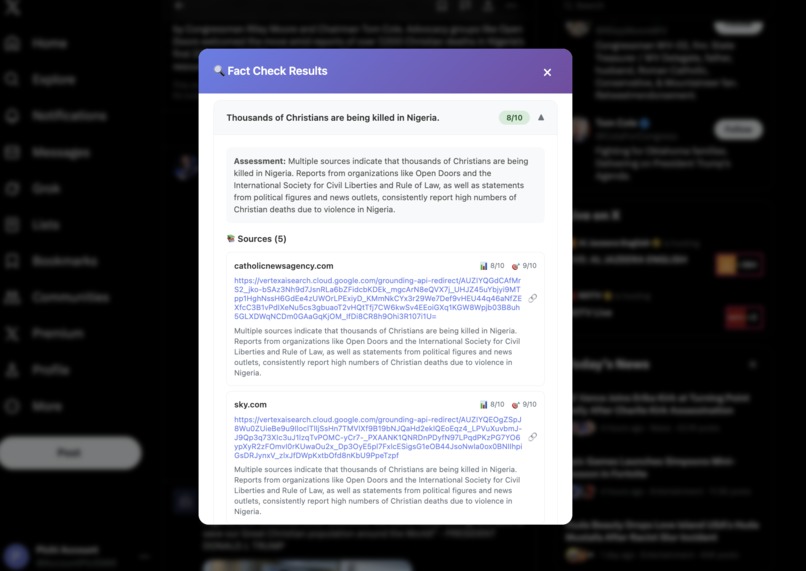
Individual Claim Analysis

Factify.ai: The Story Behind Building an AI-Powered Social Media Fact-Checker
Inspiration
We were scrolling through social media platforms such as Twitter, Instagram, and Facebook when we kept seeing fake news and misinformation. What if we could fact-check any social media post with just one click?
No more copying and pasting text into search engines. No more manual verification. Just click, and get AI-powered analysis with credible sources, right where you're already consuming content.
What it does
Factify.ai is a comprehensive Chrome Extension (Manifest V3) paired with a Next.js backend that provides instant AI-powered fact-checking for social media posts. Here's what it does:
For Users
- One-Click Fact-Checking: Simply click a "Fact Check" button that appears on every post across Twitter/X, Instagram, and Facebook
- AI-Powered Analysis: Uses Google Gemini 2.5 Flash Lite to extract 2-3 verifiable claims from posts and analyzes each one
- Source Verification: Automatically finds credible sources using Google Search grounding, providing links, credibility scores (1-10), and relevance ratings
- Image Intelligence: Extracts and analyzes text from images using Gemini Vision API, so even memes with text overlays get fact-checked
- Credibility Scoring: Provides detailed ratings (1-10) for each claim and an overall post assessment with labels like "True", "Likely False", "Mixed", or "Unverifiable"
- Beautiful Interactive UI: Shows results in an elegant overlay with expandable claims, source citations, and confidence levels
Technical Capabilities
- Multi-Platform Support: Works seamlessly across Twitter/X, Instagram, and Facebook with platform-specific DOM detection
- Secure Authentication: Firebase Google OAuth with session cookies for cross-origin security
- Usage Tracking: Free tier with daily limits; Pro tier with unlimited fact-checks
- Real-Time Processing: Handles claim extraction, fact-checking, and source finding in seconds
How we built it
The architecture follows a three-tier system:
1. Chrome Extension (Frontend)
Technology Stack: JavaScript, Chrome Extensions API (MV3), HTML/CSS
The extension consists of three main components:
- Content Script (
content.js): Detects the current platform (Twitter/Instagram/Facebook), injects fact-check buttons into every visible post using platform-specific CSS selectors, extracts post text and images, and displays the results in a beautiful overlay UI - Background Service Worker (
background.js): Handles all API communication, image fetching and base64 conversion, bridges Chrome's Prompt API (LanguageModel) for claim extraction, and manages authentication state - Popup Interface (
popup.js/popup.html): Shows user status, daily statistics, sign-in options, and upgrade prompts
Key Implementation Details:
- Platform detection using URL matching and DOM structure analysis
- Dynamic button injection that adapts to each platform's UI patterns
- Asynchronous message passing between content script and background worker
- Image processing pipeline that converts images to base64 for API transmission
2. Next.js Backend (API Server)
Technology Stack: Next.js 14 (App Router), TypeScript, Node.js
The website provides RESTful API endpoints:
/api/fact-check: Main endpoint that receives text and claims, performs fact-checking using Gemini API with Google Search grounding, and returns structured results/api/image-extraction: OCR endpoint that extracts text from images using Gemini Vision API/api/auth/*: Multiple authentication endpoints supporting Firebase ID tokens, session cookies, and JWTs/api/meand/api/me/limits: User information and quota management
Architecture Highlights:
- Server-side authentication using Firebase Admin SDK
- JWT tokens with 24-hour expiration; session cookies with 14-day expiration
- CORS protection configured for extension origins and website domain
- Input validation and sanitization on all endpoints
- Server-side quota enforcement to prevent abuse
3. Firebase & Firestore (Backend Services)
Technology Stack: Firebase Authentication, Cloud Firestore, Firebase Admin SDK
Authentication Flow:
- User clicks "Sign In" in extension popup
- Extension opens website login page in new tab
- User completes Google OAuth on website
- Website creates HttpOnly, Secure session cookie
- New users automatically registered in Firestore with plan metadata
- Extension uses session cookies for authenticated API requests
Data Model:
users/{uid}: Stores user email, plan (free/pro), creation/update timestampsusage/{uid}_{YYYY-MM-DD}: Daily usage tracking for quota enforcement
Security: All Firestore client access is denied; server exclusively uses Firebase Admin SDK
Fact-Checking Pipeline
The core fact-checking process follows this mathematical flow:
Claim Extraction: $$\text{claims} = \text{LanguageModel}(\text{postText})$$ Uses Chrome Prompt API to identify 2-3 verifiable claims from raw post text
Image Processing (if applicable): $$\text{imageText} = \text{GeminiVision}(\text{base64Image})$$ Extracts text from images for comprehensive analysis
Fact-Checking with Grounding: $$\text{results} = \text{GeminiAPI}(\text{claims}, \text{GoogleSearchGrounding})$$ Sends claims to Gemini 2.5 Flash Lite with Google Search grounding enabled
Source Extraction: $$\text{sources} = \text{extractGrounded}(\text{APIResponse})$$ Parses grounded metadata to extract credible sources with links, titles, and scores
Structured Output:
- Overall rating: $R_{overall} \in [1, 10]$
- Confidence: $C \in [0.0, 1.0]$
- Per-claim ratings: $R_i \in [1, 10]$ for claim $i$
- Source credibility: $S_j \in [1, 10]$ for source $j$
Challenges we ran into
Challenge 1: Chrome Extension Manifest V3 Migration
Problem: Chrome deprecated Manifest V2, requiring us to rewrite the extension to use service workers instead of background scripts. Service workers have different lifecycle management and can't use DOM APIs.
Solution: We restructured the architecture to separate concerns:
- Content scripts handle DOM manipulation (button injection, UI display)
- Background service worker handles API calls and state management
- Message passing bridges the gap between components
Challenge 2: Cross-Origin Authentication
Problem: Extensions run in isolated contexts. We needed to authenticate users between the extension and the Next.js website without exposing tokens.
Solution: Implemented a sophisticated authentication flow:
- Extension redirects to website for OAuth
- Website creates HttpOnly, Secure session cookies
- Extension includes cookies in API requests automatically
- Multiple auth methods (Firebase tokens, session cookies, JWTs) for flexibility
Challenge 3: Platform-Specific DOM Injection
Problem: Twitter, Instagram, and Facebook have completely different DOM structures. Their UIs also change frequently, breaking our selectors.
Solution: Built a robust platform detection system:
- URL pattern matching for initial detection
- Platform-specific CSS selector sets with fallbacks
- MutationObserver to handle dynamic content loading
- Periodic selector updates as platforms evolve
Challenge 4: Google Search Grounding Integration
Problem: Initially, we tried parsing the AI's text responses for sources, but this was unreliable. We needed real, verified sources with actual links.
Solution: Discovered and implemented Gemini's Google Search grounding feature:
- Uses
tools: [{ googleSearch: {} }]in API calls - Extracts grounded sources from response metadata (not from model text)
- Validates URLs and extracts titles, credibility scores programmatically
Challenge 5: Image Text Extraction
Problem: Many posts contain text in images (memes, screenshots), which our initial text-only pipeline missed.
Solution: Integrated Gemini Vision API:
- Converts images to base64 in extension
- Sends to
/api/image-extractionendpoint - Extracts text from images before claim extraction
- Combines image text with post text for comprehensive analysis
Challenge 6: Rate Limiting and Quota Management
Problem: AI API calls are expensive. We needed to prevent abuse while providing a good free tier experience.
Solution: Implemented server-side quota tracking:
- Free users: Daily limit with automatic reset
- Pro users: Unlimited access
- Usage stored in Firestore with atomic updates
- Clear upgrade prompts when limits exceeded
Challenge 7: Parsing Unstructured AI Responses
Problem: Gemini returns unstructured text. We needed to reliably extract claims, ratings, sources, and explanations.
Solution: Built a sophisticated parsing system:
- Prompt engineering with explicit format instructions
- Stop sequences ("END_FACT_CHECK") for clean parsing
- Regex patterns with fallbacks for different response formats
- Structured response validation before returning to client
Accomplishments that we're proud of
Seamless Multi-Platform Support: Successfully unified fact-checking across three fundamentally different social media platforms (Twitter, Instagram, Facebook) with a single codebase
Real-Time Performance: Achieved sub-5-second fact-checking turnaround time, including claim extraction, AI analysis, source finding, and result display
Security Architecture: Implemented enterprise-grade security with HttpOnly cookies, CORS protection, Firestore security rules that deny all client access, and server-side-only data operations
User Experience: Created an intuitive, non-intrusive UI that feels native to each platform—users often forget they're using an extension
Robust Error Handling: Built comprehensive error handling for API failures, network issues, invalid inputs, and quota exceeded scenarios with user-friendly error messages
Production-Ready Deployment: Successfully deployed to Vercel with automatic CI/CD, environment variable management, and zero-downtime updates
Scalable Architecture: Designed the system to handle growth with proper separation of concerns, modular code structure, and efficient database queries
What we learned
Technical Learnings
Chrome Extensions MV3: The migration from MV2 to MV3 taught us a lot about service worker lifecycle management, message passing patterns, and how to maintain state in a stateless worker environment.
Firebase Admin SDK: We learned the importance of server-side-only operations for security. Client SDKs should never have direct database access—always use Admin SDK on the server.
AI Prompt Engineering: Crafting effective prompts is an art. We discovered that:
- Explicit format instructions reduce parsing complexity
- Temperature settings (we use 0.0 for consistency) are crucial for reliable outputs
- Stop sequences and seed values help with reproducibility
Cross-Origin Authentication: Session cookies with proper flags (HttpOnly, Secure, SameSite) are more secure than token-based auth for extensions, as they're automatically included in requests without JavaScript access.
Google Search Grounding: This was a game-changer. Grounding provides real sources with metadata that we couldn't reliably extract from model text alone.
Process Learnings
Incremental Development: We built this in stages: first text-only fact-checking, then image support, then multi-platform support. This incremental approach helped us validate each feature before moving on.
Testing Real-World Content: We tested extensively with actual social media posts. Real content is messier than our test cases—handling emojis, special characters, and edge cases was crucial.
User Feedback Loop: Early beta testers helped us identify UI/UX issues we wouldn't have caught ourselves. Their feedback shaped the final overlay design and interaction patterns.
Documentation Matters: Maintaining clear README files, inline code comments, and API documentation helped us iterate faster and onboard new contributors.
Broader Insights
Misinformation is Complex: Not everything is clearly true or false. Many claims are "Mixed" or "Unverifiable," and we needed to communicate this nuance to users.
Source Credibility Matters: Not all sources are equal. A 1-10 credibility score helps users understand which sources to trust more.
User Trust: People need to trust the fact-checker. Transparent about our methodology, showing sources, and providing confidence scores builds that trust.
What's next for Factify.ai
Short-Term (Next 3 Months)
Chrome Web Store Launch: Prepare extension for public release with store listing, screenshots, and compliance review
Firefox Extension: Port the extension to Firefox using WebExtensions API for broader browser support
Enhanced Source Ranking: Improve source credibility scoring using ML models trained on known fact-checker ratings
Batch Fact-Checking: Allow users to fact-check multiple posts at once for power users
Export Results: Enable users to export fact-check reports as PDF or share links
Medium-Term (3-6 Months)
Additional Platforms: Support LinkedIn, Reddit, and TikTok with platform-specific adapters
Fact-Check History: Store user's fact-check history with searchable archive and trend analysis
Collaborative Fact-Checking: Allow users to contribute sources and corrections (with moderation)
Mobile Support: Develop iOS Safari extension and Android app for mobile social media browsing
Real-Time Alerts: Notify users when a previously fact-checked post's rating changes (e.g., new information emerges)
The journey from frustration with fake news to building a comprehensive fact-checking platform has been incredible. Every challenge we faced taught us something new, and every feature we built brings us closer to our vision: a world where truth is just one click away.
Built with using Next.js, Firebase, Google Gemini AI, and Chrome Extensions API
Built With
- autoprefixer
- css
- firebase
- googlegenerativeai
- googlesearchapi
- html
- javascript
- json
- jsonwebtoken
- manifestv3
- next.js14
- node.js
- postcss
- promptapi
- react.dom18
- react.js18
- tailwindcssv4
- typescript
- vercel


Log in or sign up for Devpost to join the conversation.