FaceShift — Hackathon Project Write-Up
🌟 Inspiration
Attendance fraud is a silent problem in every office. Employees punch in for absent colleagues, leave early without anyone noticing, and HR spends hours manually reconciling records at the end of every month. We asked ourselves — in a world where your phone can unlock with your face, why is office attendance still done with cards, PINs, or paper registers? That question became FaceShift. We wanted to build something that didn't just digitize attendance — but made faking it genuinely impossible.
✅ What It Does
FaceShift is a two-layer AI attendance system for offices:
Layer 1 — Face Recognition Check-In: Employees walk up to a browser-based kiosk. The AI instantly recognizes their face (trained on 3 angles at registration) and marks them present — no tapping, no swiping, no PINs.
Layer 2 — GPS Presence Tracking: After check-in, the employee's phone silently tracks their GPS location throughout the shift. If they leave the office geofence (configurable radius, default 150m), it's logged with a timestamp. When they return, that's logged too.
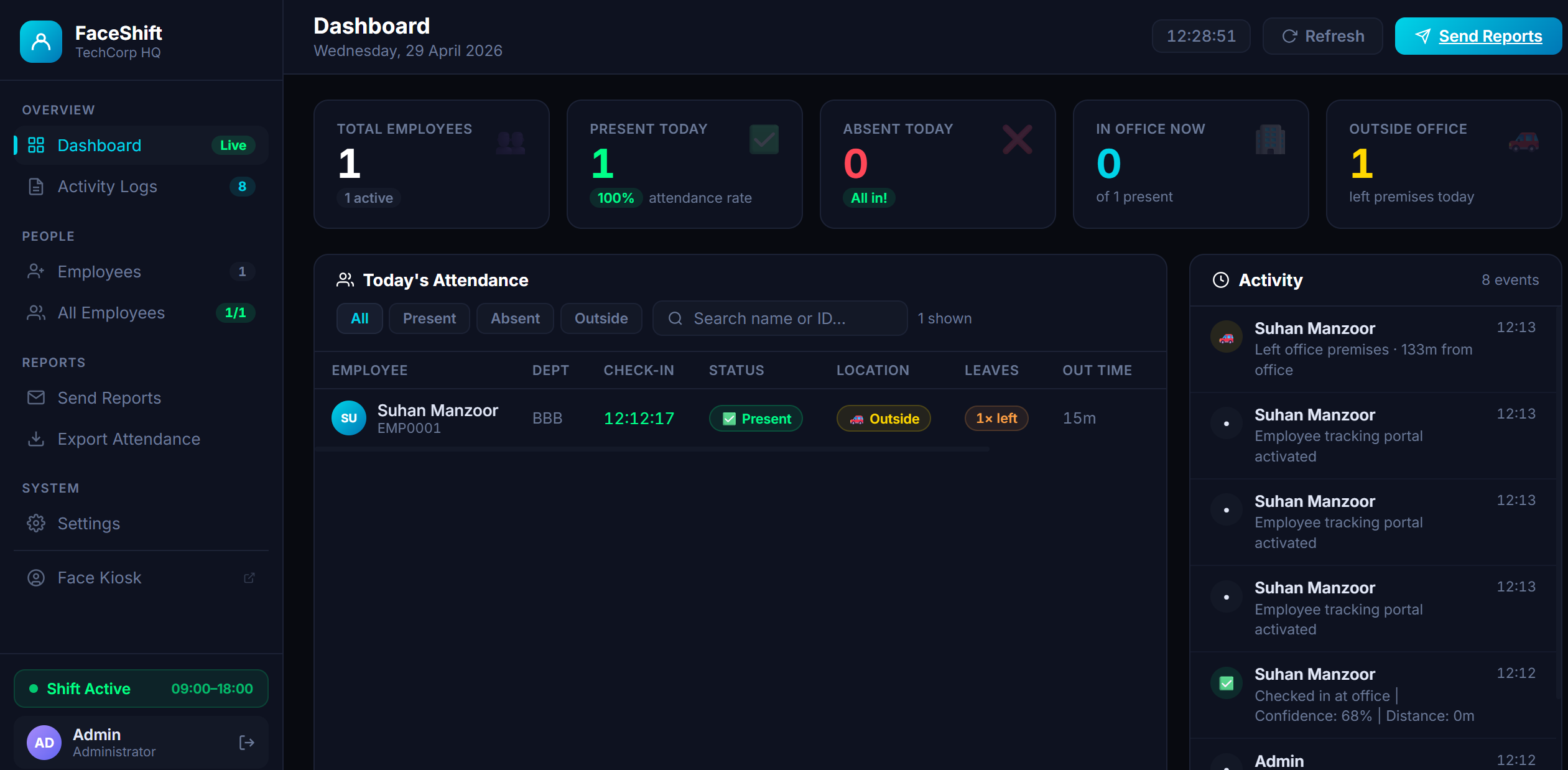
At the end of the day, every employee automatically receives a personalized email summarizing their check-in time, total work duration, face recognition confidence score, and a full log of any time they left and returned. Admins monitor everything live on a real-time dashboard showing who's present, who's absent, who's physically in the office right now, and a running activity feed.
🔨 How We Built It
- Face Recognition —
face-api.jsrunning entirely in the browser using SSD MobileNet V1. Each employee is registered with 3 face angles (left, front, right), generating 128-dimensional face descriptor vectors. At check-in, live video is matched against stored descriptors using Euclidean distance with a 0.5 threshold. - GPS Geofencing — The browser's
navigator.geolocation.watchPosition()API feeds coordinates to our backend every time the device moves. We compute distance using the Haversine formula and compare against the configured office radius. - Backend — Pure PHP 8 handling all API endpoints: marking attendance, receiving GPS pings, detecting leave/return events, and serving admin data.
- Storage — JSON flat files for employees, daily attendance records, and activity logs. Zero database setup required.
- Email — PHPMailer over SMTP sends personalized HTML attendance summaries to each employee.
- UI — Bootstrap 5 with a custom dark theme for both the kiosk and admin dashboard.
🧱 Challenges We Ran Into
- Face recognition accuracy across lighting conditions — A single frontal descriptor performed poorly under dim or harsh lighting. We solved this by capturing 3 angles at registration and using
LabeledFaceDescriptorsso face-api.js finds the best match across all three. - GPS accuracy indoors — Browser GPS can drift significantly inside buildings. We addressed this by adding a tolerance buffer to the geofence radius and using
enableHighAccuracy: trueto force GPS chipset usage over Wi-Fi triangulation. - Shift lock enforcement — We needed the kiosk to be completely inaccessible outside shift hours, not just visually hidden. We enforced this server-side in PHP so even direct URL access returns the locked screen.
- Storing face descriptors efficiently — Face descriptor Float32Arrays needed to be serialized to JSON for storage and deserialized back into typed arrays on the client. Getting this round-trip right without precision loss took careful handling.
- Real-time dashboard without WebSockets — With a PHP + JSON stack, we achieved near-real-time updates using smart polling (every 30 seconds) with animated KPI counters so the dashboard always feels live.
🏆 Accomplishments That We're Proud Of
- Built a fully working AI attendance system from scratch during the hackathon with zero external APIs — all face recognition runs locally in the browser
- No database, no cloud, no paid services — the entire system runs on plain PHP and JSON files, making it deployable on any shared hosting in minutes
- The 3-angle face registration significantly outperforms single-photo systems in real-world lighting conditions
- End-to-end automation — from face scan at 9 AM to email in the inbox at 6 PM, zero human intervention needed
- A clean, professional UI that looks production-ready, not like a hackathon prototype
📚 What We Learned
- How face descriptor matching actually works under the hood — the math behind Euclidean distance thresholds and why 0.5 is a sweet spot between false positives and false negatives
- The Haversine formula for calculating real-world distances from GPS coordinates on a spherical Earth
- How to run a full neural network pipeline entirely client-side in the browser using
face-api.jswithout any server-side ML infrastructure - The importance of defensive UI — designing for every state (shift locked, no face detected, already checked in, GPS denied) makes the difference between a demo and a real product
- JSON flat-file architecture can scale surprisingly well for small-to-medium teams when structured thoughtfully
🚀 What's Next for FaceShift
- Liveness detection — prevent spoofing by holding a photo to the camera; detect blinks and micro-movements to confirm a live face
- MySQL migration — move from JSON files to a proper database for teams with 100+ employees
- PWA mobile app — background GPS tracking with a Progressive Web App so employees don't need to keep the browser open all day
- Analytics dashboard — monthly attendance heatmaps, punctuality scores, and department-level reporting
- Multi-branch support — multiple office locations with separate geofences under one admin panel
- Slack / WhatsApp integration — instant alerts to managers when an employee leaves the premises unexpectedly
- Overtime & late arrival detection — automatically flag check-ins after shift start and hours beyond shift end
Built With
- frontend
- javascript
- json
- php

Log in or sign up for Devpost to join the conversation.