-
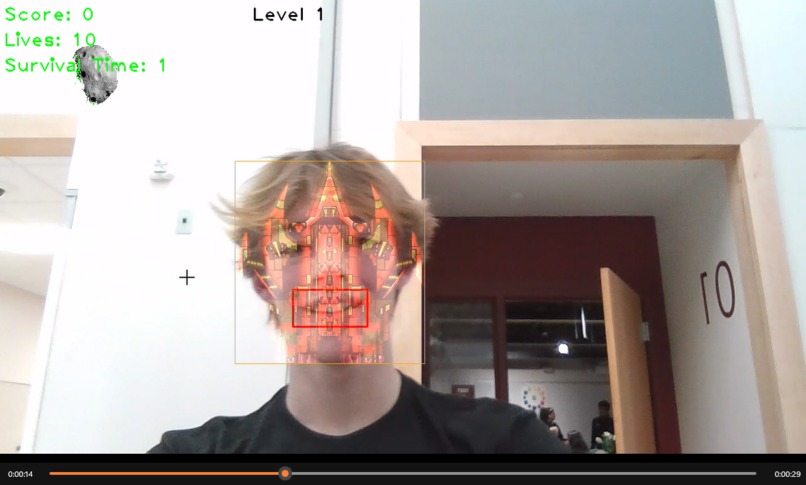
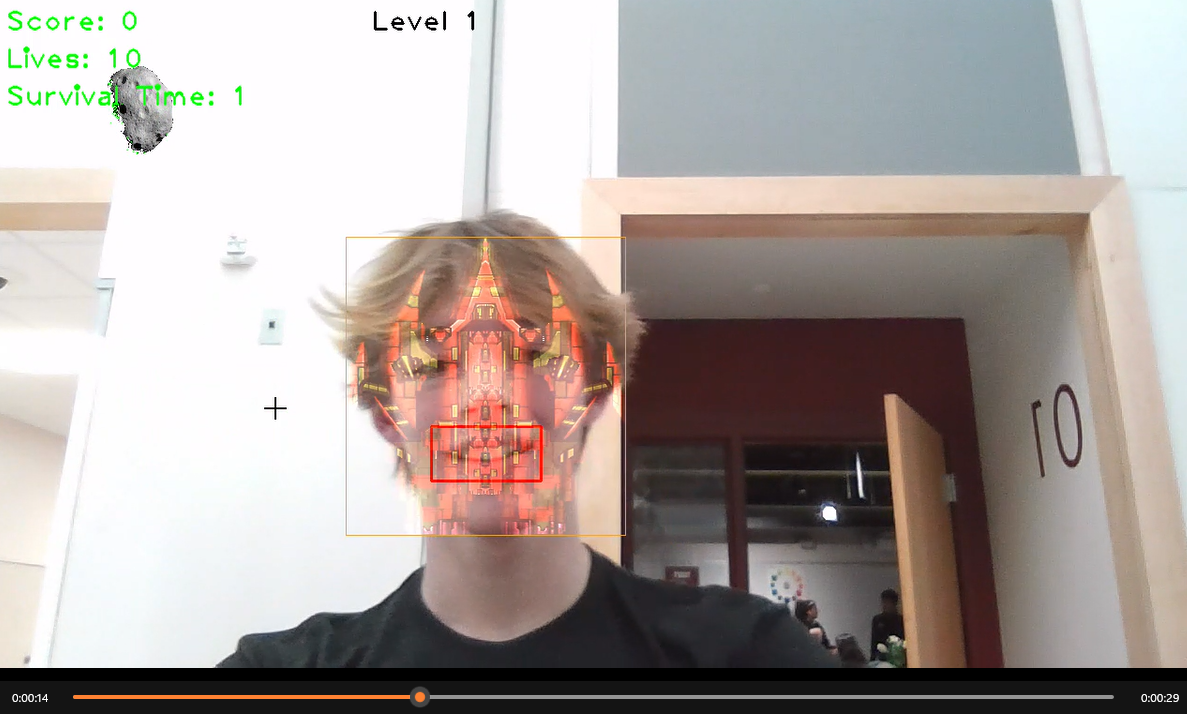
smile was captured.
-
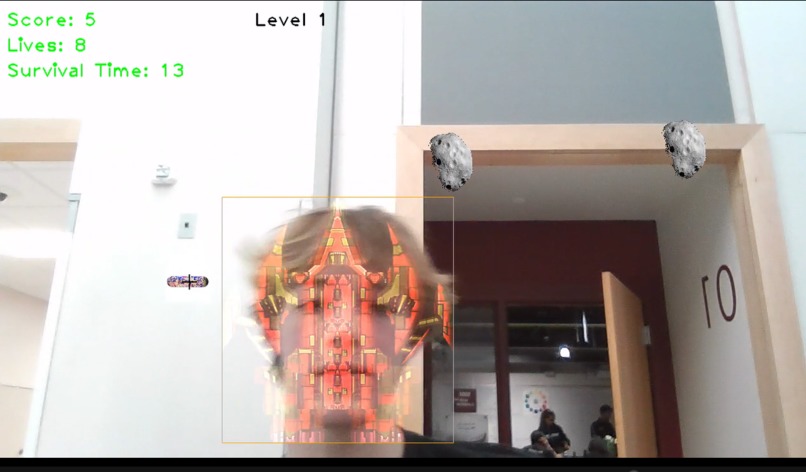
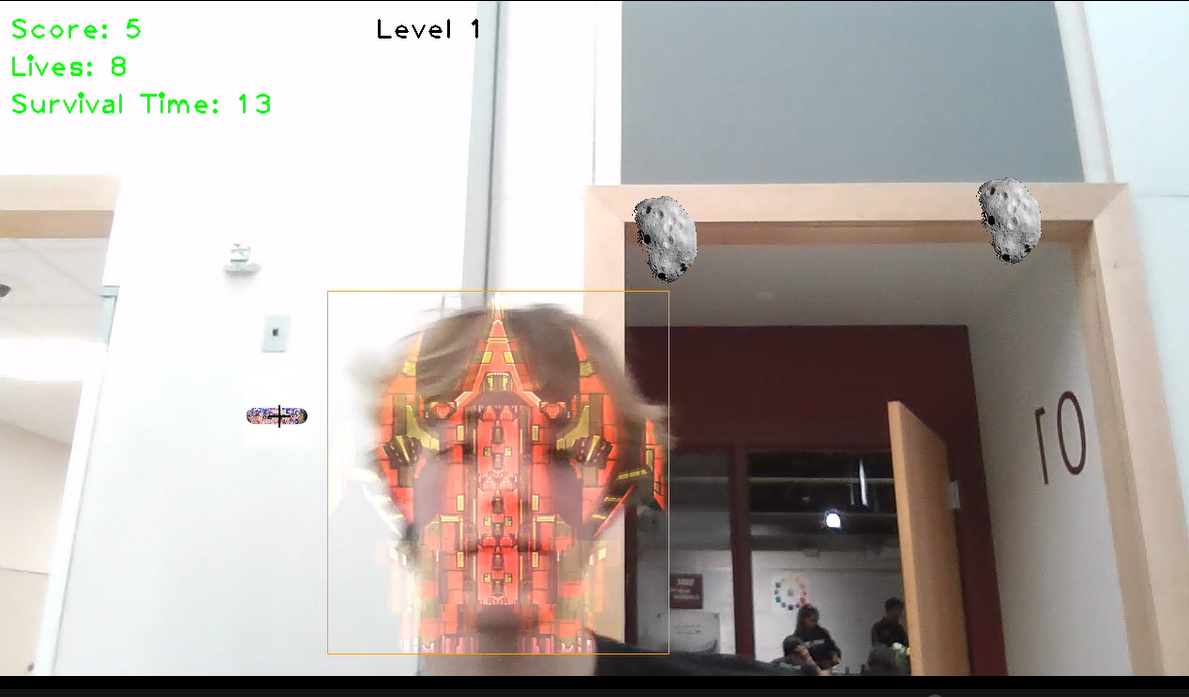
space ship was apllied on top of tracked face.
Inspiration
wanted to do some sort of computer vision. Object tracking and contrast motion gathering sounded fun.
What it does
you count as the space ship if you hit an asteroid you lose a life if your smileing when you hit an asteroid you have a chance of not suffering a loss of life
How we built it
Challenges we ran into
Accomplishments that we're proud of
What we learned
What's next for Face and body tracking game
import cv2 import numpy as np import random
class Ball: def init(self, size=100, lives=10, level=1): # image from https://www.ontheballbowling.eu/en/products/plasma self._image = cv2.imread('Images/asteroid.png') self.size = size self.image = cv2.resize(self._image, (size, size)) img2gray = cv2.cvtColor(self.image, cv2.COLOR_BGR2GRAY) _, ms = cv2.threshold(img2gray, 1, 255, cv2.THRESH_BINARY) self.ms = ms self.level_speeds = [3,5,10,12,16,21,43,50,100] #100 is impossible, 43 is probably impossible self.speed = self.level_speeds[level] self.x = 100 self.level = level self.y = 0 self.score = 0 self.lives = lives def insert_object(self, frame): roi = frame[self.y:self.y + self.size, self.x:self.x + self.size] roi[np.where(self.ms)] = 0 roi += self.image def update_position(self, tresh): self.score = 0 height, width = tresh.shape self.y += self.speed if self.y + self.size > height: self.y = 0 self.x = np.random.randint(0, width - self.size - 1) self.score = 1 # self.speed += 1 # could be implemented but current system with levels doesnt need it # Check for collision roi = tresh[self.y:self.y + self.size, self.x:self.x + self.size] check = np.any(roi[np.where(self.ms)]) if check: # self.lives -= 1 self.y = 0 self.x = np.random.randint(0, width - self.size - 1) # self.speed - random.randint(self.level_speeds[self.level],self.level_speeds[self.level+1])
return check,self.score
class CurveBall: def init(self, size=70, lives=10, level=1): # image from https://www.orinswift.com/skatedecks self._image = cv2.imread('Images/skate_board.jfif') self.size = size self.image = cv2.resize(self._image, (size, size)) img2gray = cv2.cvtColor(self.image, cv2.COLOR_BGR2GRAY) _, ms = cv2.threshold(img2gray, 1, 255, cv2.THRESH_BINARY) self.ms = ms level_speeds = [8,15,18,22,30,35,43,50,100] #100 is impossible, 43 is probably impossible self.speed = level_speeds[level] self.horiz_speed = int(self.speed/2) self.x = 100 self.y = 0 self.score = 0 self.lives = lives def insert_object(self, frame): roi = frame[self.y:self.y + self.size, self.x:self.x + self.size] roi[np.where(self.ms)] = 0 roi += self.image def update_position(self, tresh): self.score = 0 height, width = tresh.shape self.y += self.speed self.x += random.randint(-self.horiz_speed,self.horiz_speed) if self.y + self.size > height: self.y = 0 self.x = np.random.randint(0, width - self.size - 1) self.score = 1 # self.speed += 1 # Check for collision roi = tresh[self.y:self.y + self.size, self.x:self.x + self.size] check = np.any(roi[np.where(self.ms)]) if check: # self.lives -= 1 self.y = 0 self.x = np.random.randint(0, width - self.size - 1)
return check,self.score
import dlib
Initialize a face cascade using the frontal face haar cascade provided
with the OpenCV2 library
faceCascade = cv2.CascadeClassifier(cv2.data.haarcascades + 'haarcascade_frontalface_default.xml') eye_cascade = cv2.CascadeClassifier(cv2.data.haarcascades +'haarcascade_eye.xml') smile_cascade = cv2.CascadeClassifier(cv2.data.haarcascades +'haarcascade_smile.xml')
rectangleColor = (0,165,255) filter_image = cv2.imread('Images/ss.png') #image from https://pngtree.com/so/space-ship
tracker = dlib.correlation_tracker()
def detect_smile(gray, frame, face): (x, y, w, h) = face # cv2.rectangle(frame, (x, y), ((x + w), (y + h)), (255, 0, 0), 2)
roi_gray = gray[y:y + h, x:x + w]
roi_color = frame[y:y + h, x:x + w]
smiles = smile_cascade.detectMultiScale(roi_gray, 1.8, 20)
for (sx, sy, sw, sh) in smiles:
    cv2.rectangle(roi_color, (sx, sy), ((sx + sw), (sy + sh)), (0, 0, 255), 2)

return frame,len(smiles)==0
def trackFace(tracked,baseImage,width,height): trackingFace = tracked smiling = False gray = cv2.cvtColor(baseImage, cv2.COLOR_BGR2GRAY)
resultImage = baseImage.copy()

smile_gray = cv2.cvtColor(resultImage, cv2.COLOR_BGR2GRAY)

if not trackingFace:
    gray = cv2.cvtColor(baseImage, cv2.COLOR_BGR2GRAY)
    faces = faceCascade.detectMultiScale(gray, 1.3, 5)
    maxArea = 0
    x = 0
    y = 0
    w = 0
    h = 0
    #find the largest area face
    for (_x,_y,_w,_h) in faces:
        if  _w*_h > maxArea:
            x = int(_x)
            y = int(_y)
            w = int(_w)
            h = int(_h)
            maxArea = w*h

    if maxArea > 0 :

        #Initialize the tracker
        tracker.start_track(baseImage,dlib.rectangle(x-10,y-20,x+w+10,y+h+20))

        #have found the face, trakcing
        trackingFace = 1

if trackingFace:
    #Update the tracker
    trackingQuality = tracker.update(baseImage)


    if trackingQuality >= 4: #adjust to change amount of face needed, at cost to recogntion
        tracked_position =  tracker.get_position()

        t_x = int(tracked_position.left())
        t_y = int(tracked_position.top())
        t_w = int(tracked_position.width())
        t_h = int(tracked_position.height())
        t_xe = t_x + t_w
        t_ye = t_y + t_h
        cv2.rectangle(resultImage, (t_x, t_y),
                                    (t_xe, t_ye),
                                    rectangleColor ,1)

        r,s = detect_smile(smile_gray,resultImage,(t_x,t_y,t_w,t_h))
        resultImage = r
        smiling = s
        #TODO
        #make new image ontop of rect, possibly put text cv2.putText()

        # if rect is in the screen fully put the filter
        if t_x >= 0 and t_y >= 0 and t_xe <= width and t_ye <= height:
            face_filter = cv2.resize(filter_image,(t_w,t_h))
            rows,columns,chanels = face_filter.shape
            roi = resultImage[t_y:t_ye, t_x:t_xe]
            final_roi = cv2.add(roi,face_filter)
            small_img = final_roi
            resultImage[t_y : t_y + small_img.shape[0], t_x : t_x + small_img.shape[1]]= small_img
        else:
            print('outlide',t_x,t_y,t_xe,t_ye)
            trackingFace = 0


    else:
        trackingFace = 0

# largeResult = cv2.resize(resultImage,
            # (w,h))
return resultImage,trackingFace,smiling
def nextLevel(level,stage): nextLevel = False enemies = [] # all the level one stages if level == 1: if stage > 5: nextLevel = True if stage == 2: enemies.append(Ball(level=1)) if stage == 3: enemies.append(CurveBall(level=1)) if stage == 4: pass if stage == 5: enemies.append(CurveBall(level=2)) enemies.append(CurveBall(level=2)) # furure level 2 stages if level == 2: print('next level') return enemies, nextLevel
import cv2 import imutils import cvzone from cvzone.SelfiSegmentationModule import SelfiSegmentation import os
Capture the webcam # my webcam resolutions: 1280x720, 640x480, 640x360
width = 1280 height = 720 FPS = 30 cap = cv2.VideoCapture(0) cap.set(cv2.CAP_PROP_FRAME_WIDTH, width) cap.set(cv2.CAP_PROP_FRAME_HEIGHT, height) cap.set(cv2.CAP_PROP_FPS, FPS)
segmentor = SelfiSegmentation() fpsReader = cvzone.FPS()
To capture the background - take a few iterations to stabilize view
print('capture background') while True: # Get the next frame _, bg_frame = cap.read() bg_frame = cv2.flip(bg_frame, 1)
text = 'Capture a stable background without you in it. Click q to continue.'
cv2.putText(bg_frame, text, (int(100), int(height/2)), cv2.FONT_HERSHEY_PLAIN, 2, (0, 255, 0), 2)

# Update the frame in the window
cv2.imshow("Webcam", bg_frame)
key = cv2.waitKey(1)

# Check if q is pressed, terminate if so
if key == 133 or key == '133' or key == ord('q'):
    print('brake')
    break
Processing of frames are done in gray
bg_gray = cv2.cvtColor(bg_frame, cv2.COLOR_BGR2GRAY)
We blur it to minimize reaction to small details
bg_gray = cv2.GaussianBlur(bg_gray, (5, 5), 0)
background image
background_image = cv2.imread('Images/space.jfif') #image from https://pngtree.com/so/space-ship background = cv2.resize(background_image, (1280, 720))
Let's create the object that will fall from the sky
balls = [] balls.append(Ball())
print('play game') state = 'before' #play, dead, before are the states score = 0 lives = 10 level = 1 stage = 1 #sublevels time = 1 # in seconds #will break if starts at 0 frames = 0 trackingFace = 0 # no face yet
This is where the game loop starts
while True:
if state == 'before':
_, frame = cap.read()
frame = cv2.flip(frame, 1)
    frame_with_face, tracked, smiling = trackFace(trackingFace,frame,width,height)
    frame = frame_with_face
    trackingFace = tracked

    text = 'Please put your face in the frame.'
    cv2.putText(frame, text, (int(100), int(height/2)), cv2.FONT_HERSHEY_PLAIN, 2, (0, 255, 0), 2)
    text = 'Dont let your spaceship leave the frame!'
    cv2.putText(frame, text, (int(100), int(height/2+50)), cv2.FONT_HERSHEY_PLAIN, 2, (0, 255, 0), 2)
    text = 'CLick p to enter level ' + str(level) + " and click q to quit"
    cv2.putText(frame, text, (int(150), int(height/2+100)), cv2.FONT_HERSHEY_PLAIN, 2, (0, 255, 0), 2)

    cv2.imshow("Webcam", frame)

    if cv2.waitKey(1) == ord('p') and trackingFace == 1:
        state = 'play'


if state == 'play':
    smiling = 0
    frames += 1
    if frames % FPS == 0:
        time += 1
    # Get the next frame
    _, frame = cap.read()
    frame = cv2.flip(frame, 1)


    #every couple seconds re search for face
    #this makes sure that the trakcer doesnt slip to far away and will re attach if bugged out
    # if time % 5 == 0 and frames % time == 0:
    #     trackingFace = 0
    frame_with_face, tracked,smiling = trackFace(trackingFace,frame,width,height)
    frame = frame_with_face
    trackingFace = tracked
    if trackingFace == 0 and frames % time == 0:
        state = 'dead'
    # Processing of frames are done in gray
    gray = cv2.cvtColor(frame, cv2.COLOR_BGR2GRAY)
    # We blur it to minimize reaction to small details
    gray = cv2.GaussianBlur(gray, (5, 5), 0)
    # Get the difference from last_frame
    delta_frame = cv2.absdiff(bg_gray, gray)
    # Have some threshold on what is enough movement
    thresh = cv2.threshold(delta_frame, 100, 255, cv2.THRESH_BINARY)[1]
    # This dilates with two iterations
    thresh = cv2.dilate(thresh, None, iterations=2)
    # cv2.imshow("track", thresh)
    for ball in balls:
        hit, point= ball.update_position(thresh)
        score += point
        ball.insert_object(frame)
        # To make the screen white when you get hit
        if hit:
            if smiling and random.random() < 0.5: # FOR FUN if their smiling and get hit its a 50/50 miss
                print('smile bonus')
                break
            lives -= 1
            frame[:, :, :] = 255
            if lives <= 0:
                state = 'dead'
    text = f"Score: {score}"
    cv2.putText(frame, text, (10, 40), cv2.FONT_HERSHEY_PLAIN, 2, (0, 255, 0), 2)
    lives_text = f"Lives: {lives}"
    cv2.putText(frame, lives_text, (10, 80), cv2.FONT_HERSHEY_PLAIN, 2, (0, 255, 0), 2)
    time_text = f"Survival Time: {time}"
    cv2.putText(frame, time_text, (10, 120), cv2.FONT_HERSHEY_PLAIN, 2, (0, 255, 0), 2)
    level_text = f"Level {level}"
    cv2.putText(frame, level_text, (400, 40), cv2.FONT_HERSHEY_PLAIN, 2, (0, 0, 0), 2)

    #check to see if it is time for the next stage
    print(stage)
    if time % 5 == 0 and frames % FPS == 0:
        stage += 1
        en,next = nextLevel(level,stage)
        print(en,next)
        if next:
            level += 1
            score = 0
            lives = 10
            stage = 1 #sublevels
            time = 1 # in seconds #will break if starts at 0
            frames = 0
            trackingFace = 0 # no face yet
            state = 'before'
            balls = []

        for e in en:
            balls.append(e)

    # Update the frame in the window
    cv2.imshow("Webcam", frame)

if state == 'dead':
    frame = background
    retry_text = "Click r to retry! Click q to quit"
    cv2.putText(frame, retry_text, (int(width/2-200), 160), cv2.FONT_HERSHEY_PLAIN, 2, (255, 255, 255), 2)
    time_text = "You reached " + str(time) + " seconds"
    cv2.putText(frame, time_text, (int(width/2-200), 80), cv2.FONT_HERSHEY_PLAIN, 2, (0, 255, 0), 2)
    score_text = "You scored " + str(score) + " on level " + str(level)
    cv2.putText(frame, score_text, (int(width/2-200), 120), cv2.FONT_HERSHEY_PLAIN, 2, (0, 255, 0), 2)


    cv2.imshow("Webcam", frame)
    if cv2.waitKey(1) == ord('r'):
        state = 'play'

# Check if q is pressed, terminate if so
if cv2.waitKey(1) == ord('q'):
    break
print('well played!!')
Release the webcam and destroy windows
cv2.waitKey(0) cap.release() cv2.destroyAllWindows()
Built With
- cmake
- cv2
- dlib
- python

Log in or sign up for Devpost to join the conversation.