-
-
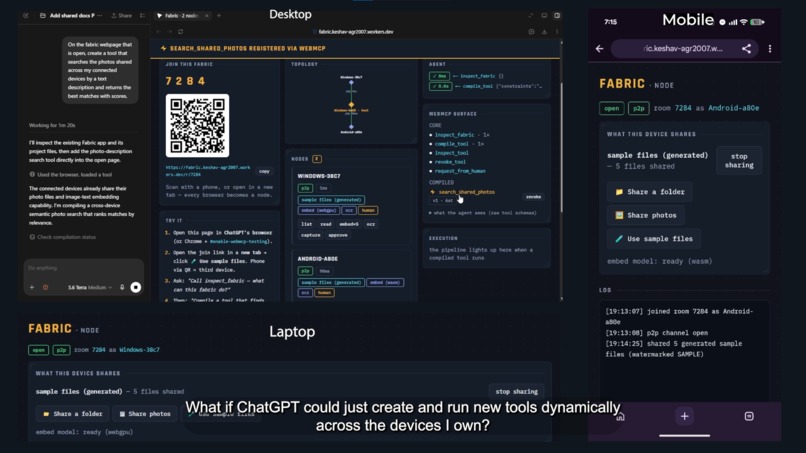
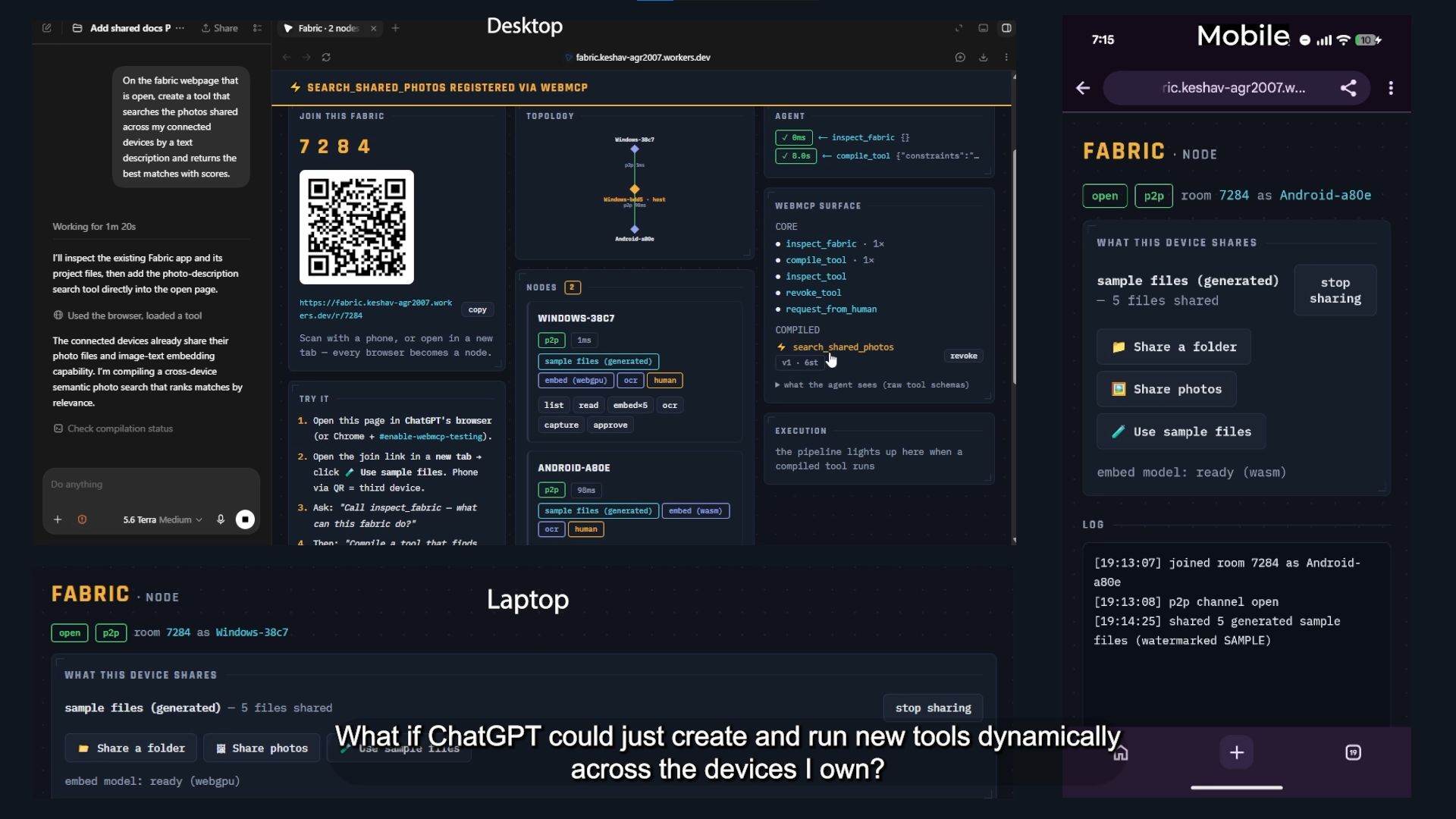
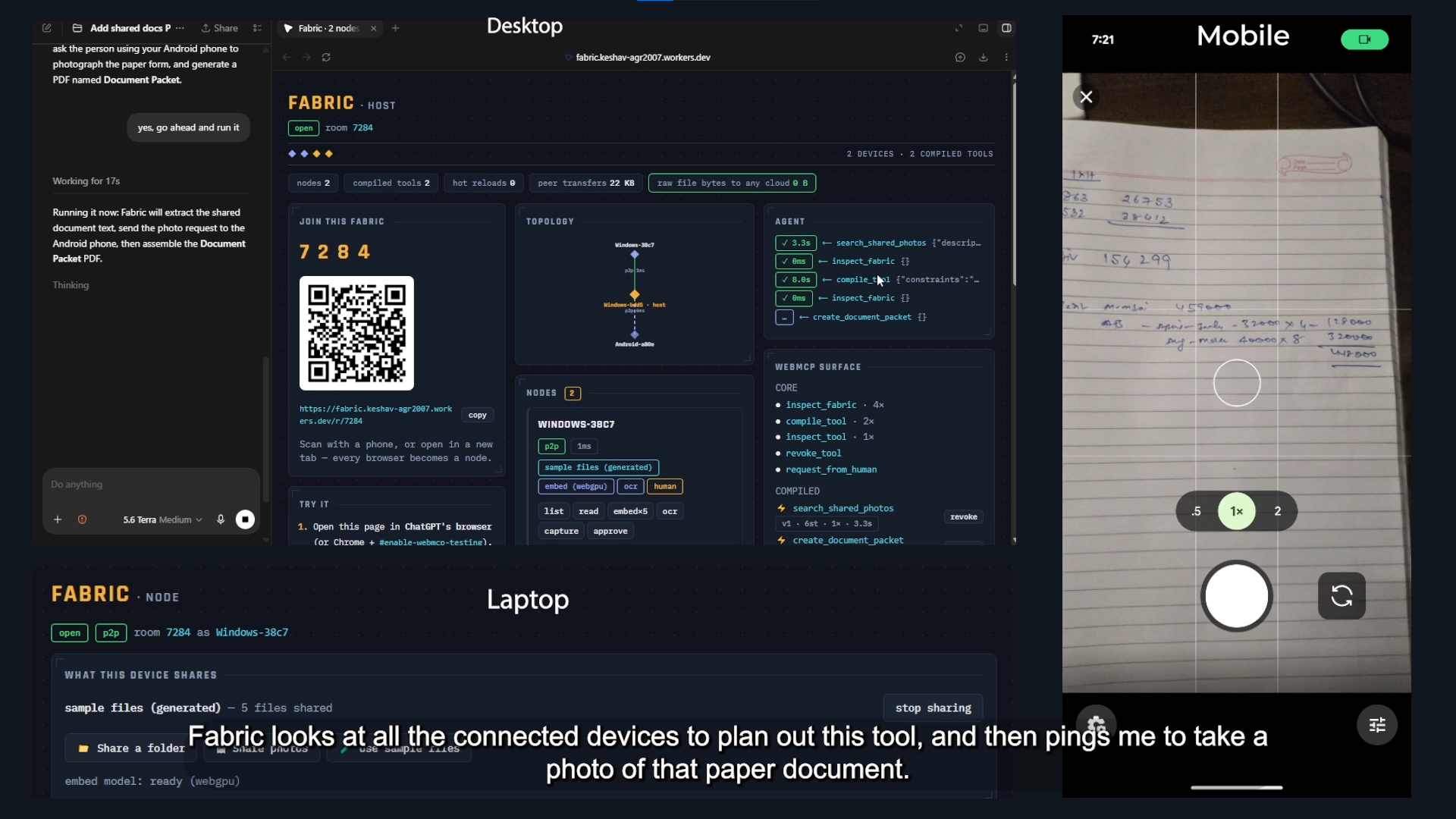
Fabric lets an agent combine capabilities across desktop, laptop, and mobile to compile a new WebMCP photo-search tool during conversation.
-
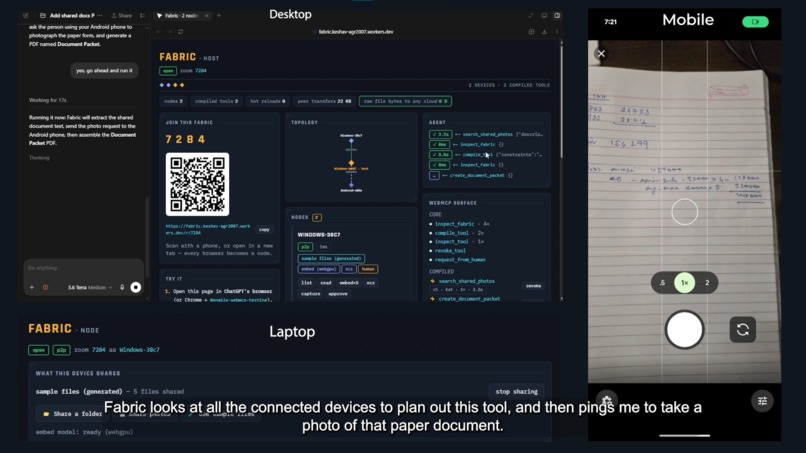
Fabric makes people part of the runtime by routing a camera request to user’s phone, continuing the cross-device workflow with their input.
-
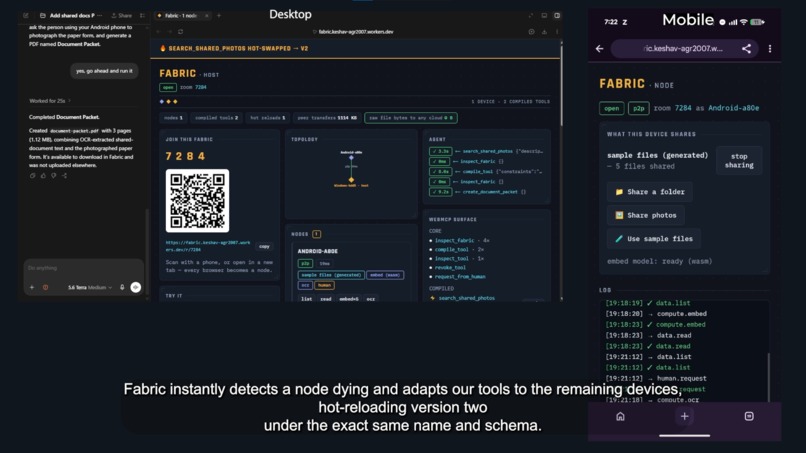
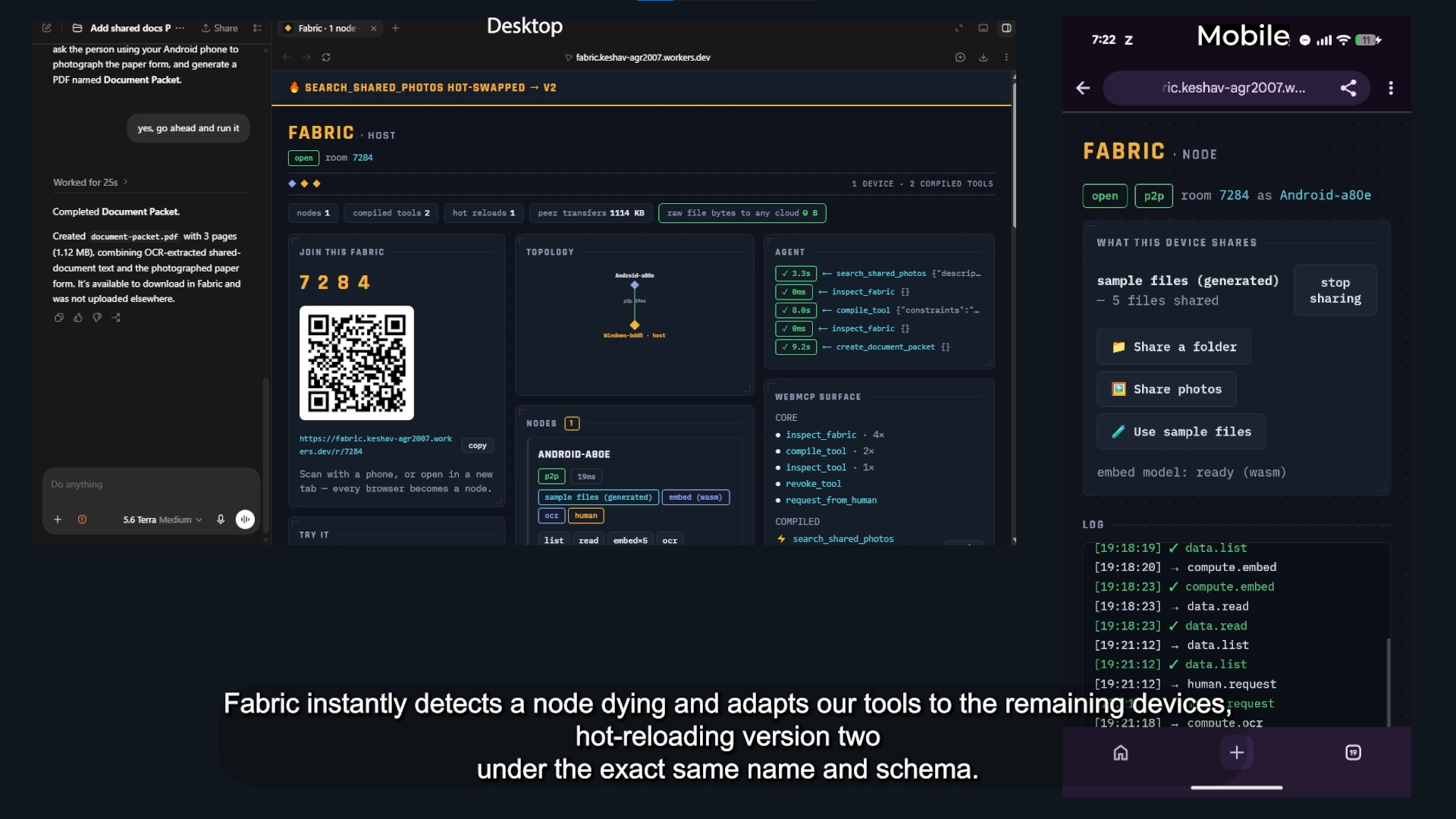
Fabric detects a disconnected device, replans the affected tool, and hot-registers version two under the same name and schema.
Fabric: WebMCP Tools Across Your Devices
Fabric connects your devices so agents can build, run, and hot-swap WebMCP tools from whatever files, cameras, compute, and people are available right now.
Try Fabric Live · Explore the Source Code (MIT) · Watch the Demo
Inspiration: One Fabric for People, Agents, and Devices
AI agents are capable reasoners, but the moment they need to operate in the physical world, they run into a hard boundary: the tools and data they need are fragmented across multiple devices and humans.
- The draft contract PDF is saved on your laptop.
- A signed paper addendum is sitting physically on your desk.
- Your phone has the macro lens to photograph it clearly.
- A workstation desktop in the next room has an idle discrete GPU capable of lightning-fast inference.
- You are sitting in the middle of all of it, holding the judgment and authority needed to approve the final action.
Today, bridging these disconnected islands turns you into a copy-paste courier. You email attachments to yourself, AirDrop photos between folders, upload private documents to remote cloud APIs, and manually synchronize three separate screens. The agent understands the high-level intent, yet it remains trapped inside a single browser tab.
Fabric was built around a straightforward question: What if your devices did not need custom native agents or centralized cloud storage to collaborate? What if an agent could treat your entire personal device ecosystem, and the people in the room, as a single, ad-hoc capability fabric?
Open a link on your laptop, point a phone or tablet at a QR code, and click a link on your desktop. In seconds, every screen negotiates an ad-hoc peer mesh. The agent inspects the room, sees what each device and human can do, compiles task-specific WebMCP tools on the fly, and gets straight to work.
What It Does
Fabric changes the agent experience from a passive chat interface into an active, multi-device team that dynamically organizes around whatever hardware is in the room.
Dynamic Multi-Device Plug-and-Play
You start a session on whatever device is in front of you. As other hardware enters the room, scanning a QR code or opening a URL seamlessly adds that device to the fabric without requiring software installations, browser extensions, or synchronized system accounts.
Each device automatically contributes its natural strengths:
- Smartphones contribute high-resolution cameras, mobility, and personal photo libraries.
- Laptops offer local document stores, working directory access, and active workspace management.
- Desktops and Workstations volunteer hardware-accelerated compute, idle GPUs, and high-throughput batch processing.
- Tablets contribute stylus inputs, touch annotations, and review surfaces.
- Humans contribute real-world perception, contextual judgment, and explicit approval.
Fluid, Local-First Execution
Once devices join the fabric, the agent orchestrates tasks across them based on which node is best suited for each sub-task.
For instance, when you ask the agent to search your personal photo library for a specific tax receipt, Fabric plans a distributed pipeline. Instead of uploading your camera roll to a server, the phone executes an on-device vision model locally in its browser engine. It generates vector embeddings right on the device, sends compact floating-point scores across an encrypted peer-to-peer channel, and transfers only the single matching image preview to your laptop display. Your personal media stays entirely private and local.
First-Class Human Collaboration
Rather than treating human interaction as an unhandled exception where the model halts, Fabric treats human judgment as an intrinsic stage of the tool pipeline.
When generating a verified legal dossier, the agent can initiate a multi-device pipeline:
- It pulls the digital draft from your laptop filesystem.
- It pushes an interactive capture prompt directly to your phone screen, asking you to photograph the missing physical document.
- The moment you capture the image, your phone runs in-browser optical character recognition and pipes the extracted text back into the pipeline.
- Before any final document is stamped and exported, an interactive verification card pops up on your tablet or phone, displaying the extracted metadata with an approval toggle.
- You review the summary, tap Approve, and the agent completes the export.
Human intent and physical actions blend directly into the execution graph alongside automated compute.
Self-Healing Topology
Because physical hardware is dynamic, devices frequently disconnect, sleep, or move out of Wi-Fi range. Fabric actively monitors node presence. If your desktop drops offline while performing vector calculations, Fabric immediately detects the missing node, re-routes the pending pipeline stages to run on your laptop processor, and hot-swaps the underlying tool implementation while keeping the exact same tool interface active. The agent continues the conversation uninterrupted.
Why Fabric Is a Strong Fit for WebMCP
Most WebMCP implementations register a static, pre-compiled set of tool definitions when the browser initializes. Fabric approaches WebMCP as a dynamic runtime compilation target:
- Just-In-Time Tool Synthesis: Instead of exposing fixed endpoints, the host inspects the live device mesh and synthesizes custom, validated execution graphs tailored to the user's specific prompt.
- The Web as a Strict Permission Sandbox: Fabric reaches local hardware, cameras, and filesystems exclusively through standard browser capabilities explicitly granted by the user. The agent gains powerful multi-device physical reach without obtaining unrestricted operating system access.
- Schema-Preserving Hot Swaps: When the physical topology changes, Fabric preserves the tool's external identifier and JSON Schema contract while hot-swapping the internal execution graph, avoiding model hallucinations caused by disappearing or mutating tool schemas.
Cloudflare Architecture
Fabric uses Cloudflare Workers and Durable Objects to provide an ultra-low-latency edge coordination layer for the peer mesh:
- Transactional Edge Coordination: A dedicated Cloudflare Durable Object manages each room, maintaining an authoritative, ordered log of peer presence, ICE candidate exchanges, and active capability leases. The Durable Object persists compiled tool graphs to transactional storage, allowing pipelines to recover seamlessly if the host browser reloads.
- Low-Cost Edge Parking via WebSocket Hibernation: Fabric leverages the Cloudflare WebSocket Hibernation API. When a room is idle, the Durable Object is evicted from active worker memory while maintaining open client WebSocket connections. The edge fabric remains parked and available indefinitely at virtually zero idle compute cost until an incoming frame wakes it up.
- Signaling and Data Transport Fallback: Browsers negotiate direct peer-to-peer WebRTC DataChannels using the Durable Object as an SDP signaling bus. SCTP-framed DataChannels deliver high-throughput binary tensor and image streams with zero server hops. If symmetric NATs or corporate enterprise firewalls prevent direct peer traversal, the Durable Object automatically falls back to an encrypted, zero-knowledge relay mode.
How WebMCP Is Implemented
The WebMCP integration layer lives in app/src/webmcp/ and connects ad-hoc peer networks directly into standard browser agent contexts:
- Dynamic Registration via
registerTool: When a task is planned, Fabric compiles the pipeline into a validated Directed Acyclic Graph (DAG) and registers it immediately usingdocument.modelContext.registerTool({ name, description, inputSchema, execute }). Each registration is bound to a dedicated JavaScriptAbortController. When topology updates occur, Fabric invokesabort(), cancels the pending runtime pipeline, and re-registers the updated DAG under the same name and input schema. - Validated Execution Pipelines: Instead of generating unverified code strings, the planner outputs a structured pipeline blueprint. Fabric checks every step, data flow, and device lease before calling
registerTool. - Adaptive Client-Side Inference Engines:
- Workstations and Desktops: Utilizes Transformers.js running CLIP ViT-B/32 through WebGPU with fp16 half-precision GEMM kernels, delivering sub-50ms vector generation.
- Mobile Devices: Automatically switches to an 8-bit quantized ONNX model compiled to WebAssembly (WASM), keeping working set memory below 250MB to avoid mobile browser memory termination.
- OCR Processing: Dispatches document text recognition to dedicated Tesseract.js Web Workers, isolating heavy image thresholding and matrix processing from the main UI thread.
Engineering Challenges Overcome
- Mobile WebKit Memory Ceilings: Running modern vision-language models inside mobile browsers regularly exceeded the operating system's strict memory limits, terminating browser tabs. We addressed this by implementing an adaptive model loader that inspects device memory and WebGPU availability, dynamically serving the fp16 WebGPU pipeline to desktops while routing mobile devices to an optimized int8 quantized WASM build.
- CORS and Edge Streaming for Model Weights: Loading multi-hundred-megabyte model shards directly from upstream model hubs routinely failed due to strict cross-origin isolation policies required by high-precision browser timers. We engineered a streaming, edge-cached reverse proxy in the Cloudflare Worker that delivers model chunks with correct same-origin isolation headers.
- Dynamic Capability Drift and Revocation: Users can revoke camera or filesystem access at any point mid-session. Fabric eliminates stale capability assumptions by implementing lazy token re-resolution, verifying permissions on the target device immediately before each DAG stage executes.
- Mobile Sleep and WebRTC Recovery: Aggressive mobile power management can suspend background tabs and drop peer connections. Fabric pairs a Screen Wake Lock on active nodes with an aggressive 3-second heartbeat monitor. When a disconnection occurs, the system switches traffic to the Durable Object relay within 200ms while attempting ICE renegotiation.
What's Next
- Multi-Agent Room Sharing: Allowing distinct WebMCP agents (such as ChatGPT, Claude, and specialized local browser agents) to attach to the same device fabric simultaneously.
- Autonomous Capability Synthesis: Detecting repeated manual capability sequences and proposing new, composite WebMCP tools that users can pin to their fabric.
- Persistent Cryptographic Leases: Introducing WebAuthn-based peer authorization so personal devices rejoining a known room can automatically restore verified capability grants with a single biometric tap.
Testing Instructions
Fabric can be tested using two separate devices (such as a laptop and smartphone) or by opening two separate browser windows:
- Open the Live App in ChatGPT's in-app browser or in Google Chrome 149+ with the
#enable-webmcp-testingflag enabled:https://fabric.keshav-agr2007.workers.dev - Scan the on-screen room QR code using your phone or tablet (or open the join URL in a second browser window).
- On the joined node, tap "Use Sample Files" to load the bundled test documents, receipts, and photos.
- In ChatGPT or your WebMCP agent, prompt:
"Inspect the connected fabric and compile a tool to search my photos by description." - Once the pipeline compiles and Fabric registers the tool into the browser context, prompt:
"Find the photo of the dog." - Observe the execution: the mobile device embeds the photos locally via WASM and sends lightweight vector scores over WebRTC. The source photos never leave the phone.
- To test human-in-the-loop coordination, prompt the agent:
"Compile and sign the document packet."
Follow the interactive prompt on your mobile screen to snap a photo of a document, verify the in-browser OCR parsing, and tap the approval prompt to authorize the final PDF compilation.
Built With
- chrome
- clip
- cloudflare-durable-objects
- cloudflare-workers
- onnx-runtime-web
- openai-api
- react
- tesseract.js
- transformers.js
- typescript
- vite
- webgpu
- webmcp
- webrtc-datachannels
- websocket-hibernation

Log in or sign up for Devpost to join the conversation.