-
-
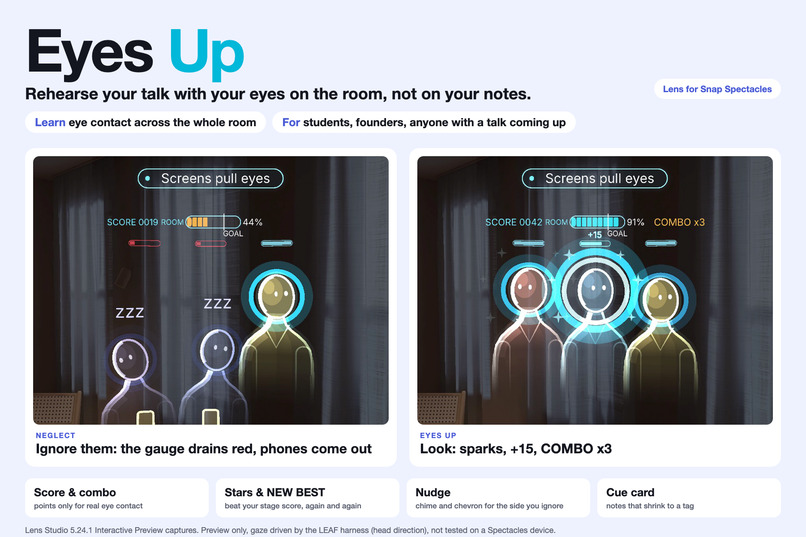
Ignore them and they slump. Look at one and the room comes back.
-
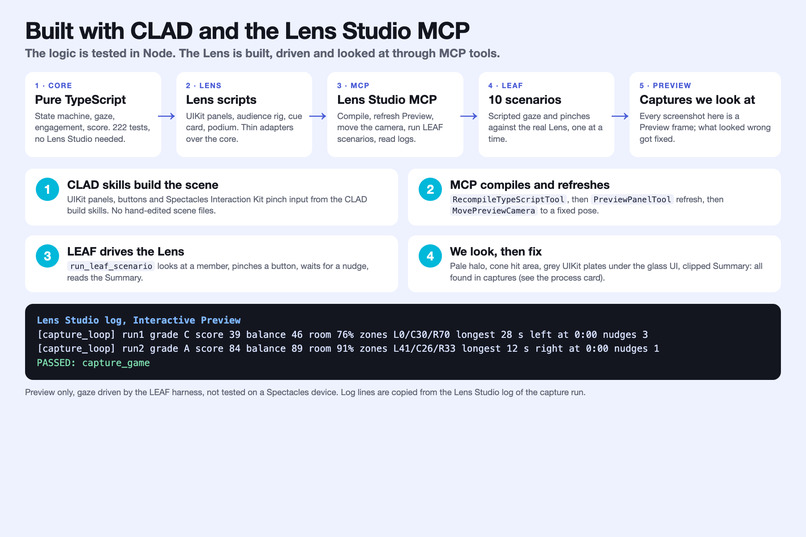
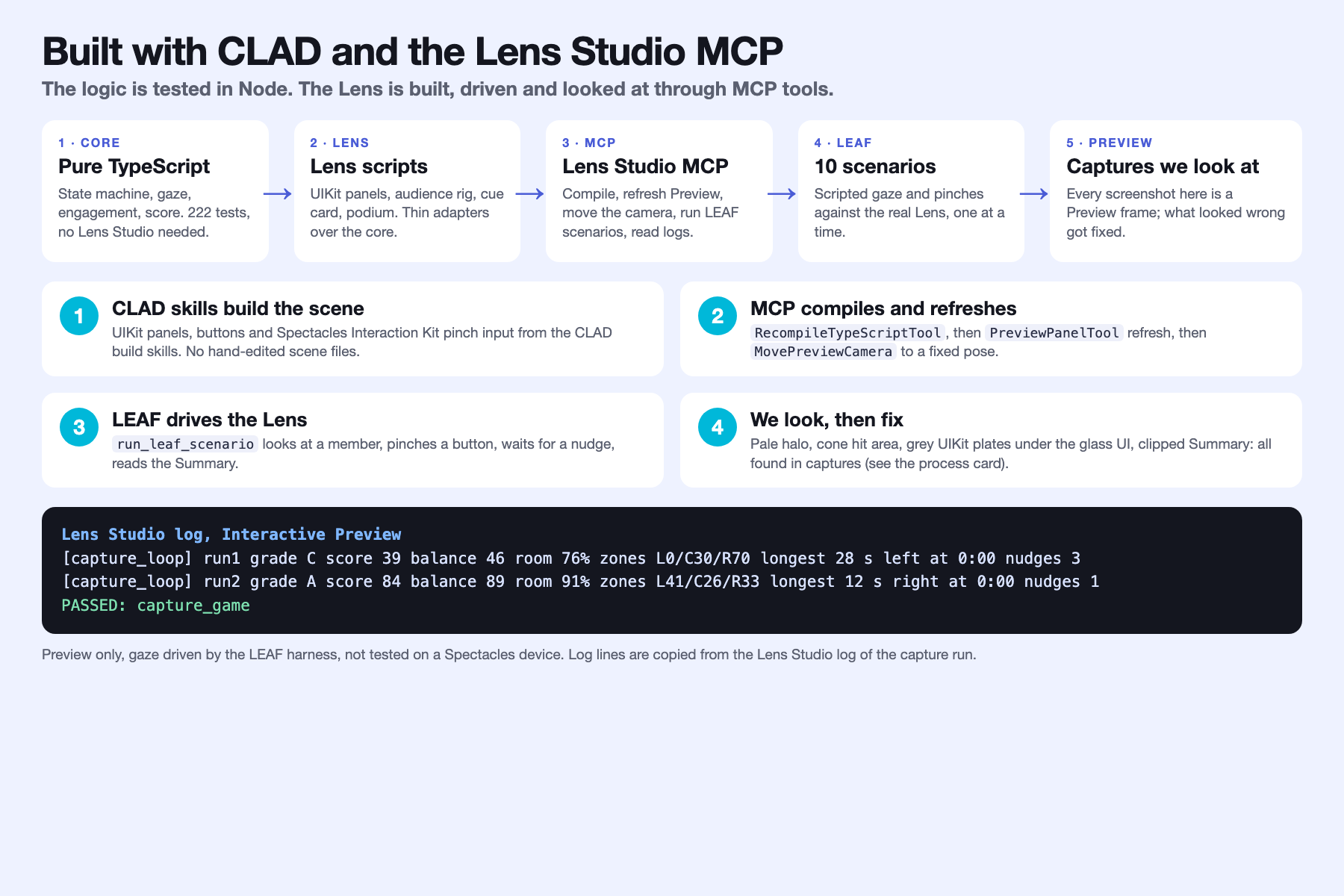
How CLAD and the Lens Studio MCP were used.
-
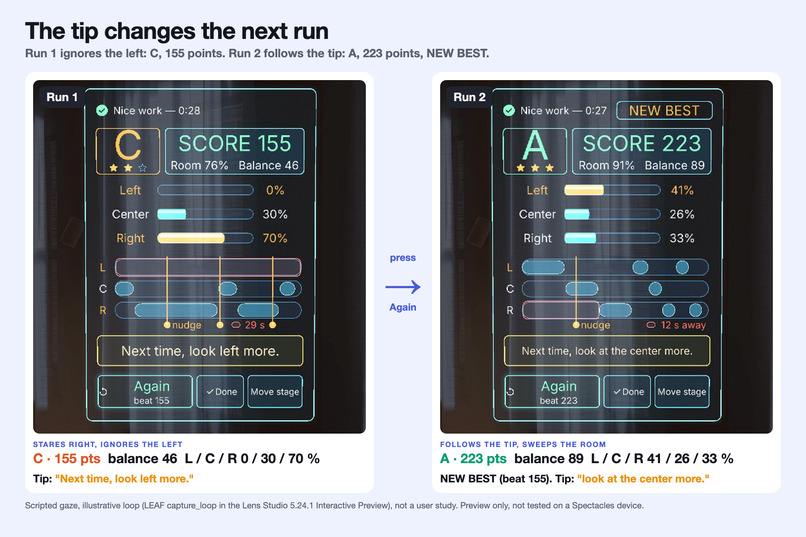
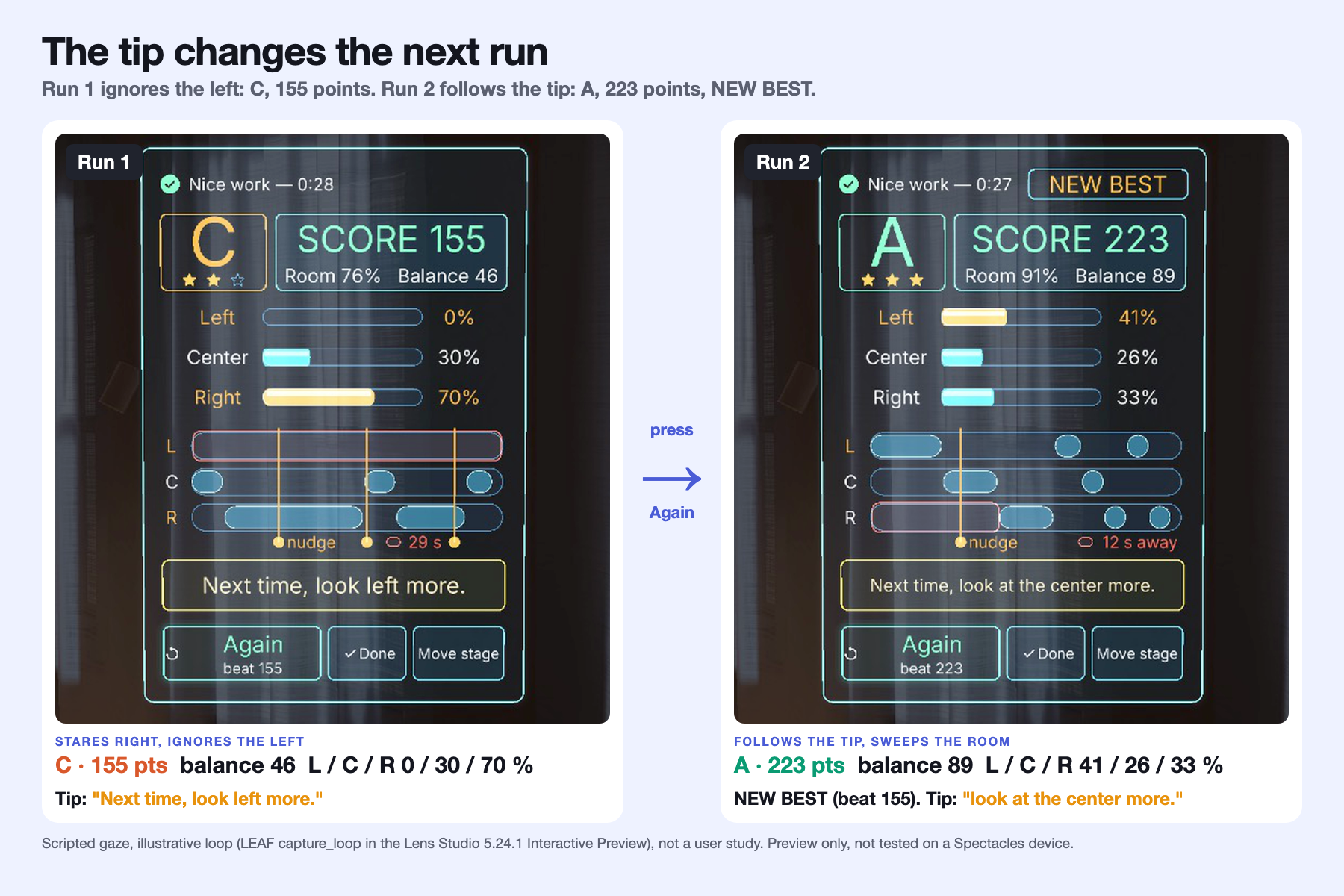
The learning loop: Run 1 (C) beside Run 2 (A, NEW BEST). Scripted gaze, not a user study.
-
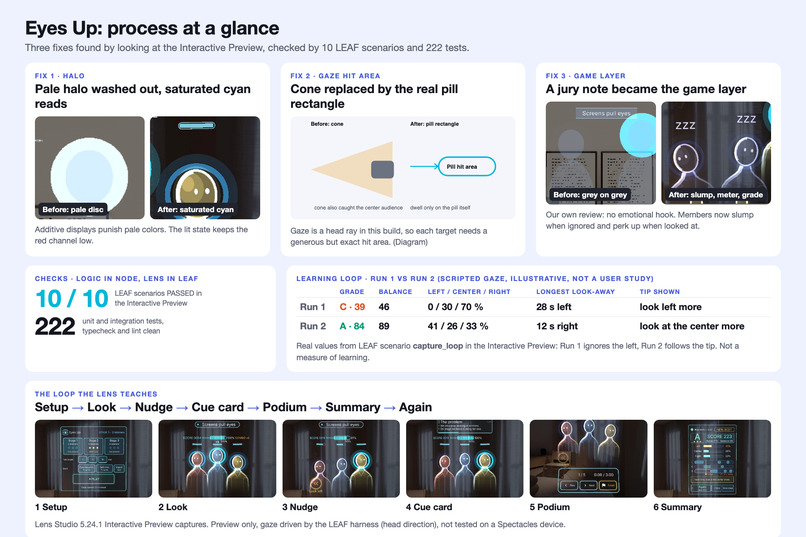
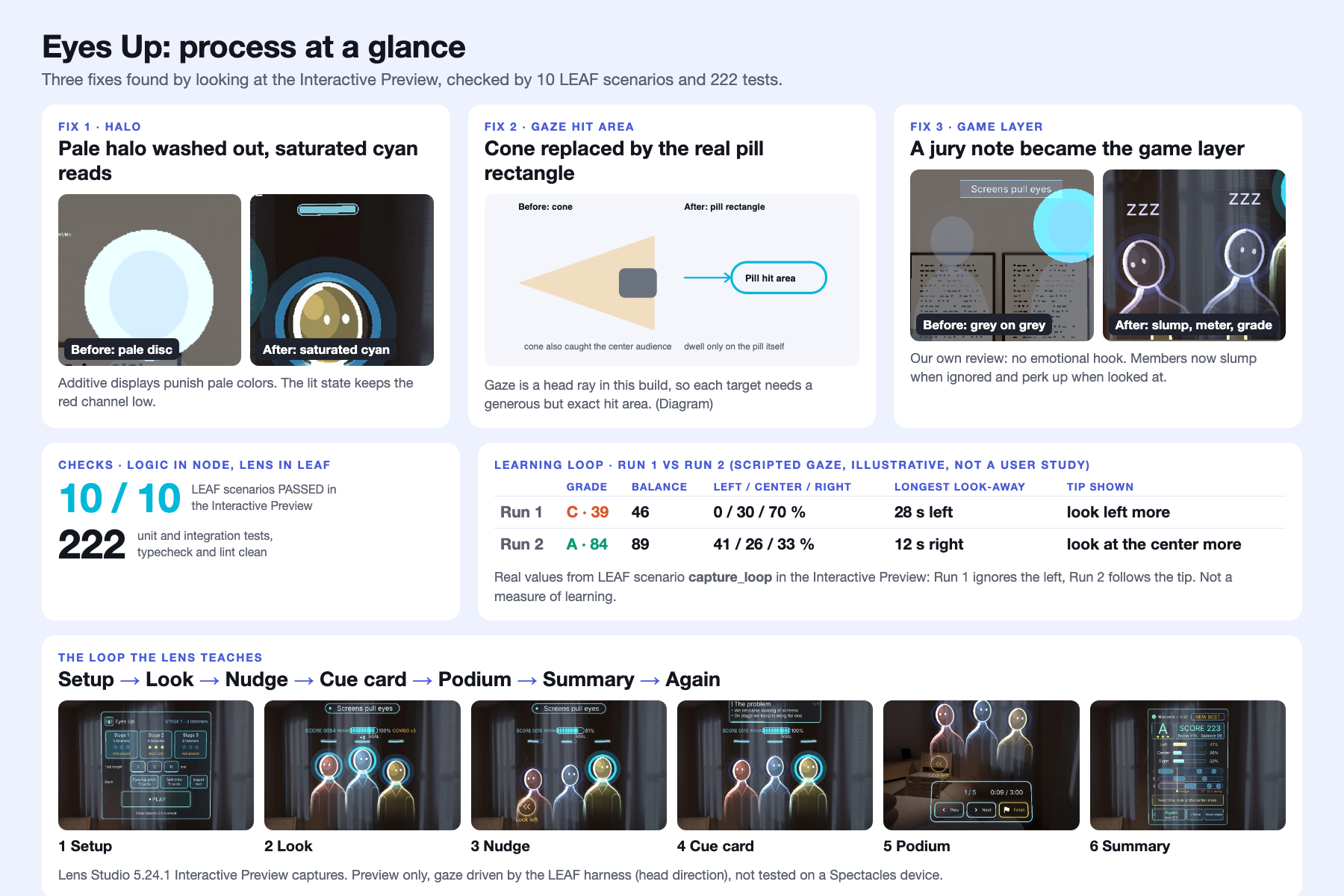
Process: fixes found in the Preview, LEAF scenarios and tests.
-
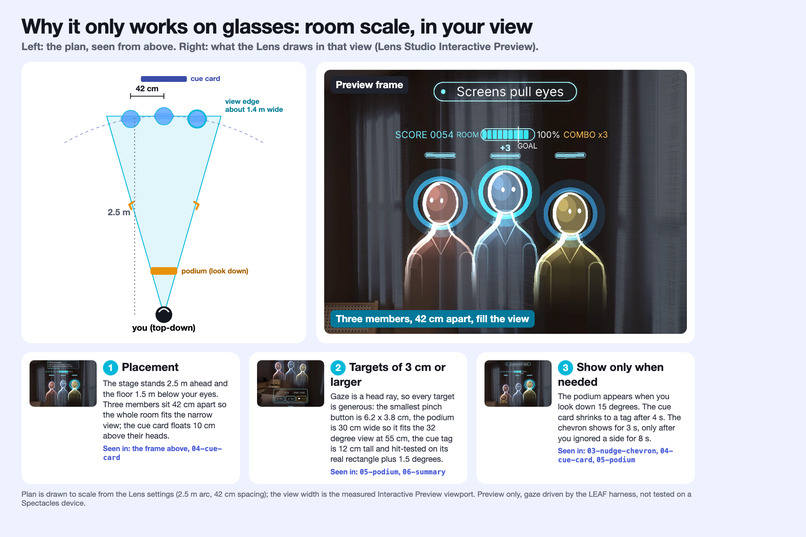
Why only on glasses: the room at real scale, in your view.
-
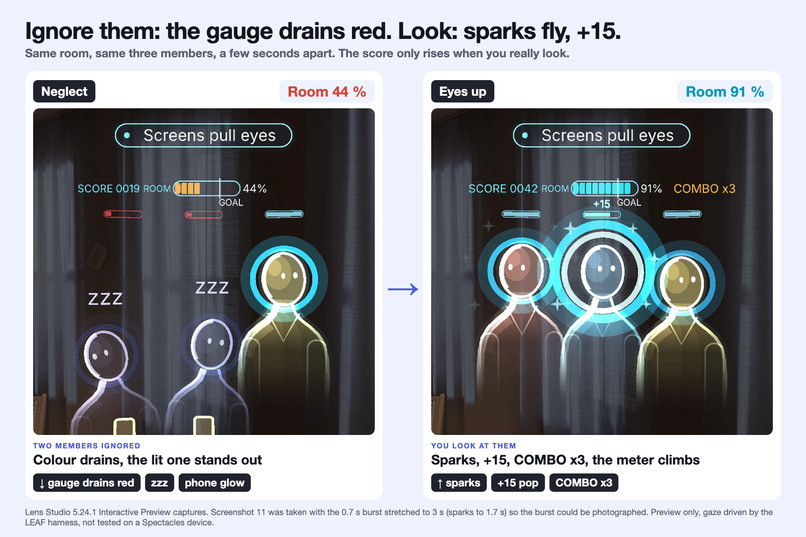
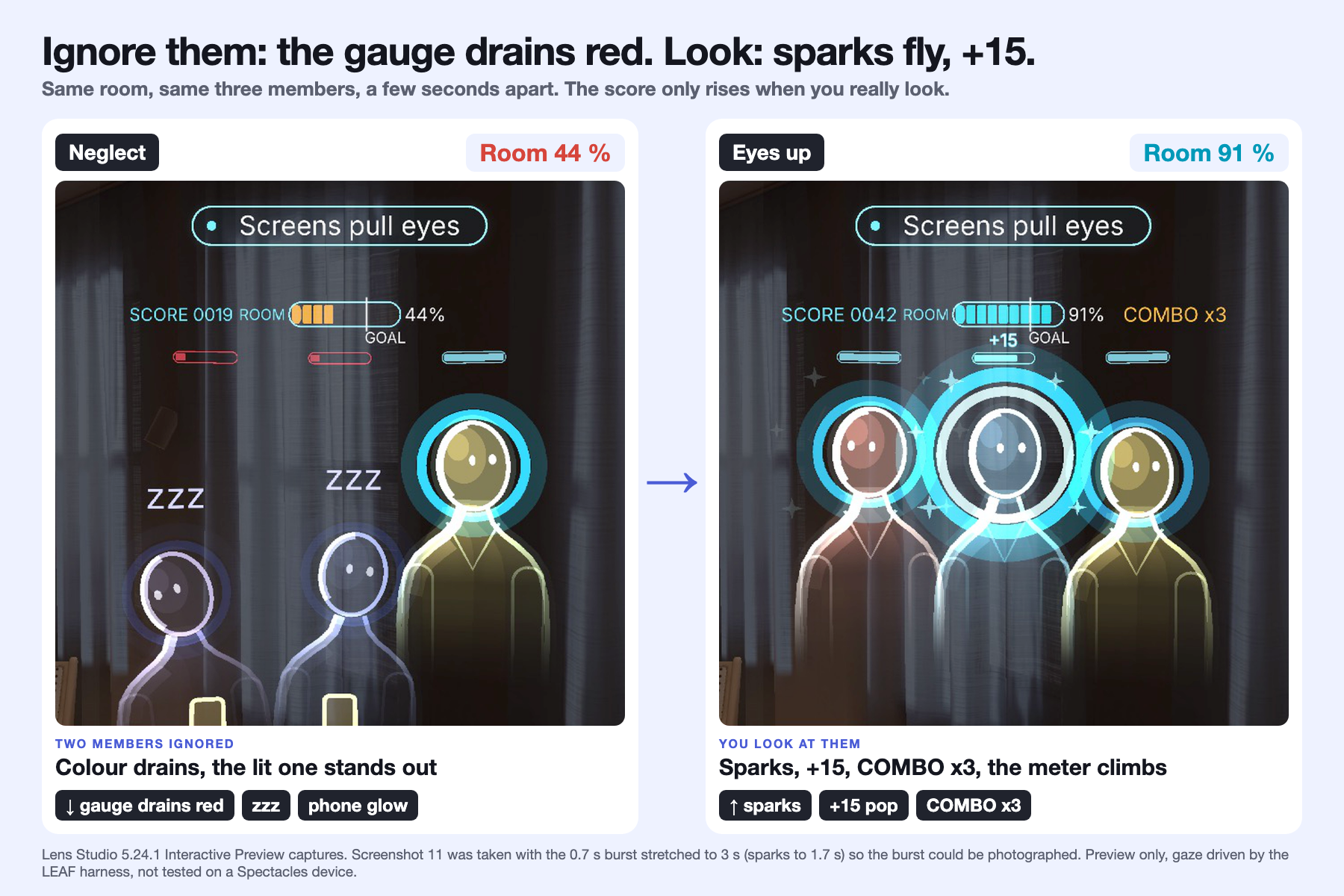
Ignore: the gauge drains red. Look: sparks fly and the score climbs.
-
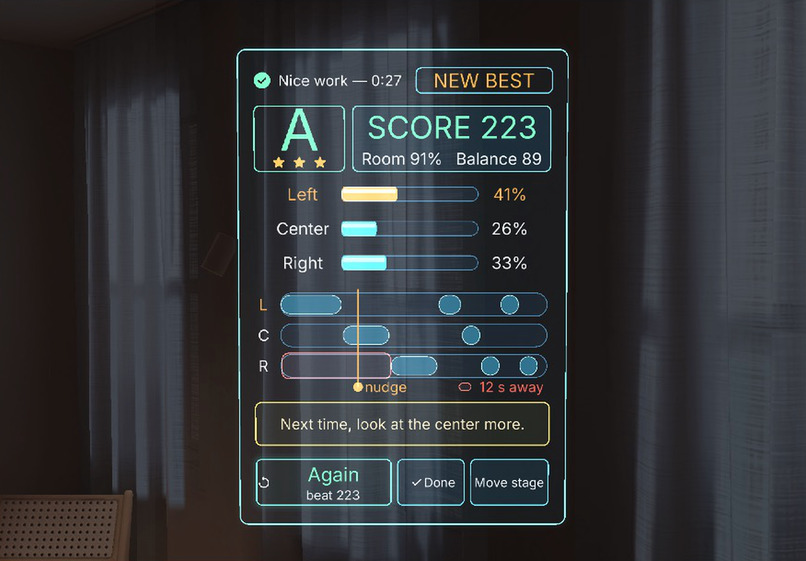
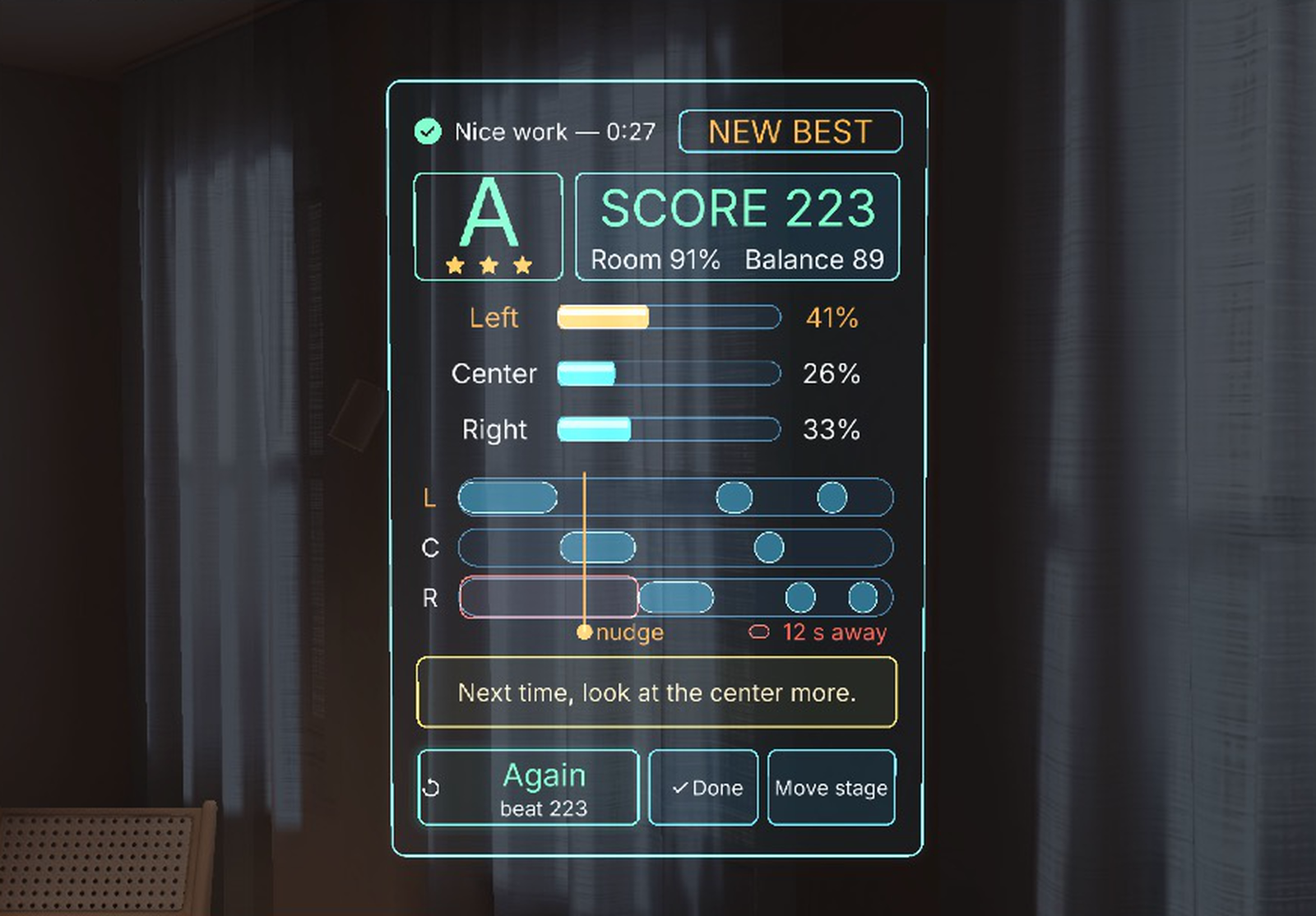
The payoff: grade stamp, stars, where your eyes went, one tip, Again.
-
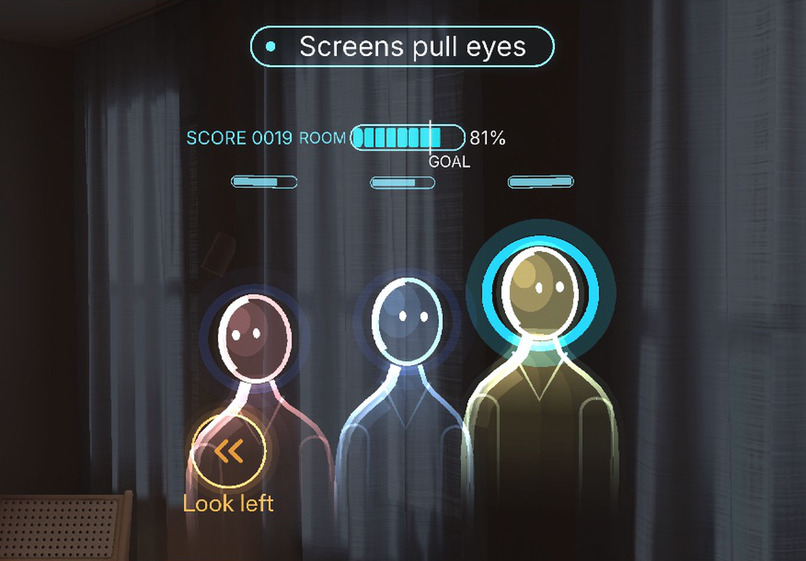
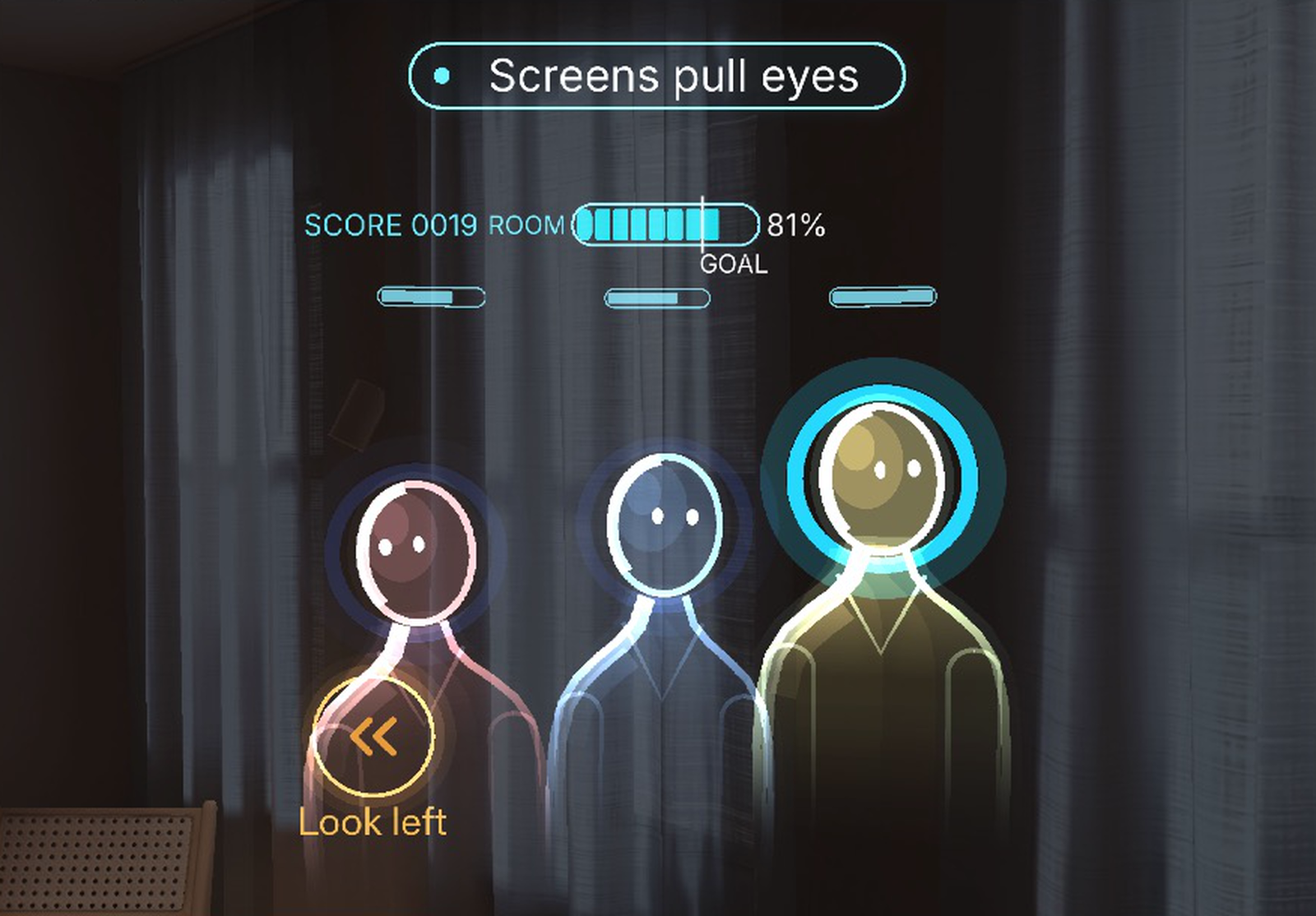
The nudge: a chime and an amber chevron for the side you ignored.
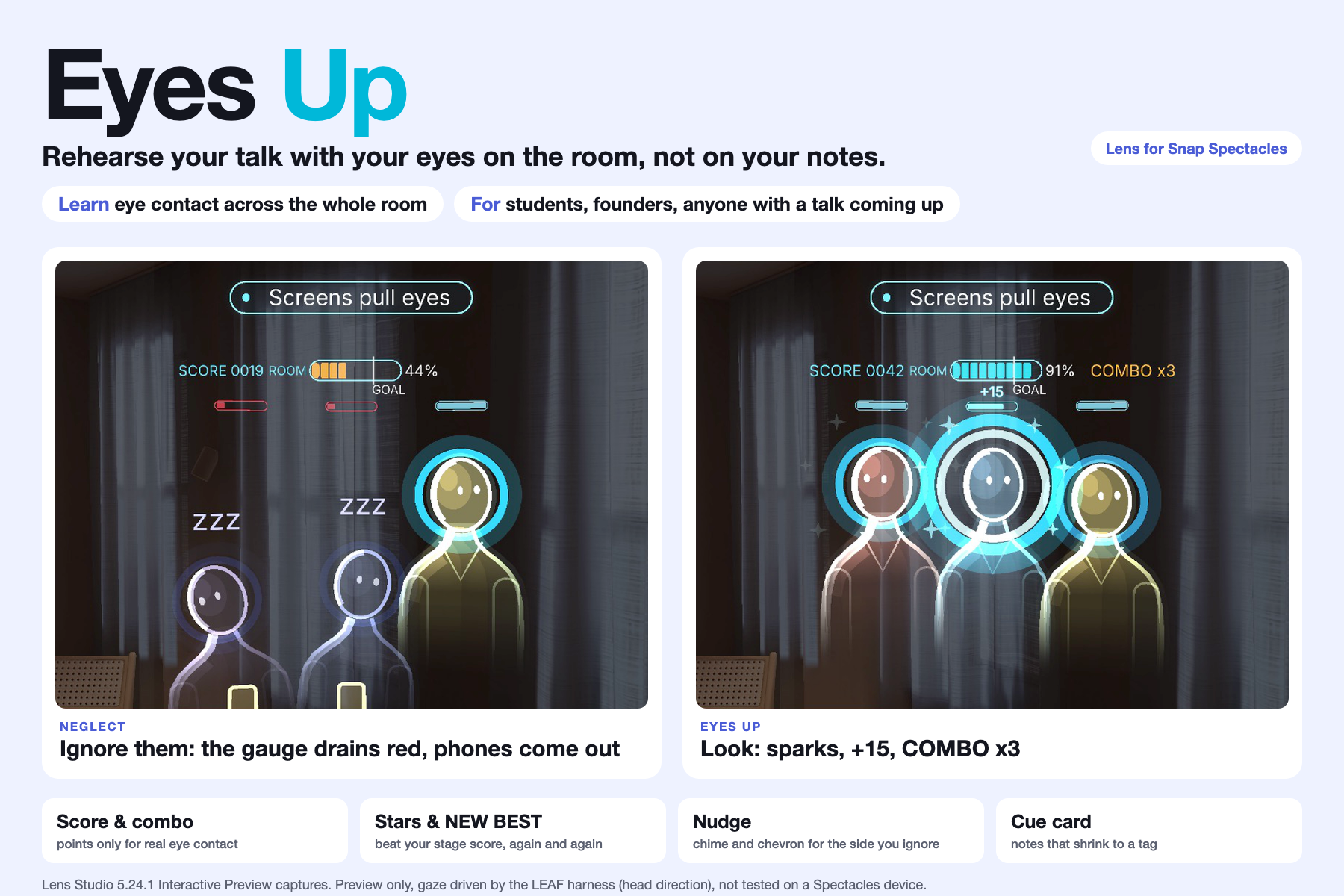
Ignore your audience and they slump; look at them and they perk up.
Judge in 60 seconds
- See it: gallery images 1 and 2 are the whole idea. Members you ignore slump, mute their colour and light a phone; the one you look at stays lit in cyan and the room meter shows how many are with you.
- See why it needs glasses: image 3 is the plan seen from above (you, 2.5 m, three members 42 cm apart, your view) beside a Preview frame, with three design rules.
- See the payoff and the loop: image 4 is the Summary (grade, split, timeline, tip). Image 5 puts Run 1 (C 39) next to Run 2 (A 84) after following the tip.
- Check it: image 6 (process, 10 of 10 LEAF scenarios, 198 tests) and image 7 (how CLAD and the Lens Studio MCP were used). Preview only, gaze driven by the LEAF harness, untested on a device.
Learn: spread your eye contact across the whole room. For: students, founders, anyone with a talk or an interview coming up.
In three lines
- Problem: people rehearse talks staring at slides, a phone or a script, so the room never gets practice.
- Spatial moment: on Spectacles a virtual audience sits 2.5 m ahead and reacts to where you look: the member you face lights up in cyan and perks up, the ones you ignore slump and light a phone, and after 8 seconds a chime and a chevron point to the side you forgot.
- Proof: built with CLAD and the Lens Studio MCP; 10 of 10 LEAF scenarios pass in the Interactive Preview and 194 Node tests pass. Preview only, gaze = head direction driven by the LEAF harness, not tested on a device.
Learning goal: spread your eye contact across the whole room. Feedback: the audience reacts live, then you get one tip and a grade. Practice: press Again and beat your grade. Limit: learning outcomes are not measured; preview only, gaze is head direction driven by the LEAF harness, untested on a device.
What it does
Eyes Up is a presentation rehearsal coach for Spectacles. Setup is three pinches (talk length 3 / 5 / 10 min, audience 3 / 6 / 9 with 3 selected so the whole room fits the view, deck: two samples or your own outline), then Start rehearsal.
- Look: a half circle of glass figures (head, neck, shoulders and torso, each person in a different hue, each with a "#n NN%" engagement tag) stands 2.5 m ahead. Whoever you look at gets a bright cyan ring within a second.
- Nudge: ignore one side for 8 seconds and a soft chime plays from that side while an amber double chevron appears at the edge of your view.
- Notes: your next talking point floats above the audience for 4 seconds, then shrinks to a three-word tag. Look at it for a second and it opens again.
- Podium: look down like a wristwatch for Prev, Next, Finish, a section counter and the talk timer.
- Audience and room: ignored members slump (head sinks and tilts, colour mutes, "zzz", phone glow); look at them and they perk up with a cyan ring burst. A room meter shows how engaged everyone is: one capsule with a tick and a "target" caption at 70 %: cyan at 70 % or above, amber below, coral below 40 %.
- Summary: applause that scales with your score, then an S / A / B / C grade, left / center / right split, gaze timeline, longest look-away and one tip. Again keeps your settings and shows your best earlier score from this session.
Why only on glasses
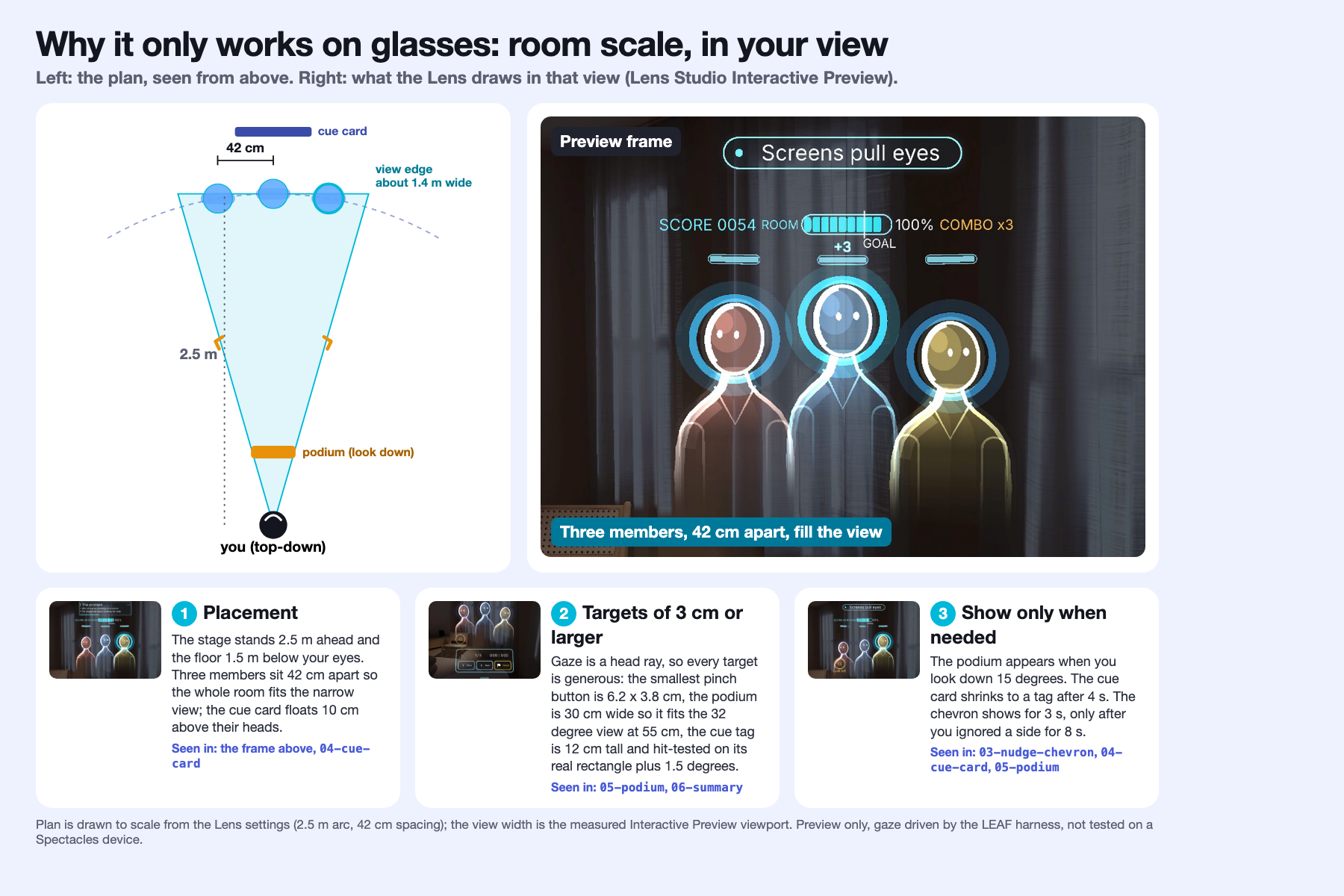
Gallery image 3 shows it: the plan from above next to a Preview frame, with the three rules below and where each is visible in the Lens.
- It shares your view. The Lens knows where you look, so it can light up the person you face and time the side you ignored.
- It draws in your room. The audience and the cue card sit at real scale (2.5 m ahead, 10 cm above heads), so your eyes stay up instead of dropping to a screen.
- It leaves your body free. You stand, walk and gesture while you rehearse. Nothing is held or typed.
Design rules: placement (stage 2.5 m ahead, three members 42 cm apart so the room fits the narrow view), targets of 3 cm or larger (gaze is a head ray; pills and buttons are hit-tested on their real rectangle) and show only when needed (podium on look-down, cue card shrinks to a tag, chevron only after 8 s of ignoring a side).
The learning loop: Run 1 vs Run 2
Rehearse, read the Summary, press Again (it keeps your settings) and run the talk once more. One scripted example, played by the LEAF harness in the Interactive Preview (capture_loop, logged in devpost/leaf-results.md). Scripted gaze, illustrative loop, not a user study.
| Grade | Balance | Left / Center / Right | Longest look-away | Nudges | Tip shown | |
|---|---|---|---|---|---|---|
| Run 1: stares right, ignores the left | C (score 39) | 46 | 0 / 30 / 70 % | 28 s, left | 3 | "Next time, look left more." |
| Run 2: follows the tip | A (score 84, new best) | 89 | 41 / 26 / 33 % | 12 s, right | 1 | "Next time, look at the center more." |
| What the learner gets | |
|---|---|
| Without Eyes Up | You rehearse to slides or a phone. Nobody reacts, so you cannot tell that one side of the room never got a look. |
| With Eyes Up | The room reacts as you look: ignored members slump, the one you face perks up, a chime and chevron point to the side you forgot. |
| What the Summary tells you | A grade, your left / center / right split, the longest look-away and one tip ("look left more"), then Again to run it once more. |
Design rationale: the audience reaction is the feedback, the tip is the next step, and Again is the practice loop. Room engagement went from 76 % to 91 % in the scripted example. Gallery image 5 shows both Summaries side by side. The Lens does not measure whether a real speaker would learn this; it makes the feedback loop visible and repeatable.
What I learned building AR
- Glasses punish pale colours and thin lines. The display is additive, so black is clear and pale is washed out. A cyan-white halo read as a grey disc in the Preview, and a thin amber chevron box vanished on a bright wall. The lit state is now saturated cyan with the red channel low, slumped members keep a muted blue instead of grey, and the chevron is a bold icon with no box.
- Gaze is a head ray, so targets need an exact, generous hit area, and the whole scene has to fit a narrow view. We hit-test the real pill rectangle instead of a cone, and the Setup default is a 3-person audience that sits 42 cm apart, because the lens viewport is only about 1.4 m wide at 2.5 m (a 6-person arc at 60 cm was cut off at the edge), and the stage floor sits 8 cm higher than the 1.6 m plan so slumped heads stay in frame. UIKit's rounded backplates did not draw on Lens Studio 5.24.1, so panels use plain quads and UIKit keeps layout and pinch input.
- Test the logic in Node, drive the Lens with CLAD and MCP. Timing rules (8 s nudge, 4 s card, 1 s dwell, engagement decay) live in pure TypeScript and ran in milliseconds under Vitest. CLAD skills built the scene and the Lens Studio MCP tools edited it, moved the preview camera, ran LEAF scenarios and let us look at captures, which found all of the above.
How it was built
- Pure-TypeScript core (no Lens Studio dependency): state machine, gaze zones, halo attention, nudge rules, cue card, stage-line timer, session stats, engagement and room meter, score and grade, panel view models, chevron placement, deck import parser. Unit and integration tests, typecheck and lint pass in Node.
- CLAD skills: scene and UIKit panels built with the CLAD build skills (UIKit panels and buttons, Spectacles Interaction Kit pinch input).
- Lens Studio MCP tools: scene edits,
MovePreviewCamera,run_leaf_scenario, compile checks and log reads, all driven through MCP; no hand-edited scene files. - LEAF: 10 scenarios pass one at a time in the Interactive Preview.
Who it is for
Anyone who has to speak to a room and keeps staring at slides, a phone or a script.
- Student: a thesis defence in front of a panel. Practise looking at every committee member, not only the supervisor.
- Founder: a pitch. Keep your eyes on the room instead of the deck, and see which side you forgot.
- Interview: a panel interview. Learn to share eye contact between interviewers, not the table.
A laptop teleprompter pulls your eyes down to a screen, which is the habit you want to break. Glasses keep the room in view, know where you look, and draw in the world, so this only makes sense on glasses.
What is not done (honest list)
- Not tested on a Spectacles device (none available). Gaze is head rotation, simulated in preview. Spatial direction of the chime and legibility at 2.5 m on real optics are unverified.
- The score and grade are a design heuristic, not a validated measure of speaking skill; nothing is saved between sessions.
- The Run 1 vs Run 2 loop is one scripted run, not a user study.
- Everything shown is the Interactive Preview with simulated gaze and pinches. Sound effects and the video narration are synthesized locally (macOS text to speech). The demo video was recorded before the final glass-native redesign and game layer; the gallery images show the final build.
- No speech recognition: the Lens reacts to where you look, not to what you say, so you can rehearse in any language.
Links
- Repository: https://github.com/sh0sub/eyes-up (MIT). Walkthrough, LEAF log, build log, design brief and spec check are in
devpost/anddocs/.
Built with
Lens Studio 5.24.1, TypeScript, UIKit, Spectacles Interaction Kit, LEAF, CLAD, Lens Studio MCP. Started from the SPECS base template. No third-party music, logos or trademarks. Not used: Remote Service Gateway, SnapML, ASR.
Built With
- clad
- leaf
- lens-studio
- lens-studio-mcp
- spectacles
- spectacles-interaction-kit
- typescript
- uikit
