-
-
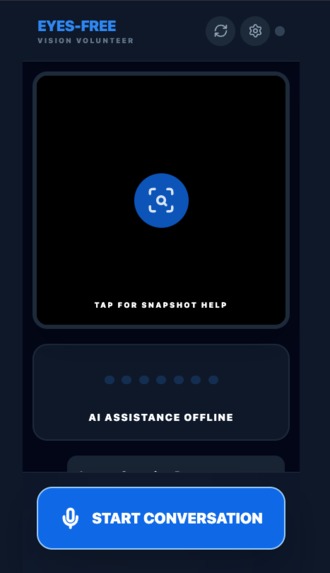
Tap "START ASSISTANT" to begin or Tap the camera view for deep analysis when you need detailed information.
-
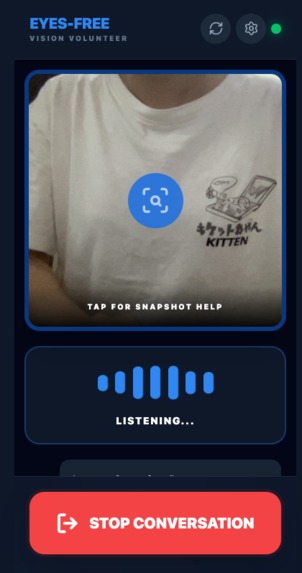
Switch between front (selfie) and back (environment) camera for different use cases. Speak naturally and let the AI guide you.
Eyes-Free: A Voice-First Visual Assistant for Low-Vision Users
Inspiration
The inspiration for Eyes-Free came from my uncle, who is partially blind.
In his daily life, he often uses the app Be My Eyes to take photos and ask for help understanding his surroundings. While the app is incredibly helpful, there are moments when AI image analysis fails — especially when the camera is not aligned correctly.
In those situations, my uncle has to call a human volunteer. The volunteer then guides him step by step: "move the phone a bit to the left," "tilt it up," or "walk forward slowly." While this works, it depends on volunteer availability, and sometimes help is not immediate.
This made me wonder:
What if an AI could temporarily replace the volunteer and provide simple, real-time voice guidance when no one is available?
That question became the starting point for Eyes-Free.
What it does
Eyes-Free is a voice-first visual assistant designed for partially blind and elderly users.
Instead of relying on text or complex interfaces, users simply point their phone camera and speak.
The app uses a hybrid AI approach combining multiple Gemini models:
Real-Time Assistance (Gemini 2.5 Flash Native Audio - Live API):
- Continuous voice conversation: Users speak naturally, and the AI responds with clear, spoken guidance in real-time
- Live camera vision: The app continuously captures camera frames and sends them to Gemini for environmental awareness
- Spatial guidance: The AI uses clock directions and brief instructions to guide users (e.g., "move to 3 o'clock", "step forward")
- Contextual understanding: Gemini sees what the user sees and provides relevant, actionable instructions
- Hands-free operation: The entire interaction happens through voice, minimizing the need for visual interface navigation
Deep Analysis Mode (Gemini 3 Flash):
- On-demand instant analysis: Users can tap the camera view to trigger a fast, detailed analysis of the current scene
- High-speed text recognition: Gemini 3 Flash provides near-instant OCR, reading medicine labels, expiration dates, and complex text with high accuracy
- Comprehensive scene understanding: Identifies all objects, describes spatial relationships, and provides detailed descriptions
- Immediate feedback: Provides spoken feedback ("Analyzing image. Please hold still.") during processing
- Spoken results: Analysis is automatically read aloud using text-to-speech for seamless voice experience
Accessibility Features:
- Transcription display: All conversations are transcribed for users with partial vision
- Replay functionality: Users can tap a replay button to hear any AI response again
- System sounds: Audio feedback for connection status and actions
- Camera toggle: Switch between front (selfie) and back (environment) camera for different use cases
- Quota warnings: Visual alerts when API limits are reached, with options to upgrade
- Settings management: Easy access to configure API keys and settings
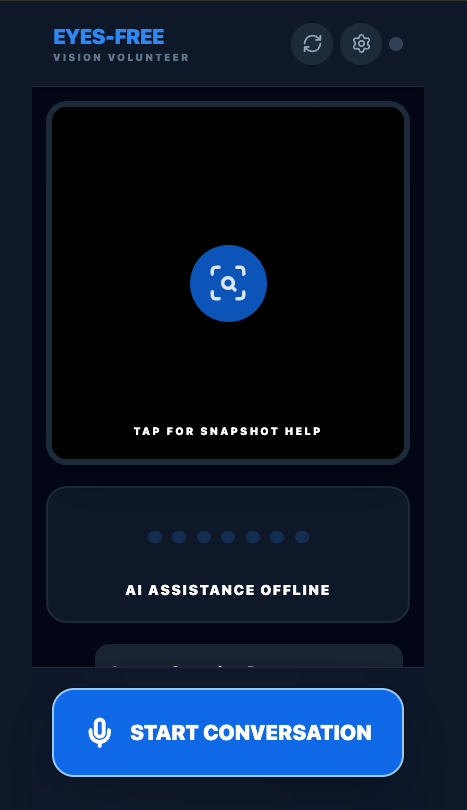
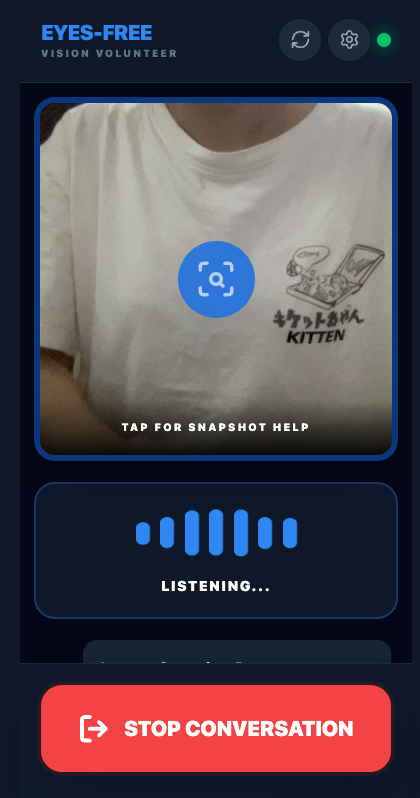
- Minimal, high-contrast UI: Large buttons and clear visual indicators optimized for accessibility
The goal is not perfect navigation, but fast, accessible assistance when human help is unavailable.
Use Cases
Eyes-Free addresses real-world scenarios where partially blind and elderly users need immediate assistance:
1. Finding and Reading Medicine Labels
Scenario: A user needs to find a specific medication from multiple bottles on a shelf.
How Eyes-Free helps:
- User asks: "Can you help me find my blood pressure medicine?"
- AI provides real-time spatial guidance: "Move your phone to the left, about 3 o'clock. I see several bottles. Tilt down slightly."
- Once the correct bottle is found, user taps the camera for deep analysis
- Gemini 3 Flash reads the label: "This is Lisinopril 10mg tablets. Expiration date: December 2025. Take one tablet daily with water."
- Critical value: Prevents medication errors, ensures correct dosage and expiration dates
2. Checking Clothing and Appearance
Scenario: A user wants to verify their outfit matches or check if clothing is clean and presentable.
How Eyes-Free helps:
- User asks: "Does my shirt match my pants?"
- AI responds in real-time: "I see a blue shirt and dark blue pants. They coordinate well."
- For detailed checks, user can tap for instant analysis: "Your shirt is navy blue, button-down style. Pants are charcoal gray. No visible stains or wrinkles."
- Critical value: Helps maintain confidence and independence in daily grooming
3. Reading Product Labels and Expiration Dates
Scenario: A user needs to check if food items are still safe to consume or identify product ingredients.
How Eyes-Free helps:
- User points camera at a product and asks: "What is this?"
- Real-time guidance helps align the camera: "Move closer. Good, now I can see it."
- Tap for deep analysis: "This is canned tomatoes. Best before: March 2026. Ingredients: tomatoes, salt, citric acid."
- Critical value: Prevents food waste, ensures food safety, helps with dietary restrictions
4. Navigating Indoor Spaces
Scenario: A user enters an unfamiliar room and needs to understand the layout and locate objects.
How Eyes-Free helps:
- User asks: "What do you see in this room?"
- AI provides spatial description: "I see a table at 12 o'clock, about 3 steps away. A chair at 2 o'clock. A door at 9 o'clock."
- User can ask follow-up questions: "Is there anything on the table?"
- Critical value: Reduces risk of accidents, increases confidence in unfamiliar environments
5. Reading Mail and Documents
Scenario: A user receives mail and needs to know what it is and if it requires immediate attention.
How Eyes-Free helps:
- User holds mail in front of camera and asks: "What does this say?"
- Real-time guidance: "Move the letter closer. Tilt it slightly up."
- Tap for detailed reading: "This is a utility bill from City Electric. Amount due: $125.50. Due date: January 15, 2026."
- Critical value: Ensures important documents aren't missed, helps with financial management
6. Identifying Objects and Products
Scenario: A user needs to identify an object they've found or verify what a product is.
How Eyes-Free helps:
- User asks: "What is this object?"
- AI provides real-time identification: "I see a small electronic device. It appears to be a remote control."
- For detailed information, tap for analysis: "This is a TV remote control. Brand: Samsung. Model number visible on the back."
- Critical value: Helps users locate and use everyday objects independently
7. Checking Road and Safety Conditions
Scenario: A user needs to verify if it's safe to cross a street or navigate an outdoor area.
How Eyes-Free helps:
- User asks: "Is it safe to cross here?"
- AI provides real-time assessment: "I see a crosswalk ahead. There's a red light, so wait. Now the light is green, you can proceed."
- Critical value: Enhances safety in outdoor navigation
Common Pattern Across All Use Cases:
- Real-time guidance (Live API) for spatial awareness and quick questions
- Deep analysis (Gemini 3 Flash) when detailed information is needed
- Voice-first interaction - no need to read screens or navigate complex menus
- Immediate assistance - no waiting for human volunteers
How we built it
Eyes-Free is built as a lightweight web application using modern web technologies to ensure broad accessibility and low deployment costs.
Tech Stack:
- Frontend: React 19 with TypeScript for a responsive, accessible UI
- Build Tool: Vite for fast development and optimized production builds
- AI Integration:
- Gemini 2.5 Flash Native Audio (Gemini Live API) for real-time multimodal conversation
- Gemini 3 Flash Preview for fast, on-demand image analysis optimized for speed and accuracy
- Gemini 2.5 Flash Preview TTS for high-quality text-to-speech synthesis
- Audio Processing: Web Audio API for real-time audio encoding/decoding, playback, and system sounds
- Camera Access: MediaDevices API for live camera feed capture
- Styling: Tailwind CSS for a clean, minimal interface optimized for accessibility
Key Technical Features:
Real-time audio streaming:
- Processes microphone input at 16kHz PCM, encoded to base64 for Gemini Live API
- Plays AI responses at 24kHz with proper audio buffering and timing
- Handles multiple audio sources with queue management to prevent gaps or overlaps
Continuous vision:
- Captures camera frames every 2.5 seconds (optimized for stability)
- Sends JPEG images (60% quality) to Gemini Live API for environmental awareness
- Prevents frame sending during deep analysis to avoid conflicts
Hybrid AI architecture:
- Live API for real-time conversational guidance
- Gemini 3 Flash for on-demand instant analysis optimized for speed
- Seamless switching between modes based on user needs
- Pauses frame sending during deep analysis to avoid conflicts
Advanced audio management:
- Separate audio contexts for input (16kHz) and output (24kHz)
- Audio context priming to prevent browser suspension issues
- Proper cleanup of media streams, audio contexts, and WebSocket connections
- System sounds for user feedback (connection status, actions)
- Manual TTS for replaying transcriptions with immediate audio unlock
- Spoken feedback during deep analysis ("Analyzing image. Please hold still.")
Session management:
- Robust connection state handling (IDLE, CONNECTING, ACTIVE, ERROR)
- Graceful error recovery and reconnection
- Prevents audio input during manual TTS playback
- Proper cleanup on session end
Voice-first UI:
- Minimal visual interface with large, accessible controls
- Real-time transcription display
- Tap-to-replay functionality for any AI response
- High-contrast design optimized for low-vision users
Camera management:
- Switch between front (selfie) and back (environment) camera
- Automatic horizontal flip for front camera to match user's perspective
- Proper stream cleanup and management
- Square aspect ratio optimized for mobile viewing
System instructions:
- Carefully crafted, concise prompts instruct Gemini to use clock directions
- Brief, actionable responses suitable for real-time guidance
- Suggests "tap screen" for detailed label reading when needed
User experience enhancements:
- Quota warning system with visual alerts
- Settings access for API key management
- Improved status messages ("AI Assistance Offline", "Talking...", "Listening...")
- Better visual feedback during analysis (amber border, animated icon)
Challenges we ran into
1. Real-time audio synchronization and buffering One of the biggest technical challenges was managing real-time audio streaming:
- Problem: Audio chunks from Gemini Live API arrive asynchronously and need to be played in sequence without gaps
- Solution: Implemented a queue system using
nextStartTimeRefto schedule audio playback precisely, ensuring smooth transitions between audio chunks - Challenge: Handling interruptions when users speak while the AI is talking
- Solution: Clear all active audio sources immediately when interrupted, reset timing, and allow new audio to start fresh
2. Preventing audio input conflicts
- Problem: When manually reading transcriptions (TTS), the microphone input was still being sent to Gemini, causing network errors
- Solution: Implemented
isReadingManualRefflag to prevent audio input processing during manual TTS playback - Additional: Added status checks before sending any data to prevent sending to closed/half-open WebSocket connections
3. Camera frame optimization and stability
- Problem: Sending frames too frequently (every 1 second) caused instability and potential rate limiting
- Solution: Increased interval to 2.5 seconds and added checks to prevent sending during deep analysis
- Optimization: Compressed JPEG images to 60% quality to reduce bandwidth while maintaining readability
4. Ensuring practical, actionable responses
- Problem: General image descriptions are not enough — the guidance must be short, directional, and spoken naturally
- Solution: Refined system instructions to use clock directions ("move to 3 o'clock") and keep responses brief
- Approach: Hybrid model - use Live API for real-time guidance, suggest deep analysis for detailed reading
5. Audio context management
- Problem: Multiple audio contexts (input, output, system sounds) needed proper lifecycle management
- Solution: Separate refs for each context, proper cleanup on session end, and state checks before operations
- Challenge: Audio contexts can be suspended by browsers
- Solution: Explicitly resume contexts when needed and handle suspended states gracefully
6. Error handling and user feedback
- Problem: Network errors, connection failures, and API errors needed clear user communication
- Solution: Implemented comprehensive error handling with spoken feedback using TTS
- Enhancement: Added visual status indicators and system sounds for connection events
7. Deep analysis integration and speed optimization
- Problem: Integrating deep analysis without disrupting the Live API session, and ensuring fast response times
- Solution: Pause frame sending during analysis, use separate API call, then resume Live API
- Optimization: Switched from Gemini 3 Pro to Gemini 3 Flash for near-instant analysis while maintaining high accuracy
- Enhancement: Automatic TTS playback of analysis results with immediate spoken feedback during processing
8. Audio context suspension issues
- Problem: Browsers suspend audio contexts, causing TTS and audio playback to fail
- Solution: Implemented audio priming - resume context and start dummy synthesis on user interaction
- Enhancement: Immediate audio unlock before any TTS operation to ensure reliable playback
9. Camera stream management
- Problem: Switching between front and back camera required proper stream cleanup
- Solution: Proper cleanup of previous streams before starting new ones, with horizontal flip for front camera
- Enhancement: Added camera toggle button for easy switching between use cases
Accomplishments that we're proud of
Creating a functional, production-ready prototype that works entirely through voice interaction, demonstrating the power of multimodal AI for accessibility
Successfully implementing a hybrid AI architecture that combines real-time conversational AI (Gemini Live API) with on-demand instant analysis (Gemini 3 Flash), providing both speed and detail when needed
Designing an AI experience specifically for low-vision users, with careful attention to:
- Language (clock directions, brief instructions)
- Pacing (real-time responses, clear pauses)
- Guidance style (actionable, encouraging, patient)
- Interface design (minimal, high-contrast, voice-first)
Translating a real personal problem into a working solution within limited resources and time constraints, with direct inspiration from real-world accessibility challenges
Advanced audio engineering: Successfully managing complex audio streaming, buffering, and playback with multiple contexts and sources
Robust session management: Implementing reliable connection handling, error recovery, and graceful degradation
Accessibility-first design: Every feature is designed with low-vision users in mind, from voice interaction to transcription replay to system sounds
Demonstrating Gemini's capabilities: Showcasing how different Gemini models can work together (Live API for real-time, Gemini 3 Flash for instant analysis, TTS for replay)
Optimizing for speed: Choosing Gemini 3 Flash over Pro for deep analysis to provide near-instant results while maintaining high accuracy
Enhanced user experience: Camera toggle, quota warnings, settings management, and improved audio reliability
What we learned
Through this project, I learned how powerful multimodal AI can be when applied thoughtfully.
More importantly, I learned that accessibility is not about adding features — it's about removing barriers.
Technical Learnings:
- Gemini Live API's real-time capabilities enable natural, conversational AI experiences that feel like talking to a human volunteer
- Web Audio API provides powerful tools for real-time audio processing, but requires careful management of contexts, timing, and lifecycle
- Hybrid AI architectures (combining real-time and on-demand models) can provide both speed and depth
- Voice-first design requires rethinking traditional UI/UX patterns — every interaction must work without vision
- Error handling is critical in real-time systems — users need immediate, clear feedback when things go wrong
Human-Centered Insights:
- Simple, clear language is more valuable than complex features — "move to 3 o'clock" is better than "rotate 90 degrees clockwise"
- Real-time guidance is more helpful than static image analysis — continuous awareness beats single snapshots
- Empathy in design leads to more effective solutions — understanding my uncle's daily challenges shaped every design decision
- Accessibility benefits everyone — the clean, voice-first interface is easier for all users, not just those with vision impairments
AI Model Insights:
- Gemini 2.5 Flash Native Audio excels at real-time conversational guidance with environmental awareness
- Gemini 3 Flash provides fast, accurate text recognition and detailed analysis for critical tasks like reading medicine labels, optimized for speed
- Different models for different tasks — using the right tool for each job creates a better overall experience
- Speed matters in accessibility — near-instant analysis (Gemini 3 Flash) is more valuable than slower, more detailed analysis when users need quick information
Project Management:
- Starting with a real problem (my uncle's daily challenges) kept the project focused and meaningful
- Iterative development — testing with real use cases revealed issues that wouldn't appear in demos
- Simplicity wins — removing features (like the separate info view) improved usability
Gemini's multimodal capabilities showed how AI can act not just as a tool, but as a companion when designed with empathy and understanding of real user needs.
What's next for Eyes-Free
Short-term improvements:
- Voice-activated deep analysis: Allow users to say "read this label" or "analyze this" during Live API sessions to trigger Gemini 3 Flash instant analysis
- Offline-friendly modes: Implement caching strategies and fallback mechanisms for low-connectivity environments
- Customizable voice settings: Allow users to adjust speech rate, volume, and voice characteristics
- Haptic feedback: Add vibration patterns for connection status and important events
- Gesture controls: Explore simple gesture recognition for hands-free navigation
Medium-term enhancements:
- Continuous camera guidance: Real-time navigation assistance with more sophisticated spatial awareness
- Object memory: Remember previously identified objects in a session for context
- Multi-language support: Localization for different languages and cultural contexts
- Integration with smart home devices: Connect with smart lights, speakers, and other assistive technologies
Long-term vision:
- Collaboration with accessibility communities: Partner with organizations serving low-vision users for real-world feedback and iterative improvement
- Machine learning on usage patterns: Learn from user interactions to improve guidance quality
- Community features: Share helpful location descriptions and navigation tips
- Integration with other assistive apps: Work alongside Be My Eyes, Seeing AI, and other tools
- Advanced spatial mapping: Build understanding of room layouts and common spaces
Impact goals:
- Make everyday environments more accessible for everyone
- Reduce dependency on human volunteers during off-hours
- Provide immediate assistance when help is needed most
- Demonstrate that AI can be a reliable, empathetic companion for accessibility
Technical roadmap:
- Explore Gemini 3 Live API when available for even better real-time capabilities
- Implement progressive web app (PWA) features for better mobile experience
- Add support for video input for better context understanding
- Optimize for lower bandwidth connections
- Add analytics (privacy-preserving) to understand usage patterns and improve the experience
Eyes-Free is a small step toward making everyday environments more accessible for everyone. By combining Gemini's multimodal capabilities with thoughtful, voice-first design, we believe AI can become a reliable companion for those who need it most.
The journey from my uncle's daily challenges to a working prototype has shown that technology, when designed with empathy, can make a real difference in people's lives.
Try it yourself
Eyes-Free is ready to use. Simply:
- Visit the live application
- Grant camera and microphone permissions
- Tap "START ASSISTANT" to begin
- Speak naturally and let the AI guide you
- Tap the camera view for deep analysis when you need detailed information
Built with:
- React 19 + TypeScript
- Google Gemini 2.5 Flash Native Audio (Gemini Live API)
- Google Gemini 3 Flash Preview (for instant deep analysis)
- Google Gemini 2.5 Flash Preview TTS (for text-to-speech)
- Vite
- Web Audio API
- MediaDevices API (camera and microphone)
This project was built for the Google Gemini Hackathon, inspired by real-world accessibility challenges and the daily experiences of partially blind users.
Built With
- gemini
- javascript
- react
- tailwind
- typescript

Log in or sign up for Devpost to join the conversation.