-
-
-
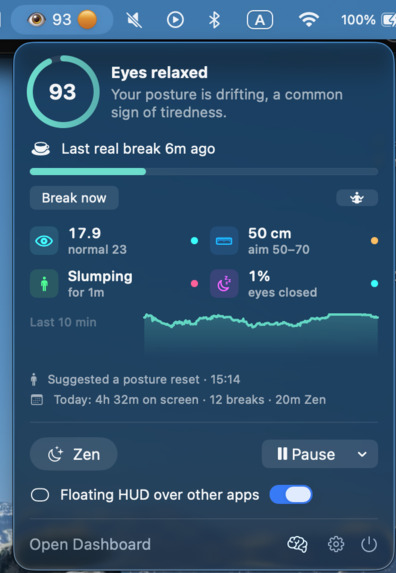
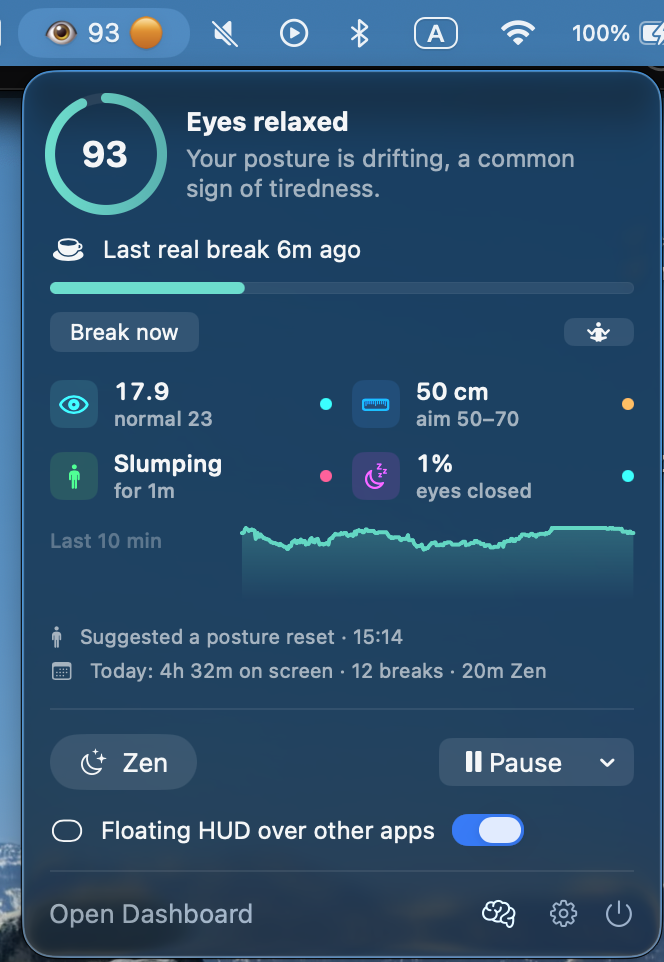
Clean, sleek menu bar for quick eye health metrics
-
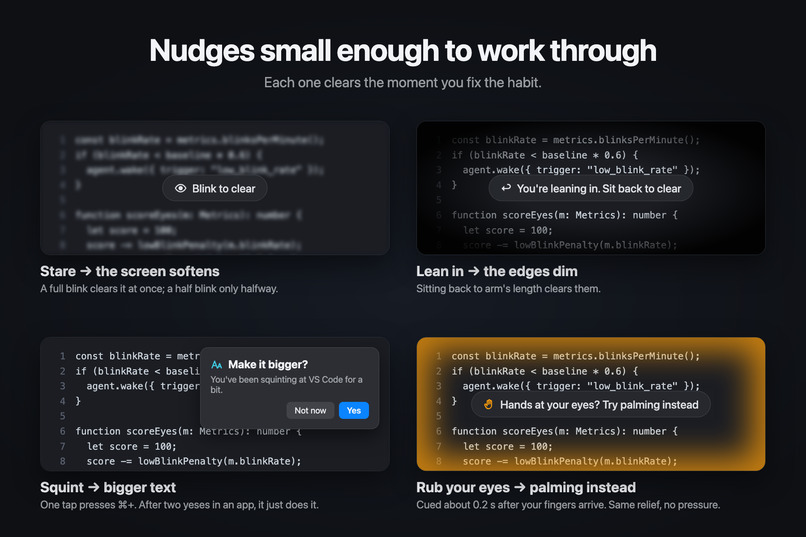
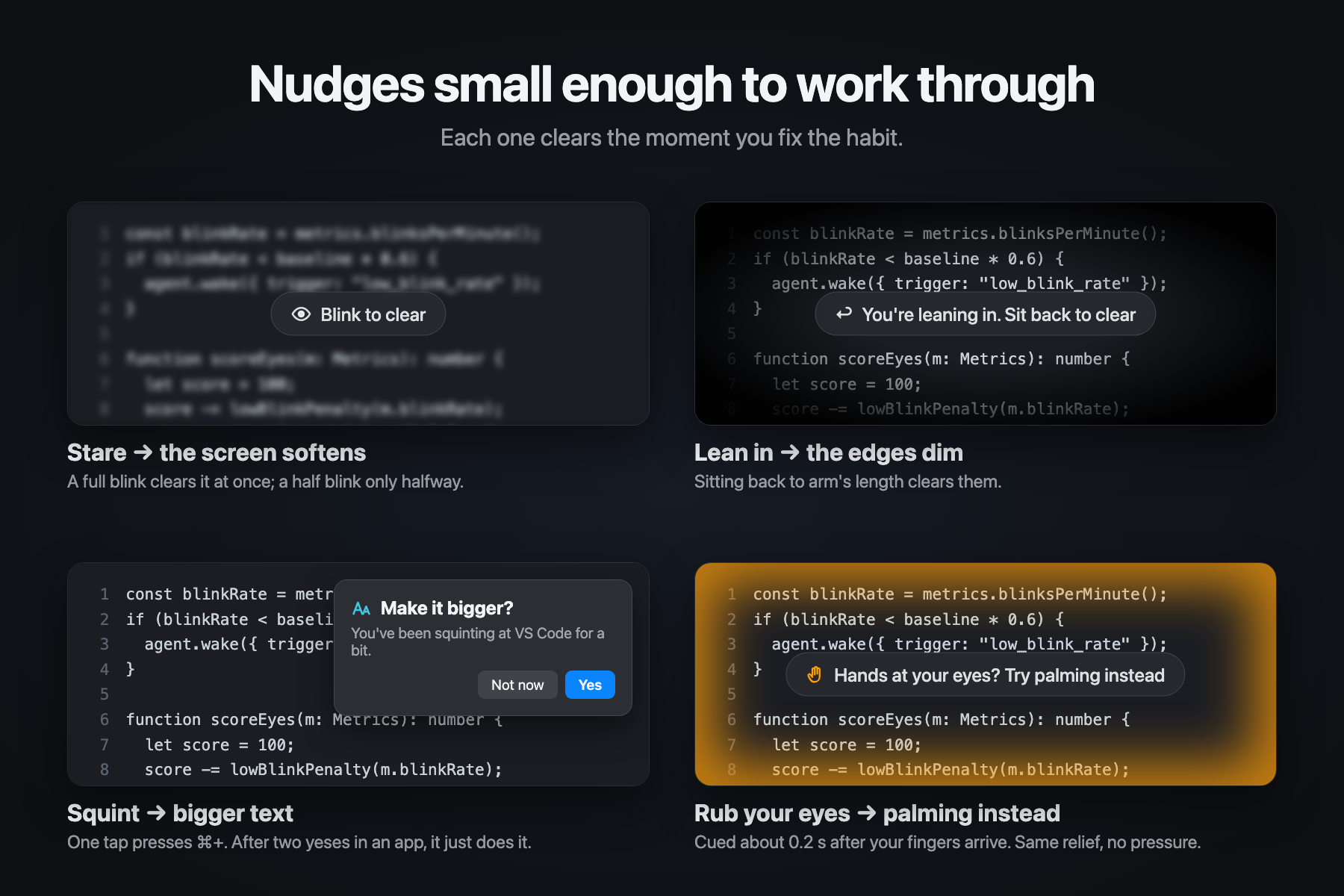
Nudges
-
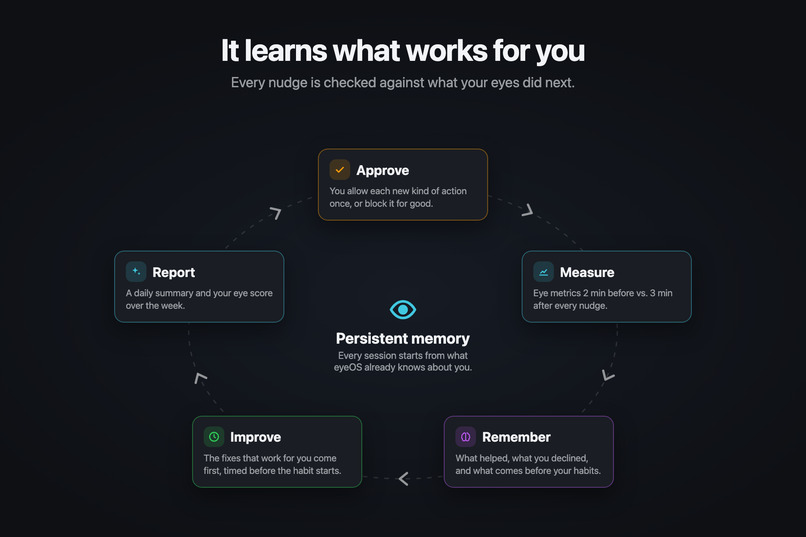
Experience Loop
-
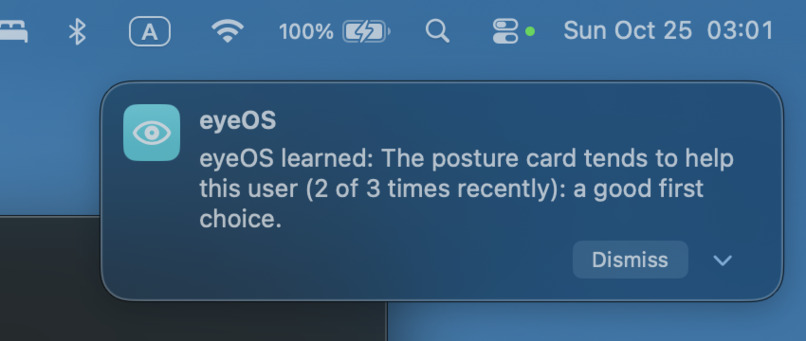
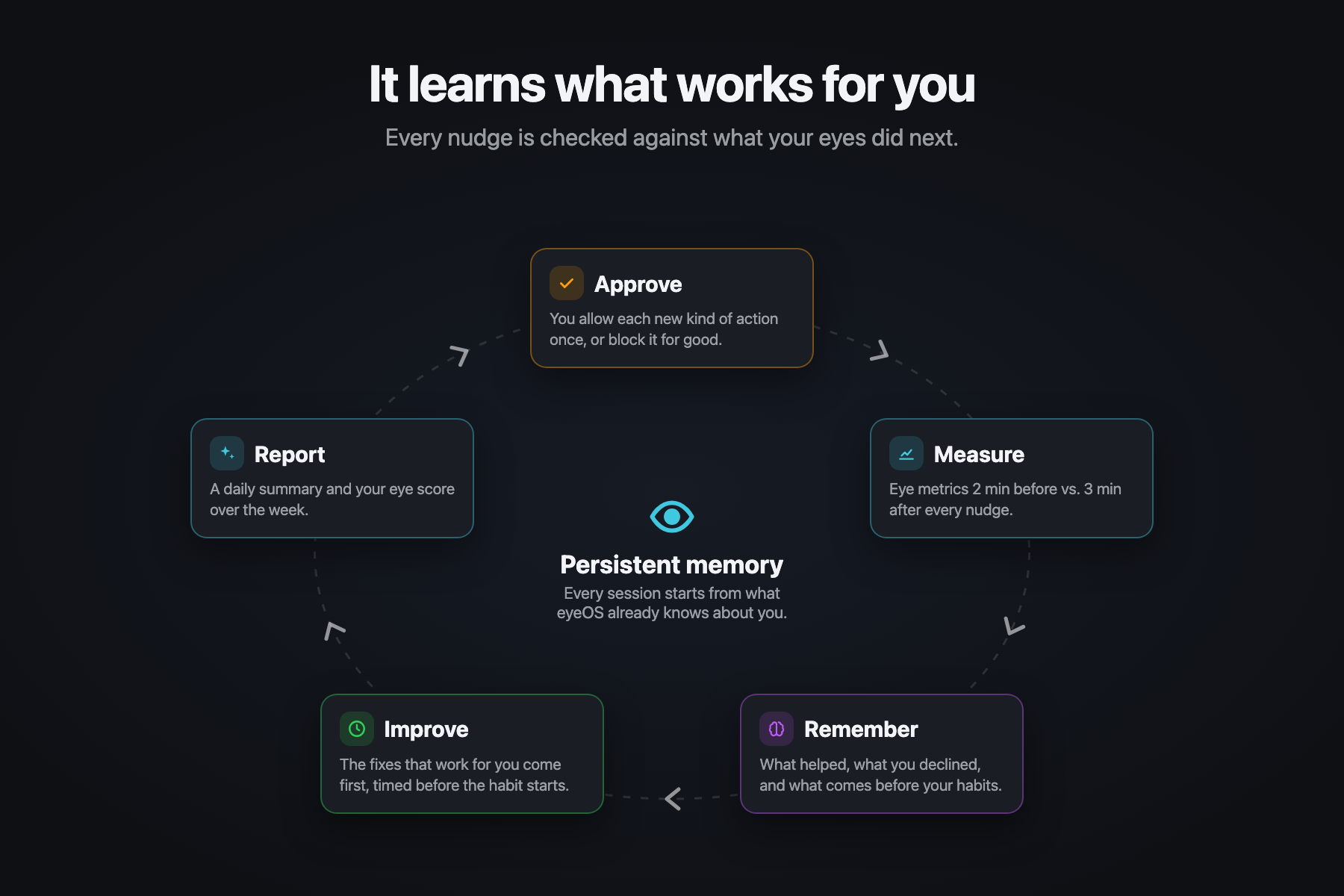
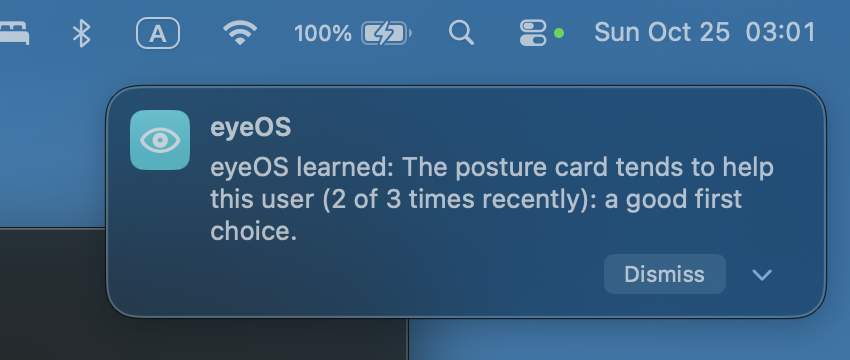
Constantly updates its memory on what works for you
-
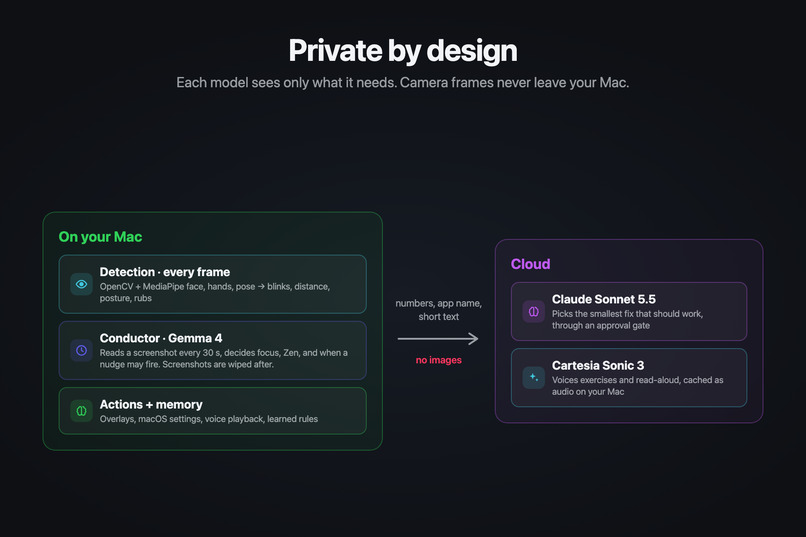
Privacy
-
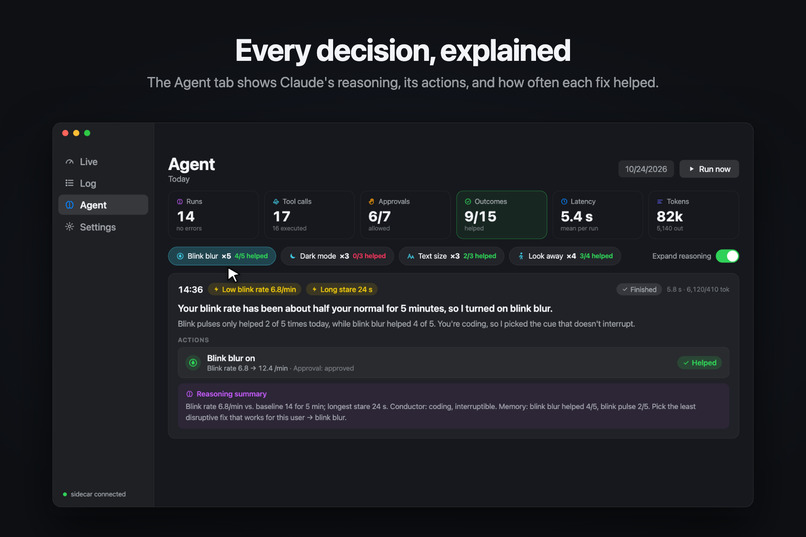
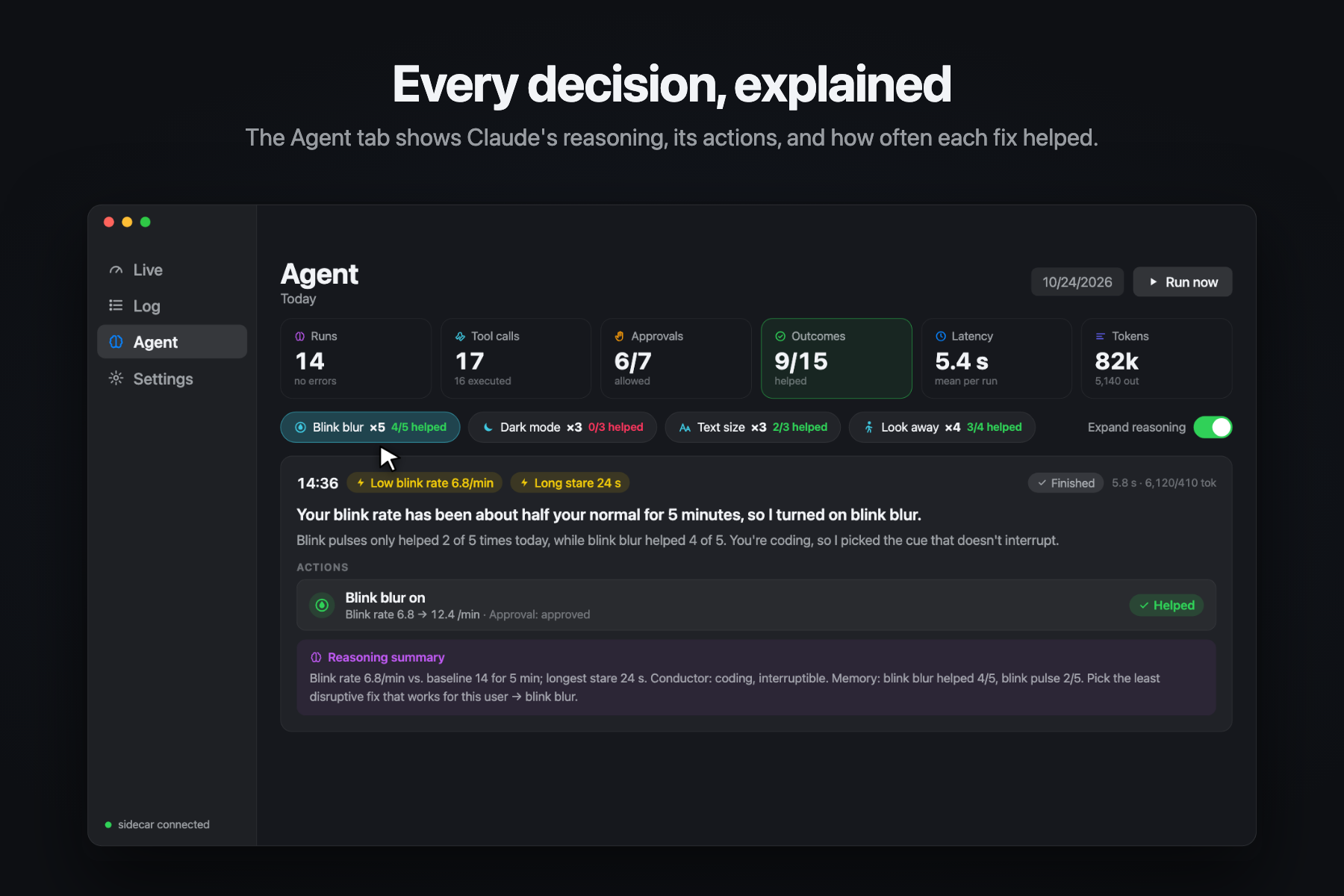
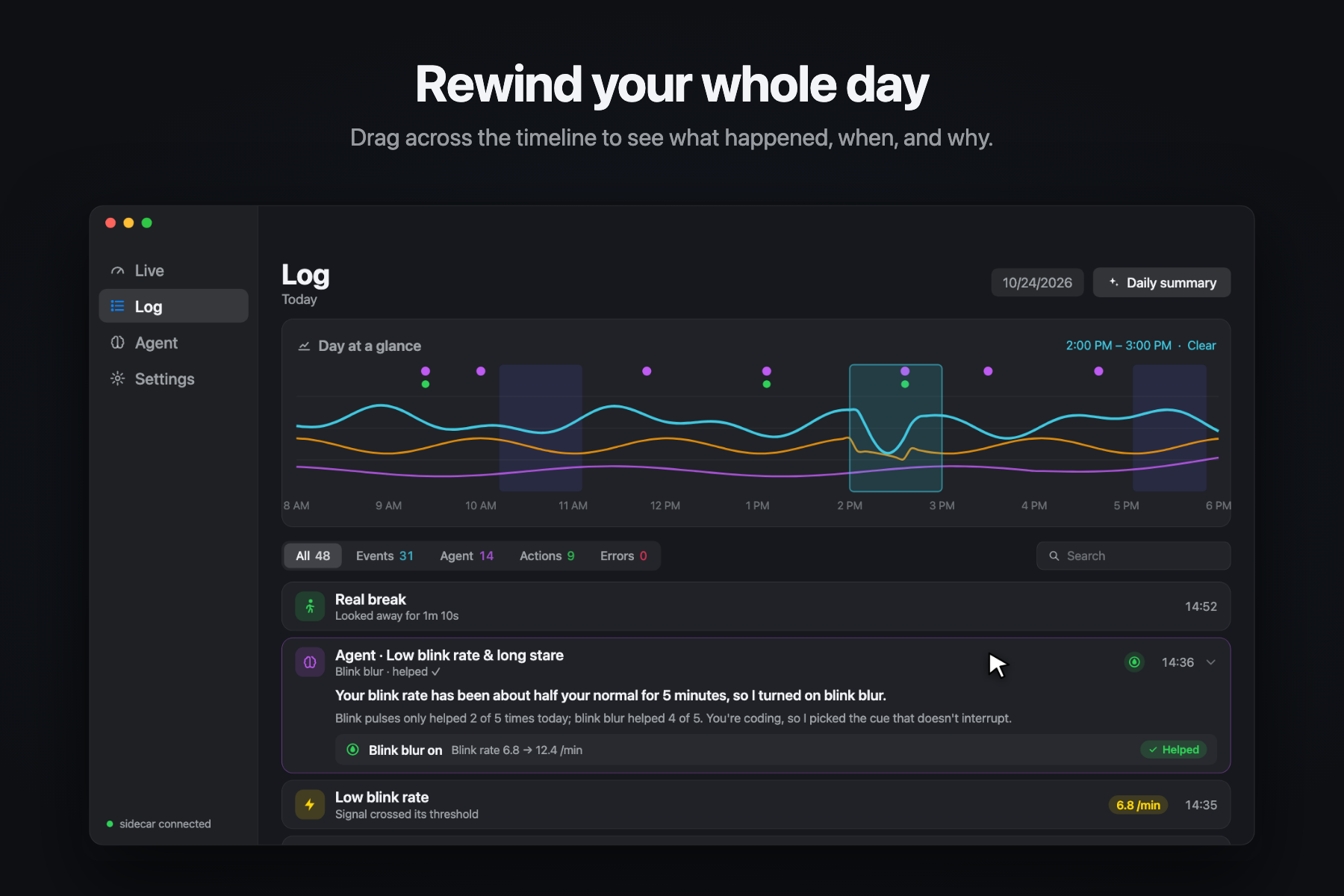
Agent tab transparent reasoning view
-
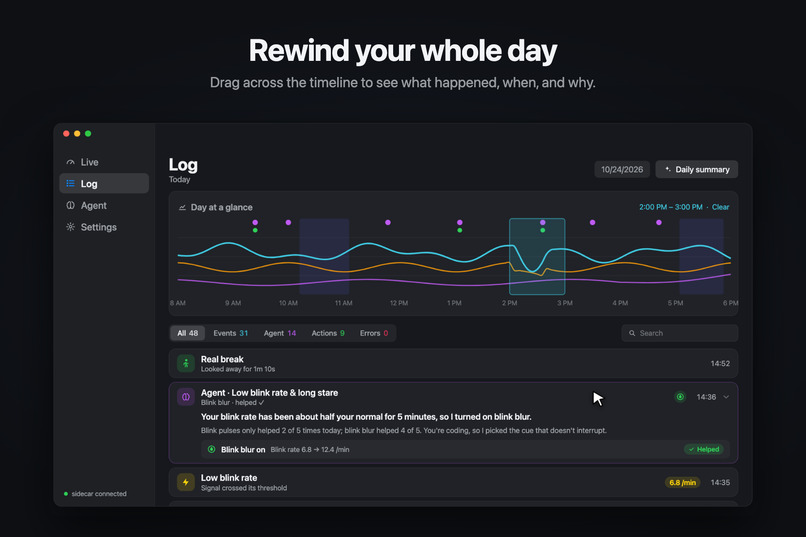
Log reviewing
-
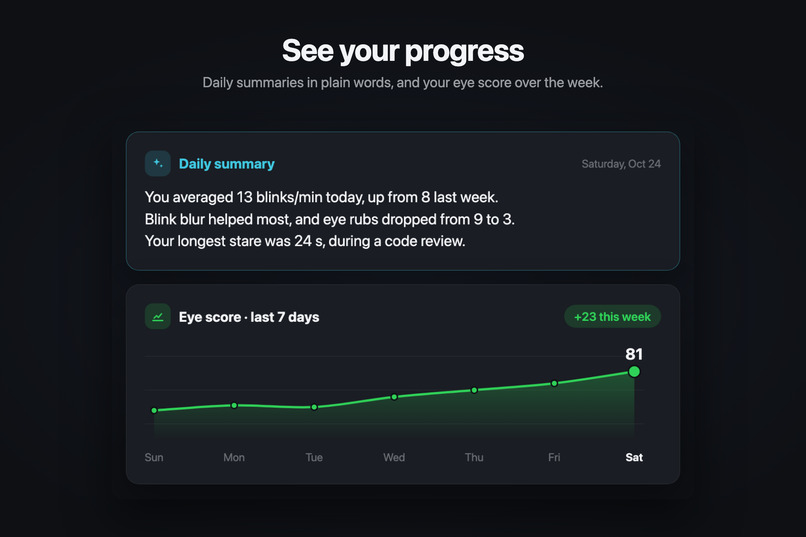
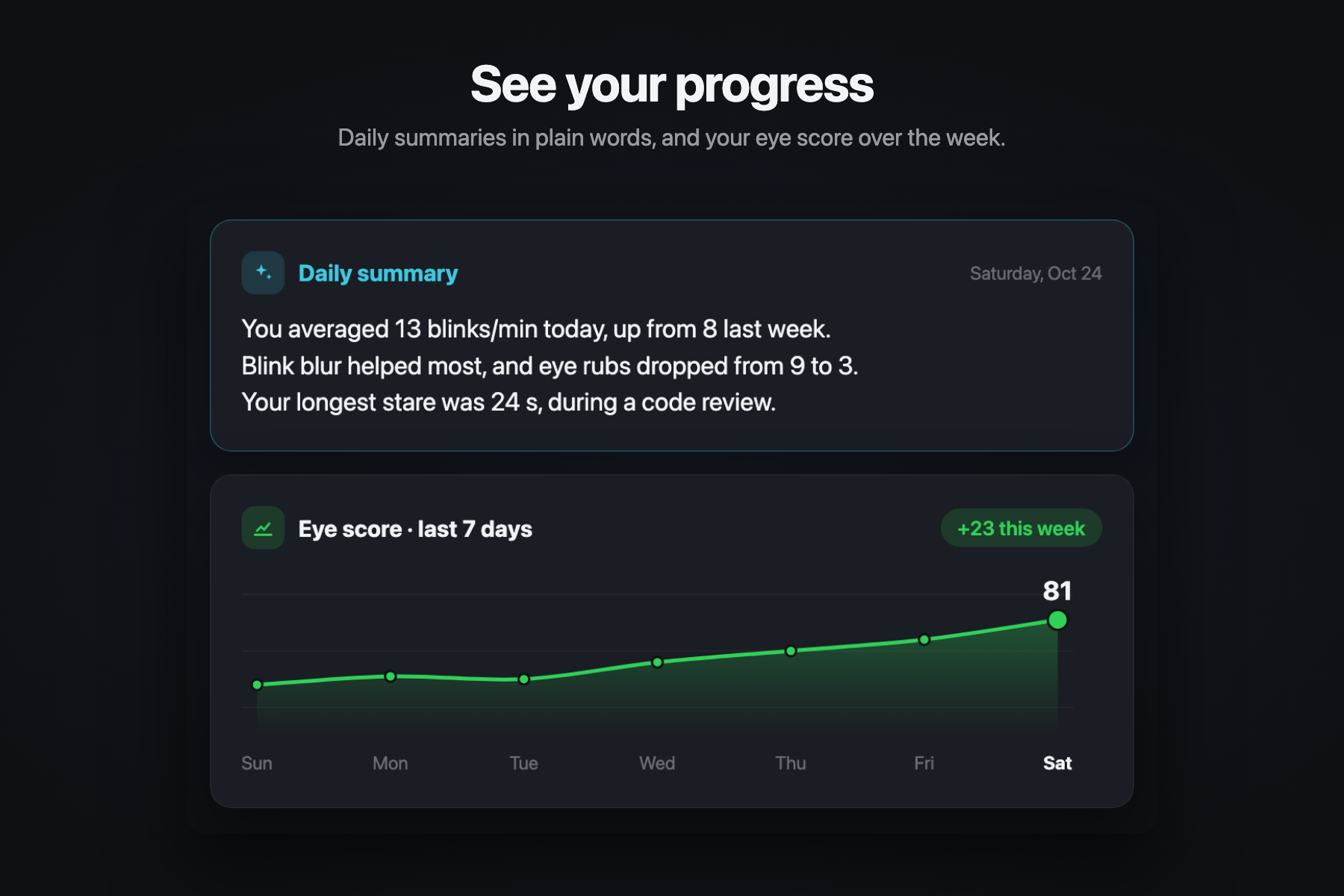
Progression
Inspiration
Computer vision syndrome (CVS), or digital eye strain, is the dry, tired, irritating feeling in your eyes after hours in front of a screen. It affects ~50–90% of people who work at computers, and the standard advice is always the same: blink more, sit back, take more breaks. But when you're even remotely focused, this rarely ever crosses your mind.
Jason knows this firsthand. He has severe meibomian gland dysfunction (dry eye) and myopia, both worsened by years of heavy screen time and bad screen habits. His eyes are now so sensitive that he needs blue light glasses at a screen to avoid strain and twitching. His optometrist keeps telling him to change his habits, but his workload won't let him take a break.
We wanted to build something for people who are on screens not by choice, but because their work demands it: students pulling all-nighters, engineers, IT, accountants, and anyone at a desk all day. That even includes us: a hackathon is 36 hours on a laptop with 5 hours of rest, and our careers ahead look similar, 8+ hours a day, 50 weeks a year. So every fix had to work along with your focus, not against it with unwanted interruptions.
We tried apps that already exist. They tell you to set a 20-20-20 timer and take an eye break when it rings. When work is real, everyone dismisses the reminder, and they're essentially useless.
Our app centers around one question:
Can you work on your computer rigorously, as usual, while taking care of your eyes simultaneously?
Our answer is yes!
What it does
eyeOS is an AI eye-habit coach in your Mac's menu bar. Through your laptop camera it monitors physical habits that are clinically known to negatively affect eye health, including staring, squinting, bad posture, and eye rubbing, and fixes each one in the moment without breaking your focus: the screen softens until you blink, the edges dim until you sit back, text gets bigger when you squint, and palming replaces rubbing. It goes silent during deep work and saves breaks for natural pauses, when a Cartesia voice guides eye exercises the camera checks. Every nudge is measured, so eyeOS keeps what works, learns what triggers your habits, and steps in before they start. Camera frames never leave your Mac, Claude never sees an image of you or your screen, and nothing changes without your approval.
Key features
We followed three design principles: unobtrusive, adaptive, and transparent.
Watches
- Habit detection: catches habits that affect eye health through your laptop camera: staring without blinking, squinting, bad posture, and eye rubbing.
- Live eye score: blink rate, half blinks, staring, drowsiness, distance, squinting, and time since your last break, rolled into one 0–100 score.
Nudges at the right moment
- In-the-moment nudges: the screen softens until you blink, edges dim until you sit back, bigger text when you squint, and palming instead of rubbing. When more is needed, Claude can adjust brightness, dark mode, contrast, or Do Not Disturb.
- Zen mode and smart timing: reads how interruptible you are and saves breaks for natural pauses. During deep work it goes silent, keeps measuring, and shows a recap afterward.
Helps you rest
- Guided eye exercises: a Cartesia voice talks you through various exercises while watching you and making sure you're doing the exercises correctly.
- Read aloud: Cartesia reads the current page or your selection aloud so your eyes can rest.
Learns what works
- Learning memory: checks every nudge against what your eyes did next, favors what works, and learns your triggers to step in early. A reflection pass turns each stretch of use into new rules.
- Progress tracking: compare today's habits to your weekly average, or get a daily summary in plain words.
Shows its work
- Menu bar and HUD: a minimal menu bar popover shows how you're doing at a glance, with one-click breaks and exercises. A small floating HUD stays faint while you're fine, brightens when something drifts, and hides during Zen, meetings, and calls.
- Full transparency: the dashboard shows what the camera tracks (face mesh, gaze, head pose, posture), live graphs of every metric, and every agent decision with its reasoning, its actions, and whether they helped. Hover any number to see how it's calculated.
Respects you
- You're in control: eyeOS asks before using each new kind of action, and you can allow it, decline it, or block it for good. Pause anytime, and pick your model: Claude, Codex, or a local one.
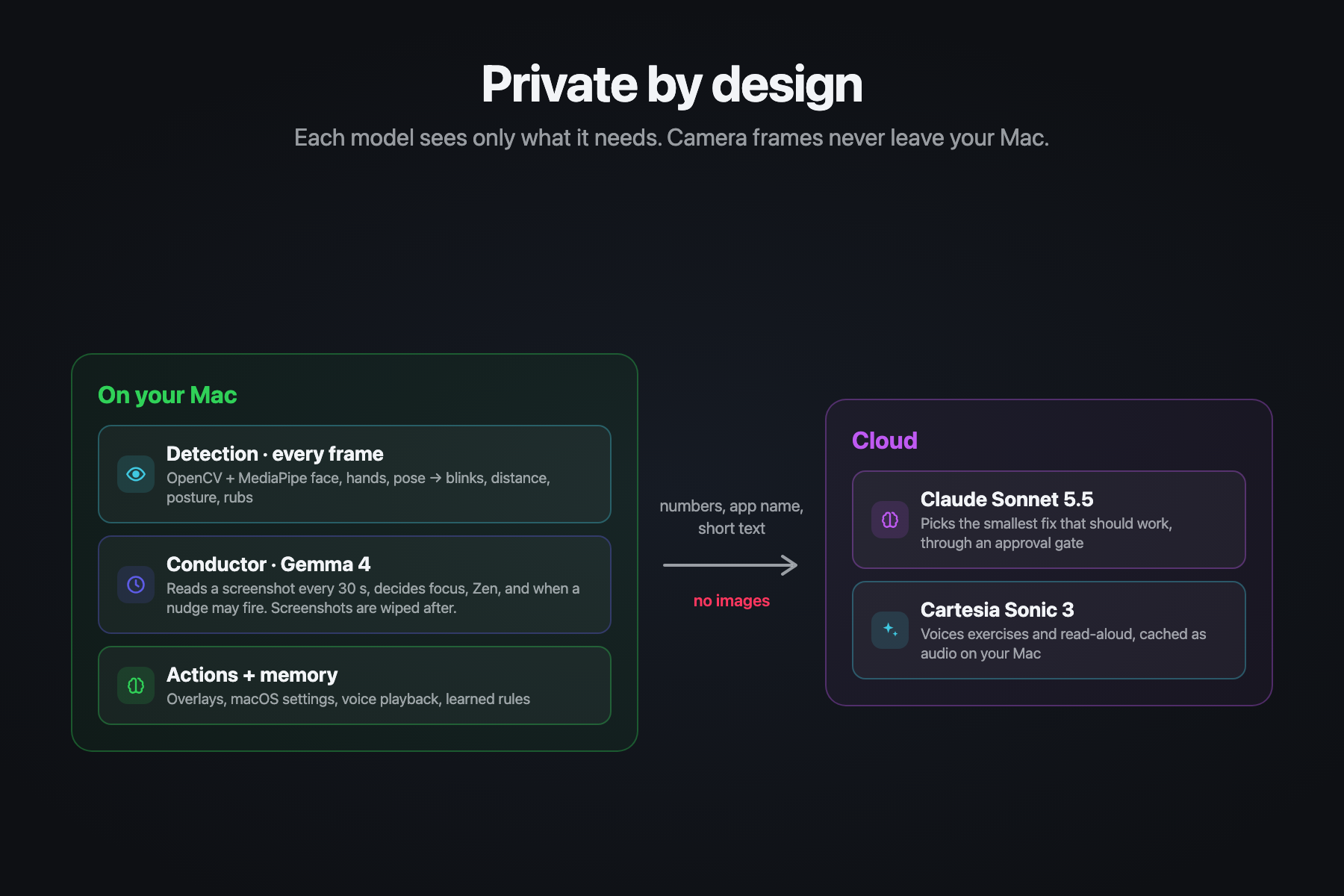
- Private by design: camera frames never leave your Mac, and Claude never sees an image of you or your screen.
How we built it
Mac app
- SwiftUI: Live, Log, Agent, and Settings views, a menu bar extra, overlays, and the exercise screen.
- Python sidecar: connected over a token-authenticated WebSocket bound to localhost.
On-device
- OpenCV: camera capture.
- MediaPipe Face, Hand, and Pose: landmarks that feed the metrics engine.
- Local LLM: the conductor. Every 30 seconds it reads the screen and metrics to decide your activity, your focus, and whether a nudge may fire.
Cloud
- Claude Agent SDK on Claude Sonnet 5.5: sees only the metrics and rules, then calls tools through an approval gate. Codex can drive the same tools.
- Cartesia Sonic 3: voices the exercises and read-aloud, cached locally as WAV.
System actions
- macOS: brightness and dark mode.
- Shortcuts: contrast and display toggles.
Challenges we ran into
- Deciding what to build took the longest, since a timer is a weekend project but a coach that can tell a meeting from a coding block is an architecture.
- Splitting the agents by what they can see was the core technical problem: the camera and screen stay with the on-device models, and Claude gets only the numbers it needs, never an image.
- Teaching eyeOS to stay quiet was hard, because if it talks over a deadline it becomes the timer we were trying to replace.
- Making an app we'd actually leave running meant the interface (live eye score, decision log, and understandable settings) took as long as the models.
Accomplishments that we're proud of
- Unobtrusive: most nudges resolve themselves as you keep working: a blink clears the blur, sitting back clears the dimmed edges, and Zen holds everything during deep work, then recaps what it saw. In our recordings, the eye-rub cue caught every rub about 0.2 s after the fingers arrived, without firing on hair twirling or pushing up glasses.
- Adaptive: every action is measured against what your eyes did in the next few minutes, so eyeOS learns which fixes help you, which ones you'd rather skip, and what tends to come before your habits. The next session starts from there.
- Transparent: you can see everything eyeOS sees and decides: the camera tracking, live graphs of every metric, and each agent run with its reasoning, its actions, and whether they helped.
- Private orchestration: a local model that sees your screen decides when to act, and Claude decides what to do without ever seeing an image of you or your screen.
- Camera-checked exercises: the voice coach counts your blinks, catches you peeking during palming, and scores how well your eyes follow a moving dot.
What we learned
- Private and cloud models can share one product if each only sees what it needs. Local model sees the screen; Claude never does.
- Solve a problem people already have. We didn't need to invent eye strain. We needed a coach for the hour when a timer is going to be dismissed.
What's next for eyeOS
- More screens: the Mac is the first screen, not the only one. Next is syncing a session across devices and a phone version for when the laptop is closed, so these signals aren't trapped in one app.
- Clinical partners: reviewing the eye score, blink rate, and session history with eye doctors and specialists, to take eyeOS from a coach for deadline week to something a clinician could stand behind.
- Gamified progress: streaks and goals that make building healthy screen habits more rewarding.
- Talking back to the agent: tell eyeOS why a nudge didn't work, in your own words or by voice, so it learns faster than from outcomes alone.
Built With
- agents
- ai
- anthropic
- cartesia
- cartesia-sonic
- claude
- claude-agent-sdk
- gemma
- macos
- mcp
- mediapipe
- ollama
- opencv
- python
- sqlite
- swift
- swiftui
- websockets


Log in or sign up for Devpost to join the conversation.