-
-
Thumbnail
-
System Architecture
Inspiration
I've always been fascinated by the gap between what AI can do and what it actually does for people who need it most. When I learned that 285 million people worldwide live with visual impairment, and that most existing assistive tools are limited to screen readers that can't describe the physical world, I knew there was a massive opportunity.
The idea hit me when I saw the Gemini Live API — real-time voice AND vision in a single model. I thought: what if a blind person could just point their phone at the world and have a conversation with an AI that literally sees for them? Not a chatbot. Not a screen reader. A real-time companion — like having a friend who whispers what's around you, warns you about stairs, reads labels at the grocery store, and never gets tired.
That's EyeGuide.
What it does
EyeGuide is a real-time AI visual companion for visually impaired users. It uses the phone's camera and microphone to:
- 🧭 Navigate safely — Describes surroundings, warns about obstacles, stairs, and vehicles using spatial descriptions ("door at your 2 o'clock, about 5 feet ahead")
- 📖 Read text — Reads signs, labels, documents, and screens aloud
- 🔍 Explore environments — Paints a vivid mental picture of any scene
- 🛒 Shop independently — Reads product names, prices, and nutritional labels
- 🗣️ Natural conversation — Users talk naturally and can interrupt the AI mid-sentence (barge-in)
The entire experience is voice-driven — no visual UI needed. Users never touch a button.
How I built it
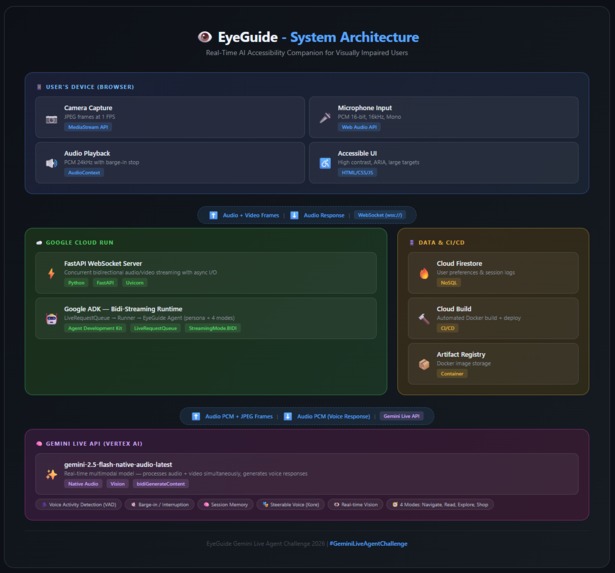
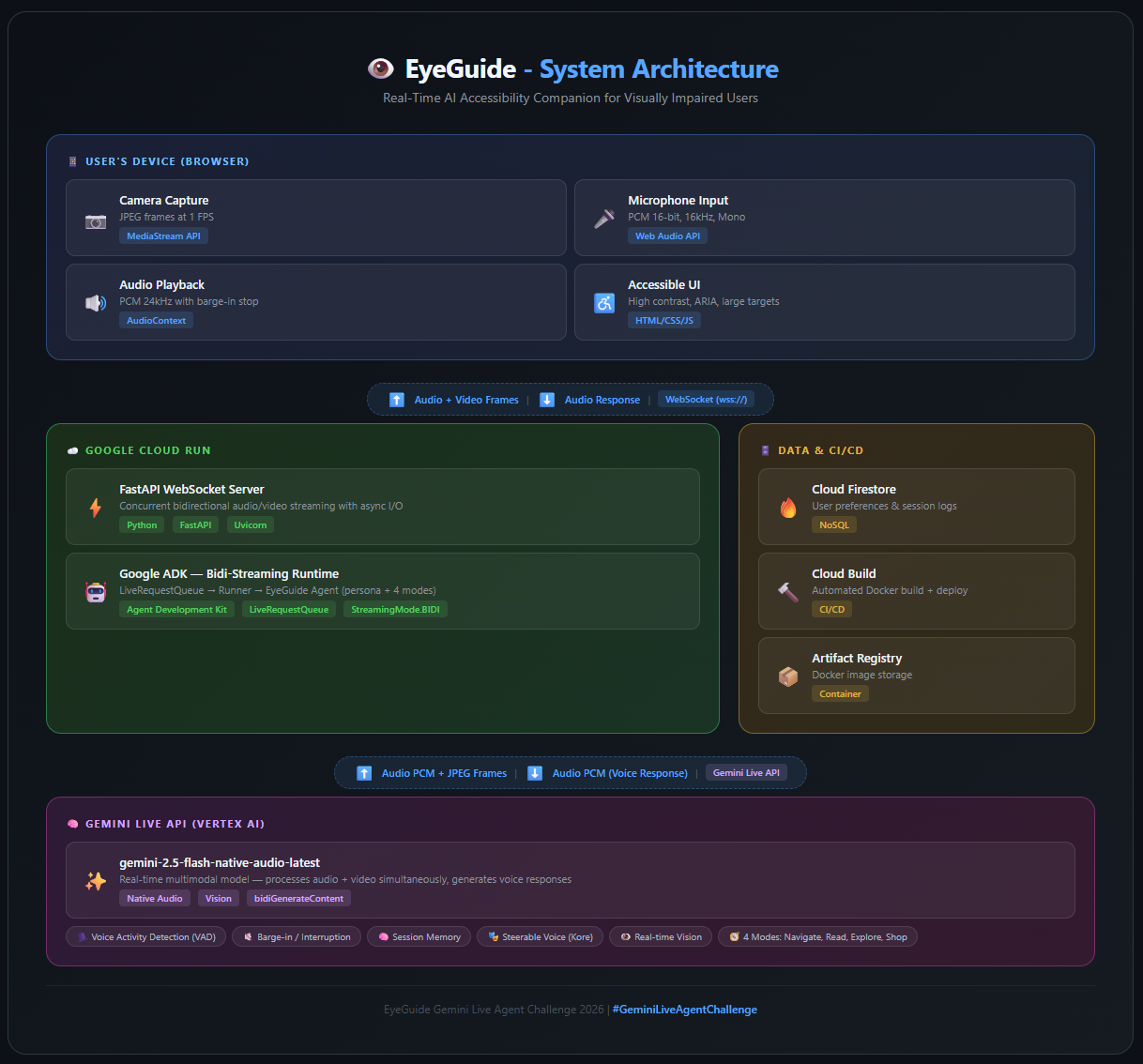
Architecture: Browser (camera + mic) → WebSocket → FastAPI backend on Cloud Run → ADK bidi-streaming → Gemini Live API
Backend:
- Built with Google ADK (Agent Development Kit) using the bidi-streaming runtime
- Gemini 2.5 Flash Native Audio model for real-time voice + vision processing
- FastAPI WebSocket server handles concurrent audio/video I/O
- Firestore for user preferences and session logging
- Deployed on Google Cloud Run with automated deployment scripts
Frontend:
- Vanilla HTML/CSS/JavaScript — no frameworks (keeps it lightweight and fast)
- Web Audio API for microphone capture (16kHz PCM) and audio playback (24kHz)
- MediaStream API for camera capture at 1 FPS (sufficient for scene understanding)
- WebSocket for real-time bidirectional communication
- Accessibility-first design — high contrast mode, large touch targets, ARIA labels, screen reader compatible
Agent Design:
- Rich system prompt with a warm, calm persona ("like a close friend who sees for them")
- 4 operating modes: Navigation, Reading, Exploration, Shopping
- Safety-first behavior — hazards are always mentioned immediately
- Clock-position spatial descriptions ("chair at your 10 o'clock")
Challenges I ran into
Model selection for Live API: Not all Gemini models support
bidiGenerateContent. I had to discover that onlygemini-2.5-flash-native-audio-latestworks for real-time bidirectional audio streaming on the Google AI Studio API. This took significant debugging.ADK API evolution: The ADK's
Runner.run_live()method signature differs between versions. I had to inspect the actual method signatures at runtime to match the correct parameters (run_configwithRunConfigandStreamingMode.BIDI).Event structure differences: The ADK
Eventobject from live streaming has a different structure than documented examples. Fields likecontent,interrupted, and transcription data required carefulgetattr()handling for robustness.Native audio model limitations: The native audio model doesn't support function calling (tools), so I had to architect the agent to handle everything through the system prompt and natural language understanding rather than structured tool calls.
Audio format compatibility: Getting PCM audio encoding right between the browser's Web Audio API (Float32) and the Gemini Live API's expected format (Int16, 16kHz) required careful conversion logic.
Accomplishments that I'm proud of
- Barge-in works naturally — You can interrupt the AI mid-sentence and it responds immediately, just like a real conversation
- 1 FPS is enough — Gemini can understand a scene from just 1 frame per second, keeping bandwidth low
- Accessibility-first design — High contrast mode, screen reader support, and large touch targets built in from day one
- One-command deployment — The
deploy.shscript handles everything: APIs, Artifact Registry, Cloud Build, Cloud Run, and Firestore setup
What I learned
- The Gemini Live API is incredibly powerful for real-time multimodal applications — the combination of audio + vision in a single streaming connection is a game-changer
- System prompt engineering is critical for voice agents — the difference between a good and great voice assistant is entirely in the persona design
- ADK's
LiveRequestQueueabstracts enormous complexity — it handles concurrent audio/video I/O that would be incredibly difficult to build from scratch - Building for accessibility teaches you to build better software for everyone
What's next for EyeGuide
- Smart glasses integration — AR glasses for hands-free, always-on assistance
- Navigation with Google Maps — Turn-by-turn walking directions with spatial audio
- Object memory — Remember previously seen objects and places
- Multi-language support — Help non-English speakers navigate foreign environments
- Emergency contacts — One-tap alert to caregivers in dangerous situations
- Offline mode — Basic hazard detection using on-device models
Built With
- css
- docker
- fastapi
- gemini
- gemini2.5flashnativeaudio
- geminiliveapi
- google-cloud
- googleadk
- googlecloudbuild
- googlecloudfirestore
- googlecloudrun
- googlegenaiadk
- html
- javascript
- mediastreamapi
- python
- uvicorn
- vertexai
- webaudioapi
- websockets

Log in or sign up for Devpost to join the conversation.