-
-
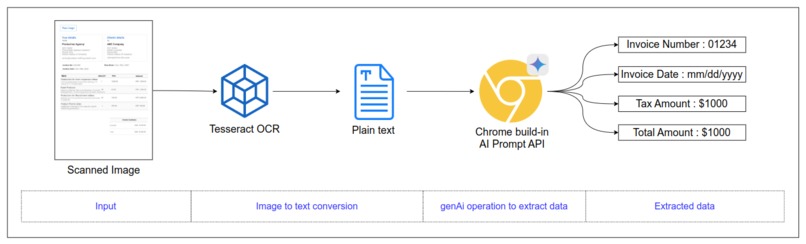
Process flow
-
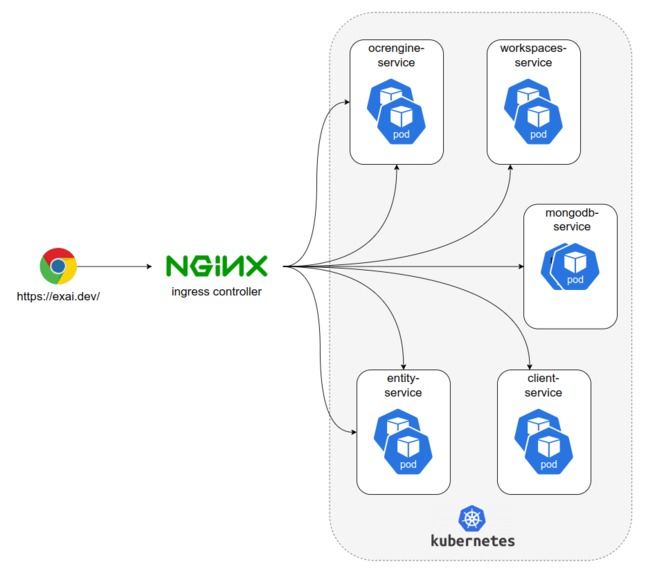
System architecture
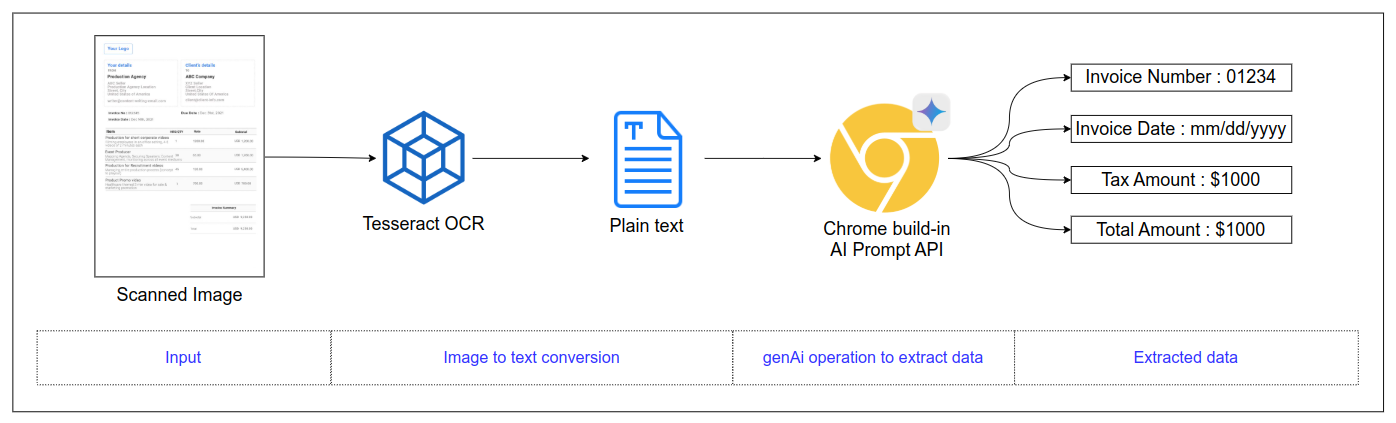
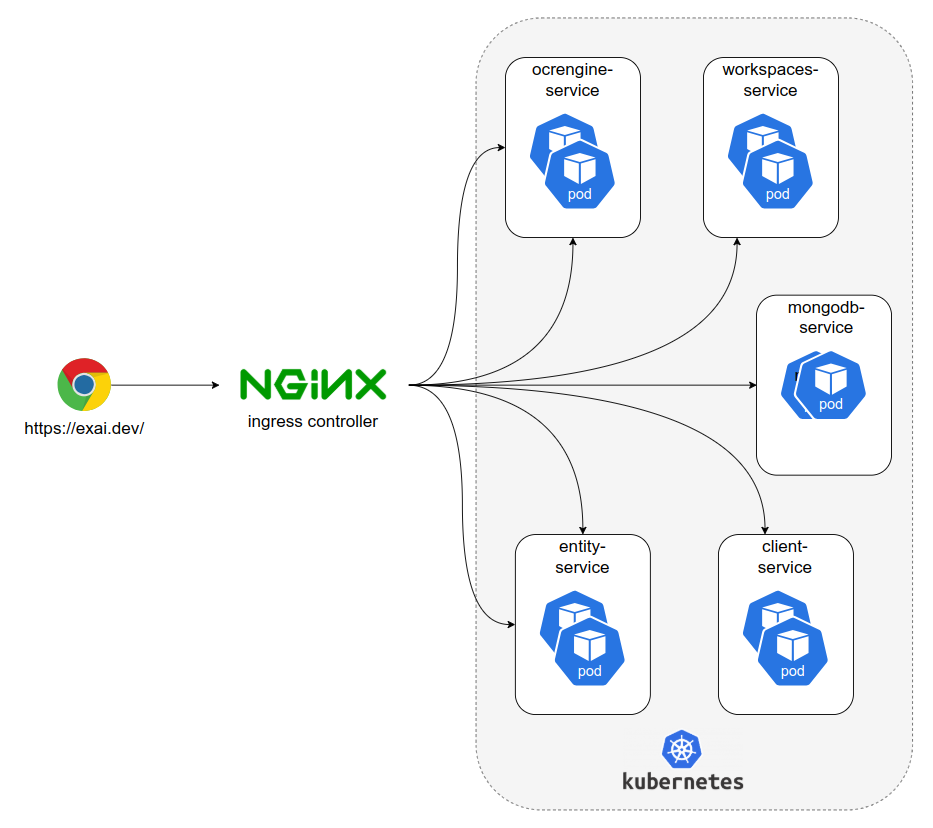
Inspiration
Most of the text extraction ML models (TensorFlow, Spacy etc) that organization uses are template dependent, which means we have to retag the training data and retrain the models to start extraction of the new templates, also Organization are not eager to use GenAi for this purpose due to data security, But both of the problems will be solved if we can leverage Chrome Build-in AI for this purpose that is exactly inspires me to build this web app.
What it does
This web application perform the follwoing operation on a given image
- Convert the given image file (png, jpg, jpeg, and other images format) into text using Tesseract OCR
- Extract the asked entitites from the chunk of data using Chrome buildin Prompt api
How I built it
I have build this web application in the form of microservices architecture as follows
- client : A frontend application written in React Typescript and bundled as a kubernetes pod
- ocrengine: A backend that will convert a given image into a text using Tesseract OCR, again I have bundled it as a kubernetes pod
- workspace: A backend that will be used to create workspaces for the user, a workspace is a logical container that will hold the entities that needs to be extracted from a given image. It is also bundled as a kubernetes pod
- entites: A backend service that will be used to create entites for a given workspace.
- Mongodb: Mongodb kuberneted pod is used to hold information about created workspaces, and entities.
All the services are written in Node express and spinned as a kubernetes pods in local kubernetes (Docker desktop) cluster for better scalablity, and availability. I have used Nx monorepo which let me allow to use a component by multiple projects, component in this whole project
Challenges I ran into
Technical challange while creating Tesseract OCR: I was trying to setup Tesseract OCR on a node-alpine virtual container via its standard library manager, APK. I was able to create node-alpine image and able to install it via APK but due to some reason the pretrained model for english language were missing from there. That is where I decided to use standard linux instead of alpine. I am able to create the docker image successfully and use Tesseract correctly.
Technical challange while dealing unstable response from Chrome buildin Ai Prompt API: I was facing a weird situation when if I ask a question such as "Extract the Invoice Number, Invoice Date from the below text in json format, ", then some time it extracted me the data such as "```json { :}", and sometime it responded the Markdown version of it but most of the time it responded me with the Unknown Language detected. When i changed the question slightly from "Extract the data in Json format" to "Extract the data in key:value format" then it responded correctly in most of the questions but still I have to parse the Markdown format, and Json format. That is where I developed a Response Normalizer function using Regex to parse the result correctly
Technical challange of reusing a function across the apps/services/libraries: I have used Nx monorepo to increase the reuseability.
Scaleability: The deployment of the services and apps are being done using kubernetes to ingeset the scalability to the developed system.
Accomplishments that I'am proud of
- Big accomplishment is that this web app is working as I have thought initially, It is really a cool vibe to convert an idea to a working product.
- I am able to compare the response of different api such as Write/rewrite API, and Prompt Api. I saw that the Prompt api is great fit for my use cases as its response is quite stable in compare with the response of write/rewrite api.
- I am able to do my hands dirty with the monorepo Nx setup for the first time. So now I have one more tool in my experties list.
What I learned
- I now know how the genAi tools works in the backend, I have done a deep analysis of the responses and how they very according to the way questions is asked.
- I now know how the pub/sub systems such as Kafka works, though I did not used in the submission but I was planning to use it as this submission project architecture is a microservices based
What's next for extractAi
- Current version of the application can handle images only, In the future version, it would be able to handle pdf files as well.
- I have used the microservices architecture of this application, but it is not fully microservices at the moment as a single instance of Mongodb is used within multiple API, It would the first point to attack in next version of this application.
- The data pipeline functionality: Currently, application require users to select the image and extract the data but not really doing anything with the data. In the next version of the application there would be a functionality where users can define the data pipeline so that application can send the extracted data to the destination via defined pipeline.


Log in or sign up for Devpost to join the conversation.