The problem
Browser extensions are the least checked software in most companies. They install in one click, update silently, and run inside the browser where people read email, handle customer data and log in to everything. An extension that asked for access to one site when someone installed it can ask for access to every site in a later update, and nobody in the company checks that change. Extension checks today are manual. Someone opens the store page, reads the description and guesses.
The product
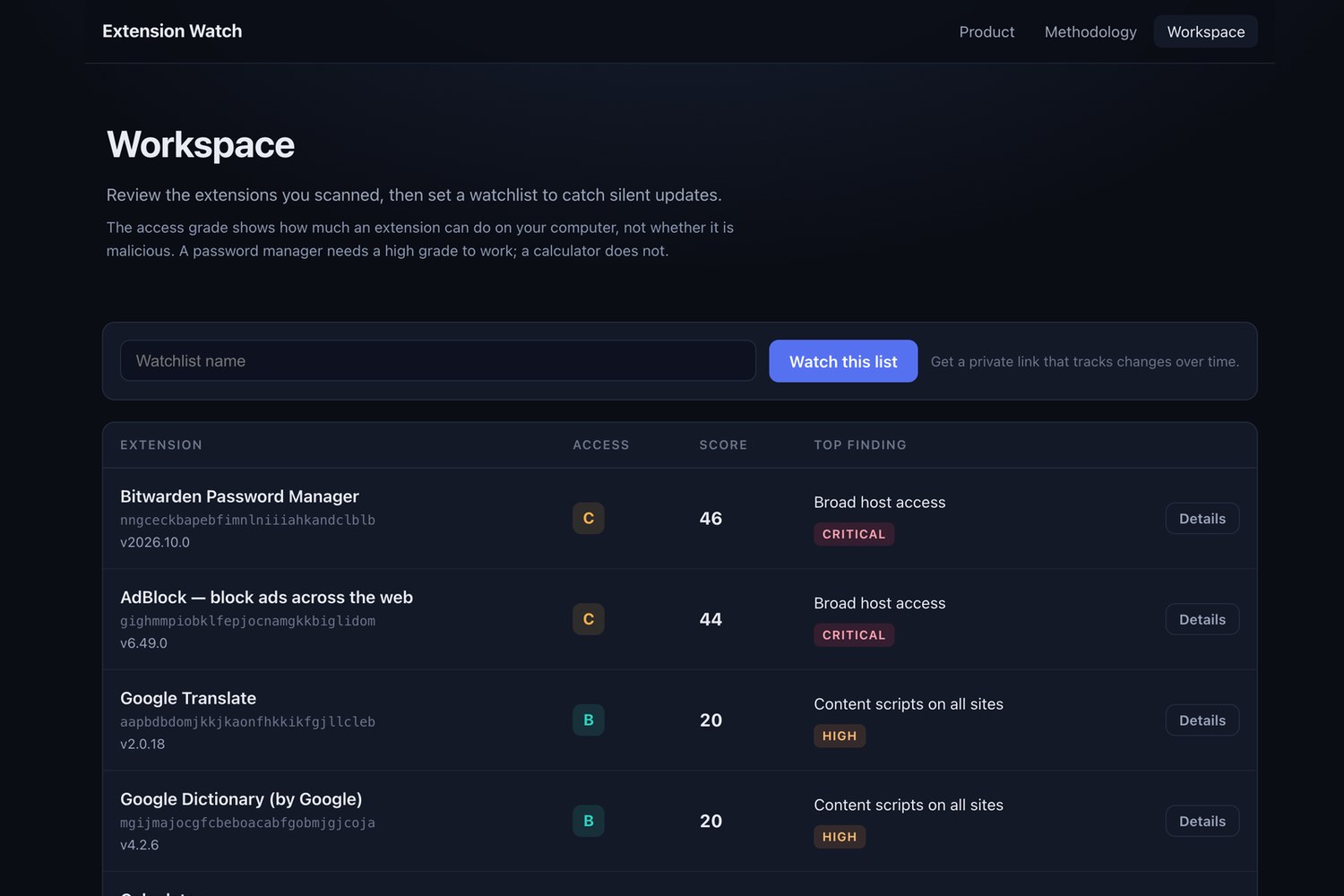
Extension Watch reads each extension's real package from Google's update service, grades how much it can do with a published rule set, and checks the list every day. The live app is at https://extension-watch.lipmichal.workers.dev. When an update adds a permission, reaches new sites, loosens its script policy or moves its updates off the Web Store, the change lands in the watchlist and in the team's Slack, Discord or Google Chat. Teams paste extension IDs or store links, and nothing is installed on employee machines. The start page has a "Try a sample team list" button with eight real extensions that are currently in the Chrome Web Store, and it warns when the 50 extension cap drops IDs or when most IDs are not found in the store. The watchlist page exports the inventory and the change log as CSV on the Team plan and the trial. The admin link also builds a Chrome ExtensionSettings policy in two modes, with a preview of what will be blocked.
Target cohort
IT and security leads at companies with 20 to 2,000 people who manage Chrome (often with Google Workspace or Chrome Enterprise) and have no budget or time for an enterprise browser security platform. A second cohort is agencies and consultancies who must answer client security questionnaires about the tools their staff use.
Architecture
Cloudflare Workers serve the API and the web app. Workers KV holds one record per watchlist and one shared record per extension per day, so an extension watched by a thousand companies is still downloaded once a day, and removed or unreadable extensions are cached for the day too. A Cron Trigger runs every 10 minutes and re-checks lists that have gone 23 hours without a check, oldest first, with a fixed budget per run (150 lists, 40 downloads, 800 KV operations against Cloudflare's 1,000). A larger list stays due until every extension in it got an answer.
Packages are streamed and never stored. Google ignores range requests for large packages, so the Worker streams each package once and keeps only its first 64 KB, its last 2 MB (where the ZIP index lives) and the bytes after headers named manifest.json or a locale file. It then reads manifest.json at the offset the ZIP index gives and checks the name in the local header, so a decoy manifest hidden inside another file cannot change the grade. A package that becomes unreadable after an update is itself logged and alerted. Keeper, a 143 MB package, was read in production in 5.5 seconds together with RoboForm. The ZIP and DEFLATE decoding is written in the Worker with no zip library and handles CRX2, CRX3, data-descriptor entries, comments and a byte order mark. 245 automated tests run without network access, and a GitHub Actions workflow runs them on every push.
Grading
Chrome shows an install warning for several permissions that now carry points. They include webNavigation, history, topSites, bookmarks, identity.email, contentSettings, browsingData, pageCapture, sessions, tabCapture, desktopCapture, downloads, management, privacy, proxy, geolocation, clipboardRead, nativeMessaging and declarativeNetRequestFeedback. An update that adds webNavigation, topSites and identity.email reaches 30 points and raises an alert.
Broad host access is decided with the ICANN public suffix list, which is downloaded and stored as a generated module. A wildcard such as *://*.co.uk/* or *://*.com/* covers every site under that suffix, while *://*.bit.ly/*, *://*.x.ai/* and *://*.t.co/* cover one domain. Host permissions on mail, single sign-on, password, banking, CRM and cloud console sites add 15 points as Sensitive site access.
The grade bands are 0 to 19 A, 20 to 39 B, 40 to 59 C, 60 to 79 D, 80 and above F. The grade measures the access an extension gets and says nothing about intent.
Governance and compliance
There are no accounts, no email and no employee data. A watchlist holds extension IDs, public manifest data, its change log and an optional webhook.
Each list has an admin link and a read-only link, both 256-bit random tokens. Only the admin link can change alerts or delete the list, the page tells people to share the read-only one, and alerts always carry the read-only link. A saved webhook is shown back as its host name only. The CSV exports are available from both links, and the policy export is available only from the admin link.
The Worker fetches only from Google and from the one webhook a list's admin sets. Webhooks must be https host names on the standard port. IP addresses, user names and internal names such as localhost are refused, and redirects are not followed. The API accepts only a parsed application/json type. Per-address daily limits are 200 scans, 20 new watchlists and 10 test alerts, and they are approximate under parallel requests.
CSV cells are escaped against spreadsheet formula injection, and responses that carry a token are not cached.
Pages are served with a strict Content Security Policy (no inline script, no eval), framing denied and no referrer. All manifest text is rendered as text, never as HTML.
The full points table, with a severity and a group for every rule, is public at /api/rules and on the Methodology page. Rules that describe the same power count once, at the highest value. The same manifest always gets the same grade, and no model is involved.
Retention is bounded. A list nobody opens for 90 days (365 with a webhook) stops being checked and then expires, and the admin can delete a list at any time.
The first production check ran on 18 October 2026 with the shared cache cleared so only the deployed code ran. The grading is deterministic, so the same manifests always give the same grades, and no policy for wasm-unsafe-eval was mistaken for unsafe-eval.
Exports
The watchlist page has download buttons for the inventory CSV and the change log CSV. Both the admin link and the read-only link can download them. The admin link also builds a Chrome ExtensionSettings policy in two modes. Threshold mode, the default, leaves the catch-all unblocked and blocks only the listed extensions graded at or below the threshold you choose. Default deny mode blocks every extension that is not on the list. Both modes block the debugger permission for every extension, block runtime access to sensitive domains such as mail, single sign-on, password, banking, CRM and cloud consoles, and keep a password manager or sign-on tool reachable on its own vendor and sign-in domains. The page previews what the policy will block before you download it. In the Google Admin console, open Chrome browser, then Custom Configurations under Chrome Enterprise Core, and paste the JSON. The same JSON can be deployed through the Chrome Group Policy templates on Windows, added to the com.google.Chrome configuration profile plist on macOS, or written to a file under /etc/opt/chrome/policies/managed/ on Linux. The policy lists one wildcard host pattern per sensitive domain family, with no path and no port. An allowed extension repeats the debugger and host blocks because Chrome does not inherit them from the catch-all entry, and a blocked extension needs only the blocked install mode. The CSV and policy exports are part of the Team plan, and every new list gets them on its 14 day trial.
Plans and unit economics
| Plan | Price | What it includes |
|---|---|---|
| Free | 0 | The risk report and daily checks for up to 25 extensions per list |
| Team | 29 USD a month, planned | Up to 50 extensions per list, the CSV exports, the Chrome policy export and the admin audit log |
Plans are enforced in the code today. Every new list starts on a 14 day Team trial, up to 3 trials per address in 30 days, so a first visitor sees every feature at once, and the watchlist page shows a badge with the plan, the extensions used of the limit and the trial days left. After the trial a Free list answers HTTP 402 with a plain message on the CSV, policy and audit routes, and its daily check covers its first 25 extensions. Billing is not connected, so no plan is charged. A list owner cannot upgrade their own list, because the plan route needs the operator's secret code on top of the admin link, and that is how Team is granted while billing is not live. Lists saved before plans existed count as Team, so nothing saved earlier broke. The 402 message and the privacy page link to the issue tracker at https://github.com/theluckystrike/extension-watch/issues, so a customer can reach the operator, and the page warns never to post an admin link in a public issue. Trial and rate limit counters store only a salted hash of the address, IPv6 by its /64 prefix, and the Worker refuses those routes with 503 if the salt secret is missing rather than hash without it.
Each extension is downloaded once a day for all customers, so the popular extensions every company runs are shared. A local simulation runs the real scheduled check code against an in-memory fake KV with 300 lists of 20 extensions for one day of 144 runs. The day spends 1,560 KV reads, 320 KV writes, 144 KV list calls and 20 package downloads, and the busiest run spends 689 KV operations against the 1,000 per invocation Cloudflare allows. KV writes bind first on the Workers Free daily limits, at about 980 lists of that shape. Production uses a Workers Paid setting with a 10 second CPU limit per run. The script and the counts are in the repository at https://github.com/theluckystrike/extension-watch/blob/main/docs/ECONOMICS.md and the run is not a measurement on Cloudflare. Revenue grows with the number of extensions watched, which grows with headcount, and the policy export turns the product from a report into a control.
What is built today
Scanning, grading, watchlists with admin and read-only links, daily re-checks, the change log with severities, webhook alerts (a test alert from production was delivered and received), delete and expiry. The inventory and the change log export as CSV. The admin link builds a Chrome ExtensionSettings policy in two modes, with a preview of what will be blocked. Free and Team plans with a trial are enforced in code. The start page has the sample team list button. The 245-test suite and the GitHub Actions workflow are in place.
| Built in this version | Planned |
|---|---|
| Scan and grade up to 25 extensions | Billing and a checkout for Team |
| Shared daily cache, one download per extension a day | Email alerts |
| A daily re-check of each watchlist, run by a scheduler every 10 minutes, and a change log | Single sign-on |
| Slack, Discord and Google Chat webhook alerts | Usage-based API metering |
| Read-only link and admin link for every watchlist | More than 50 extensions per list |
| CSV inventory and change log export | |
| Chrome ExtensionSettings policy export in two modes | |
| Admin audit log with CSV, link rotation and a privacy page | |
| Free and Team plans with a 14 day trial and 402 on Team exports |
Built with
TypeScript, Cloudflare Workers, Workers KV, Cron Triggers, Workers static assets, Chrome extension CRX format, streaming ZIP and DEFLATE decoding, and GitHub Actions.
Links
The live service is at https://extension-watch.lipmichal.workers.dev and the code is at https://github.com/theluckystrike/extension-watch. The demo video is at https://youtu.be/x93gbdHhUr8.
Built by Michael Lip of Warsaw, Poland. His profile is at https://github.com/theluckystrike. Not affiliated with Google.
Built With
- chrome
- cloudflare-workers
- cron-triggers
- saas
- security
- typescript
- workers-kv

Log in or sign up for Devpost to join the conversation.