Inspiration
We were inspired by the need for more accessible and user-friendly web browsing experiences, especially for those who have visual impairments or learning difficulties. We wanted to create a tool that combines text summarization, text-to-speech functionality, and an interactive AI chatbot to provide comprehensive assistance for web content.
What it does
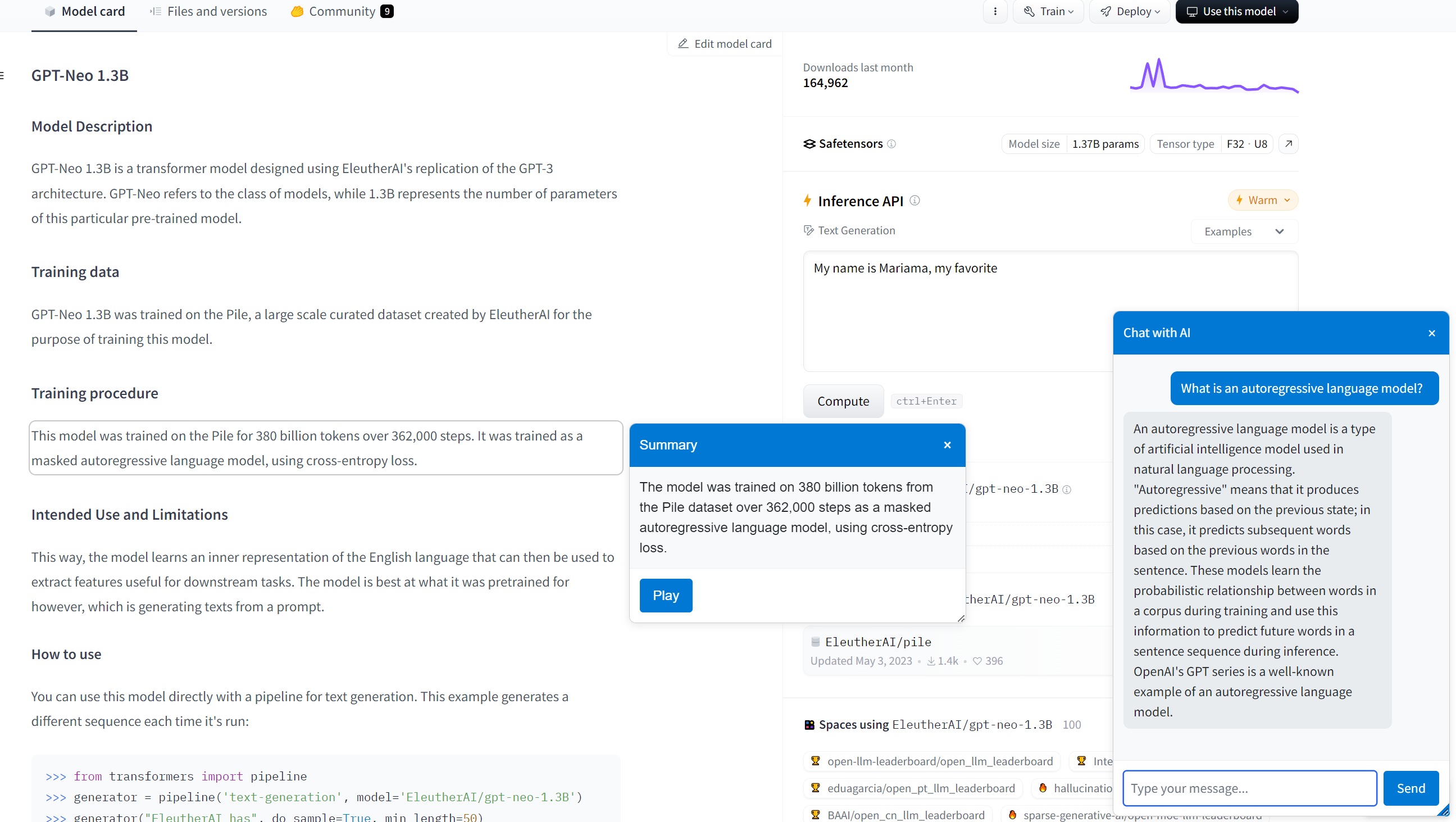
The Accessibility App enhances web accessibility by summarizing paragraphs on websites, providing text-to-speech capabilities, and allowing users to interact with an AI chatbot for further questions or clarification. It simplifies content interaction and improves the overall accessibility of information on the internet.
How we built it
We built the app using JavaScript and the Chrome Extensions API, integrating OpenAI's API for text summarization and chatbot responses. The text-to-speech functionality was implemented to read summarized text aloud, using both custom JavaScript and OpenAI's text-to-speech API capabilities. We used HTML and CSS to create a user-friendly popup interface within the browser.
Challenges we ran into
One of the main challenges was handling asynchronous API calls within the Chrome Extension environment. We encountered issues with message handling between background scripts and content scripts, especially when managing errors and closed message ports. Ensuring reliable audio playback for text-to-speech and managing API request limits also presented some challenges.
Accomplishments that we're proud of
We’re proud of creating a functional and helpful tool that supports users who may need extra assistance while browsing the web. Developing a seamless integration between summarization, text-to-speech, and chatbot functionality within a single extension was an achievement, and we’re thrilled to have provided a valuable resource for users.
What we learned
We learned a lot about working with asynchronous operations and managing data flow between different scripts in a Chrome Extension. Debugging API requests and understanding how to effectively use OpenAI's API in an extension context provided valuable insights. Additionally, we gained experience in designing accessible interfaces for a wide range of users. We also learned a lot about version control and not messing up the main branch.
What's next for Extension for Dummies
Moving forward, we plan to enhance the accessibility features further by adding more language options, voice customization for text-to-speech. We’re also considering options to improve chatbot functionality by caching already discussed information with you user for more specific accessibility queries and further development.
Built With
- javascript
- openai

Log in or sign up for Devpost to join the conversation.