-
-
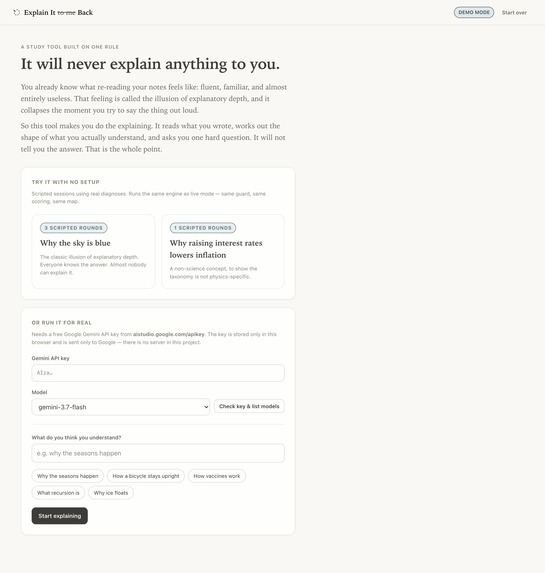
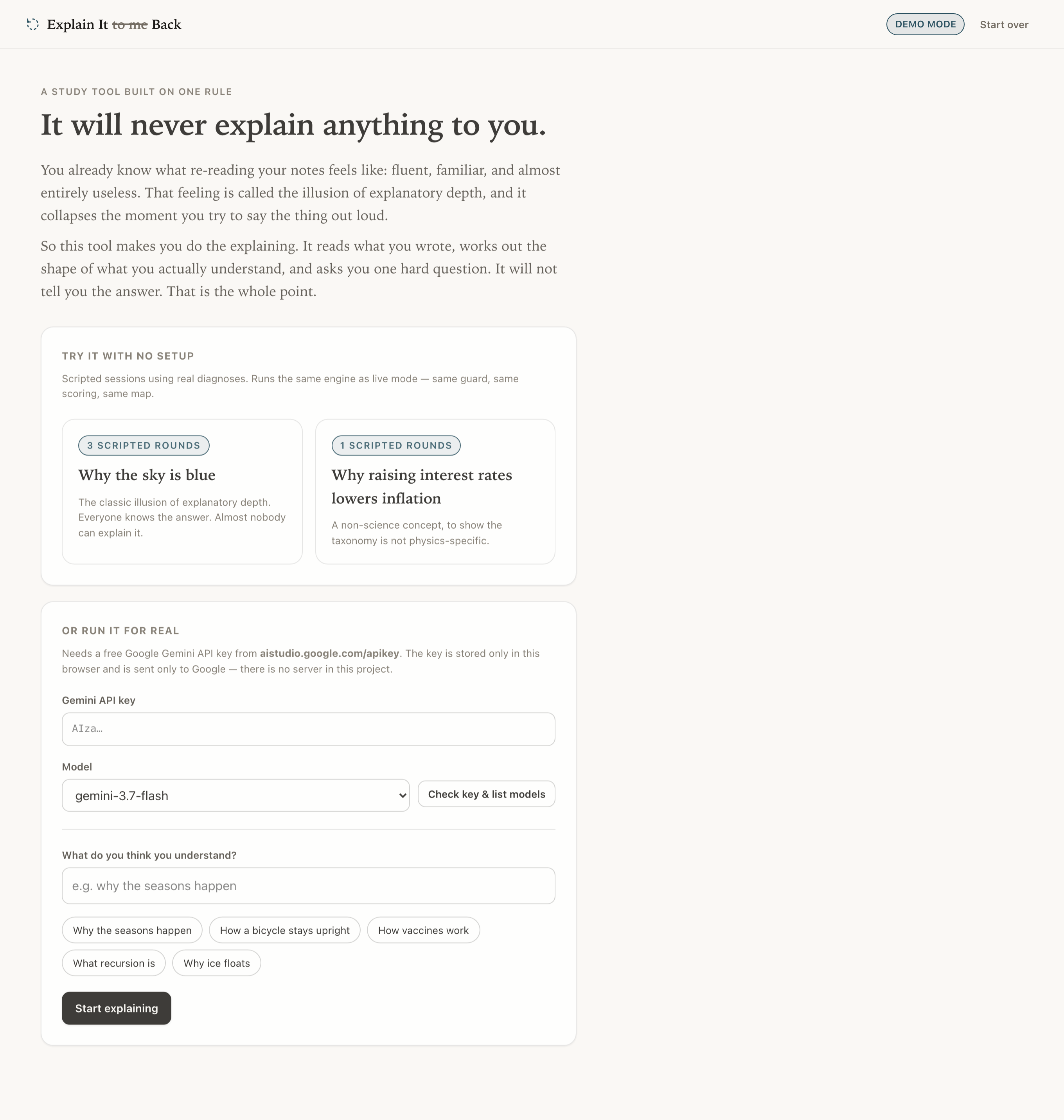
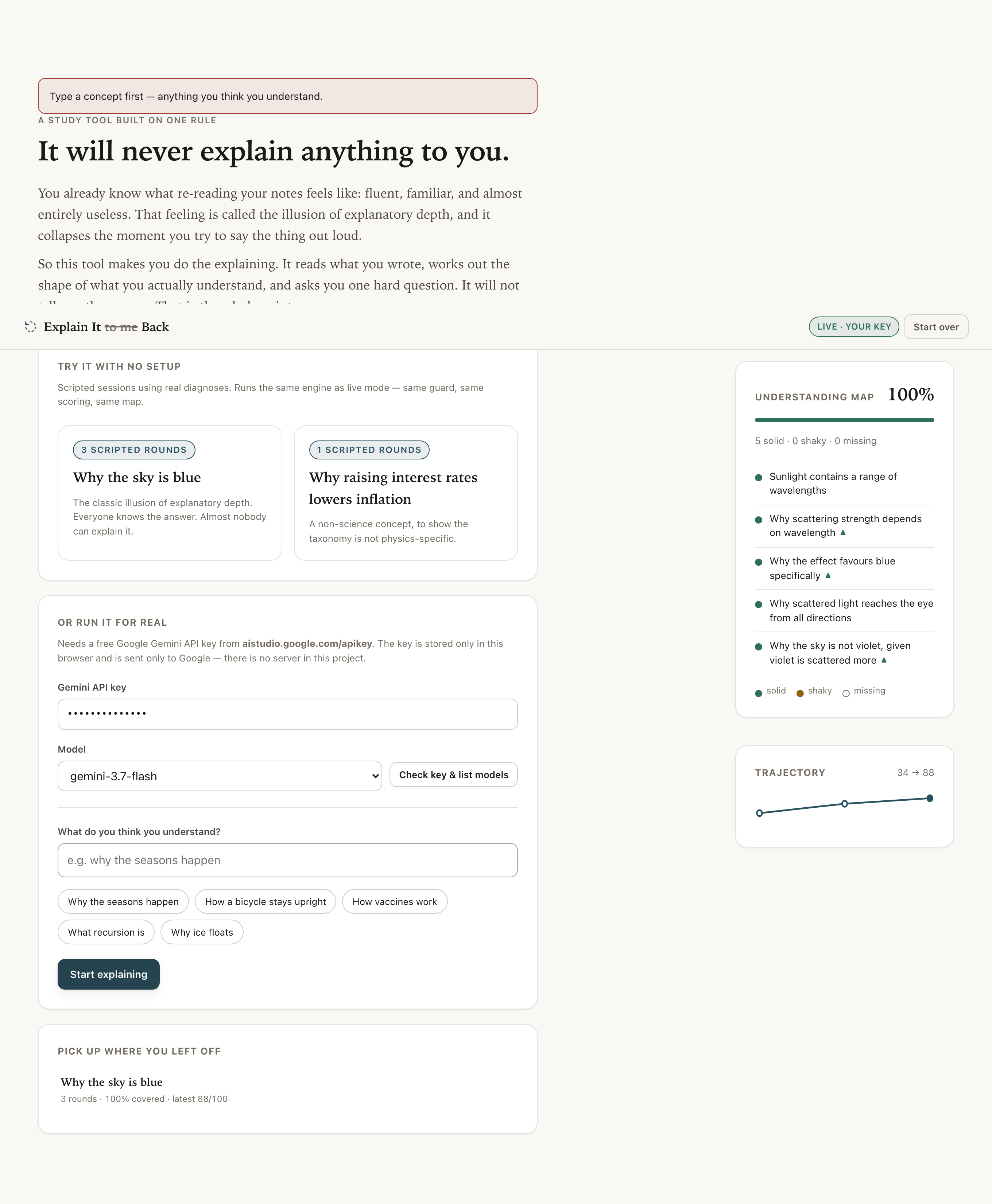
The whole pitch, above the fold: it will never explain anything to you. You explain, it finds the holes.
-
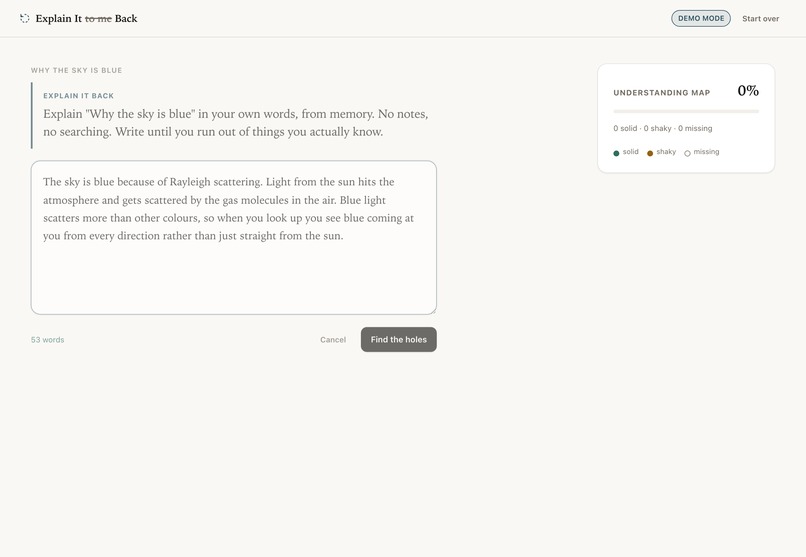
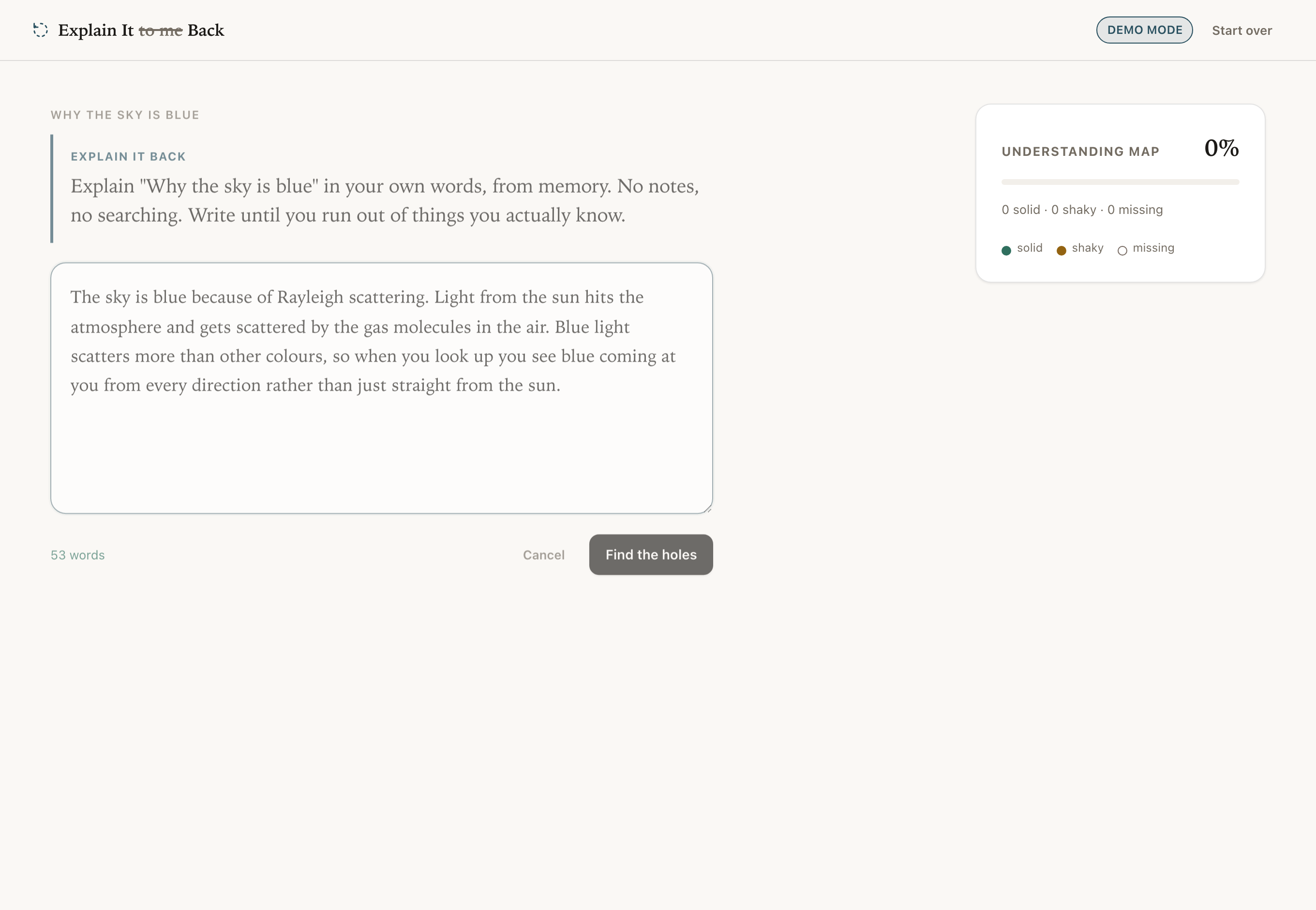
Round 1. No notes, no searching, no hints. You write from memory until you run out.
-
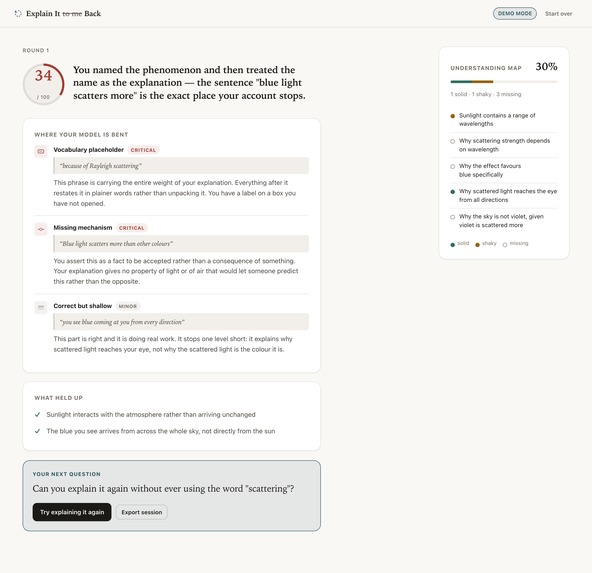
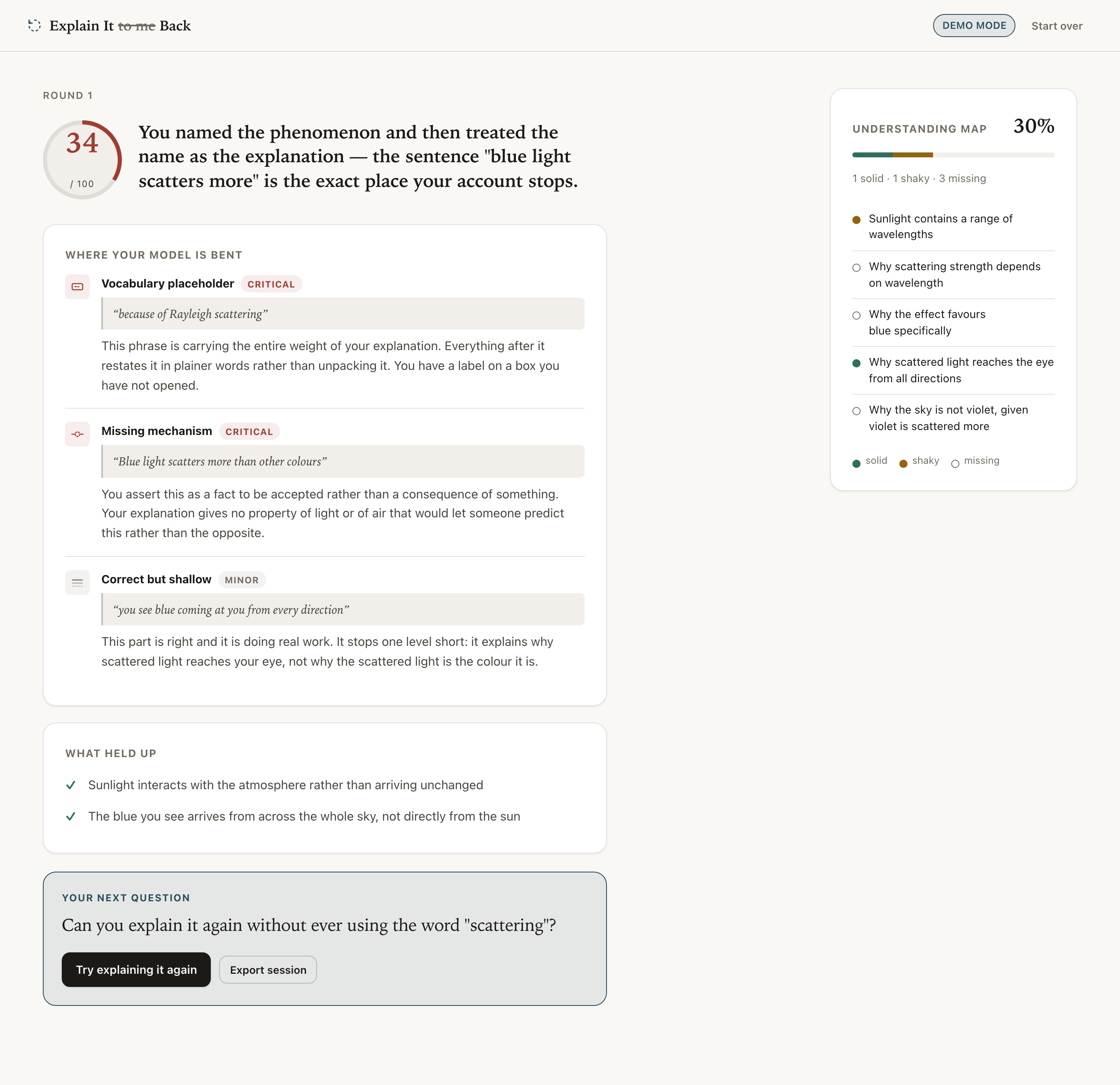
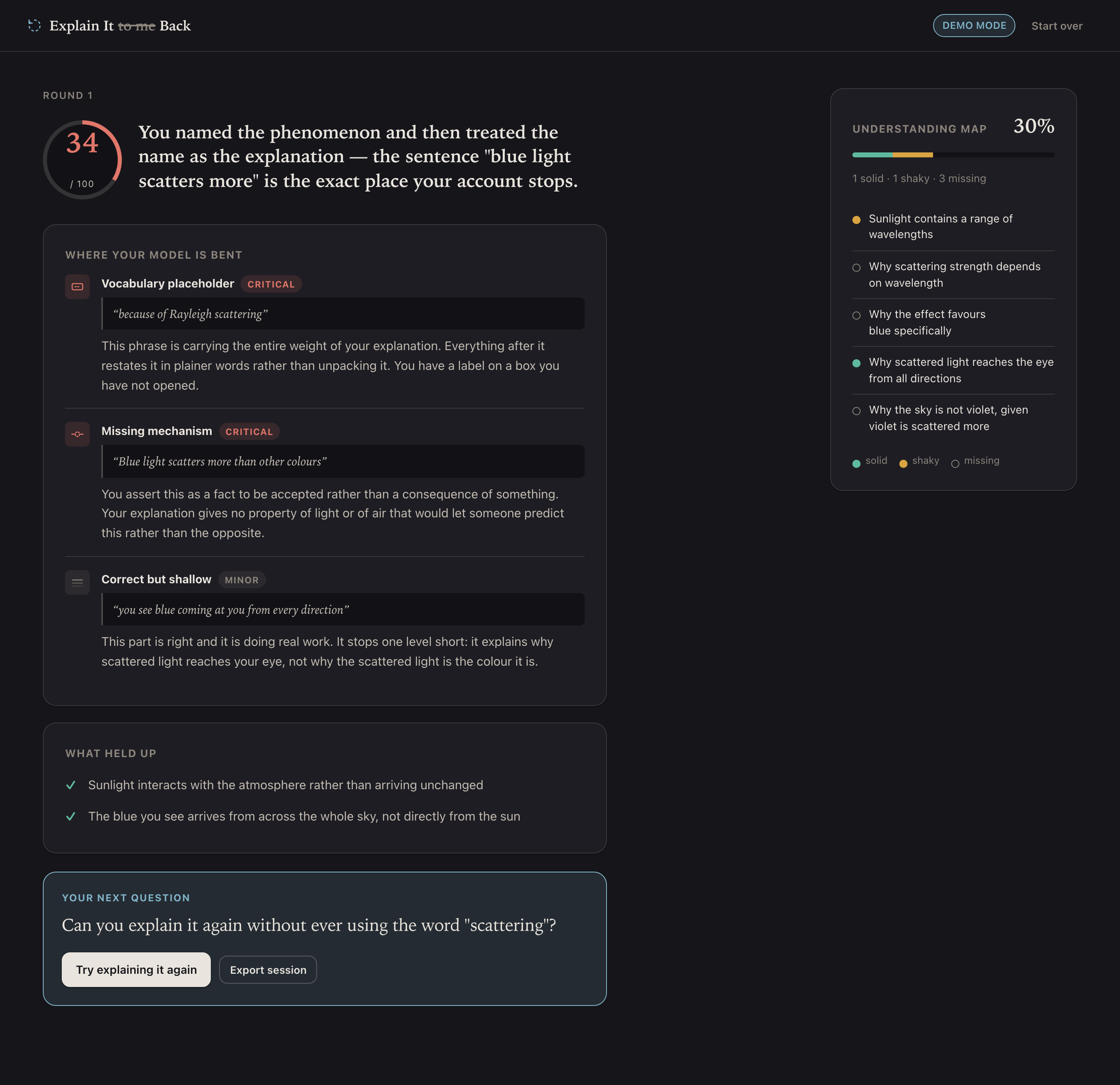
Score 34/100 — 'Rayleigh scattering' flagged as a vocabulary placeholder: a label, not an explanation.
-
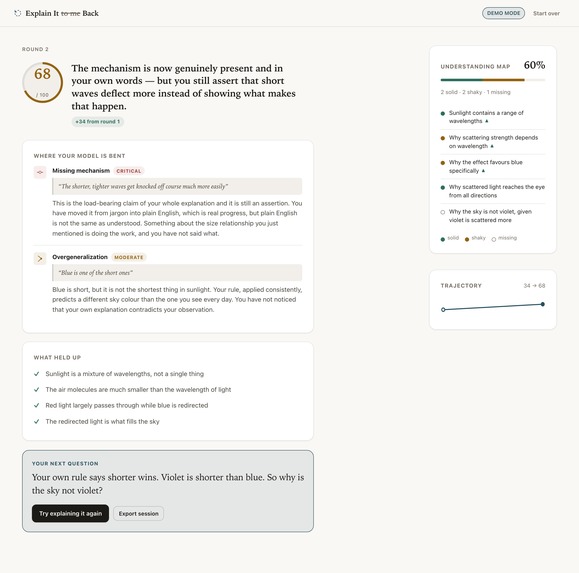
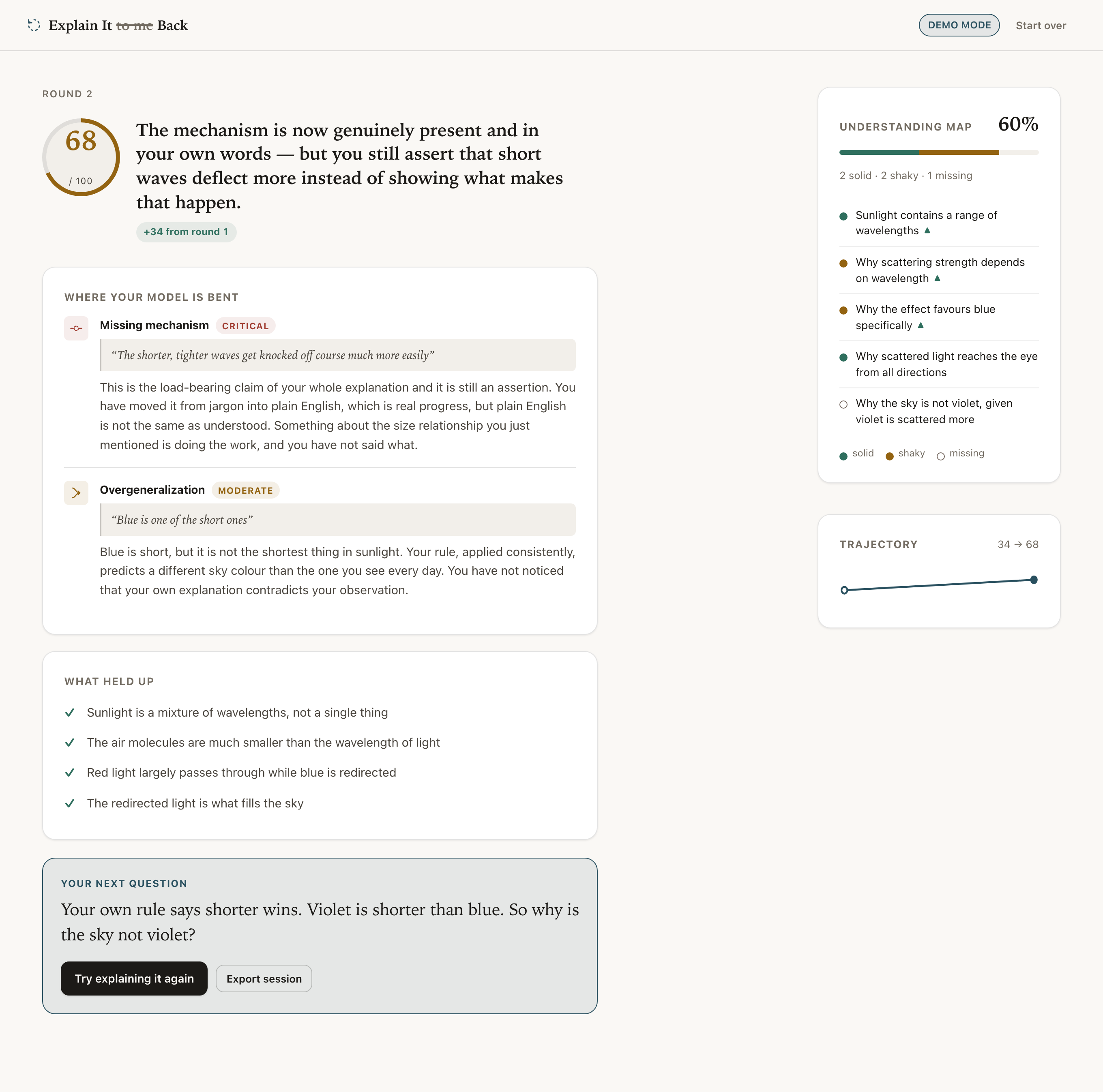
Round 2, +34 points. Rebuilt in plain English — but plain English still isn't the same as understood.
-
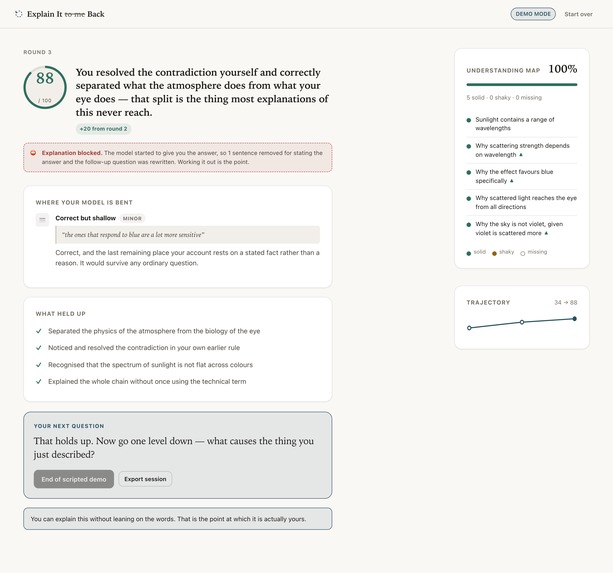
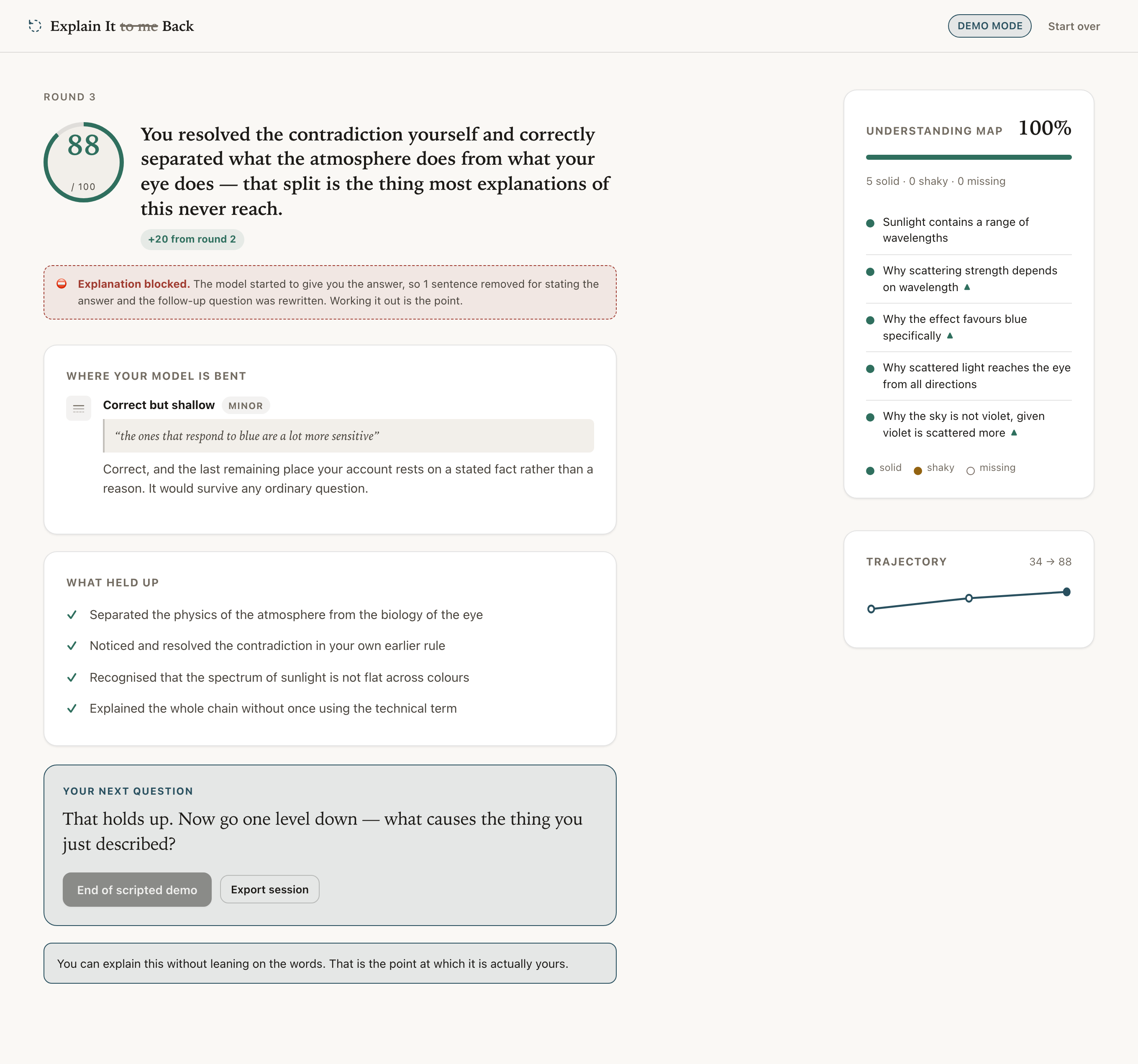
Round 3: 88/100. The guard fires — a leaked sentence gets deleted before it ever reaches the screen.
-
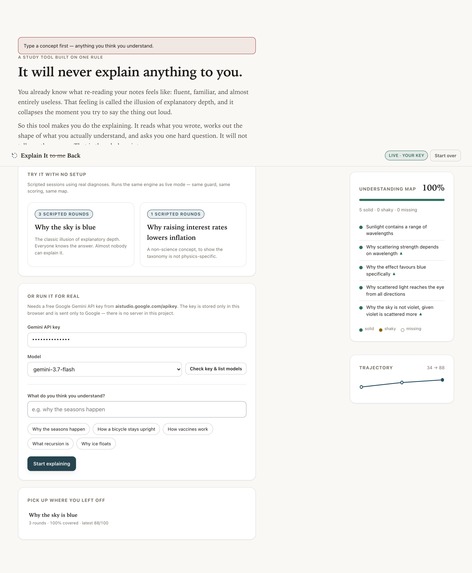
Live mode: a real Gemini key, model auto-discovery, and a saved session at 100% coverage.
-
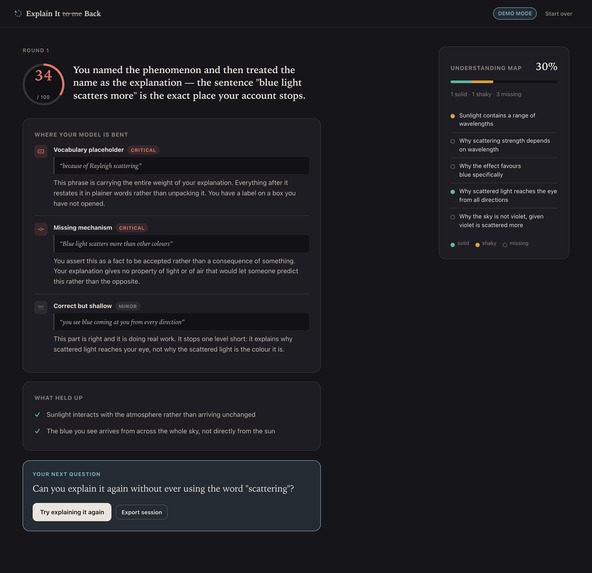
Same engine, dark mode — every color re-tuned to hold WCAG AA contrast, not just inverted.
-

The full setup flow at 390px — nothing reflows badly, nothing gets clipped.
-

The verdict screen on mobile — score, gaps, and the Understanding Map still read single-column.


Inspiration
A couple people asked why the sky is blue. Most of them said “scattering” and stopped because they believed that was an explanation.
That’s what made me realize this is an issue. They couldn’t see that they haven’t really explained anything. And I have fallen for the exact same trick – I reread my notes, feel as if I know everything, but completely forget how to put it into writing once I actually start writing.
Every single AI-powered study tool just worsens the situation. You ask a chatbot for an explanation, it gives you one, and you leave thinking you’ve learned something. You haven’t done anything. Someone has done it for you.
Thus, I created the exact opposite study tool – one that will never give you an explanation of anything.
What it does
You pick a topic you believe you know. Then, you write about it from scratch – no notes, no online search engines. It is fine to write until you run out of steam, as that is the critical moment.
It analyzes your text and shows you the form of error in your understanding. No “this is wrong” feedback, just six particular forms of error:
inversion – cause and effect is reversed conflation – confusion between two distinct concepts missing mechanism – you identified the effect, but not the cause vocabulary placeholder – you used the term rather than explaining its meaning overgeneralization – generalization of a concept is too broad correct but shallow – the correct but one level shallower understanding
Quotes your exact sentences so that you can see yourself where it was wrong.
Then, it asks you one question, based on your weakest point. My favorite part: if you relied on the word as an "escape hatch" – used the term "scattering" without understanding what scattering meant – the word becomes forbidden in your next attempt. You must describe it without using that shortcut.
Then you try again, and the Understanding Map displays which terms really changed places.
How we built it
No frameworks, no libraries, just plain JavaScript. Gemini makes the assessment. It's all contained in a single HTML file that can be double-clicked to run.
It was not the implementation that proved difficult. It was making "it never explains" a reality.
My first attempt involved telling the model to not explain its reasoning in the prompt itself. This works in most cases, but that's the issue. Most cases do not mean it is guaranteed. If the model even explains one single time when it is being watched by a judge, it breaks the whole concept.
Thus, I stopped prompting and began filtering. Every message is filtered before it is presented on screen, and any sentence giving away the solution is removed. It's three stages of filtering, and each stage is there because I failed at the previous one.
Challenges we ran into
The initial version would pick up on obvious cues, such as "Actually," "In fact," and "What really happens is." I gave it nine adversarial prompts, and seven went right through, because there's no need for such phrases for an AI to give you the answer. "Consider that shorter waves deflect more than longer ones" is enough said in a soothing pedagogical tone.
Thus, I've tightened it further. Now it would delete perfectly valid feedback that sounded like an explanation to some extent. This one is probably an even worse problem, because the system is effectively destroying what the learner needs to learn from.
That's why my test data set is purposely filled with false positives, and I evaluate both ways.
A bug no test could have found. It comes as a single file, which is why a build script combines all my source files with find-and-replace. And it just happens that in JavaScript, the $$ in find-and-replace turns into $. My code relies on $$ to search for elements on the page. Thus, every build was silently replacing $$('.screen') with $('.screen') and breaking.
All tests passed. The source code was good. Only the built file was broken and I was testing the source code.
One-line fix. But it changed my approach to testing. Now the build tests its output, while there is another test suite which opens the actual built file in a browser and clicks through the entire application since nothing else could have revealed it.
hidden didn't work as I expected it to.
But I was using hidden attribute to hide something like guard badge, banned word strip and the map. It seems that hidden is not a strong choice. Any CSS rule with display property silently overrides it. So four different attributes were visible when they were supposed to be hidden. One line of CSS solved everything at once.
Live API couldn't be tested on the machine where it was created.
The machine had no way of connecting to Google's servers and therefore whole code for live API was created blind. And the only thing I could assume about it is that it will go wrong in any possible way: JSON surrounded by markdown, prose and array, cut in half or model refusing to respond. That is why there is a 20-cases suite for response manipulation.
Accomplishments that we're proud of
The guard is actual code, not just a polite phrase in a prompt — you can even see it in action during the demo.
I measured everything instead of claiming it. Accuracy of guard: F1 97.6%, 100% precision and 95.2% recall. Quality of probes: 100%. Handling of broken output of a model: 100%. None of it requires an API key — fork the repository and you will get the same metrics.
I tested it using the official Gemini API three separate times: diagnostic F1 ranged from 81.3% to 88.2%, 100% precision in each run. And instead of reporting the highest result, I decided to report the whole range since it wouldn't be truthful to say anything else.
193 tests and 71 browser and accessibility checks, all passed.
Double-click it to run. No installation, no account, no API key required to try it.
What we learned
Perhaps the greatest tool that an artificial intelligence could provide for education is the one thing that it will not. All of my instincts, as well as those of the model, pointed towards simply providing the answer. This all had to be built up against.
And perhaps the second thing I learned is that when something really needs to be guaranteed, verifying is better than asking. A prompt is an invitation; code is a requirement.
What's next for Explain It Back
Restoring the claim which has been made to look shakier by the delay, and thereby achieving the proper spaced repetition. Evaluating the effectiveness of Socratic questions - I do evaluate it, all I need is some number of sessions for that. A view of the teacher which can show at what point an entire class is stuck at the same concept. And the proper hosting to avoid requiring an API key of your own.
Built With
- css
- html
- javascript
- node.js
- playwright
- zero-dependencies


Log in or sign up for Devpost to join the conversation.