-

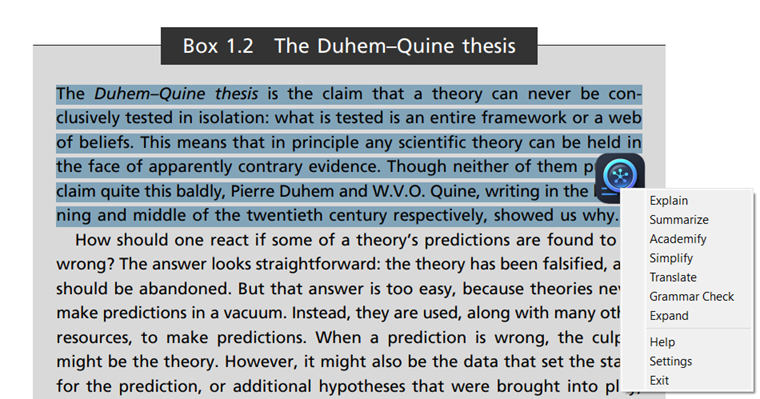
Right-Click for more options
-

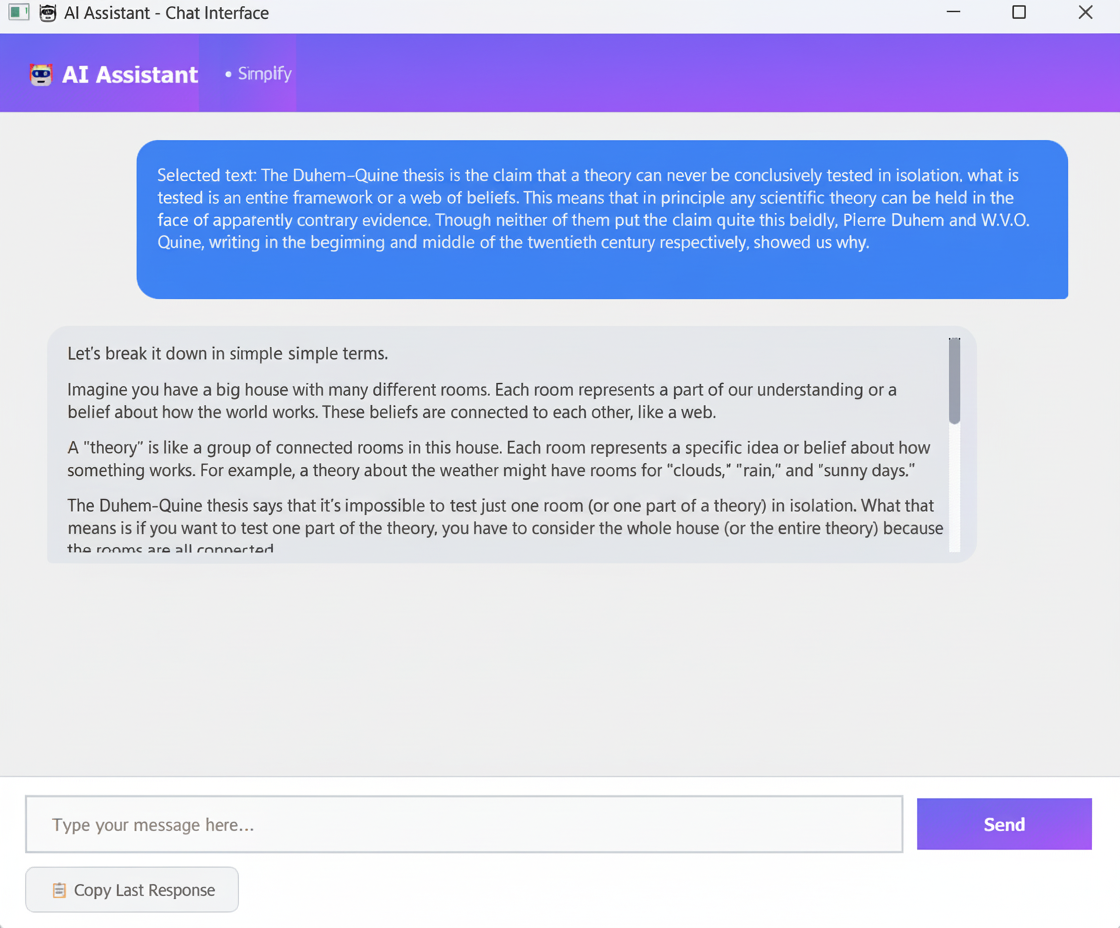
Follow-up chat interface
-

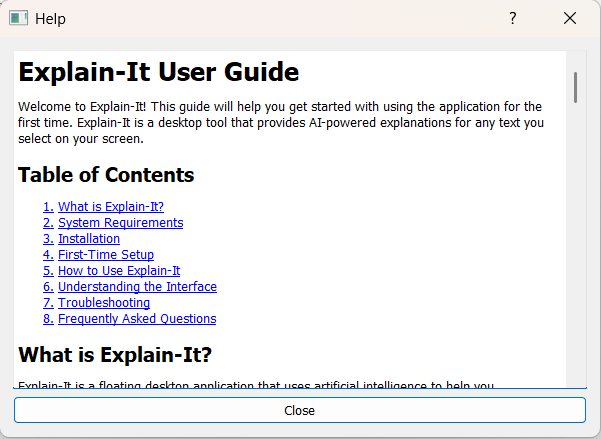
Help window
-

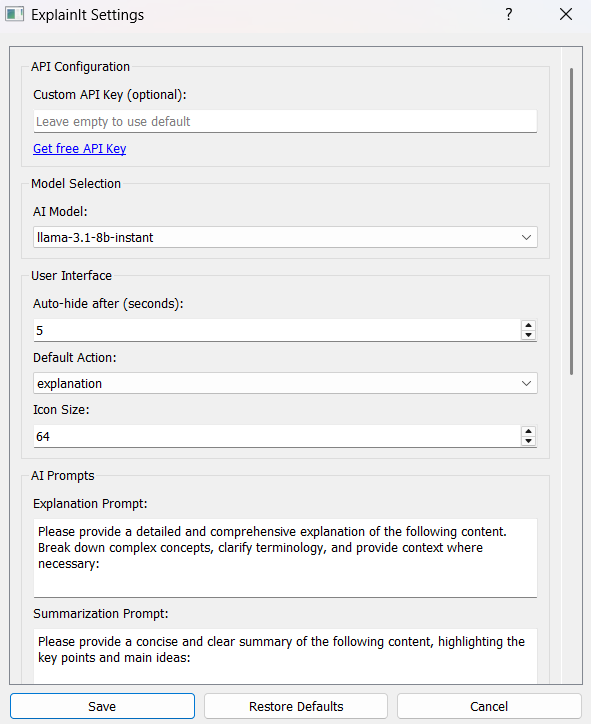
Settings window
Inspiration
We've all been there—reading an article, a research paper, or technical documentation, and suddenly hitting a wall of jargon or complex concepts. The usual workflow? Ctrl+C to copy the confusing text, open a new tab, Ctrl+V into ChatGPT or Google, hit Enter, wait for results, then switch back to continue reading. This constant context-switching breaks our flow and kills productivity.
We asked ourselves: "What if understanding could be as simple as selecting text?" That's how Explain-It was born—a tool that brings AI explanations directly to your fingertips, eliminating the copy-paste-search cycle and keeping you in your reading flow.
NOTE : THIS IS FOR TRACK 3 : BEGINNER-FRIENDLY APP
What it does
Explain-It is an intelligent desktop companion that provides instant AI-powered assistance for any text you select on your screen. Here's how it works:
- Select any text anywhere on your computer—in your browser, PDFs, documents, or code editors
- A floating icon appears automatically near your cursor
- Click once to get instant AI-powered help
The application offers seven powerful AI-driven features:
- Explain: Get detailed breakdowns of complex concepts with context and examples
- Summarize: Extract key points and main ideas from lengthy content
- Academify: Transform casual text into formal academic language
- Simplify: Convert complex ideas into beginner-friendly explanations
- Translate: Instantly translate text to Hindi (or any configured language)
- Grammar Check: Detect and correct spelling, grammar, and punctuation errors
- Expand: Elaborate on ideas with additional details and examples
What sets Explain-It apart is its conversational AI mode—you can ask follow-up questions and dive deeper into topics without starting over, making it feel like having an expert tutor right beside you.
How we built it
Explain-It is built with a modern Python stack designed for performance and cross-platform compatibility:
Frontend & User Interface:
- PyQt5 for a native desktop experience with custom-styled widgets
- Markdown rendering for beautifully formatted AI responses
- Custom floating widget that intelligently positions itself near the cursor
- Modern chat interface with message bubbles, animations, and smooth scrolling
Backend & Logic:
- pynput for cross-platform mouse event detection and text selection tracking
- pyautogui for simulating keyboard shortcuts (Ctrl+C) to capture selected text
- pyperclip for clipboard management without disrupting user's existing clipboard
- Custom conversation manager that maintains context across multiple AI interactions
AI Integration:
- Groq API for ultra-fast inference with state-of-the-art AI models
- Multi-turn conversation support allowing contextual follow-up questions
- Flexible model selection supporting various LLaMA, Mixtral, and other models
- Custom prompt engineering for each of the seven AI tasks
Configuration & Persistence:
- JSON-based settings management stored locally in user's home directory
- Secure API key storage with optional custom key support
- Customizable prompts for power users who want to fine-tune AI behavior
Architecture Highlights:
- Separate threading for AI inference to keep UI responsive
- Event-driven architecture with Qt signals for clean component communication
- System tray integration for always-on availability
- Graceful error handling and user feedback
Challenges we ran into
1. Text Selection Detection: The biggest technical hurdle was reliably detecting when a user selects text across different applications. Unlike web extensions that have access to DOM events, desktop applications must work at the OS level. We experimented with several approaches:
- Initially tried accessibility APIs, but they had inconsistent support across applications
- Finally settled on combining mouse event detection (drag detection) with monitoring clipboard changes striking the right balance between reliability and user experience
2. Non-Intrusive UI Design: Creating a floating icon that's helpful without being annoying required careful tuning:
- Positioning the icon near the cursor without obscuring selected text
- Implementing smart auto-hide logic (5-second timer with hover detection)
- Ensuring the icon stays on top but doesn't interfere with other applications
- Handling edge cases like multi-monitor setups and screen boundaries
3. Conversation Context Management: Implementing multi-turn conversations while keeping the API stateless was tricky:
- Groq API doesn't maintain conversation state between calls
- We had to manually track the entire conversation history in memory
- Balancing context window limits while preserving relevant conversation history
- Ensuring follow-up questions maintain context without exponentially growing token usage
5. API Rate Limiting & Error Handling: Making the app robust against API failures:
- Gracefully handling network timeouts and API errors
- Providing meaningful feedback when requests fail
- Implementing retry logic without blocking the UI
- Managing free-tier rate limits to prevent user frustration
Accomplishments that we're proud of
Seamless User Experience: We achieved our core goal—reducing a three-step process (copy, paste, search) to a single click.
Lightning-Fast Responses: By leveraging Groq's optimized inference, we deliver AI explanations in 1-3 seconds, making the experience feel instant and natural.
Conversational Intelligence: Our multi-turn conversation system allows users to ask "Can you explain that in simpler terms?" or "What's an example?" without losing context—something most desktop AI tools don't support.
Modern, Polished UI: Despite being a desktop Python app, Explain-It features a beautiful, modern interface with gradient designs, smooth animations, and a chat experience that rivals web applications.
Highly Customizable: Power users can customize everything from AI models to prompt templates, while beginners can use sensible defaults—striking the perfect balance.
Open Source & Accessible: We've made Explain-It completely open-source with comprehensive documentation, making AI assistance accessible to everyone with just a free Groq API key.
What we learned
Technical Insights:
- Desktop app development still has significant advantages over web apps for system-level integrations
- Event-driven architectures with Qt signals/slots create maintainable, responsive UIs
- Stateless API design requires careful client-side state management for conversational experiences
- Cross-platform development demands extensive testing and platform-specific accommodations
Product & UX Lessons:
- Less is more: A single floating icon is more user-friendly than complex toolbars or panels
- Context switching is one of the biggest productivity killers—eliminating it has massive impact
- Conversation context transforms AI tools from simple query-response systems to intelligent assistants
- Progressive disclosure: Hiding advanced features in settings keeps the core experience simple
AI Integration:
- Model selection matters: Offering both fast (8B) and accurate (70B) models lets users choose based on their needs
- Prompt engineering significantly impacts response quality—generic prompts produce generic results
- Error messaging should be conversational and helpful, not technical
- API choice (choosing Groq over OpenAI) can dramatically improve perceived performance
Community & Open Source:
- Clear documentation lowers the barrier to entry for contributors
- Providing both executables and source code serves different user segments
- Customization options turn users into advocates
What's next for Explain-It
Smart Form & Email Automation:
- Auto-fill forms using RAG (Retrieval-Augmented Generation) with locally stored personal data
- Securely store common form data (name, address, job details, preferences)
- Detect form fields on screen and intelligently populate them
- One-click form completion for job applications, registrations, surveys
- Privacy-first: all data stored locally, never sent to external servers
- Auto-write emails with intelligent context detection
- Analyze screen content to automatically detect email subject and context
- Generate contextually appropriate email drafts in seconds
- Smart tone adjustment (formal, casual, persuasive)
- Reply suggestions based on incoming email content
- Follow-up email generation with conversation history awareness
Collaborative Features:
- Share explanations with teammates
- Collaborative knowledge base built from explained content
- Team workspaces with shared custom prompts
Educational Mode:
- Spaced repetition flashcards generated from explanations
- Learning path tracking and progress analytics
- Integration with note-taking apps (Notion, Obsidian)
Domain-Specific Models:
- Specialized models for medical, legal, or technical fields
- Custom RAG (Retrieval-Augmented Generation) for domain knowledge
- Integration with research databases and academic sources
Smart Automation:
- Auto-explain on hover (optional power-user mode)
- Keyboard shortcuts for different AI tasks
- Integration with productivity tools (Slack, Teams, IDEs)
- Meeting notes automation with action item extraction
Our ultimate vision is to make Explain-It the universal AI layer for your entire digital workflow—eliminating repetitive tasks like form filling and email writing, while turning every piece of text into an opportunity to learn and understand. We believe AI should enhance human productivity and learning, not replace it, and Explain-It is our contribution to making AI assistance truly seamless and integrated into daily life.
The Future Workflow:
- Old way: Open ChatGPT → Type query → Copy response → Paste elsewhere → Fill forms manually → Write emails from scratch
- Explain-It way: Select text for instant understanding → Press hotkey for direct AI chat → Auto-fill forms with one click → Generate contextual emails automatically
Our ultimate vision is to make Explain-It the universal layer between users and knowledge—turning every piece of text into an opportunity to learn, understand, and grow. We believe AI should enhance human learning, not replace it, and Explain-It is our contribution to that future.
