-
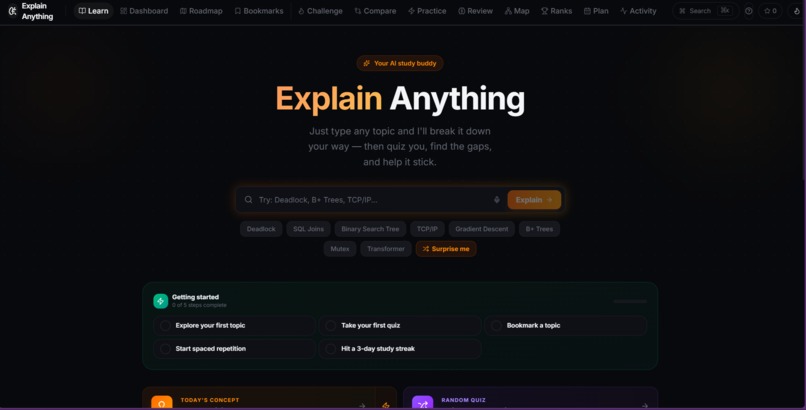
Home Page
-
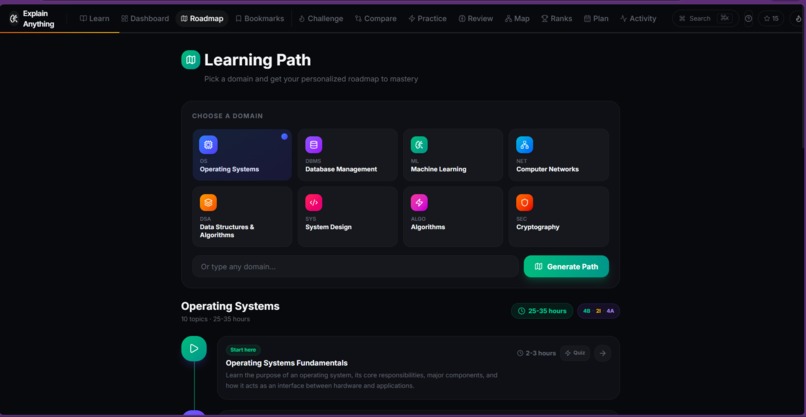
Learning Path
Inspiration
Most “explanations” online come in one flavor: either overly simplified (and misleading) or so dense that you bounce off. I wanted a tool that can explain anything at multiple depths, but also make the explanation stick—not just sound smart for 30 seconds.
The idea for ExplainAnything came from a simple frustration: I could read a concept, feel like I understood it, and then fail to recall it a week later. So I built a tutor that doesn’t just explain—it helps you learn, practice, and revisit topics when your brain is about to forget.
What it does
ExplainAnything is an AI-powered learning app that turns any topic into a structured learning experience:
- Multi-level explanations (beginner → intermediate → advanced) returned in consistent JSON so the UI can render it cleanly.
- Creative learning modes (e.g., vivid story, rap, haikus, mnemonics, ELI5) that attack the same concept from different angles.
- Study plan generator that creates a personalized day-by-day schedule with linked topics.
- Spaced Repetition (SRS) so you can add topics you want to retain and review them based on when they’re due.
How we built it
- Frontend (TypeScript + React): A web UI where users enter a topic, choose explanation/creative modes, generate study plans, and review due SRS cards.
- API server: Routes that build high-quality prompts and request structured JSON outputs from an LLM (so the frontend can reliably display sections like misconceptions, examples, and step-by-step breakdowns).
- Typed contracts: Generated API schemas/types (including Zod validation) so client/server stay in sync and UI rendering stays predictable.
- Learning system: A local SRS engine that stores cards in the browser and updates intervals using a quality score (0–5), including due queues, forecasting, and stats.
Challenges we ran into
- Getting reliable structure from AI output: “Creative” often means “messy.” The hardest part was enforcing strict JSON structure so the app stays stable.
- Avoiding generic explanations: We had to push prompts toward concrete, non-template analogies and examples without sacrificing correctness.
- Turning understanding into retention: Explaining is easy; helping users remember required adding SRS and making reviews feel lightweight instead of like homework.
Accomplishments that we're proud of
- A single topic can be transformed into multiple learning artifacts (deep explanation + creative modes) while staying technically grounded.
- The study plan + SRS loop turns one-off curiosity into an actual learning system.
- Strong TypeScript typing across the app makes the experience feel cohesive and debuggable.
What we learned
- Prompt design is product design: structure, constraints, and validation matter as much as model choice.
- The best learning tools aren’t just informative—they’re repeatable and habit-forming.
- Strong types and shared schemas reduce iteration time dramatically in a fast-moving hackathon environment.
What's next
- Add quizzes/tests per topic and feed weak areas back into study plans automatically.
- Account sync so SRS and progress persist across devices.
- Better sharing/export (shareable “explain cards”, public study plans, and embeddable explain widgets).
- Expand domains and add curated “learning paths” for common goals (interviews, CS fundamentals, system design).
Built With
- and
- api
- browser
- creative
- explanations
- for
- generating
- learning
- llm
- localstorage
- node.js
- react
- repetition
- server
- srs
- structured
- typed
- typescript
- validation
- zod

Log in or sign up for Devpost to join the conversation.