-
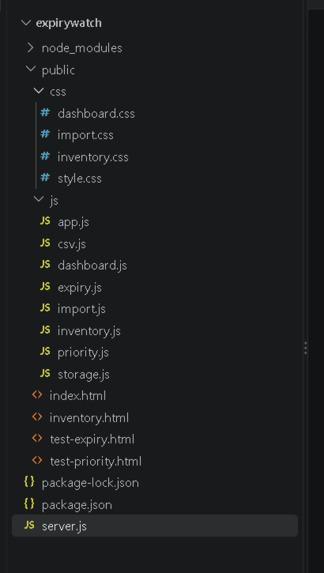
The files that I created
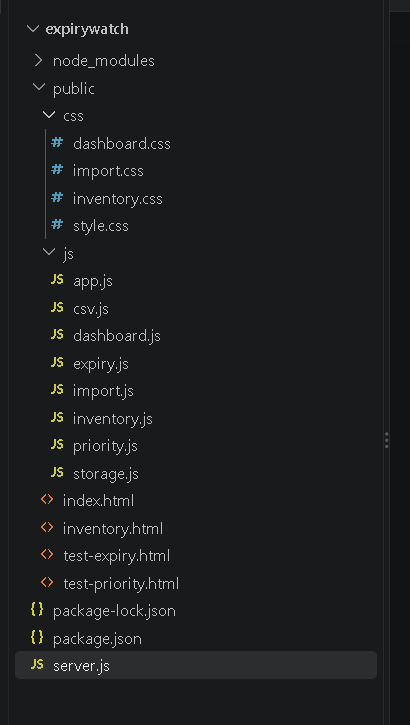
- Project title
ExpiryWatch
- Tagline
Stop checking every shelf. ExpiryWatch tells shop owners which products to check first.
Inspiration Small shops can stock hundreds of products, and each one has its own expiry date. The usual method is walking the shelves and reading dates by hand. It takes a long time, and it’s easy to miss something. We wanted to see if a simple web app could do the checking instead. I have heard many a times from people i know who business owners are shopkeepers etc that they forget which product is going to get expired because of the vast number of materials they sell. So I wanted to design a solution that could help them.
Problem
Retail shop owners manually check hundreds of products for expiry dates, so expired products can stay on the shelf unnoticed. That risks customer safety and wasted stock, and a plain list of every product doesn’t help because the important items get buried.
- Solution
ExpiryWatch is a web app where a shop owner adds products with their expiry dates, by hand or by importing a CSV. The app works out each product’s status and a priority score, then puts the products that need attention at the top.
- How it works Add products one at a time, or import a CSV file. The expiry engine counts the days between today and each expiry date, then assigns a status: EXPIRED: the date has passed CRITICAL: 0 to 3 days left WARNING: 4 to 7 days left SAFE: more than 7 days left The priority engine gives each product a score from 0 to 100, using days left and quantity. Expired products always rank first. The dashboard counts everything from the real product list and shows Priority Alerts, the products to check first. The inventory page lists everything, sorted by priority, with search, filters and sorting.
Status and score are never stored. They’re recalculated every time a page loads, so a product that was SAFE last week shows up as CRITICAL automatically when its date gets close.
Key features Add, edit and delete products, with validation and clear error messages Automatic expiry status, with correct handling of expiring today, expiring tomorrow, leap years and different month lengths Priority score (0 to 100) with a level (Urgent, High, Medium, Low) and a plain-English reason Search by name, filter by category and status, and sort by priority, expiry date, quantity or name, all working together CSV bulk import that checks each row, lists invalid rows with the reason, skips duplicates, and imports the valid rows Downloadable sample CSV so users know the format Dashboard with total products, expired, expiring within 7 days, safe, Priority Alerts, a stock-health bar, a category breakdown and value at risk “Load Demo Data” button that fills the app with 40 realistic products for instant demos Responsive layout with a mobile menu Data saved in the browser, so it survives refreshes
Technical implementation Frontend: HTML, CSS and vanilla JavaScript, with no frameworks and no build step Storage: browser localStorage, behind a single storage.js file Local server: Node.js and Express, used only to serve files during development Hosting: Netlify, deploying the public folder as a static site
Expiry engine (expiry.js). We don’t use new Date("2026-10-05"), because browsers read that as UTC and it can land on the wrong day in some time zones. Instead we split the date text ourselves, turn both dates into day numbers using UTC, and subtract. This avoids daylight-saving problems.
Priority engine (priority.js). The formula is deterministic and explainable, and it isn’t machine learning:
Time urgency = 1 - (days left / 30) (0 if 30+ days away) Quantity factor = min(quantity, 50) / 50
Not expired: score = 89 x time urgency x (0.75 + 0.25 x quantity factor) Expired: score = 90 + 10 x quantity factor
Time does most of the work. Quantity can change the score by at most 25%, so a big pile of something with a far-off date never outranks a few items expiring tomorrow. Expired products always score 90 to 100.
Testing. We built two test pages, /test-expiry.html (19 date cases, all passing) and /test-priority.html (9 rule checks, all passing).
- Challenges we faced Timezone and date bugs. Using JavaScript’s default date parsing can shift a date by a day depending on where you are, so we wrote our own date handling. Setup problems on Windows. PowerShell blocked npm scripts at first, and we had to change the execution policy. Large files getting cut off when pasting. Several files saved incompletely, which showed up as “not defined” errors in the console. We learned to check the last line of each file and to split big files into parts. Making the priority score explainable. We wanted a score judges and shop owners can understand, so we kept it to one simple formula instead of something complicated. CSV edge cases. Commas inside product names, wrong date formats, duplicates and blank rows all needed handling.
What we learned How a browser app talks to a small server, and how to deploy one Why dates are harder than they look How to keep logic in one reusable file so every page agrees Why validating input matters, and why escaping text prevents broken or unsafe pages Reading the browser console to track down bugs
Future improvements
These are not built yet:
Cloud database and accounts, so data syncs across devices and isn’t tied to one browser Barcode scanning for adding products Email or phone notifications for items about to expire Batch and lot tracking, so the same product with different expiry dates is easier to manage Automatic refresh at midnight, so a tab left open updates itself Support for more CSV formats and for Excel files directly Reports and waste statistics over time
- How to run / use the project Live demo: https://wonderful-tulumba-829e11.netlify.app
Open the link. Click Load Demo Data (top right) to fill the app with 40 sample products. Explore the Dashboard, then open Inventory to try search, filters and sorting. To try the import, click Import CSV, then Download Sample CSV, then choose that file.
Data is stored in your own browser, so each visitor starts with an empty app. Use Clear All Data to reset.
Run locally:
bash npm install npm start
Then open http://localhost:3000.
