-
-
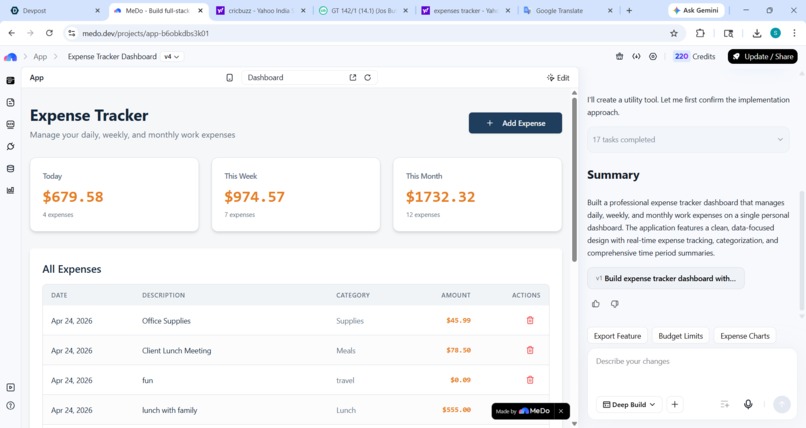
home page
-
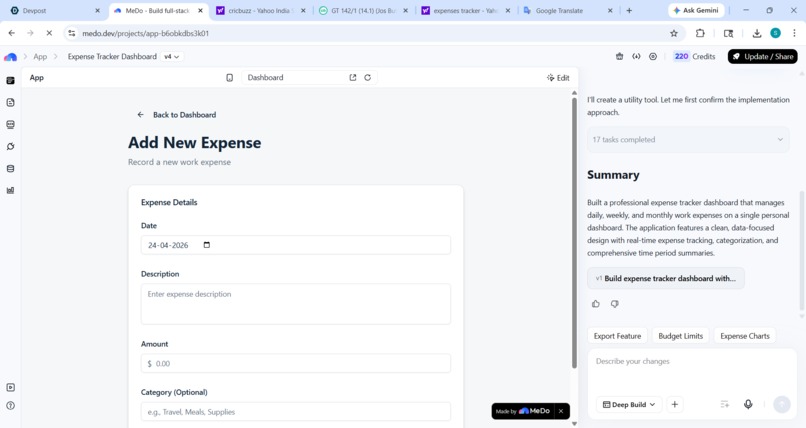
expense addition page
inspiration
about 6 months before i've notice that people are uses the pen & copy to track their expenses in this era. they want to use a tool but in market that are not available like they have trust on them so i dicide to make this ET - Expense Tracker.
What it does
hello everyone today we are made a expenses tracker that helps us in the daily life and routine. we add here over daily , weekly , and monthly expenses and get all it on a single dashboard. it helps us to manage and track over expenses and give the total amount in category wise .
how it is works
in this we add/update over expenses in day to day and track that where we are expense and what item we will purchase.
why it is useful
it is useful because in this era peoples have lot of expenses but we are always worry about his that we are where invest and which time but today in the market there have No this type of proffesional tool that are manage all things at one dashboard . its a demandable tool.
Key Features
Accuracy it manage and store your data with a fully accuracy that build trust with client/users and it assure that your data is calculated , manage and store in the tool with full trust and your track/know your any transaction at any time.
subscription in this tool we give the feature to purchase the subscription in many bases like use personal or commercial , purchase subscription monthly / yearly anyone can choose their plan behalf on his choice.
Visual Dashboard a person can see his all expenses in date wise, month wise or, category wise in that you want on a single dashboard .
how we built it
we built this tool with Medo a full stack developer tool that make this is good the link is link
what we learn
The first thing that we learn that are About the medo ai tool that are helps us to make a good apps in only a prompting skills this app is beginner friendly.
The second thing is we learn that critical thinking because we spent 3-4 days to only making this tool because in this tool we add any thing that are usable and make it futuristic.
all details
1. Application Overview 1.1 Application Name Expense Tracker Dashboard
1.2 Application Description A personal expense management tool that tracks and displays daily, weekly, and monthly work expenses on a unified dashboard.
2. Users and Usage Scenarios 2.1 Target Users Individual professionals who need to track and manage their work-related expenses.
2.2 Core Usage Scenarios Recording daily work expenses as they occur Reviewing weekly expense summaries Analyzing monthly spending patterns Managing personal work expense budget 3. Page Structure and Functionality 3.1 Page Structure Expense Tracker Dashboard ├── Dashboard Page └── Add Expense Page 3.2Dashboard Page Display Components:
Daily expenses section: Shows today's recorded expenses with total amount Weekly expenses section: Shows current week's expenses with total amount Monthly expenses section: Shows current month's expenses with total amount Expense list: Displays all recorded expenses with date, description, and amount Functionality:
View expense records grouped by time period Navigate to Add Expense Page Delete existing expense records Display total amounts for each time period 3.3 Add Expense Page Input Fields:
Date: Select expense date Description: Text input for expense description Amount: Numeric input for expense amount Category: Optional text input for expense category Functionality:
Input expense information Save expense record Return to Dashboard Page 4. Business Rules and Logic 4.1 Time Period Calculation Daily: Current calendar day Weekly: Current week from Monday to Sunday Monthly: Current calendar month from 1st to last day 4.2 Data Storage All expense records are stored persistently Records remain accessible across sessions 4.3 Amount Calculation Total amounts are calculated by summing all expenses within each time period Amounts are displayed with two decimal places 5. Exceptions and Edge Cases Scenario Handling No expenses recorded Display zero amount and empty list Invalid amount input Prevent saving and prompt for valid number Missing required fields Prevent saving until all required fields are filled Delete expense Remove from all relevant time period totals 6. Acceptance Criteria Users can successfully add new expense records with date, description, and amount Dashboard displays accurate totals for daily, weekly, and monthly expenses Expense records persist and remain accessible after closing and reopening the application Users can delete expense records and totals update accordingly All time period calculations correctly reflect current date boundaries Amount inputs only accept valid numeric values 7. Out of Scope for Current Release Multi-user support or user authentication Expense categories with predefined options Data export functionality Budget limit alerts or notifications Expense editing capability Charts or visual analytics Currency conversion Receipt image attachment Search or filter functionality Expense approval workflow
Built With
- agent
- canva
- duo
- medo
- pages
- platform


Log in or sign up for Devpost to join the conversation.