-
-
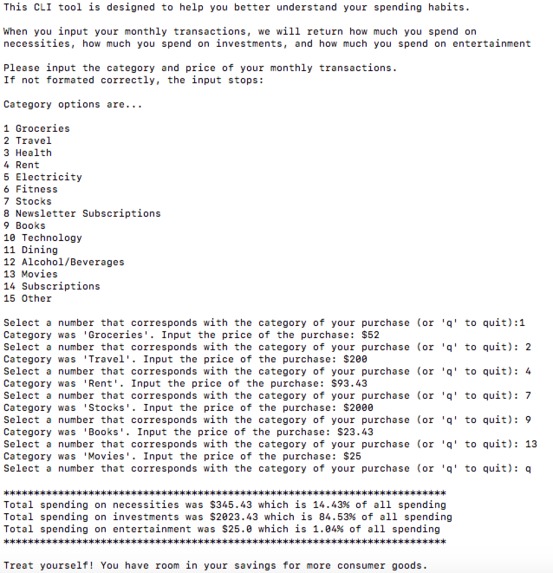
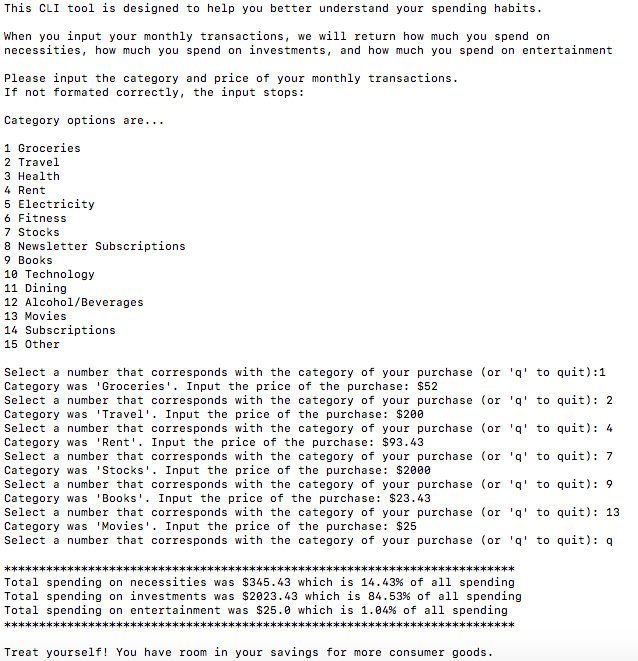
This is what our program looks like when run in the terminal
Inspiration
Our inspiration was an Office episode called "Money" (season 4, episode 8). In this episode, Oscar evaluates Michael's spending habits and finds that he spends X amount on necessities, Y amount on entertainment goods, and a whole lot more on things he doesn't use such as magic kits and bass fishing equipment. We wanted to build a program that helps people understand their spending habits.
What it does
This program takes in the categories and prices of the user's monthly purchases and groups them into necessities, investments, and entertainment goods. It then returns the relative proportions of the user's spending in each of the three groups and provides a suggestion for how to improve spending habits.
How we built it
We worked on this program collaboratively using the LiveShare feature in VS Code. The program runs in the terminal.
Challenges we ran into
We ran into a little trouble figuring out how to store the collected information into data structures, but eventually, we figured out how to organize everything efficiently.
Accomplishments that we're proud of
We're very proud of the design we put together in the terminal, which features a menu, a few prompts, and exceptions that force the user to enter an input another time if the format was incorrect.
What we learned
In creating this program, we learned that it is possible to collaborate on code through LiveShare on VS Code. We also learned how to correctly format a program in the terminal, and how to handle exceptions effectively.
What's next for Expense Categorizer
In the future, we hope to further develop the code by turning it into a webpage. We also hope to gather information on average consumer spending habits in order to provide more advanced suggestions to the user.
Built With
- liveshare
- python
- vscode

Log in or sign up for Devpost to join the conversation.