ExodusAI - Project Story
Inspiration
Every major evacuation in history - Katrina, the Paradise wildfire, Fukushima - shared one fatal flaw: decisions were made too slowly. Commanders at emergency centers received fragmented information, relied on gut instinct, and issued orders minutes after the window to act had already closed. We asked ourselves: what if an AI could watch the entire evacuation unfold in real time and make every routing decision faster than any human ever could? That question became ExodusAI.
What it does
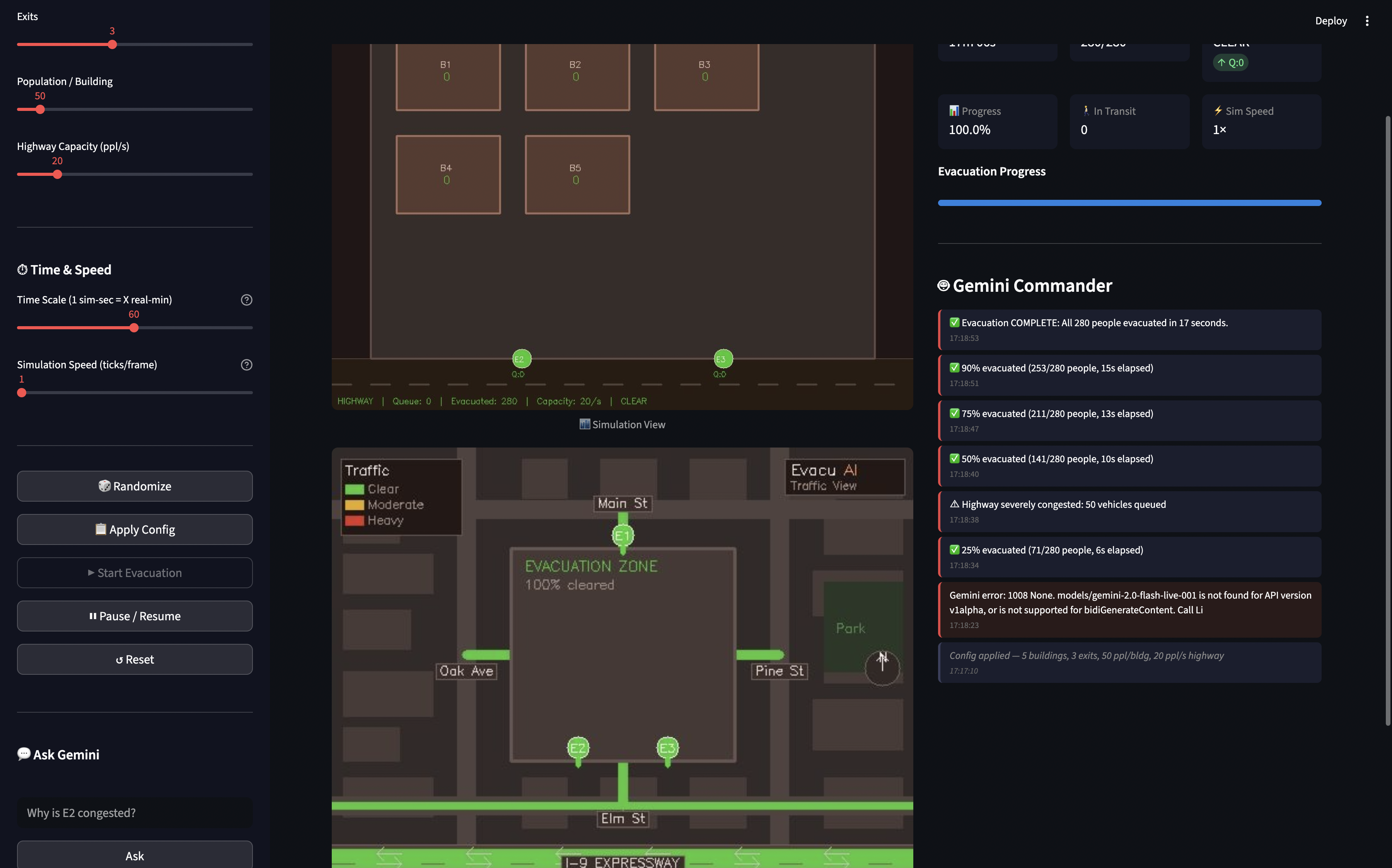
ExodusAI is a real-time, AI-commanded city block evacuation simulation. The engine generates genuine chaos - crowds forming, exits clogging, highways backing up - and Gemini Live API acts as the autonomous evacuation commander, watching two simultaneous live video feeds (a top-down simulation canvas and a Google Maps-style traffic view) and issuing binding commands to minimize total evacuation time.
Gemini doesn't just observe - it acts. Through live function calling, it redirects building occupants to less congested exits, opens and closes exit gates, adjusts highway outbound capacity, and blocks inbound traffic. Every decision takes effect within the next render frame, so Gemini can watch its own actions play out and continuously adapt its strategy.
How we built it
- Simulation Engine: A custom agent-based model in Python where each person moves independently toward their assigned exit. The engine runs at 10 Hz with configurable buildings, exits, population, and highway capacity.
- Dual Video Streams: OpenCV renders two views - a top-down simulation canvas and a traffic map - streamed to Gemini Live API at ~3 fps and ~0.5 fps respectively via
send_realtime_input. - Gemini Live API: Using
gemini-2.0-flash-live-001in TEXT mode with function calling. Gemini receives continuous video frames, congestion alerts, and milestone updates, and responds with both text reasoning and tool calls (control_exit,control_highway,redirect_building,get_status). - Backend: FastAPI with three concurrent asyncio tasks per session - client receiver, Gemini streamer, and simulation runner - all communicating over WebSockets.
- Frontend: Vanilla JS with a 3-panel layout (Config | Simulation Canvas | AI Decisions) for real-time visualization.
- Deployment: Dockerized and deployed on Google Cloud Run via Terraform.
Challenges we ran into
Gemini seeing its own decisions - The hardest problem. When Gemini issues a redirect_building command, if the next frame arrives before people visibly start moving, Gemini would issue the same command again. We solved this by sending tool results back immediately and including state summaries in alert texts - giving Gemini textual confirmation before the visual update arrives.
Frame rate tuning - Too many frames flooded the Live API with no benefit. Too few, and Gemini lacked the temporal context to distinguish a developing bottleneck from a resolved one. We landed on 3 fps for simulation and 0.5 fps for the traffic map - enough for temporal reasoning without overwhelming the session.
Dual-view coherence - The two renderers use different coordinate systems and visual languages. Teaching Gemini to correlate both views required careful system prompt engineering, explicitly labeling what each visual element means in each view.
Making Gemini proactive - By default, language models are reactive. Getting Gemini to continuously issue commands required framing the task as a time-optimization competition: every second of delay is measurable, and its score is the total evacuation time.
Accomplishments that we're proud of
- Gemini genuinely reasons over time - it notices congestion building across multiple frames, acts, and then monitors whether its intervention worked before adjusting further.
- The full loop - see problem → call tool → observe result - happens in under 3 seconds of real time.
- The dual-view architecture gives Gemini a richer understanding of both micro (people movement) and macro (road traffic) dynamics, producing measurably better decisions than a single view alone.
- The entire system runs as a single WebSocket session with no polling, no queues, and no external databases - just pure real-time streaming.
What we learned
- The Gemini Live API is built for continuous visual reasoning, not just single-image captioning. Streaming frames gives the model context over time that fundamentally changes response quality.
- Function calling inside a Live session is surprisingly powerful: the model can see a problem, call a tool to fix it, and observe the result - all within seconds.
- Simulation fidelity directly impacts AI decision quality. Richer visuals (traffic colors, queue indicators, two views) produced more specific and correct decisions than a plain canvas alone.
- Prompt engineering for a real-time agent is very different from static prompts - you need to make the AI feel urgency and give it a measurable objective to optimize against.
What's next for ExodusAI
- Real geospatial data - Replace the synthetic city block with real building footprints and road networks from OpenStreetMap, enabling simulations of actual neighborhoods.
- Multi-hazard scenarios - Add fire spread, flooding, and earthquake aftershock models so Gemini must dynamically reroute around evolving danger zones.
- Multi-agent coordination - Deploy multiple Gemini agents managing different sectors of a larger evacuation, with a coordinator agent resolving conflicts.
- Voice mode - Leverage Gemini Live's audio modality so emergency commanders can have a live voice conversation with the AI while it simultaneously watches the simulation.
- Hardware integration - Connect to real traffic camera feeds and IoT sensors so ExodusAI can transition from simulation to a real-world decision-support tool for emergency management agencies.
Built With
- docker
- fastapi
- google-cloud-run
- google-gemini-api
- javascript
- opencv
- pydantic
- python
- streamlit
- terraform

Log in or sign up for Devpost to join the conversation.