Inspiration
Exception Lens was inspired by our own struggles while building custom error-handling middleware for backend applications.
As our projects grew across routes, services, and repositories, it became difficult to answer a simple question: Which exceptions can reach this endpoint, and have I handled all of them?
I could search for throw statements manually, but that did not show how errors propagated through the application. I wanted a visual and intuitive way to see every relevant exception, understand where it originated, and verify whether our middleware covered it.
Our goal was to turn a frustrating manual process into something that makes developers' lives easier.
What it does
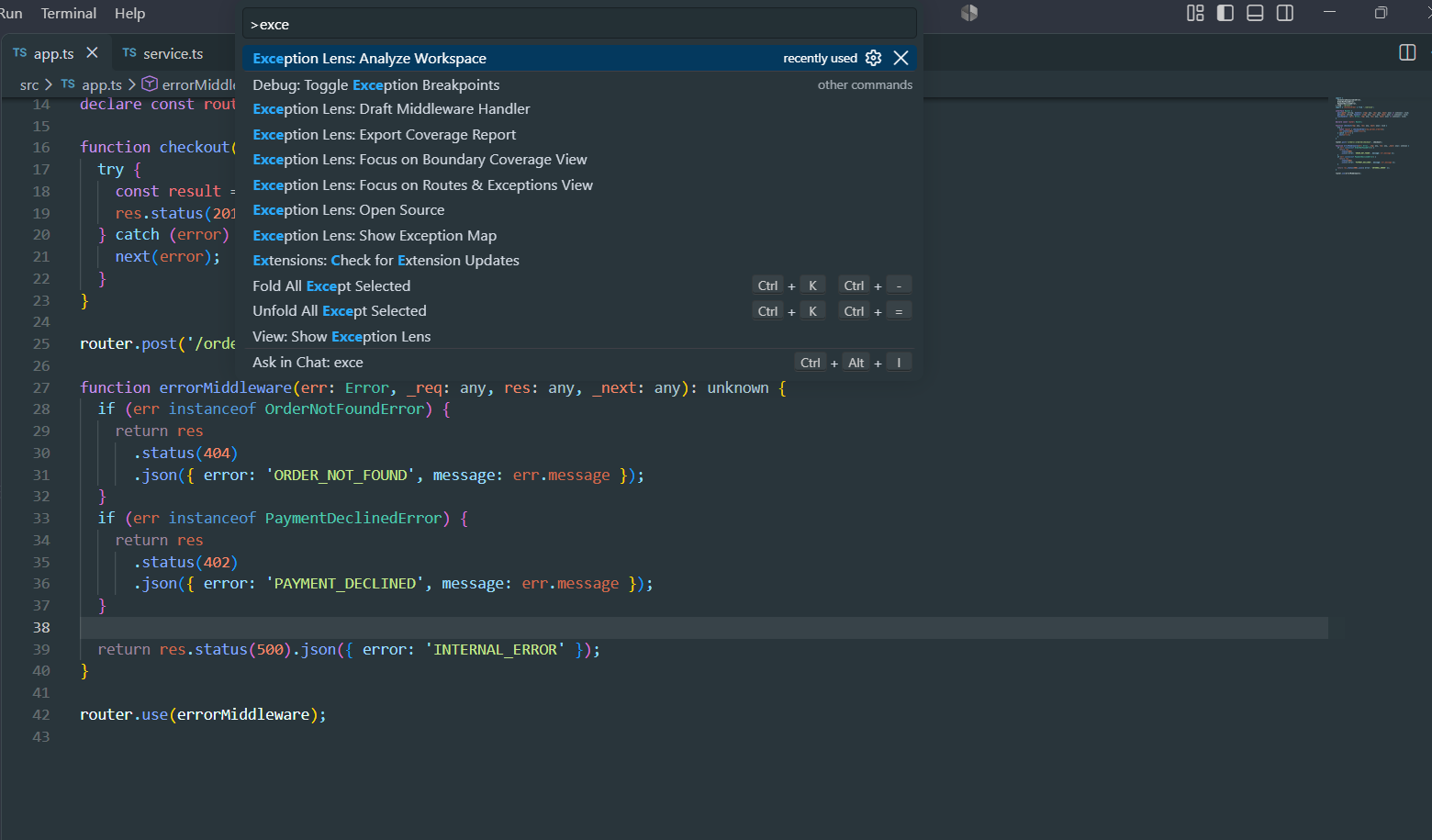
Exception Lens is a VS Code extension that analyzes TypeScript Express applications and maps how exceptions travel through the backend.
Starting from an Express route, it traces calls across handlers, services, and repositories. It discovers exceptions created through throw, Promise.reject(...), and next(error), then compares them with the application's centralized error middleware.
Exception Lens provides:
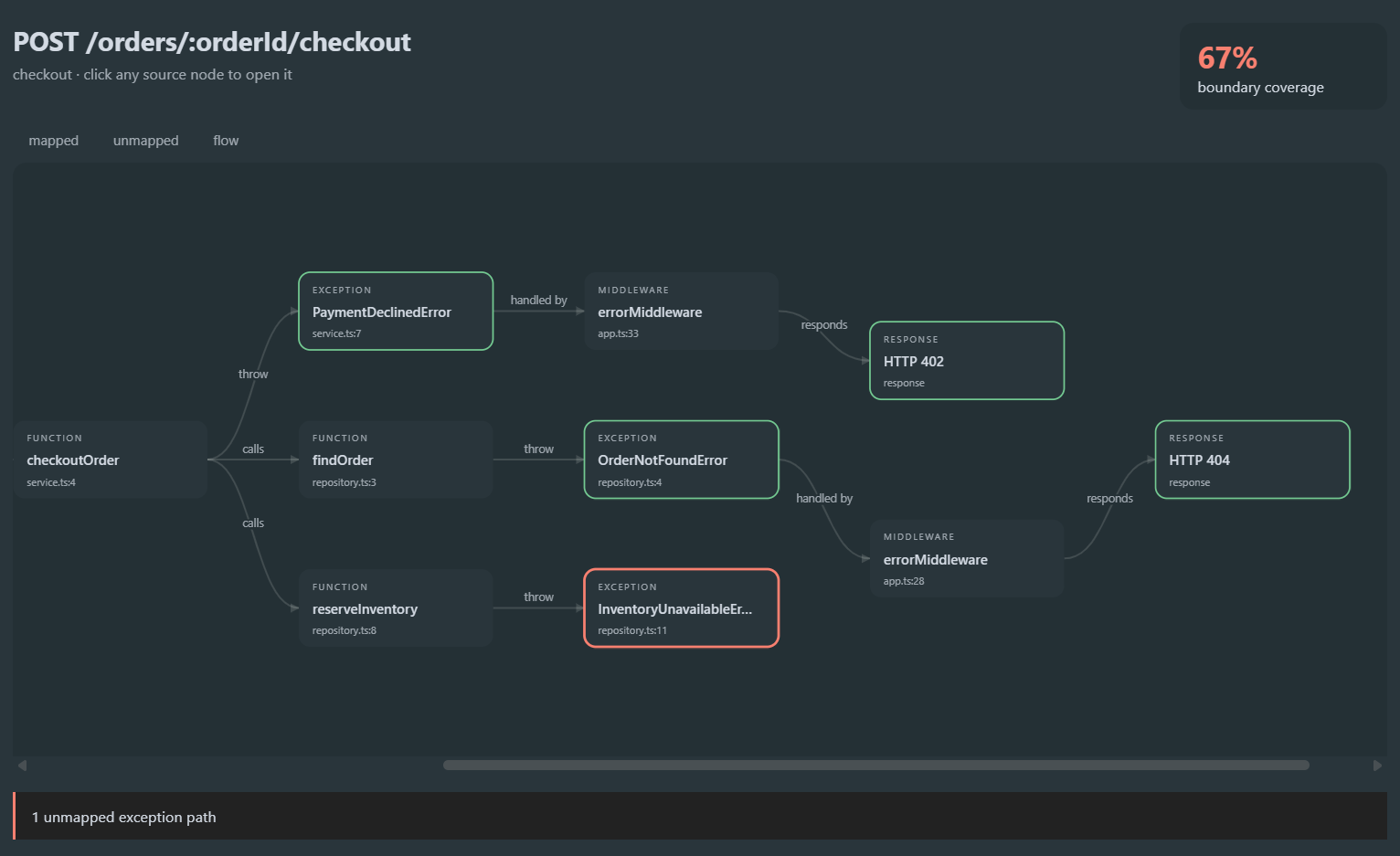
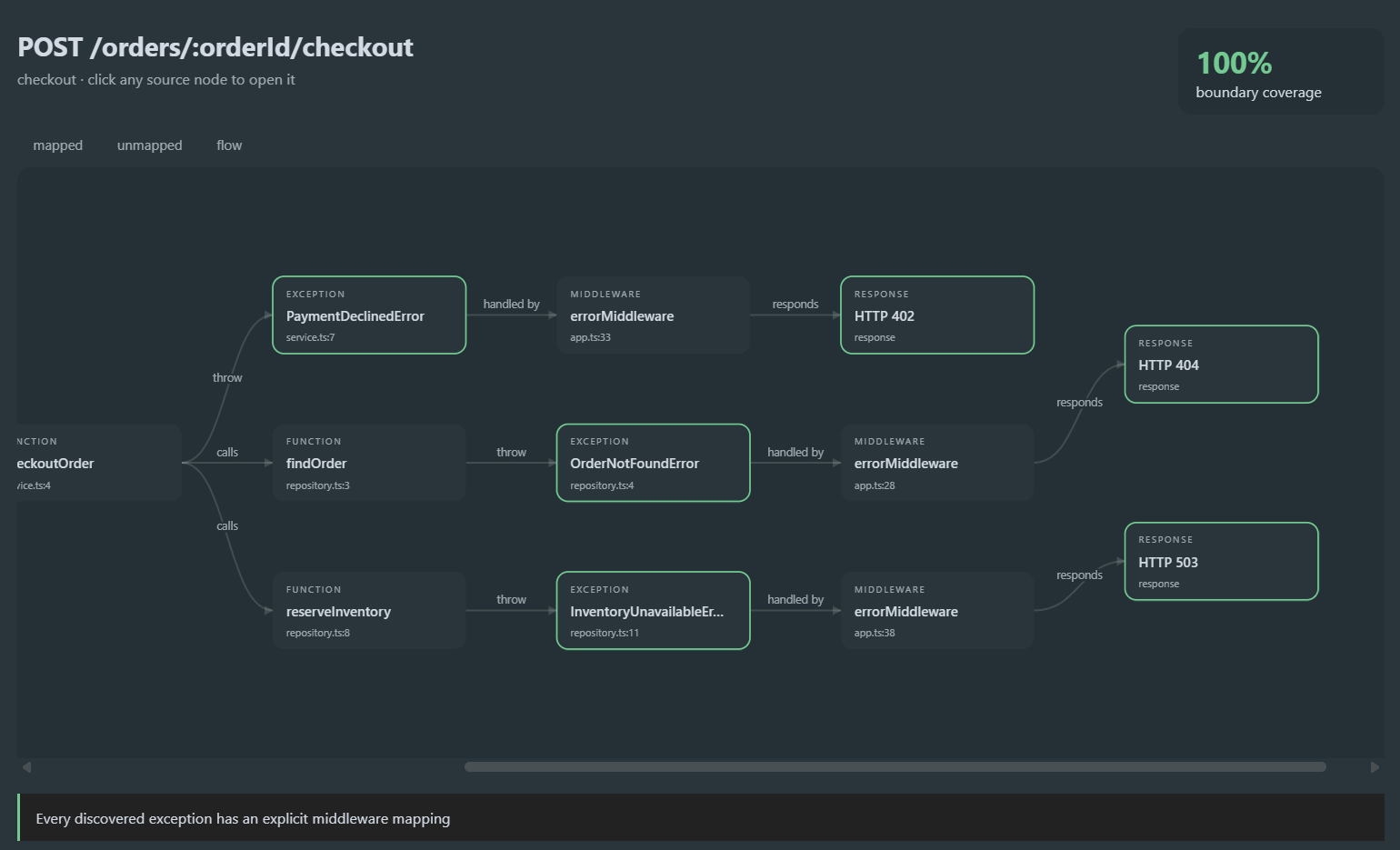
- An interactive exception-propagation graph
- A boundary-coverage score for each route
- Red indicators for exceptions without explicit middleware mappings
- Green paths for correctly handled exceptions
- Editor diagnostics at uncovered throw sites
- Click-to-source navigation
- Markdown coverage reports
- Draft middleware handlers for uncovered errors
In the included demonstration, Exception Lens discovers three exception paths for a checkout route. Two have defined HTTP responses, while InventoryUnavailableError is initially uncovered. After adding an HTTP 503 mapping and rescanning, boundary coverage increases from 67% to 100%.
How we built it
We built the extension in TypeScript using the Visual Studio Code Extension API and TypeScript Compiler API.
The analysis engine creates a TypeScript program and performs several passes over the workspace:
- It discovers functions, methods, and Express route handlers.
- It resolves function calls across files using TypeScript symbols.
- It builds a reachable call graph from each route.
- It identifies exception-producing expressions.
- It inspects four-argument Express error middleware for
instanceofchecks and HTTP status mappings. - It compares reachable exceptions with those mappings to calculate boundary coverage.
The results are displayed using native VS Code sidebar views, diagnostics, commands, and a theme-aware SVG graph inside a secured webview.
All analysis runs locally. Exception Lens does not upload source code and does not require an API key or hosted model.
Challenges we faced
The biggest challenge was making the analysis accurate while keeping the experience intuitive.
One example was distinguishing between an exception's origin and its propagation. Code such as catch (error) { next(error); } forwards an existing exception, it does not create a new exception type called error. Treating it as a new failure would produce duplicate and misleading results.
Cross-file symbol resolution was another challenge. Simple text matching was not enough because handlers and services can be imported, aliased, or assigned to variables. We used the TypeScript type checker to connect call expressions to their actual declarations.
We also worked carefully on the visualization. The graph needed to make complex backend behavior understandable without overwhelming the developer. It also had to update immediately after a rescan so users could watch an uncovered path turn from red to green.
What I learned
We learned how much semantic information is available through the TypeScript Compiler API beyond a basic syntax tree. Reliable static analysis requires understanding symbols, declarations, source locations, and relationships between files.
We also learned that developer tools should explain their findings instead of presenting a score without context. Exception Lens shows the complete path behind each result so developers can inspect and trust the analysis.
Most importantly, we learned that technical complexity and usability have to be designed together. The analysis can be sophisticated internally, but the final experience should still feel simple: scan, inspect, fix, and verify.
Accomplishments we are proud of
- Built a working cross-file exception analyzer instead of a single-file linter
- Created a measurable boundary-coverage score
- Integrated the analyzer naturally into VS Code
- Built an interactive, source-linked exception graph
- Kept the analysis deterministic, private, and completely local
- Produced an installable VSIX package
- Verified the project from a fresh GitHub clone
- Created a complete detect-fix-rescan workflow that can be demonstrated in two minutes
What's next
Future versions could support NestJS exception filters, Fastify handlers, error-code mappings, and additional languages such as Python and Java.
We would also like to add runtime trace correlation, test-coverage integration, and a CI mode that warns teams when a pull request decreases boundary coverage.
Long-term, Exception Lens could help teams maintain versioned error contracts for every endpoint and detect accidental API behavior changes before deployment.
AI assistance disclosure
This project was developed with assistance from OpenAI Codex / ChatGPT for ideation, implementation, testing, documentation, and code review.
Built With
- actions
- analysis
- api
- chatgpt
- code
- codex
- compiler
- css
- esbuild
- express.js
- extension
- github
- html
- node.js
- openai
- pnpm
- static
- studio
- svg
- typescript
- visual
- vs

Log in or sign up for Devpost to join the conversation.