-
-
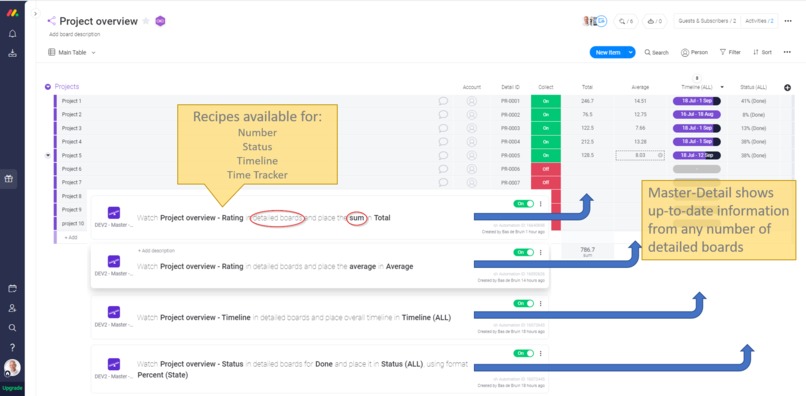
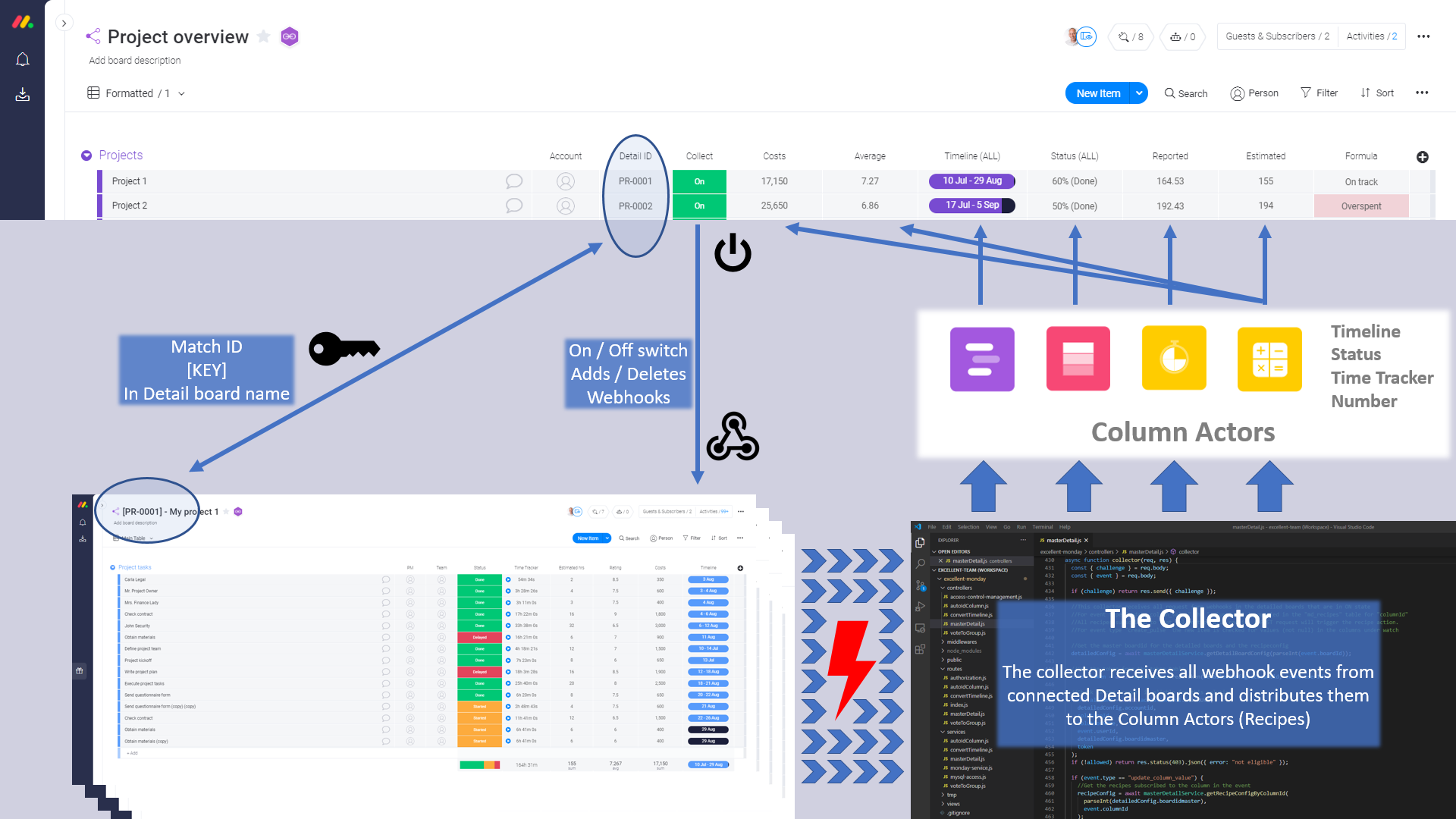
Single image explaining the idea
-
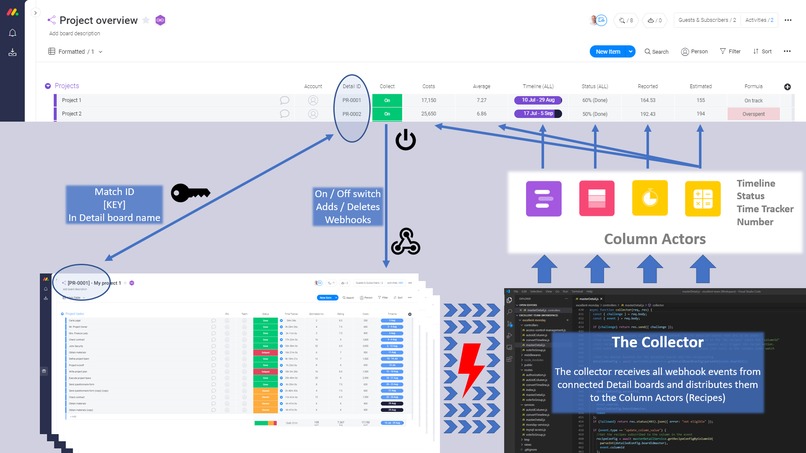
Master-Detail design
-
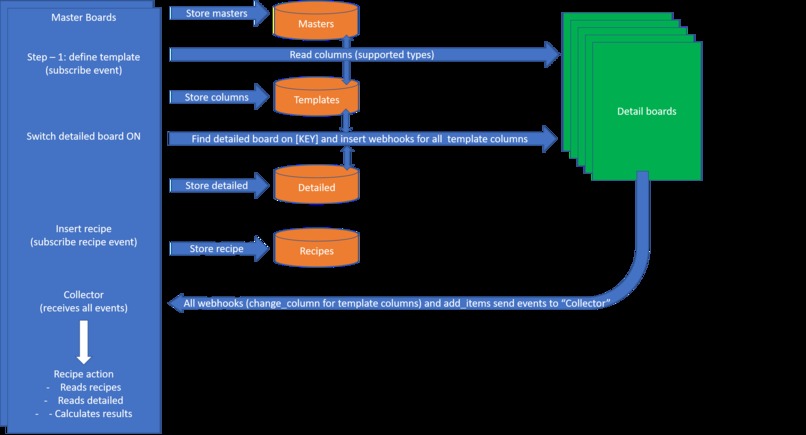
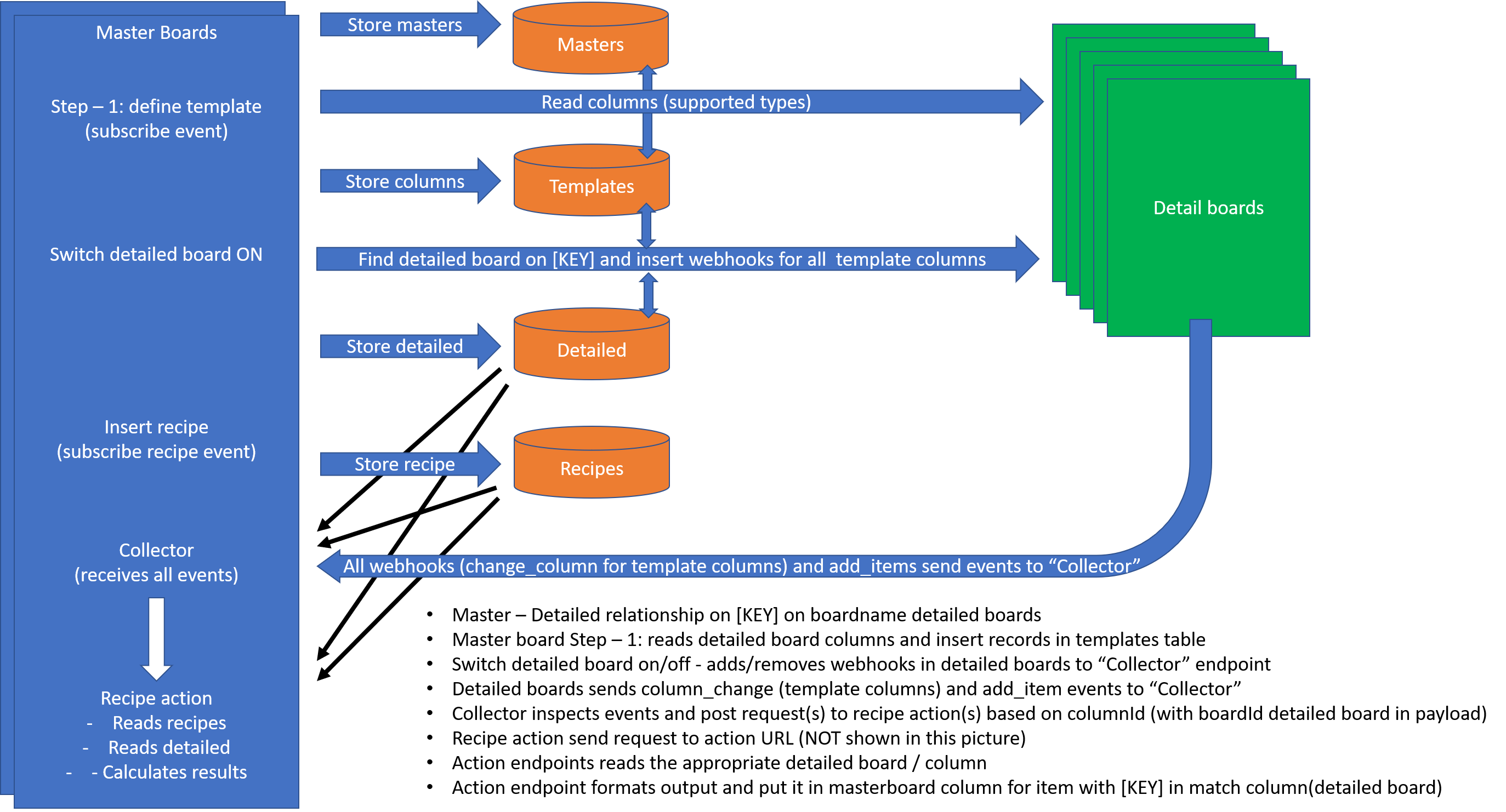
Master-Detail process flow
-
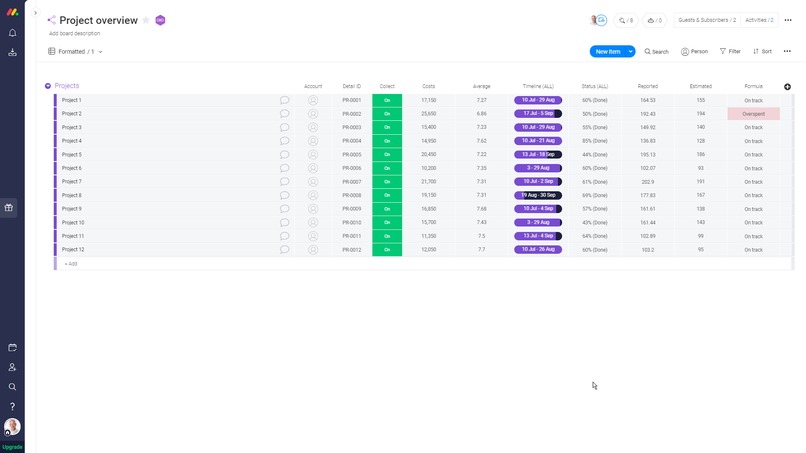
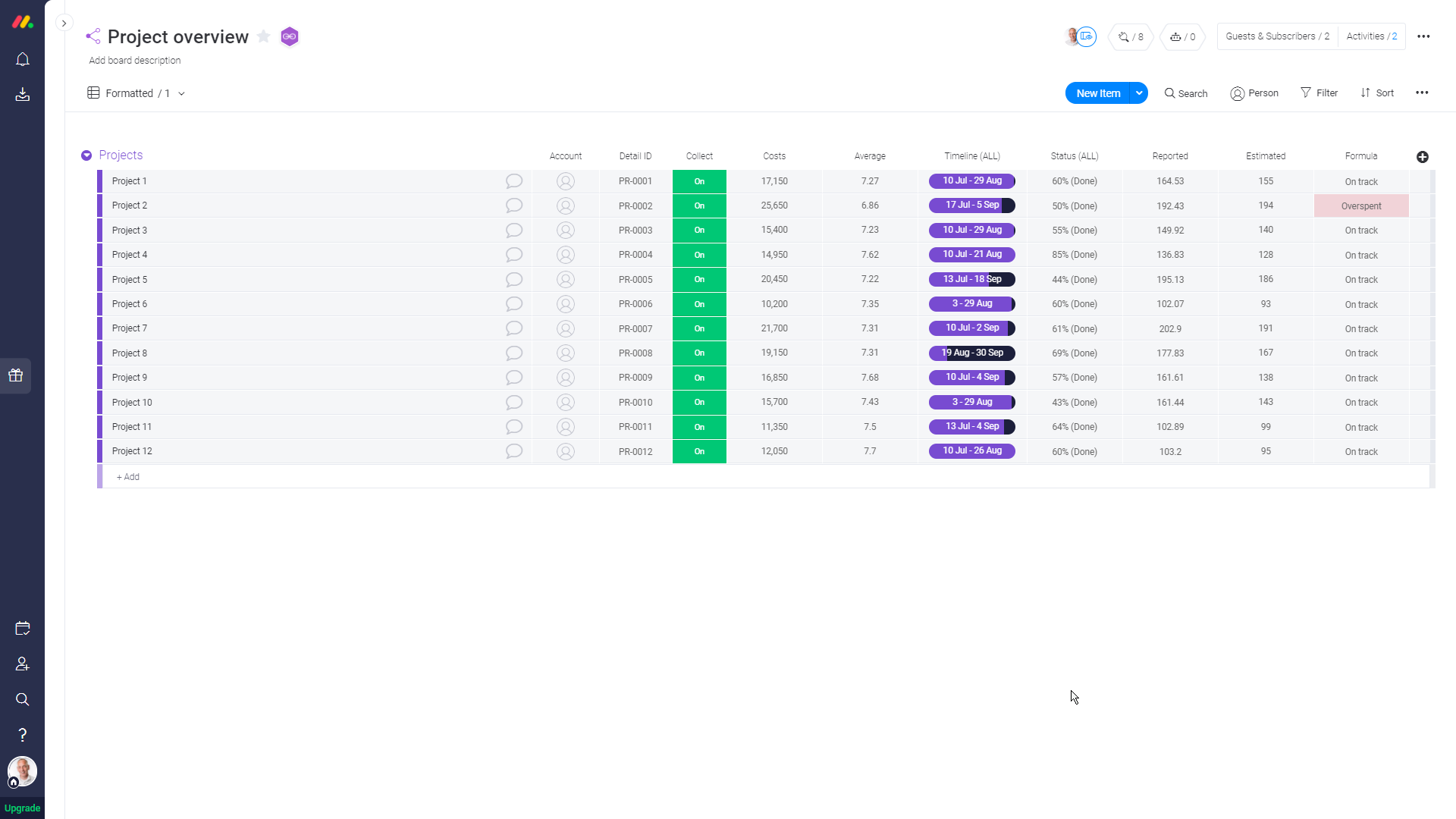
Master-Detail screenshot
Inspiration
I got inspired by the number of messages in both the Community and the Partner channel where fellow monday.com lovers are asking for Master-Detail solutions. In many use cases the amazing dashboards in monday.com will solve the user's needs. Mirror columns and sub-items can also be of great usage. In other situations the available features are not the best solution, some people just want to see the Column Summary of many columns in many (Detail) boards in a Master board. That is why I developed Master-Detail.
What it does
All configuration is done from the Master board. The first thing to do is to prepare the master board with columns for: • Matching ID – a text column that will hold the ID of the Detail board where the Detail board will have this [ID] anywhere in its title • Collect – a status column with two statuses (On/Off) to be able to switch the data collection for a Detail board On or Off.
The next step is to configure the Master board with this recipe:
Step 1 – use this board as template for detailed boards and this column for matching. Control data collection by setting this status to on status or off status
The field this board let you chose any board in your account (providing you have access to it) to be used as a template. The app will look for supported columns in this template board to build a list for later use. When you add a Detail board (by changing the this status in you Master board) the app will check if this Detail boards exists (does it have the [ID] in its title) and then will check if the Detail board contains the same (supported) columns as the specified template.
A Detail board that is switched on will be configured with webhooks (one for each supported column + one for add items) that are all posting to the same endpoint in the app, I call this endpoint the "Collector".
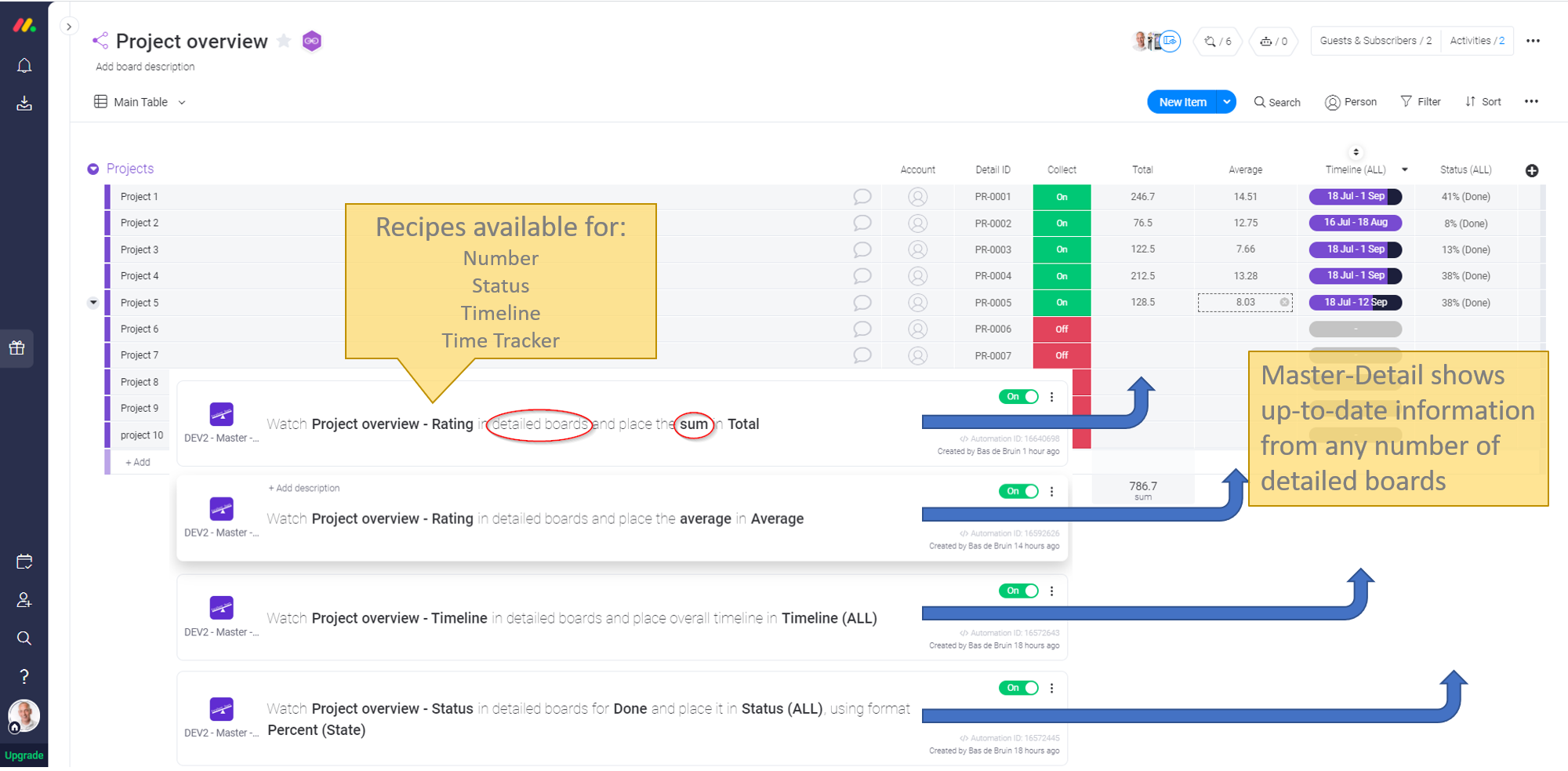
There are recipes available for all supported column types, these are:
Watch this timeline in detailed boards and place overall timeline in this column
Watch this number in detailed boards and place the operation in this column
Watch this status in detailed boards for this state and place it in this column, using this format
Watch this time tracker in detailed boards and place the operation in this column, using this format
These recipes are used to get the required information from the detailed boards, where in some case users can select the operation (sum, average, min, max) and the format to be used.
How I built it
The app / feature is built with node.js that runs an a Plesk server on Ubuntu. On the same server a mariaDB instance is running to store user tokens and configuration data. On the monday.com side I am using only custom triggers and custom actions. The main reason to use custom triggers is that I use the subscribe event to check (or create) a purchase record in my database. The purchase record contains the installation date and a notification date. Newly installed features will be available in trial mode (currently set to 10 days). This trial mode can be unlocked from the Excellent Team webshop. See also attached images with the request flows.
The "Master-Detail" feature is part of a single app that contains more features. All features share the same code base and make use of this trial mode / unlocking idea. Another feature worth mentioning here is "AutoID Column" which let users define an auto increment ID (like PR-001, PR-002, etc). This "AutoID Column" feature can be perfectly used to create incremental ID's for the Detail boards.
As explained the "Collector" endpoint will receive all requests from column changes and item additions from all switched On Detail boards. The "Collector" will post requests to the configured features (recipes) based on the column type that is under watch. From these features (recipes) this post request is seen as the trigger that is fired and the feature receives the boardId of the Detail board in the payload. With this data the action part of the recipe will send a request to the Master-Detail app endpoint (configured in the custom action as the action URL) which does read the items in the Detail board to calculate the desired outcome.
Basically the "Collector" sits between the custom triggers and the custom actions of all configured recipes.
Challenges I ran into
The first challenge was to define the request flow between the Master and the Detail boards. This was solved by using a single endpoint (the "Collector") that distributes the request to the action part of the features.
Other challenges had to do with the custom field type (dropdown boxes). After I reported a bug to monday.com that it was not possible to use multiple custom field types in one recipe, the amazing support and development team form monday.com were able to solve this just in time for this challenge. The Master-Detail app supports multiple Master boards (each with its own set of Detail boards) in one account. Therefore it would be very helpful when the boardId of the board where the user is configuring the custom trigger to is part of the request that is send to get the options for a custom field type. As this is not available yet I worked around this by preceding the column name in the recipes with the name of the Master board. This can lead to error (which I currently catches in code) where user can select a column that belongs to a template configure in another Master board. An alternative solution will be to have dependencies between custom field types and I understand that this is currently in development.
Accomplishments that I'm proud of
The two accomplishments I am most proud of are: the implementation of trial mode for all features and apps (with the unlocking feature through our shop) and idea to have a common endpoint "Collector" that sits in between all inserted webhooks recipes in the Detail boards and the action part of the column based recipes. The trigger for those column based recipes takes the value from a list of columns generated from the Detail board used as a template.
What I learned
Never give up! During the build phase I ran into a few things that looks impossible to do. After some good discussions with monday.com team members and with the help of the Community there is always an alternative road to the end goal.
What's next for Excellent Team - Master-Detail
When monday.com sends more information in the request to supply custom dropdown field values and create the possibility for custom field dependencies the Master-Detail app will be changed to adapt to these enhancements. This will make the dropdown boxes in the recipes more tailored to the board where the recipe is added to.
Another enhancement will be to ease the creation of Detail boards by creating those boards from inside the Master board, using the specified template and an integration with AutoID Column. The goal is to create a Detail board every time a row is added in the Master board, using the matching ID generated by AutoId Column. When generating matching ID's is automated we will change the ID column to a link column, so users can click on it to open the Detail board directly from the Master board. The challenge here is to understand where (in which Workspace) the user wants to store those Detail boards in their monday account.
PS: there is a ""Master Detail - How it works" video available on Vimeo explaining the app in full detail How it works

Log in or sign up for Devpost to join the conversation.