Excelerator: AI-Powered Machine Learning for Excel
Inspiration
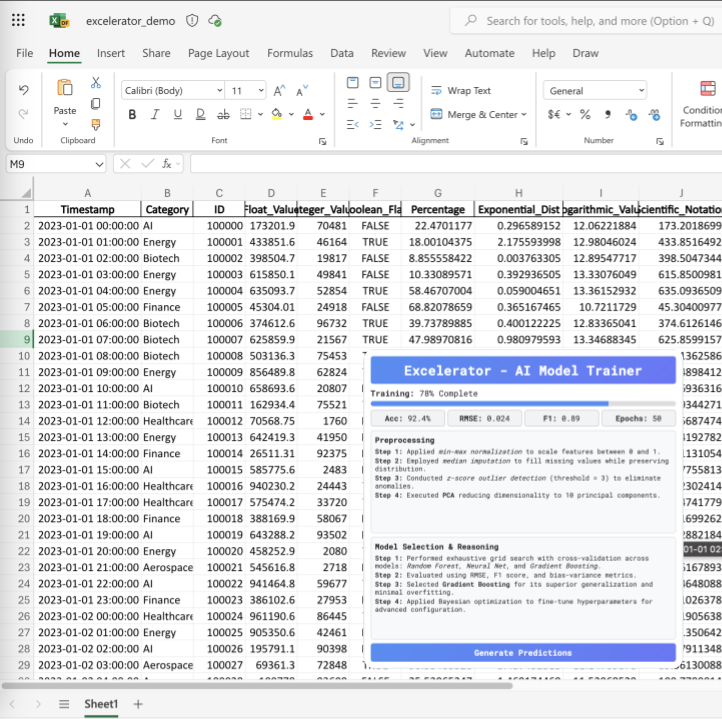
Spreadsheets are everywhere, but adding machine learning to them usually means coding, extra software, and clunky data transfers. Excelerator changes that by integrating ML directly into Excel. Whether you're predicting wildfire risks for insurance, tracking disease outbreaks, optimizing disaster response, or even managing energy and water resources, Excelerator lets you train models, clean data, and generate predictions—all without leaving your spreadsheet.
What It Does
Excelerator is an Excel add-in that enables users to:
- Train machine learning models within Excel, eliminating the need for external software.
- Automatically clean and preprocess data with AI-driven recommendations.
- Apply predictions using simple spreadsheet formulas, such as
=PREDICT(A2:D2). - Generate real-time insights with performance reports and visualizations.
- Export trained models as Python scripts or deploy them as API endpoints.
How We Built It
- Frontend: Developed using the Excel JavaScript API to provide an intuitive user interface integrated into the Excel ribbon.
- Backend: Utilizes a Python-based AutoML engine incorporating Scikit-learn, TensorFlow, and Pandas.
- Integration: Implements Office Add-ins and REST APIs to facilitate seamless communication between the spreadsheet interface and the machine learning backend.
- Optimization: Includes automated data preprocessing, feature engineering, and model selection to ensure efficient performance within Excel’s constraints.
Challenges We Encountered
- Ensuring smooth integration between Excel’s JavaScript API and a Python-based machine learning backend.
- Optimizing model training to run efficiently without slowing down spreadsheet performance.
- Designing a user interface that abstracts complex machine learning workflows while remaining intuitive for non-technical users.
- Ensuring compatibility across different versions of Excel and supporting large datasets.
Accomplishments
- Developed a fully functional machine learning pipeline within Excel, eliminating the need for external programming environments.
- Optimized AI inference to run efficiently within Excel’s memory constraints.
- Designed an intuitive user experience that makes AI accessible to non-technical users.
- Established a scalable architecture that supports local and cloud-based model training.
Lessons Learned
- Developed expertise in integrating Excel’s JavaScript API with Python-based machine learning models.
- Gained insights into the challenges of running AI models in low-code and no-code environments.
- Recognized the importance of user experience design in driving AI adoption among non-technical users.
- Learned optimization techniques to enable real-time machine learning predictions in spreadsheets.
Future Development
- Expanding support for deep learning models to enhance predictive capabilities.
- Enabling cloud-based model training to handle larger datasets and more complex computations.
- Integrating AI-driven insights to provide automated explanations of model predictions.
- Expanding compatibility to include Google Sheets for cross-platform accessibility.
- Developing a marketplace for pre-trained machine learning models to facilitate broader adoption.
Market Opportunity
- Mass Adoption Potential: With over one billion users worldwide, Excel remains the dominant tool for data analysis. Excelerator leverages this extensive user base by providing a seamless machine learning integration.
- Scalability and Monetization: The add-in can be monetized through tiered SaaS pricing for individual users, businesses, and enterprises.
- Democratizing AI: By embedding machine lear
Built With
- actions
- add-ins
- amazon-web-services
- api
- autosklearn
- azure
- blob
- colab
- css
- docker
- excel
- fastapi
- functions
- github
- graph
- h2o.ai
- html
- javascript
- keras
- lambda
- microsoft
- numpy
- office
- optuna
- pandas
- postgresql
- python
- s3
- scikit-learn
- sqlite
- storage
- tensorflow
- typescript
- vercel


Log in or sign up for Devpost to join the conversation.