-
-
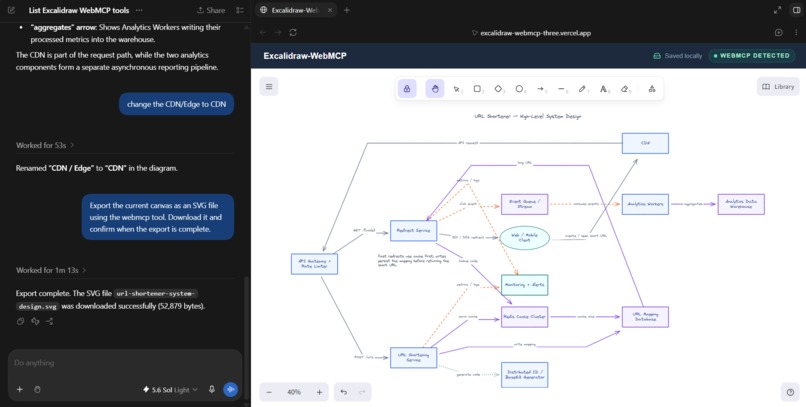
testing using chatgpt's in-app browser
-
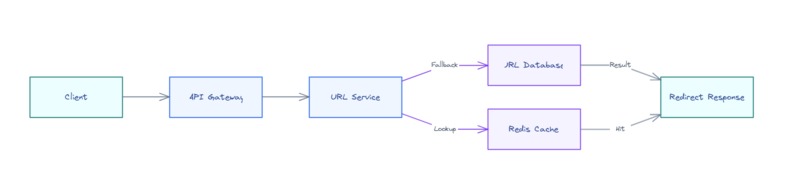
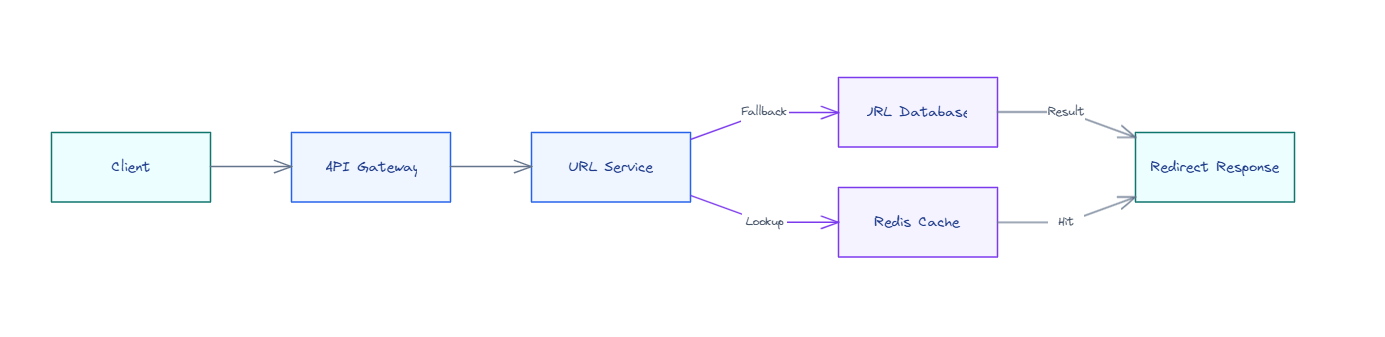
Simple diagram generated by webmcp in excalidraw
-
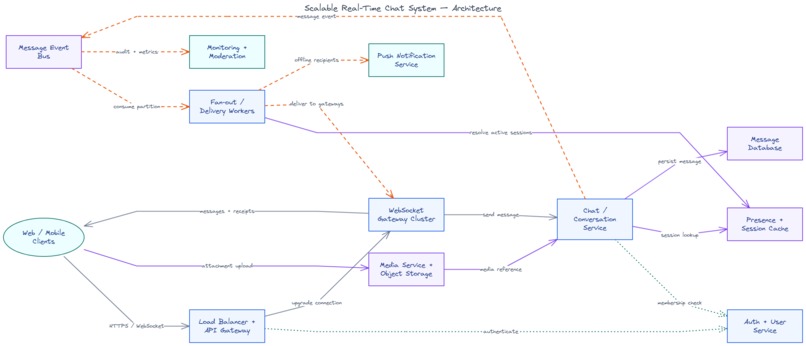
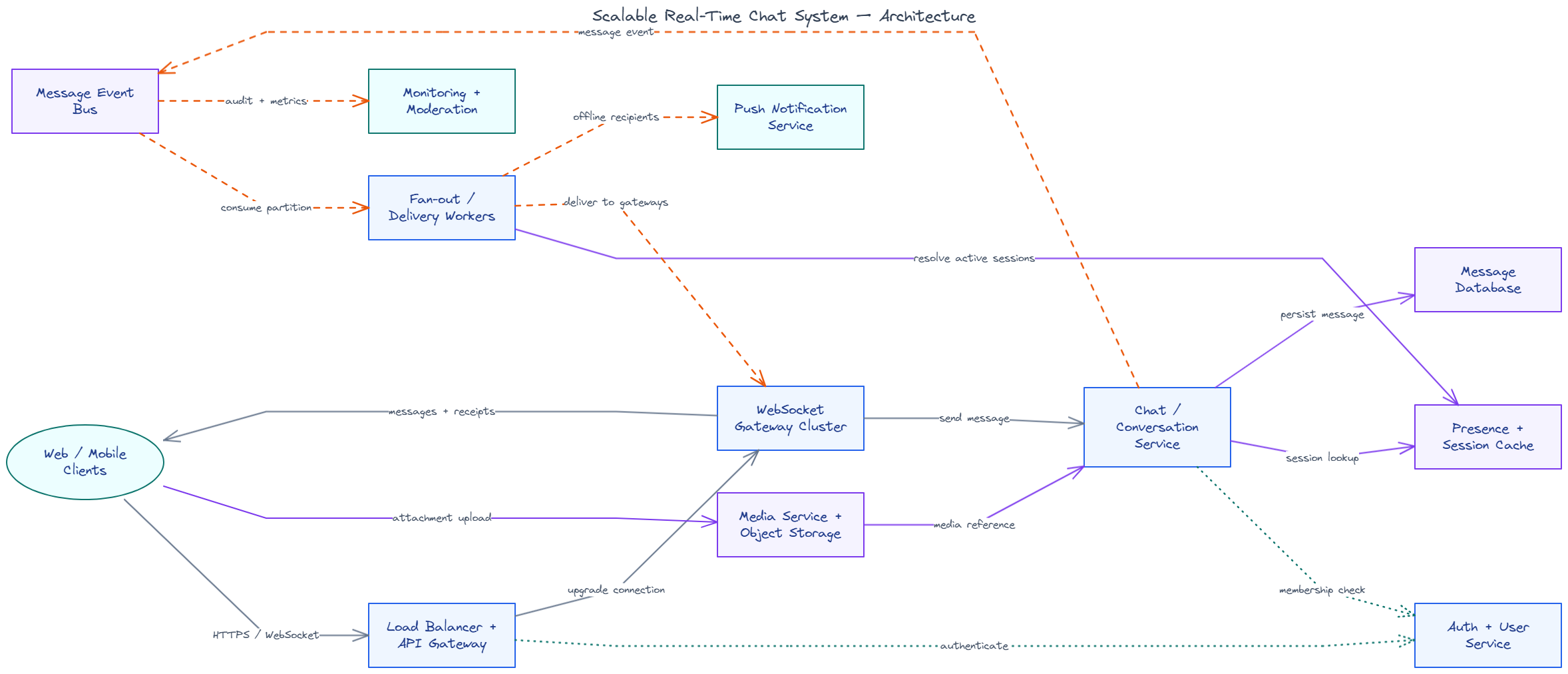
chat system diagram generated by excalidraw-webmcp and chatgpt
-
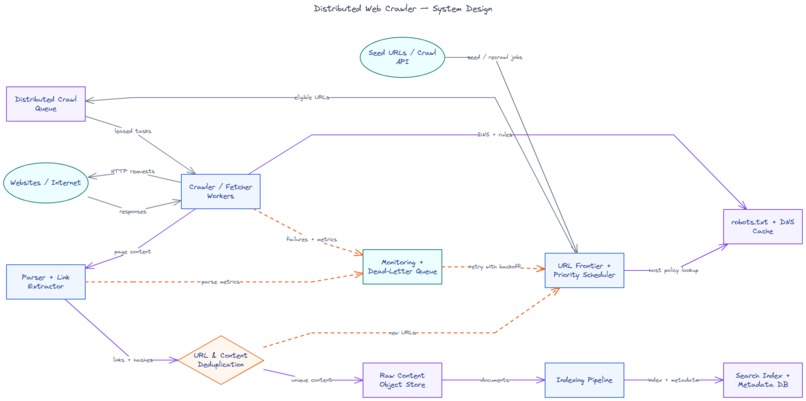
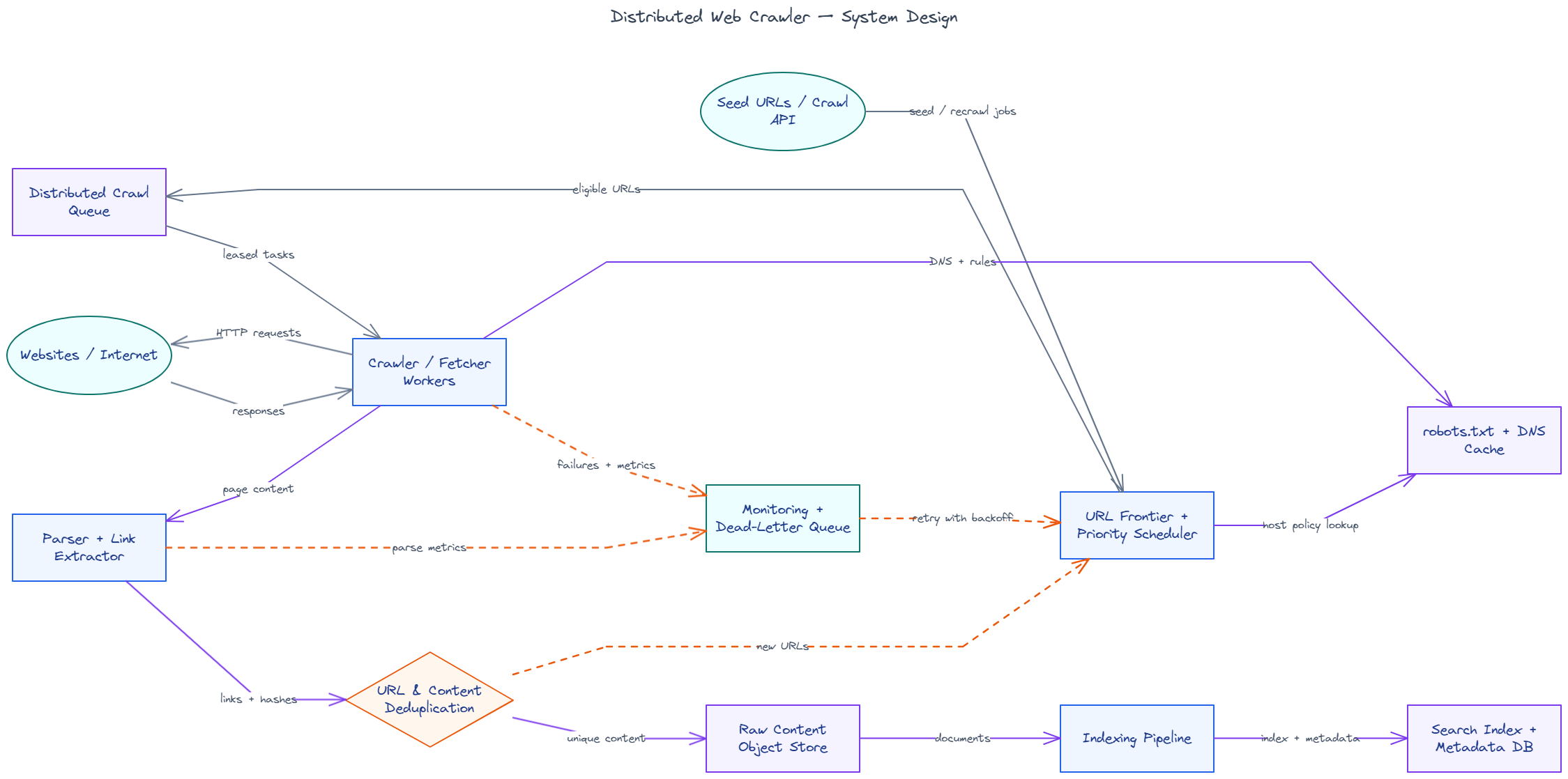
distributed webcrawler digram made with webmcp n chatgpt
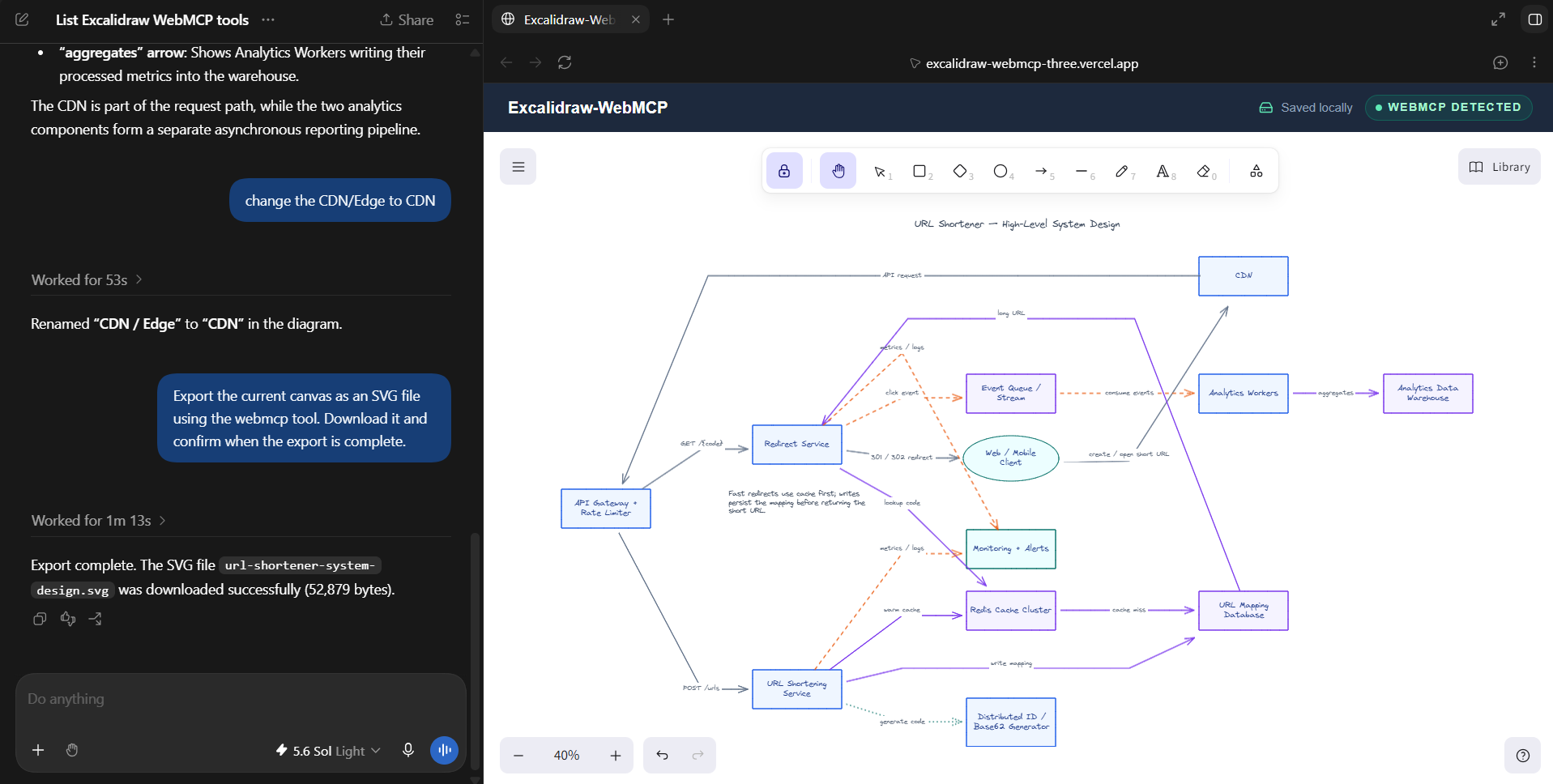
Inspiration
Every developer knows this pain. You finish building something cool, and then u need to document it. And somehow, even worse than writing the docs, is drawing the architecture diagram for them.
Boxes. Arrows. Labels. Move the box. Fix the arrow. Realize the box is slightly misaligned. Move everything again. Architecture diagrams are incredibly useful for READMEs, system-design discussions, demos, presentations, and explaining how a project actually works, but creating them manually is still tedious.
Meanwhile, AI agents have become good at understanding codebases, architectures, and technical ideas. They can explain the system perfectly, but when it comes to actually putting that understanding onto a visual canvas, the human usually ends up doing the drawing.
So I built Excalidraw WebMCP. The idea is simple: What if Excalidraw wasn't just a canvas for humans, but a canvas where humans and AI agents could work on together?
What it does
Excalidraw WebMCP makes Excalidraw agent-native.
Humans and browser agents operate on the same live canvas.
An agent can understand what is currently on the canvas, reason about the diagram, make structured changes, connect elements, and export the final result. The human stays in the loop and can continue moving, editing, deleting, or adding elements normally through Excalidraw.
There is no separate "AI-generated preview" that has to be copied back into the editor. There is just one canvas shared between the human and the agent.
How I built it
The project is built around a simple rule:
There should be one source of truth for the canvas, regardless of whether a human or an agent changes it.
The central canvas state and mutation boundary lives in:
src/canvas/canvas-controller.ts
All changes to the canvas flow through this layer. On top of that, I created a semantic operation layer which translates higher-level operations into actual Excalidraw elements in:
src/canvas/semantic-operations.ts
The WebMCP layer lives inside src/webmcp/. It contains the schemas, tool registration, validation, and the execution bridge used by the exposed tools.
When the browser provides document.modelContext, the application registers its WebMCP capabilities and allows compatible browser agents to interact with the current board.
The canvas is stored locally in the browser using localStorage, keeping the project intentionally lightweight.
Challenges I faced
1. Turning drawing actions into semantic operations
Drawing applications are very coordinate-heavy. Agents, however, work much better with concepts. I didn't want the interface to expose something like:
drawRectangle(x: 417, y: 263, width: 188...)
as it would confuse the agent. Instead, I needed an abstraction where the agent could express meaningful operations while the application handled the Excalidraw-specific details.
Finding that between agent-friendly semantics and precise canvas geometry was one of the biggest challenges.
2. Keeping connectors and elements stable
A diagram is not just a collection of rectangles. Elements have relationships.
Connectors need to stay attached to the right shapes, elements need stable identifiers, and updates must avoid unexpectedly breaking the rest of the canvas.
3. Letting humans and agents edit the same state
I didn't want an “AI mode” and a separate “human mode.”
The agent needed to modify exactly the same board the user was looking at, while keeping normal Excalidraw interaction intact.
Designing a single mutation boundary helped make both interaction models coexist without creating two competing versions of the canvas.
What I learned
WebMCP showed me how powerful browser-native agents can be, and we are only getting started on this tech. I think it could become a major frontier for browser agents, with applications far beyond this project.
What's next
This project is a prototype, and there is a lot more in Excalidraw that I would love to bring into WebMCP.
Right now, the agent can work with the core canvas primitives, but Excalidraw itself has a much richer set of capabilities. The next step would be to expose more of those features through WebMCP so an agent can interact with the canvas almost as completely as a human can.
That could include things like image insertion, richer element controls, and Mermaid-to-Excalidraw, where Mermaid syntax can be turned directly into editable Excalidraw diagrams.
I also want to make the natural-language → diagram experience much more robust. The current prototype works well for many diagrams, but there is still room to improve how agents reason about layout, spacing, connector placement, and iterative refinement instead of trying to get everything perfect in one pass.
Beyond that, I would love to explore:
- Canvas history and revisions so agents can understand and restore previous states
- Better real-time human + agent collaboration on the same board
- Multi-agent collaboration, where multiple agents can contribute to one canvas
- Deeper support for Excalidraw's existing tools instead of maintaining a smaller agent-specific subset
And if I get the opportunity to take this further, I would love to contribute these ideas back toward the actual open-source Excalidraw ecosystem.
Excalidraw already has an MCP App Server. I think WebMCP could complement that by making the Excalidraw web app itself natively understandable and operable by browser agents, without treating the browser as just a screen to click around.
The end goal is simple:
Take everything humans can do inside Excalidraw and make those capabilities equally accessible to agents through WebMCP.
Built With
- codex
- excalidraw
- nextjs
- react
- typescript
- vercel
- webmcp


Log in or sign up for Devpost to join the conversation.