-
-
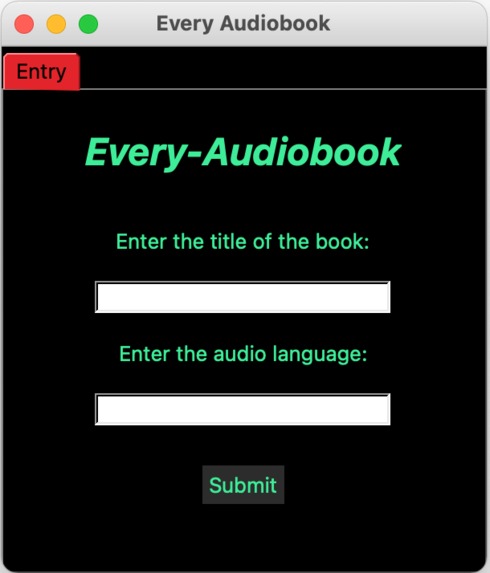
Front Page
-
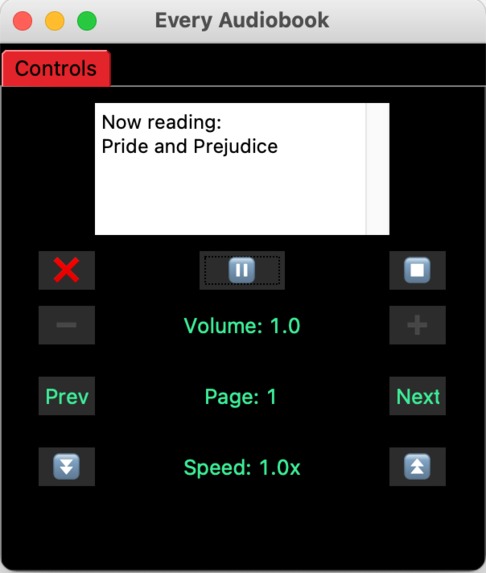
Control Page
Edit: Devpost removed my entire description and there's no more time before the deadline (it timed out as I was making final edits). I am putting down whatever I can in just 5 minutes.
Inspiration
I created this to help the average audiobook consumer (like my mom), who wants to listen to books because reading them strains their eyes or doing so saves them valuable time, and mainly because all the paid options for audiobooks (like Audible) are too expensive for what they offer, and their collections are certainly not as big as Libgenisis'. In any case, I do want to develop this GUI further to be able to have multiple books you can add in a list that allows you to pick and choose immediately which book you want to listen to, but I just didn't have enough time due to the time limit on the Hackathon. I plan to do implement these changes after the Hackathon finishes.
What it does and How I build it
This is a GUI-based application built from Tkinter for XHacks (and to get more experience with GUI construction in python). This project uses the gTTS and pygame (mixer) libraries in conjunction with the libgen-api library to find almost any book and convert it to an audiobook that you can listen to. The GUI itself has the following features:
pause/play, stop (stops the entire book), next/previous page, volume up/down (this increases/decreases the volume of the audio itself, not of the system on which the audio is being played), an exit button to start listening to another audiobook, a speed up/down button (this is in construction, because I couldn't find a solution online for speeding up an audio file, even with formulae on the sampling rate, in real-time). Run Instructions
Just run the audiobook_gui.py file to start the GUI. The convert_to_iso.py file is a general python dictionary file that I plan to upload to PyPI because it solves a problem I haven't seen solved elsewhere - it takes a language (e.g. Spanish) and converts it to its ISO-639 equivalent (in four different forms: ISO-639-1, ISO-639-2T, ISO-639-2B, and ISO-639-3). I scraped an excel sheet from an official source (the code is commented at the top of the aforementioned file) in order to create dictionaries that store this information. Ultimately, the convert(type, lang) function was used for the text-to-speech constructor (from audiobook_gui.py, line 56, in line 80, for the gTTS constructor).
As for the searchAndSpeak.py file, it is a demo of the core of all the GUI code that allows you to type in the title and language of a book and convert it into an audiobook of that language. It doesn't have all the additional features that comes with the GUI.
Challenges I ran into
I was unable to do GUI design very well as Tkinter doesn't have a visual interface like Windowbuilder, so I used Pygubu, which, like Windowbuilder, helps coders visualize the elements in a GUI.
What I learned
I learned to read the docs (.io). They are extremely helpful, especially for using many libraries.
What's next for Every Audiobook
If I can assemble a bigger team, I plan to package the product and sell it (for a base price, no subscription) or give it for free (open-source).
Built With
- gtts
- libgen
- pygubu
- python
- tkinterr


Log in or sign up for Devpost to join the conversation.