Inspiration
Developers often spend a lot of time searching the internet to understand confusing error messages and stack traces. We wanted to build a tool that instantly translates technical errors into simple English with practical fixes, helping beginners and experienced developers debug faster.
What it does
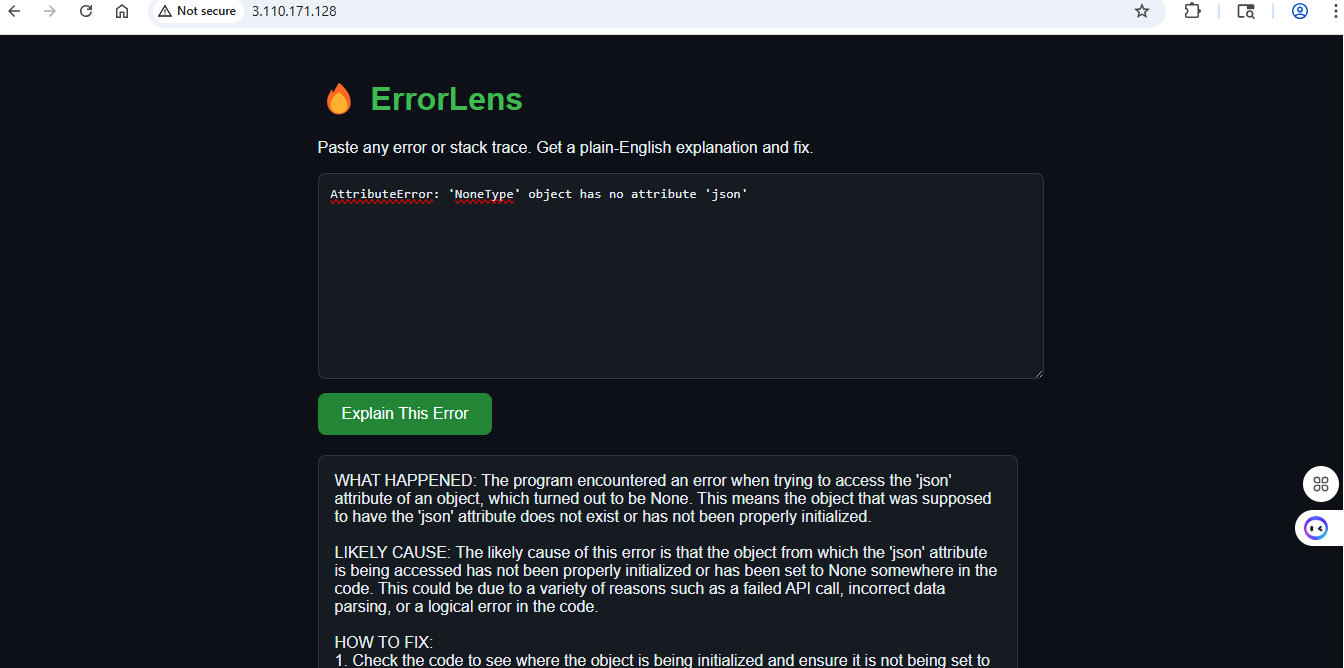
ErrorLens is an AI-powered error explanation tool. Users can paste any programming error or stack trace, and the application returns:
- A plain-English explanation of what happened.
- The likely cause of the error.
- Step-by-step instructions to fix it.
The application uses Groq's LLaMA model to generate accurate and easy-to-understand responses.
How we built it
- Frontend: HTML, CSS, JavaScript
- Backend: FastAPI (Python)
- AI Model: Groq LLaMA 3.3 70B
- Containerization: Docker
- Deployment: AWS EC2
The frontend sends the error message to a FastAPI backend, which calls the Groq API and returns a structured explanation to the user.
Challenges we ran into
- Configuring the Groq API securely using environment variables.
- Deploying the application on AWS EC2.
- Containerizing the application with Docker.
- Managing GitHub authentication using Personal Access Tokens.
- Testing API connectivity and ensuring the frontend communicated correctly with the backend.
Accomplishments that we're proud of
- Successfully built a working AI-powered debugging assistant.
- Deployed the project on AWS EC2 using Docker.
- Created a clean and responsive interface.
- Reduced complex technical errors into beginner-friendly explanations.
What we learned
This project improved our understanding of FastAPI, Docker, AWS EC2 deployment, REST APIs, environment variable management, GitHub workflows, and integrating large language models into real-world applications.
What's next for ErrorLens
- Support more programming languages and frameworks.
- Detect the programming language automatically.
- Add error history and saved explanations.
- Provide documentation links and code examples.
- Add user authentication and personalized dashboards.
- Deploy using a custom domain with HTTPS and a CI/CD pipeline.

Log in or sign up for Devpost to join the conversation.