-
-
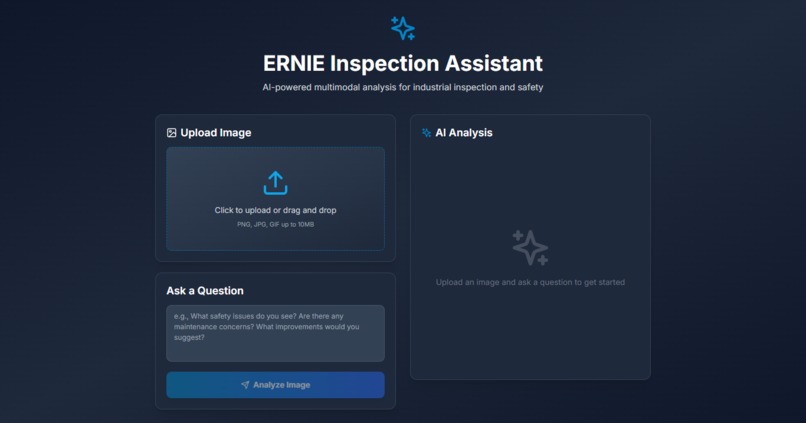
My project image
Inspiration
What it does
How we built it# About ERNIE Inspection Assistant
Inspiration
Industrial safety and maintenance inspections are critical yet time-consuming processes that require expert knowledge and careful attention to detail. Traditional inspection methods often rely on manual documentation, which can be prone to human error and inconsistencies.
The inspiration for this project came from recognizing the potential of multimodal AI to revolutionize industrial inspection workflows. By combining computer vision with natural language understanding, we can create an intelligent assistant that:
- Democratizes expertise: Makes industrial safety knowledge accessible to a wider range of personnel
- Accelerates inspections: Provides instant analysis and recommendations
- Reduces human error: Offers consistent, thorough assessments
- Enables proactive maintenance: Identifies potential issues before they become critical
The choice of ERNIE (Enhanced Representation through Knowledge Integration) was particularly compelling because of its strong performance in vision-language tasks and its ability to understand complex industrial contexts through its knowledge-enhanced architecture.
What We Learned
1. Multimodal AI Integration
Building this project taught us the intricacies of working with vision-language models:
- Image preprocessing: Converting various image formats to base64 while maintaining quality
- Content formatting: Structuring multimodal inputs (text + images) for API consumption
- Token management: Understanding context windows and token limits (32,000 tokens in our case)
The OpenAI-compatible API structure allowed us to leverage familiar patterns while working with specialized models:
content: [
  { type: 'text', text: '...' },
  { type: 'image_url', image_url: { url: imageDataUrl, detail: 'high' } }
]
2. Next.js App Router Architecture
We explored the modern Next.js 14 App Router:
- Server Components vs Client Components: Understanding when to use
'use client'for interactivity - API Routes: Building RESTful endpoints in the
app/apidirectory structure - FormData handling: Processing multipart/form-data for image uploads
- Environment variables: Secure API key management with
.env.local
3. TypeScript Type Safety
Working with the OpenAI SDK required careful type management:
- Type assertions: Using
as anystrategically for complex union types - Type narrowing: Properly typing multimodal content arrays
- Error handling: Typing error objects for better debugging
4. Modern UI/UX Patterns
We implemented several modern web development practices:
- Progressive enhancement: Drag-and-drop with fallback to file input
- Loading states: Smooth transitions and feedback during API calls
- Error boundaries: Graceful error handling with detailed messages
- Responsive design: Mobile-first approach with Tailwind CSS
5. API Integration Best Practices
- Error handling: Comprehensive error catching with detailed logging
- Request validation: Checking for required fields before processing
- Security: Keeping API keys server-side only
- Performance: Optimizing image conversion and API calls
How We Built It
Phase 1: Foundation Setup
We started by setting up a Next.js 14 project with TypeScript:
npx create-next-app@latest ernie-inspection-assistant --typescript --tailwind --app
Key dependencies added:
openai: For API client functionalityframer-motion: For smooth animationslucide-react: For consistent iconography
Phase 2: API Integration
The core of the application is the /api/analyze route:
Image Processing:
const arrayBuffer = await image.arrayBuffer();
const base64Image = Buffer.from(arrayBuffer).toString('base64');
const imageDataUrl = `data:${image.type};base64,${base64Image}`;
OpenAI SDK Configuration:
const openai = new OpenAI({
 apiKey: process.env.NOVITA_API_KEY,
 baseURL: 'https://api.novita.ai/openai'
});
Multimodal Request:
- System prompt: Defines the AI's role as an industrial inspection expert
- User message: Combines the question with the image
- Model selection: ERNIE-4.5-VL-28B-A3B-Thinking for optimal reasoning
Phase 3: Frontend Development
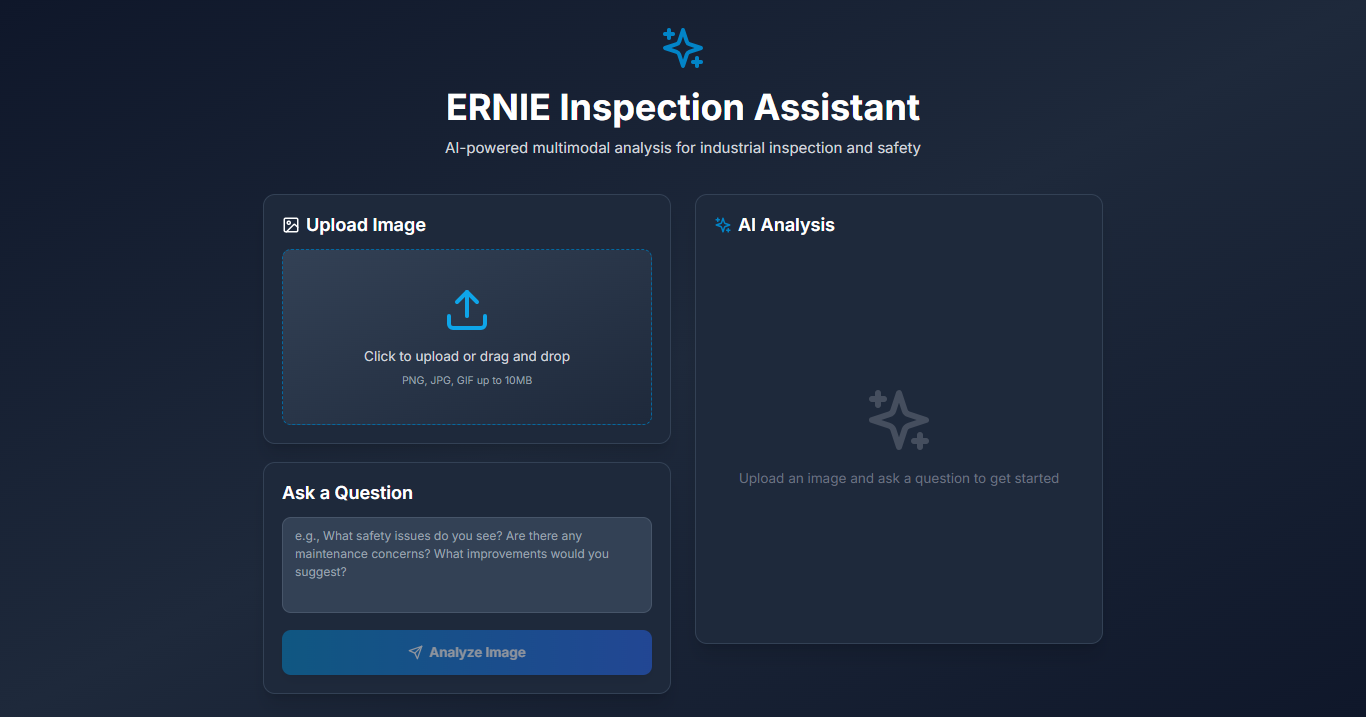
The UI was built with a focus on user experience:
Image Upload Component:
- Drag-and-drop zone with visual feedback
- File validation (type and size)
- Image preview with remove functionality
Question Input:
- Textarea with placeholder examples
- Form validation
- Disabled state during processing
Results Display:
- Animated loading states
- Formatted analysis output
- Error messages with details
Phase 4: Model Selection & Optimization
We experimented with different models:
- Initial:
baidu-ernie-4.5-vl-28b-a3b(standard vision model) - Attempted:
kat-coder(coding-focused, doesn't support vision) - Final:
baidu/ernie-4.5-vl-28b-a3b-thinking(vision + reasoning)
The Thinking variant was chosen for its superior analytical capabilities, crucial for industrial inspection tasks.
Phase 5: Error Handling & Polish
We implemented comprehensive error handling:
- API errors: Detailed logging and user-friendly messages
- Validation errors: Clear feedback for missing inputs
- Network errors: Graceful degradation
- Development mode: Enhanced error details for debugging
Challenges Faced
1. Model Compatibility Issues
Challenge: Initially tried using kat-coder model, which resulted in 400 Bad Request errors.
Root Cause: The model doesn't support vision/image inputs - it's designed for text-only coding tasks.
Solution:
- Researched available vision-language models
- Switched to ERNIE vision models (VL variants)
- Implemented proper content formatting for multimodal inputs
Learning: Always verify model capabilities before integration. Vision-language models are distinct from text-only models.
2. TypeScript Type Complexity
Challenge: The OpenAI SDK's multimodal content types were complex to type correctly.
Problem: TypeScript couldn't infer the correct union type for content arrays containing both text and image objects.
Solution:
content: [
  { type: 'text', text: string },
  { type: 'image_url', image_url: { url: string, detail: 'high' } }
] as Array<{ type: 'text'; text: string } | { type: 'image_url'; image_url: { url: string; detail: 'high' } }>
Learning: Strategic use of type assertions (as) when dealing with complex union types from external libraries.
3. API Endpoint Configuration
Challenge: Encountered 404 errors when first integrating the OpenAI SDK.
Root Cause: Incorrect baseURL configuration. The SDK automatically appends /v1/chat/completions, so the baseURL should be https://api.novita.ai/openai (not including /v1).
Solution:
baseURL: 'https://api.novita.ai/openai'  // Correct
// NOT: 'https://api.novita.ai/openai/v1' // Wrong
Learning: Understanding how SDKs construct URLs is crucial for third-party API integrations.
4. Environment Variable Management
Challenge: Ensuring API keys are never exposed to the client.
Problem: Next.js environment variables can be accidentally exposed if prefixed incorrectly.
Solution:
- Used
.env.local(gitignored) for sensitive data - Server-side only access:
process.env.NOVITA_API_KEY - Never used
NEXT_PUBLIC_prefix for API keys
Learning: Security best practices are non-negotiable when handling API credentials.
5. Image Size and Format Handling
Challenge: Supporting various image formats while maintaining performance.
Constraints:
- Maximum file size: 10MB
- Multiple formats: PNG, JPG, GIF
- Base64 encoding overhead
Solution:
- Client-side validation before upload
- Efficient ArrayBuffer to base64 conversion
- Proper MIME type preservation
Learning: Client-side validation improves UX, but server-side validation is essential for security.
6. Error Message Clarity
Challenge: Initial error messages were too generic ("Internal server error").
Problem: Users couldn't understand what went wrong, making debugging difficult.
Solution: Implemented detailed error handling:
{
  error: 'Internal server error',
  details: errorMessage,
  errorInfo: process.env.NODE_ENV === 'development' ? {
    status, code, type, param, error
  } : undefined
}
Learning: Detailed error messages in development, user-friendly messages in production.
Mathematical Considerations
While this project doesn't involve complex mathematical computations, there are some quantitative aspects worth noting:
Token Budget Management
The model supports up to 32,000 tokens. For image analysis:
[ \text{Total Tokens} = \text{Text Tokens} + \text{Image Tokens} + \text{System Tokens} ]
Where:
- Text Tokens: ~200-500 tokens (question + prompt)
- Image Tokens: Variable based on image size and detail level
- System Tokens: ~20 tokens (system message)
With detail: 'high', images consume more tokens but provide better analysis quality.
Cost Optimization
API costs scale with:
- Number of requests
- Image complexity (token consumption)
- Model selection (larger models = higher cost)
The chosen model (ernie-4.5-vl-28b-a3b-thinking) provides an optimal balance:
[ \text{Cost Efficiency} = \frac{\text{Analysis Quality}}{\text{Token Cost} \times \text{Model Cost}} ]
Future Enhancements
- Batch Processing: Analyze multiple images in a single request
- History: Save and retrieve previous inspections
- Export: Generate PDF reports with analysis
- Multi-language: Support for international teams
- Custom Models: Fine-tune for specific industrial domains
- Real-time Analysis: WebSocket support for live camera feeds
Conclusion
Building the ERNIE Inspection Assistant was a journey through modern web development, AI integration, and user experience design. The project demonstrates how cutting-edge AI can be made accessible through thoughtful interface design and robust engineering practices.
The combination of Next.js, TypeScript, Tailwind CSS, and ERNIE's vision-language capabilities creates a powerful tool that can genuinely improve industrial safety and maintenance workflows.
Built with ❤️ for safer industrial environments
Challenges we ran into
Accomplishments that we're proud of
What we learned
What's next for ERNIE Inspection Assistant
Built With
- css
- json
- novitaapi
- python
- tsx
- typescript
- vscode


Log in or sign up for Devpost to join the conversation.